
HTML5基础-新增标签+新增属性+布局案例
html5中常用的结构标签
article 文章
header 头部
nav 导航
section 区域
aside 侧边栏
hgroup 区块的相关信息
figure 定义一组内容及标题
figcaption 定义figure元素的标题
footer 底部
dialog 对话框
使用习惯:
header/section/footer > aside/article/figure/hgroup/nav > div
embed可插入flash文件,但flash已经逐渐被淘汰,不建议使用
meter状态标签,可以定义电压
optimum是标准状态
low与high之间呈现绿色,其余呈现黄色
<meter value=”220” min=”20” max=”380” low=”200” high=”240” optimum=”220”></meter>
自动计算百分比
<meter value="0.75">75%</meter>
有步长的进度条
<progress value="30" max="100"></progress>
不断加载的进度条
<progress max="100"></progress>
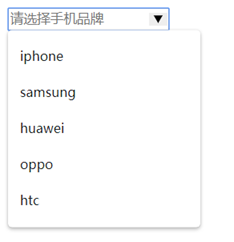
datalist为input定义下拉列表
<!DOCTYPE html>

<html lang="en">

<head>

    <meta charset="UTF-8">

    <title>demo</title>

</head>

<body>

    <input placeholder="请选择手机品牌" list="phoneList">

    <datalist id="phoneList">

        <option value="iphone">iphone</option>

        <option value="samsung">samsung</option>

        <option value="huawei">huawei</option>

        <option value="oppo">oppo</option>

        <option value="htc">htc</option>

    </datalist>

</body>

</html>
details定义元素的详细内容,配合summary
<!DOCTYPE html>

<html lang="en">

<head>

    <meta charset="UTF-8">

    <title>demo</title>

</head>

<body>

    <details>

        <summary>HTML5</summary>

        <p>HTML5是构建Web内容的一种语言描述方式。HTML5是互联网的下一代标准,是构建以及呈现互联网内容的一种语言方式.被认为是互联网的核心技术之一。HTML产生于1990年,1997年HTML4成为互联网标准,并广泛应用于互联网应用的开发。

HTML5是Web中核心语言HTML的规范,用户使用任何手段进行网页浏览时看到的内容原本都是HTML格式的,在浏览器中通过一些技术处理将其转换成为了可识别的信息。HTML5在从前HTML4.01的基础上进行了一定的改进,虽然技术人员在开发过程中可能不会将这些新技术投入应用,但是对于该种技术的新特性,网站开发技术人员是必须要有所了解的。 [1-2] </p>

    </details>

</body>

</html>

ruby和rt进行拼音的注释
<!DOCTYPE html>

<html lang="en">

<head>

    <meta charset="UTF-8">

    <title>demo</title>

</head>

<body>

    我们来<ruby>夼<rt>kuang</rt></ruby>一个话题

</body>

</html>

兼容浏览器的写法:
<!DOCTYPE html>

<html lang="en">

<head>

    <meta charset="UTF-8">

    <title>demo</title>

</head>

<body>

    我们来<ruby>夼<rp>(</rp><rt>Kuang</rt><rp>)</rp></ruby>一个话题

</body>

</html>
mark黄色选中效果
<!DOCTYPE html>

<html lang="en">

<head>

    <meta charset="UTF-8">

    <title>demo</title>

</head>

<body>

    <p>妈妈叫我回家的时候顺路买一盒<mark>牛奶</mark>,需要很新鲜的那种。</p>

</body>

</html>

output表单计算
<!DOCTYPE html>

<html lang="en">

<head>

    <meta charset="UTF-8">

    <title>demo</title>

</head>

<body>

    <form oninput="sum.value=parseInt(num1.value)*parseInt(num2.value)">

        <input type="number" id="num1">*

        <input type="number" id="num2">=

        <output name="sum" for="num1 num2"></output>

    </form>

</body>

</html>

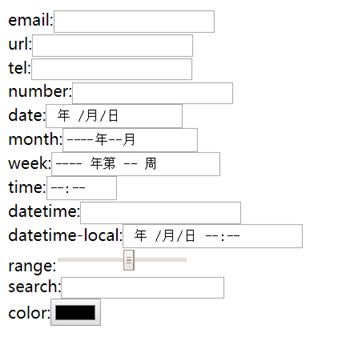
date pickers在移动端效果比较好
week兼容性不好
datetime兼容性不好,推荐用datetime-local
time用来设置时间(小时和分钟);
month用来设置年和月;
date用来设置年月日;
datetime用来设置年月日和时间;
<!DOCTYPE html>

<html lang="en">

<head>

    <meta charset="UTF-8">

    <title>demo</title>

</head>

<body>

    email:<input type="email" name="email"><br>

    url:<input type="url" name="url"><br>

    tel:<input type="tel" name="tel"><br>

    number:<input type="number" name="number"><br>

    date:<input type="date" name="date"><br>

    month:<input type="month" name="month"><br>

    week:<input type="week" name="week"><br>

    time:<input type="time" name="time"><br>

    datetime:<input type="datetime" name="datetime"><br>

    datetime-local:<input type="datetime-local" name="datetime-local"><br>

    range:<input type="range" name="range" min="1" max="10"><br>

    search:<input type="search" name="search"><br>

    color:<input type="color" name="color"><br>

</body>

</html>
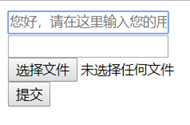
autocomplete属性规定form或input域拥有自动完成功能,该属性适用于<form>标签和<input>标签
autofocus自动获取焦点
multiple多选,适用于email和file,email中不同邮箱用,隔开
<!DOCTYPE html>

<html lang="en">

<head>

    <meta charset="UTF-8">

    <title>demo</title>

</head>

<body>

    <form action="lesson2_1 autocomplete.html" autocomplete="on">

        <input type="text" name="text" autofocus="autofocus" placeholder="您好,请在这里输入您的用户名!"><br>

        <input type="email" name="email" autocomplete="off" multiple="multiple"><br>

        <input type="file" name="file" multiple="multiple"><br>

        <input type="submit">

    </form>

</body>

</html>
<link>标签中,sizes属性可以规定被链接资源的尺寸的大小
<!DOCTYPE html>

<html lang="en">

<head>

    <meta charset="UTF-8">

    <title>demo</title>

    <link rel="icon" href="icon.gif" type="image/gif" sizes="16x16">

    <base href="http://localhost" target="_blank">

</head>

<body>

</body>

</html>
script:
defer 页面已完成加载后再执行脚本
async 一旦脚本可用,则异步执行
<!DOCTYPE html>

<html lang="en">

<head>

    <meta charset="UTF-8">

    <title>demo</title>

    <script async="async" type="text/javascript" src="async.js"></script>

    <script defer="defer" type="text/javascript" src="defer.js"></script>

</head>

<body>

</body>

</html>
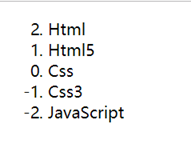
ol有序列表倒序
<!DOCTYPE html>

<html lang="en">

<head>

<meta charset="UTF-8">

<title>Ol</title>

</head>

<body>

<ol start="2" reversed="reversed">

    <li>Html</li>

    <li>Html5</li>

    <li>Css</li>

    <li>Css3</li>

    <li>JavaScript</li>

</ol>

</body>

</html>
html页面布局demo:
demo.html

----------------------------------------

<!DOCTYPE html>

<html lang="en">

<head>

<meta charset="UTF-8">

<title>html5</title>

<link rel="stylesheet" href="style.css">

</head>

<body>

    <header>

        <div class="container">

            <a href="index.html"><img src="data:images/logo.png"></a>

            <nav>

                <a class="active" href="index.html">Home</a>

                <a href="#">Course</a>

                <a href="#">Actual</a>

                <a href="#">Plan</a>

                <a href="#">FAQ</a>

                <a href="#">Notes</a>

            </nav>

        </div>

    </header>

    <section class="banner">

        <ul>

            <li class="active"><img src="data:images/banner/banner1.jpg"></li>

            <li class="left"><img src="data:images/banner/banner3.jpg"></li>

            <li class="right"><img src="data:images/banner/banner2.jpg"></li>

        </ul>

    </section>

    <section class="main">

        <aside>

            <h1>Recent <samp>Course</samp></h1>

            <dl>

                <dt>Hyper Text Markup Language</dt>

                <dd><img src="data:images/Course/05_05.png"></dd>

                <dd>HTML is the standard markup language used to create web pages and its elements form the building blocks of all websites.</dd>

            </dl>

            <dl>

                <dt>Cascading Style Sheets</dt>

                <dd><img src="data:images/Course/06_04.png"></dd>

                <dd>Cascading Style Sheets (CSS) is a simple mechanism for adding style (e.g., fonts, colors, spacing) to Web documents.</dd>

            </dl>

            <dl>

                <dt>JavaScript</dt>

                <dd><img src="data:images/Course/09_07.png"></dd>

                <dd>JavaScript is a high-level, dynamic, untyped, and interpreted programming language.</dd>

            </dl>

            <dl>

                <dt>AngularJS</dt>

                <dd><img src="data:images/Course/02_09.png"></dd>

                <dd>AngularJS is an open-source web application framework mainly maintained by Google and by a community of individuals and...</dd>

            </dl>

        </aside>

        <article>

            <h1>Welcome to <samp>Massive Open Online Course!</samp></h1>

            <p>We provide the latest knowledge to help you cope with the changing world!</p>

            <img src="data:images/article.jpg">

            <p>We hope that all the students who love the Internet can be more convenient access to learning resources, using the Internet thinking to change our learning.</p>

            <p>Focus on IT skills education MOOC, consistent with the development trend of the Internet down to earth's MOOC. We are free, we only teach useful, we concentrate on education.</p>

        </article>

    </section>

    <footer>

        <div class="container">

            <p>Copyright © 2019 test.com All Rights Reserved.</p>

            <span>

                <img src="data:images/icon/weichat.png">

                <img src="data:images/icon/sina.png">

                <img src="data:images/icon/qq.png">

            </span>

        </div>

    </footer>

</body>

</html>
style.css

------------------------------------------

/* All tag */

* { font-family: Arial; font-size: 14px; margin: 0; padding: 0; border: none; }

a { text-decoration: none; }

ul { list-style: none; }

/* header */

header { position: relative; height: 80px; background: #000; }

header:after { position: absolute; bottom: 0; left: 0; width: 100%; height: 7px; content: ''; background: #d6d6d6; }

header > .container { position: relative; z-index: 1; width: 1200px; margin: 0 auto; }

header > .container > a { display: block; float: left; margin: 5px 25px; }

header > .container > nav { float: right; }

/* nav */

nav > a { font-size: 24px; line-height: 73px; display: block; float: left; width: 110px; height: 73px; text-align: center; color: #fff; }

nav > a:nth-child(1) { background: #433b90; }

nav > a:nth-child(2) { background: #017fcb; }

nav > a:nth-child(3) { background: #78b917; }

nav > a:nth-child(4) { background: #feb800; }

nav > a:nth-child(5) { background: #f27c01; }

nav > a:nth-child(6) { background: #d40112; }

nav > a:hover,

nav > a.active { padding-bottom: 7px; }

/* banner */

.banner { position: relative; background: #eaeaea; }

.banner:after { position: absolute; bottom: 0; left: 0; width: 100%; height: 6px; content: ''; background: #d6d6d6; }

.banner > ul { position: relative; width: 1490px; height: 538px; margin: 0 auto; padding-top: 10px; }

.banner > ul > li { position: absolute; width: 610px; height: 300px; overflow: hidden; }

.banner > ul > li.active { z-index: 2; top: 37px; right: 0; left: 0; width: 960px; height: 460px; margin: auto; border: 1px solid #fff; box-shadow: 0 30px 140px 22px rgba(0, 0, 0, .35); }

.banner > ul > li.left { z-index: 1; top: 0; bottom: 0; left: 0; margin: auto; box-shadow: 0 3px 7px 0 rgba(0, 0, 0, .35); }

.banner > ul > li.right { z-index: 1; top: 0; right: 0; bottom: 0; margin: auto; box-shadow: 0 3px 7px 0 rgba(0, 0, 0, .35); }

.banner > ul > li > img { position: absolute; left: -30%; height: 100%; }

/* main */

.main { position: relative; width: 1200px; height: 473px; margin: 34px auto 0; }

.main h1 { font-size: 30px; font-weight: lighter; margin-bottom: 23px; }

.main h1 > samp { font-size: 30px; color: #7c7c7c; }

.main > aside { float: left; width: 450px; }

.main > aside > dl { position: relative; display: block; height: 74px; margin-bottom: 17px; }

.main > aside > dl > dt { position: absolute; top: -1px; left: 92px; font-size: 16px; font-weight: bold; line-height: 16px; text-decoration: underline; }

.main > aside > dl > dd:first-of-type { position: absolute; left: 0; }

.main > aside > dl > dd:last-of-type { position: absolute; top: 20px; left: 90px; }

.main > article { float: right; width: 720px; overflow: hidden; }

.main > article > p,

.main > article > img { margin-bottom: 20px; }

/* footer */

footer { position: relative; background: #000; }

footer:before { position: absolute; z-index: -1; top: -6px; left: 0; width: 100%; height: 6px; content: ''; background: #d6d6d6; }

footer > .container { width: 1200px; height: 64px; margin: 0 auto; }

footer > .container > p { line-height: 64px; float: left; color: #fff; }

footer > .container > span { float: right; margin: 14px 40px; }

footer > .container > span > img { margin-left: 4px; opacity: .7; }

footer > .container > span > img:hover { opacity: 1; cursor: pointer; }

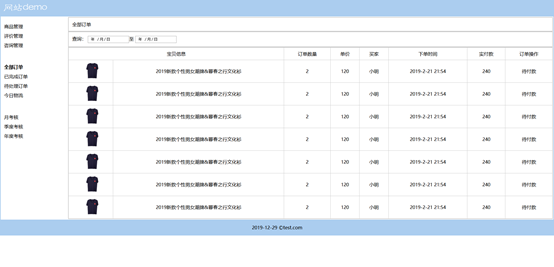
html页面布局demo2:
<!DOCTYPE html>
<html lang="en">
<head>
<meta charset="UTF-8">
<title>html</title>
<link rel="stylesheet" href="demo.css">
</head>
<body>
<table id="outer-table">
<!-- 顶部 -->
<thead>
<tr>
<td><img src="img/logo.png" alt="logo"></td>
</tr>
</thead>
<!-- 主体 -->
<tbody>
<tr>
<td>
<table>
<tr>
<!-- 左侧 -->
<td width="12%">
<p class="left-p">
<span>商品管理</span><br>
<span>评价管理</span><br>
<span>咨询管理</span><br><br><br>
<span><b>全部订单</b></span><br>
<span>已完成订单</span><br>
<span>待处理订单</span><br>
<span>今日物流</span><br><br><br>
<span>月考核</span><br>
<span>季度考核</span><br>
<span>年度考核</span><br>
</p>
</td>
<!-- 右侧 -->
<td width="88%">
<table class="inner-table">
<tr>
<td><span>全部订单</span></td>
</tr>
</table>
<table class="inner-table">
<tr>
<td>
<span>
查询:
<input type="date">至
<input type="date">
</span>
</td>
</tr>
</table>
<table id="order" class="inner-table" rules="all">
<tr>
<td colspan="2">宝贝信息</td>
<td>订单数量</td>
<td>单价</td>
<td>买家</td>
<td>下单时间</td>
<td>实付款</td>
<td>订单操作</td>
</tr>
<tr>
<td><img src="img/txue.png"></td>
<td>2019新款个性男女潮牌&暮春之行文化衫</td>
<td>2</td>
<td>120</td>
<td>小明</td>
<td>2019-2-21 21:54</td>
<td>240</td>
<td>待付款</td>
</tr>
<tr>
<td><img src="img/txue.png"></td>
<td>2019新款个性男女潮牌&暮春之行文化衫</td>
<td>2</td>
<td>120</td>
<td>小明</td>
<td>2019-2-21 21:54</td>
<td>240</td>
<td>待付款</td>
</tr>
<tr>
<td><img src="img/txue.png"></td>
<td>2019新款个性男女潮牌&暮春之行文化衫</td>
<td>2</td>
<td>120</td>
<td>小明</td>
<td>2019-2-21 21:54</td>
<td>240</td>
<td>待付款</td>
</tr>
<tr>
<td><img src="img/txue.png"></td>
<td>2019新款个性男女潮牌&暮春之行文化衫</td>
<td>2</td>
<td>120</td>
<td>小明</td>
<td>2019-2-21 21:54</td>
<td>240</td>
<td>待付款</td>
</tr>
<tr>
<td><img src="img/txue.png"></td>
<td>2019新款个性男女潮牌&暮春之行文化衫</td>
<td>2</td>
<td>120</td>
<td>小明</td>
<td>2019-2-21 21:54</td>
<td>240</td>
<td>待付款</td>
</tr>
<tr>
<td><img src="img/txue.png"></td>
<td>2019新款个性男女潮牌&暮春之行文化衫</td>
<td>2</td>
<td>120</td>
<td>小明</td>
<td>2019-2-21 21:54</td>
<td>240</td>
<td>待付款</td>
</tr>
<tr>
<td><img src="img/txue.png"></td>
<td>2019新款个性男女潮牌&暮春之行文化衫</td>
<td>2</td>
<td>120</td>
<td>小明</td>
<td>2019-2-21 21:54</td>
<td>240</td>
<td>待付款</td>
</tr>
</table>
</td>
</tr>
</table>
</td>
</tr>
</tbody>
<!-- 页脚 -->
<tfoot>
<tr>
<td><span>2019-12-29 ©test.com</span></td>
</tr>
</tfoot>
</table>
</body>
</html>
demo.css

-----------------------------------

*{margin:0;padding:0;}

table{width:100%;background-color: #fff;}

#outer-table{background-color: #abcdef;}

#outer-table tfoot td{text-align:center;height:50px;line-height: 50px;}

#outer-table img{width: 150px;margin-left: 10px;}

.left-p{margin-left:10px;margin-top:-250px;}

.left-p span{line-height:2em;}

.inner-table{border:2px solid #ccc;}

.inner-table tr td{padding:10px;}

#order tr td{text-align:center;}

#order tr td img{width:50px;}
HTML5基础-新增标签+新增属性+布局案例的更多相关文章
- html学习_html5 新增标签和属性
html5 新增标签和属性 1.html发展历程(html有很多版本) 2.快捷键生成不同版本(html4.xhtml.html5) 文档类型不同.字符设定 3.常用新标签 (只有html5才识别的标 ...
- HTML5新增标签与属性
目录 一.HTML5新增属性 1.1.contextmenu 1.2.contentEditable 1.3.hidden 1.4.draggable 1.5.data-* 1.6.placehold ...
- 第十课html5 新增标签及属性 html5学习5
一.常用新增标签 1.header:定义页面的页眉头部 2.nav:定义导航栏 3.footer:定义页面底部,页脚 4.article:定义文章 5.section:定义区域 6.aside:定义侧 ...
- HTML5的Video标签的属性,方法和事件汇总
<video>标签的属性 src :视频的属性 poster:视频封面,没有播放时显示的图片 preload:预加载 autoplay:自动播放 loop:循环播放 controls:浏览 ...
- HTML元素(包括HTML5)的标签、属性及事件大全
1.标签列表 标签 描述 <!–…–> 定义注释. <!DOCTYPE> 定义文档类型. <a> 定义超链接. <abbr> 定义缩写. <acr ...
- HTML+css基础 img 标签的属性
img: src=”” src是标签的属性 等号右边是属性值.就是图片的路径. 路径 1. 绝对路径:按照一个路径能找到,具体到某一个盘符下,某一个文件夹内. 2. 相对路径:以当前页面为参考物,去查 ...
- html5新增标签和属性
结构性标签:<header>头部</header><nav>导航</nav><section>用于表达书的一章或一部分</sectio ...
- html5新增标签做基本布局
结构标记 ***** 做布局 1.<header>元素 <header></header> ==> <div id="header" ...
- HTML5新的标签和属性
<article>标签定义外部的内容.比如来自一个外部的新闻提供者的一篇新的文章,或者来自 blog 的文本,或者是来自论坛的文本.亦或是来自其他外部源内容. HTML5:<arti ...
随机推荐
- Arduino系列之光照传感器(三)
今天,我将简单做一个当光照值低于某个值的时候,灯光自动打开,当高于某个值的时候,自动关闭. 设计代码原理: 首先,定义一个全局变量,并赋予初始值 然后,初始化程序 将设定某个IO口为输出模式 读取光度 ...
- NLP新秀 - Bert
目录 什么是Bert Bert能干什么? Bert和TensorFlow的关系 BERT的原理 Bert相关工具和服务 Bert的局限性和对应的解决方案 沉舟侧畔千帆过, 病树前头万木春. 今天介绍的 ...
- 量子计算机编程(一)——QPU编程
今天要给大家介绍的是这本书<Programming Quantum Computers -- Essential Algorithms and Code Samples>,主要讲如何在量子 ...
- D语言-认识D语言&安装
Part1: Something about "D" D语言在国外比较流行,在国内相当少的人才知道这个语言的存在 但是D语言有C++的效率,有Java的灵活 更重要的有两点: 1. ...
- XXE漏洞复现步骤
XXE漏洞复现步骤 0X00XXE注入定义 XXE注入,即XML External Entity,XML外部实体注入.通过 XML 实体,”SYSTEM”关键词导致 XML 解析器可以从本地文件或者远 ...
- nginx设置域名转发到指定端口
1.修改nginx.conf文件,将worker_processes 1 修改为 worker_processes auto 2.创建端口代理配置文件(域名地址如:xx.baidu.com , ...
- geo常见需求
常见的地理位置相关需求有: 1.查找附近的人 2.显示两点距离 3.点是否在指定范围内(地理围栏) redis.MongoDB.mysql都已支持geo 几种geo方案对比 https://blog. ...
- OSPF RFC2740
2.5. Use of link-local addresses IPv6 link-local addresses are for use on a single link, for purpose ...
- RTEMS进程同步机制
互斥量 好像没有互斥量,信号量接收那儿有个图,互斥量似乎术语一类特殊的信号量. 信号量 12. Semaphore Manager 12.1. Introduction The semaphore m ...
- 写给Unity开发者的iOS内存调试指南
0x00 前言 工作的过程中,常常会发现有小伙伴对Unity的Profiler提供的内存数据与某些原生平台Profiler工具,例如iOS系统和Xcode,所提供的内存数据有差异而感到好奇.而且大家对 ...