
Bringing up interface eth0: Device eth0 does not seem to be presen
在公司的电脑虚拟机上安装了centos 6.5 ,然后我把他克隆下来用在家里电脑的虚拟机上,打开后查看ip,发现只有回环地址lo,没有eth0,
于是重启网络 输入 service network restart 发现 报错Bringing up interface eth0: Device eth0 does not seem to be present,delaying initialization. [FAILED]
问题原因
克隆的Linux系统在新的机器上运行,新服务器网卡物理地址已经改变。而/etc/udev/rules.d/70-persistent-net.rules这个文件确定了网卡和MAC地址的信息之间的绑定,克隆后的网卡的MAC已经发生了变化,所以导致系统认为网络设备不存在,网络不能正常启动。另外一个就是/etc/sysconfig/network-scripts/ifcfg-eth0里面MAC地址也是以前的旧信息。
关于/etc/udev/rules.d/70-persistent-net.rules这个文件,系统在启动时会自动监测变化,然后由/lib/udev/write_net_rules写入到/etc/udev/rules.d/70-persistent-net.rules中一个新的配置节,网卡的的序号依次递增(如原来为eth0,则修改第一后生成一个eth1,再次修改后生成一个eth2...),且其ATTR{address}的值为当前网卡对应的mac地址。
网上解决办法很多,我选了一种
1、查看配置文件 cat /etc/udev/rules.d/70-persistent-net.rules ,记下eth1下的addr。
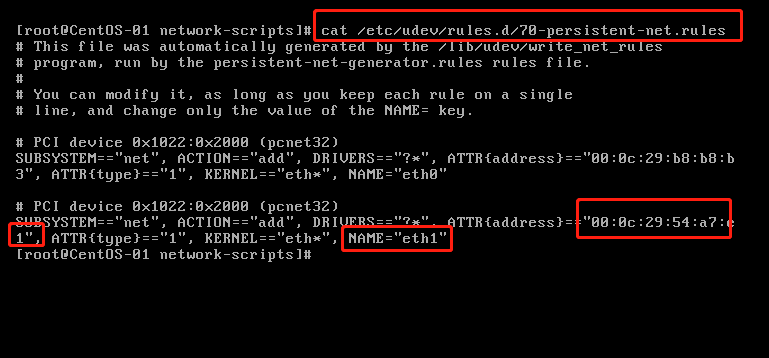
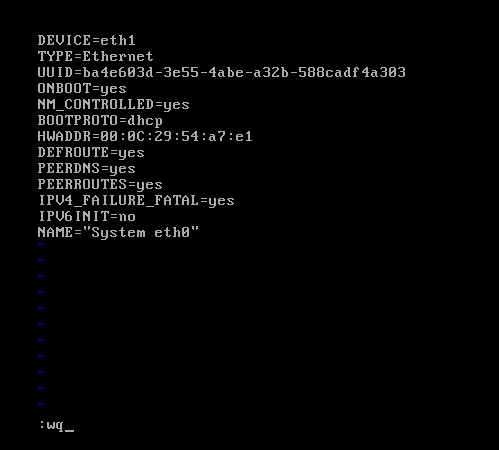
2、打开ifcfg-eth0 文件 vi /etc/sysconfig/network-scripts/ifcfg-eth0,按一下 i 键进入编辑模式,修改eth0为eth1,修改HWADDR,输入上面记下的addr地址
按:(冒号)进入底行模式,按wq 保存退出

3、重启网络 service network restart
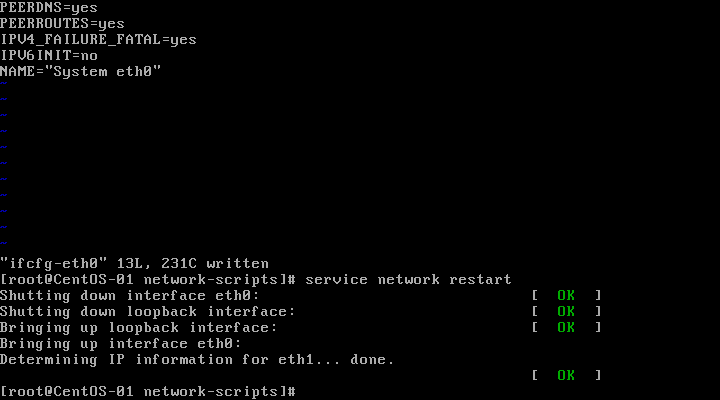
问题解决!
Bringing up interface eth0: Device eth0 does not seem to be presen的更多相关文章
- 问题:Bringing up interface eth0: Device eth0 does not seem to be present,delaying initialization. [FAILED]—— 找不到网卡。
克隆虚拟机的时候或其他情况出现以下问题(命令service network restart): Bringing up interface eth0: Device eth0 does not ...
- Bringing up interface eth0: Device eth0 does not seem to be present, delaying initialization
跑 service network restart NIC出现无法启动,他说,没有发现 Bringing up interface eth0: Device eth0 does not seem t ...
- Bringing up interface eth0: Device eth0 does not seem to be present, delaying initialization.FAILED
1.service network stop 2./etc/sysconfig/network-scripts目录下,删除想要删除的网卡配置,我要删除eth1,所以rm -rf ifcfg-eth1, ...
- 解决Bringing up interface eth0: Device eth0 does not seem to be present, delaying initialization.
一.问题描述 OS:centos 原因是拷贝虚拟机造成的. 使用vmworkstation打开虚拟机的时候,要选择copy而非move. 二.解决描述 网络上解决步骤各异,其实就一句话.只要保证vmw ...
- 虚拟机复制的linux无法联网,解决Bringing up interface eth0: Device eth0 does not seem to be present, delaying initialization.
一.问题描述 OS:centos 原因是拷贝虚拟机造成的. 使用vmworkstation打开虚拟机的时候,要选择copy而非move. 二.解决描述 网络上解决步骤各异,其实就一句话.只要保证vmw ...
- centos dhcp获取不到ip解决方法 Bringing up interface eth0: Device eth0 does not seem to be present,delaying initialization.
1.删除文件: /etc/udev/rules.d/70-persistent-net.rules 2.编辑 /etc/sysconfig/network-scripts/ifcfg-eth0 删除H ...
- VMbox复制虚拟机后网卡问题-bring up interface eth0:Device eth0 does not seem to be present
1.使用 ifconfig -a 查看mac地址 eg:HWaddr:08:00:29:B2:2B 2.vi /etc/sysconfig/network-scripts/ifcfg-eth0 将 ...
- CentOS Linux解决网卡报错Bringing up interface eth0.....
问题描述:在VMware里克隆出来的CentOS Linux,开机执行命令:ifconfig...没有看到eth0网卡.然后重启网卡又报以下错误:Bringing up interface eth0: ...
- Linux解决Device eth0 does not seem to be present
ifconfig...没有看到eth0..然后重启网卡又报下面错误. 故障现象: service network restartShutting down loopback insterface: ...
随机推荐
- 2020年大厂Java面试题(基础+框架+系统架构+分布式+实战)
前言 作为一个Java开发者,Java架构师应该是大家的一个职业目标了吧. 要成为Java架构师,首先你要是一个高级Java工程师,熟练使用各种框架,并知道它们实现的原理.jvm虚拟机原理.调优,懂得 ...
- 多线程之CountDownLatch的用法及原理笔记
前言-CountDownLatch是什么? CountDownLatch是具有synchronized机制的一个工具,目的是让一个或者多个线程等待,直到其他线程的一系列操作完成. CountDownL ...
- CUDA学习(五)之使用共享内存(shared memory)进行归约求和(一个包含N个线程的线程块)
共享内存(shared memory)是位于SM上的on-chip(片上)一块内存,每个SM都有,就是内存比较小,早期的GPU只有16K(16384),现在生产的GPU一般都是48K(49152). ...
- Nginx之keepalived高可用工具
1.创建两台虚拟机,分别为主机和从机,区别两台虚拟机的IP地址 2. 将keepalived上传到linux系统当中 3. cd /usr/local目录 4. tar -zxvf keepalive ...
- ubuntu系统下安装pip3及第三方库的安装
ubuntu系统下会自带python2.x和python3.x坏境,不需要我们去安装.并且ubuntu系统下还会自动帮助我们安装python2.x坏境下的pip安装工具, 但是没有python3.x坏 ...
- Sqli-Labs 闯关 less 42-49
Less 42 这一关一进去看着像前面的二次注入.发现也注入不了.. 我们观察代码发现这一关用的是堆叠注入. 登陆的这里可以看到login_password登陆的时候并没有使用mysqli_real_ ...
- ERP入门到精通
大家好,最近有空就跟大家分享开发ERP经验,希望对大家有所帮助. 少说废话,直接进入主题吧. ERP定义:企业资源计划 企业资源:物资资源,人力资料,财务资源,信息资源 包含内容:制造,会计,财务,销 ...
- Redis 3.2.3: 集群3哨兵模式
简介 Redis是一个使用ANSI C编写的开源.支持网络.基于内存.可选持久性的键值对存储数据库.从2015年6月开始,Redis的开发由Redis Labs赞助,而2013年5月至2015年6月期 ...
- Vsftpd: 基于PAM认证的虚拟用户和匿名用户
目录 环境说明效果说明及截图①. 安装组件②. 系统账户建立③. 编辑vsftpd的配置文件④. 生成虚拟用户的数据库文件⑤. 生成一个使用vsftpd_login.db数据文件的PAM认证文件⑥. ...
- NLP(二十一)人物关系抽取的一次实战
去年,笔者写过一篇文章利用关系抽取构建知识图谱的一次尝试,试图用现在的深度学习办法去做开放领域的关系抽取,但是遗憾的是,目前在开放领域的关系抽取,还没有成熟的解决方案和模型.当时的文章仅作为笔者的 ...