
Django项目:CMDB(服务器硬件资产自动采集系统)--05--05CMDB采集硬件数据的插件

 #__init__.py

 # ————————05CMDB采集硬件数据的插件————————

 from config import settings

 import importlib

 # ————————05CMDB采集硬件数据的插件————————

 # ————————01CMDB获取服务器基本信息————————

 from src.plugins.basic import BasicPlugin

 def get_server_info(hostname=None):

     """

     获取服务器基本信息

     :param hostname: agent模式时,hostname为空;salt或ssh模式时,hostname表示要连接的远程服务器

     :return:

     """

     response = BasicPlugin(hostname).execute()#获取基本信息

     """

     class BaseResponse(object):

         def __init__(self):

             self.status = True

             self.message = None

             self.data = None

             self.error = None

     """

     # ————————05CMDB采集硬件数据的插件————————

     if not response.status:#获取基本信息出错

         return response

     # 如果基本信息获取完没有出错,就去获取其他硬件信息

     for k, v in settings.PLUGINS_DICT.items(): # 采集硬件数据的插件

         #k是名字 V是路径 #'cpu': 'src.plugins.cpu.CpuPlugin',

         module_path, cls_name = v.rsplit('.', 1) #rsplit() 方法通过指定分隔符对字符串进行分割并返回一个列表

         cls = getattr(importlib.import_module(module_path), cls_name)#反射 #动态导入

         obj = cls(hostname).execute()# 去执行 .py文件

         response.data[k] = obj  #在字典前 添加 执行 .py文件 的名字

     # ————————05CMDB采集硬件数据的插件————————

     return response

 if __name__ == '__main__':

     ret = get_server_info()

 # ————————01CMDB获取服务器基本信息————————
#__init__.py
 #settings.py

 # ————————01CMDB获取服务器基本信息————————

 import os

 BASEDIR = os.path.dirname(os.path.dirname(os.path.abspath(__file__)))##当前路径

 # 采集资产的方式,选项有:agent(默认), salt, ssh

 MODE = 'agent'

 # ————————01CMDB获取服务器基本信息————————

 # ————————02CMDB将服务器基本信息提交到API接口————————

 # 资产信息API

 ASSET_API = "http://127.0.0.1:8000/api/asset"

 # ————————02CMDB将服务器基本信息提交到API接口————————

 # ————————03CMDB信息安全API接口交互认证————————

 # 用于API认证的KEY

 KEY = '299095cc-1330-11e5-b06a-a45e60bec08b' #认证的密码

 # 用于API认证的请求头

 AUTH_KEY_NAME = 'auth-key'

 # ————————03CMDB信息安全API接口交互认证————————

 # ————————04CMDB本地(Agent)模式客户端唯一标识(ID)————————

 # Agent模式保存服务器唯一ID的文件

 CERT_FILE_PATH = os.path.join(BASEDIR, 'config', 'cert') #文件路径

 # ————————04CMDB本地(Agent)模式客户端唯一标识(ID)————————

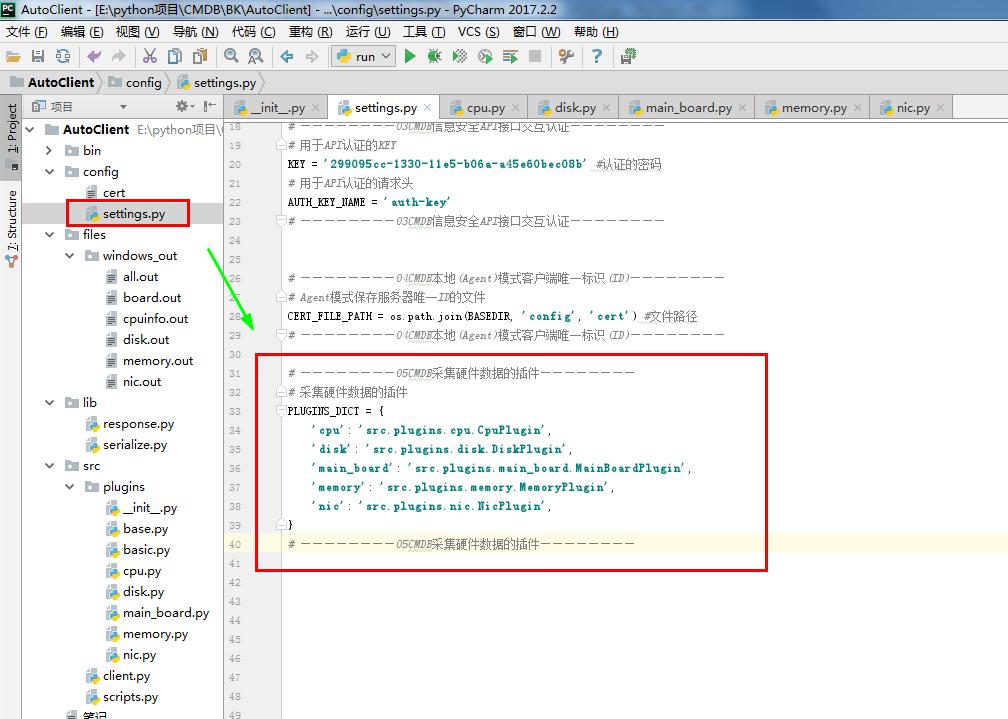
 # ————————05CMDB采集硬件数据的插件————————

 # 采集硬件数据的插件

 PLUGINS_DICT = {

     'cpu': 'src.plugins.cpu.CpuPlugin',

     'disk': 'src.plugins.disk.DiskPlugin',

     'main_board': 'src.plugins.main_board.MainBoardPlugin',

     'memory': 'src.plugins.memory.MemoryPlugin',

     'nic': 'src.plugins.nic.NicPlugin',

 }

 # ————————05CMDB采集硬件数据的插件————————
#settings.py
 # cpu.py

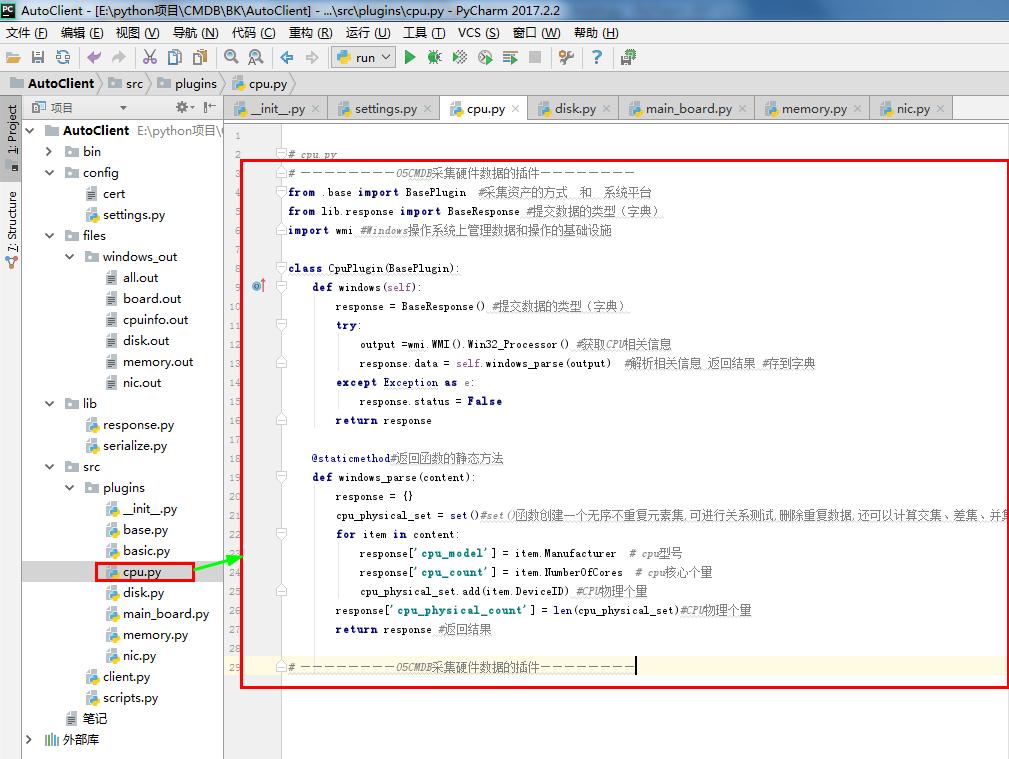
 # ————————05CMDB采集硬件数据的插件————————

 from .base import BasePlugin  #采集资产的方式  和  系统平台

 from lib.response import BaseResponse #提交数据的类型(字典)

 import wmi #Windows操作系统上管理数据和操作的基础设施

 class CpuPlugin(BasePlugin):

     def windows(self):

         response = BaseResponse() #提交数据的类型(字典)

         try:

             output =wmi.WMI().Win32_Processor() #获取CPU相关信息

             response.data = self.windows_parse(output)  #解析相关信息 返回结果 #存到字典

         except Exception as e:

             response.status = False

         return response

     @staticmethod#返回函数的静态方法

     def windows_parse(content):

         response = {}

         cpu_physical_set = set()#set()函数创建一个无序不重复元素集,可进行关系测试,删除重复数据,还可以计算交集、差集、并集等。

         for item in content:

             response['cpu_model'] = item.Manufacturer  # cpu型号

             response['cpu_count'] = item.NumberOfCores  # cpu核心个量

             cpu_physical_set.add(item.DeviceID) #CPU物理个量

         response['cpu_physical_count'] = len(cpu_physical_set)#CPU物理个量

         return response #返回结果

 # ————————05CMDB采集硬件数据的插件————————
# cpu.py

 # disk.py

 # ————————05CMDB采集硬件数据的插件————————

 from .base import BasePlugin  #采集资产的方式  和  系统平台

 from lib.response import BaseResponse #提交数据的类型(字典)

 import wmi #Windows操作系统上管理数据和操作的基础设施

 class DiskPlugin(BasePlugin):

     def windows(self):

         response = BaseResponse() #提交数据的类型(字典)

         try:

             output =wmi.WMI().Win32_DiskDrive() #获取磁盘相关信息

             response.data = self.windows_parse(output) #解析相关信息 返回结果 #存到字典

         except Exception as e:

             response.status = False

         return response

     @staticmethod#返回函数的静态方法

     def windows_parse(content):

         response = {}

         for item in content:

             item_dict = {}

             item_dict['slot'] = item.Index                      #插槽位

             item_dict['pd_type'] = item.InterfaceType           #磁盘型号

             item_dict['capacity'] = round(int(item.Size) / (1024**3))   # 磁盘容量

             item_dict['model'] = item.Model  #磁盘类型

             response[item_dict['slot']] = item_dict #分割存每个 磁盘信息

         return response #返回结果

 # ————————05CMDB采集硬件数据的插件————————
# disk.py
 # main_board.py

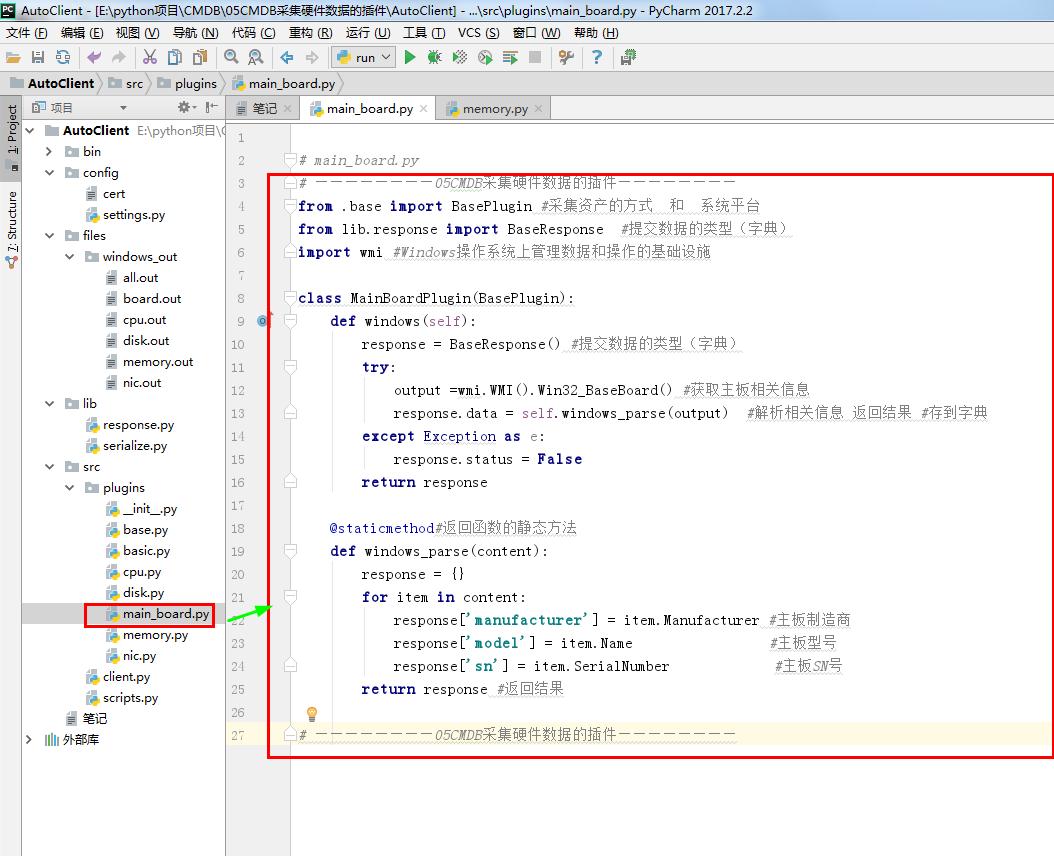
 # ————————05CMDB采集硬件数据的插件————————

 from .base import BasePlugin #采集资产的方式  和  系统平台

 from lib.response import BaseResponse  #提交数据的类型(字典)

 import wmi #Windows操作系统上管理数据和操作的基础设施

 class MainBoardPlugin(BasePlugin):

     def windows(self):

         response = BaseResponse() #提交数据的类型(字典)

         try:

             output =wmi.WMI().Win32_BaseBoard() #获取主板相关信息

             response.data = self.windows_parse(output)  #解析相关信息 返回结果 #存到字典

         except Exception as e:

             response.status = False

         return response

     @staticmethod#返回函数的静态方法

     def windows_parse(content):

         response = {}

         for item in content:

             response['manufacturer'] = item.Manufacturer #主板制造商

             response['model'] = item.Name                 #主板型号

             response['sn'] = item.SerialNumber             #主板SN号

         return response #返回结果

 # ————————05CMDB采集硬件数据的插件————————
# main_board.py
 # memory.py

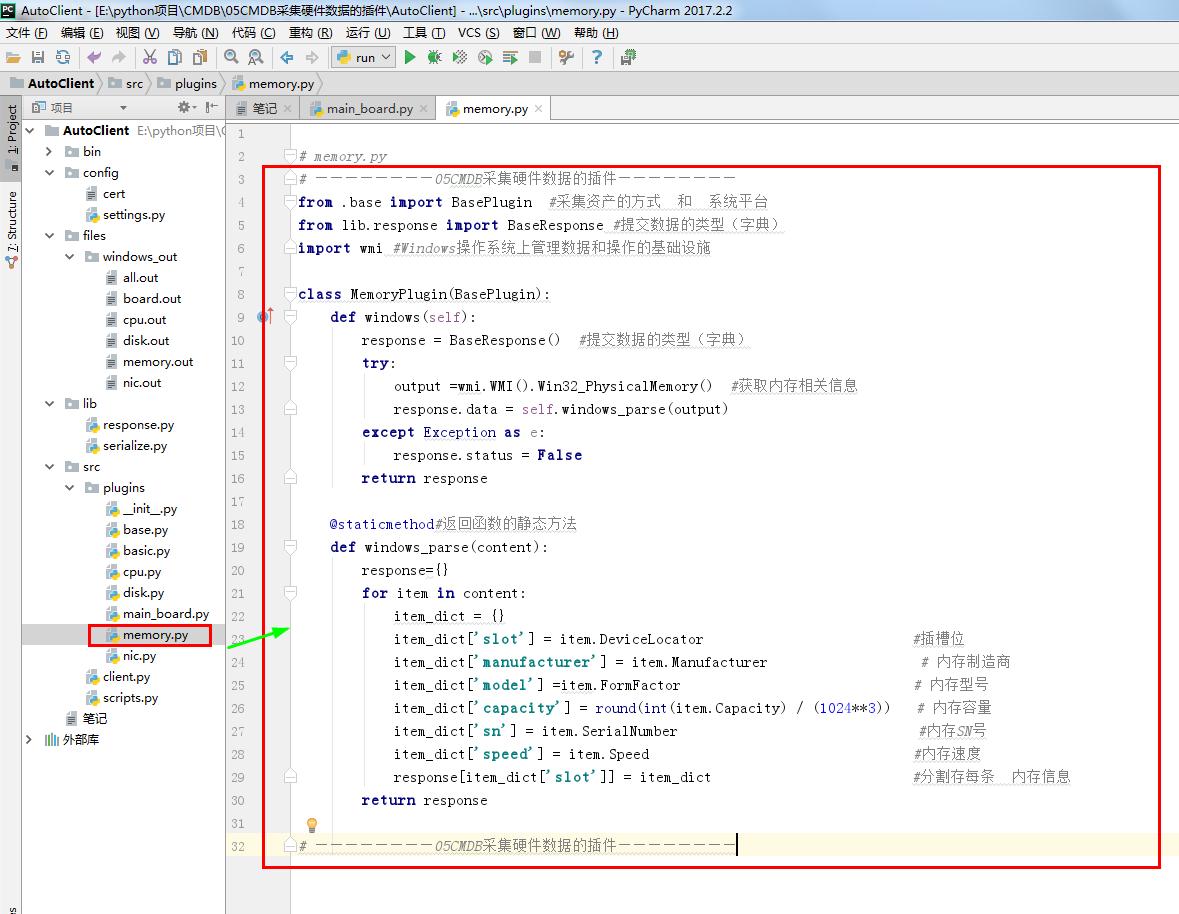
 # ————————05CMDB采集硬件数据的插件————————

 from .base import BasePlugin  #采集资产的方式  和  系统平台

 from lib.response import BaseResponse #提交数据的类型(字典)

 import wmi #Windows操作系统上管理数据和操作的基础设施

 class MemoryPlugin(BasePlugin):

     def windows(self):

         response = BaseResponse()  #提交数据的类型(字典)

         try:

             output =wmi.WMI().Win32_PhysicalMemory()  #获取内存相关信息

             response.data = self.windows_parse(output)

         except Exception as e:

             response.status = False

         return response

     @staticmethod#返回函数的静态方法

     def windows_parse(content):

         response={}

         for item in content:

             item_dict = {}

             item_dict['slot'] = item.DeviceLocator                          #插槽位

             item_dict['manufacturer'] = item.Manufacturer                   # 内存制造商

             item_dict['model'] =item.FormFactor                             # 内存型号

             item_dict['capacity'] = round(int(item.Capacity) / (1024**3))   # 内存容量

             item_dict['sn'] = item.SerialNumber                              #内存SN号

             item_dict['speed'] = item.Speed                                 #内存速度

             response[item_dict['slot']] = item_dict                         #分割存每条  内存信息

         return response

 # ————————05CMDB采集硬件数据的插件————————
# memory.py
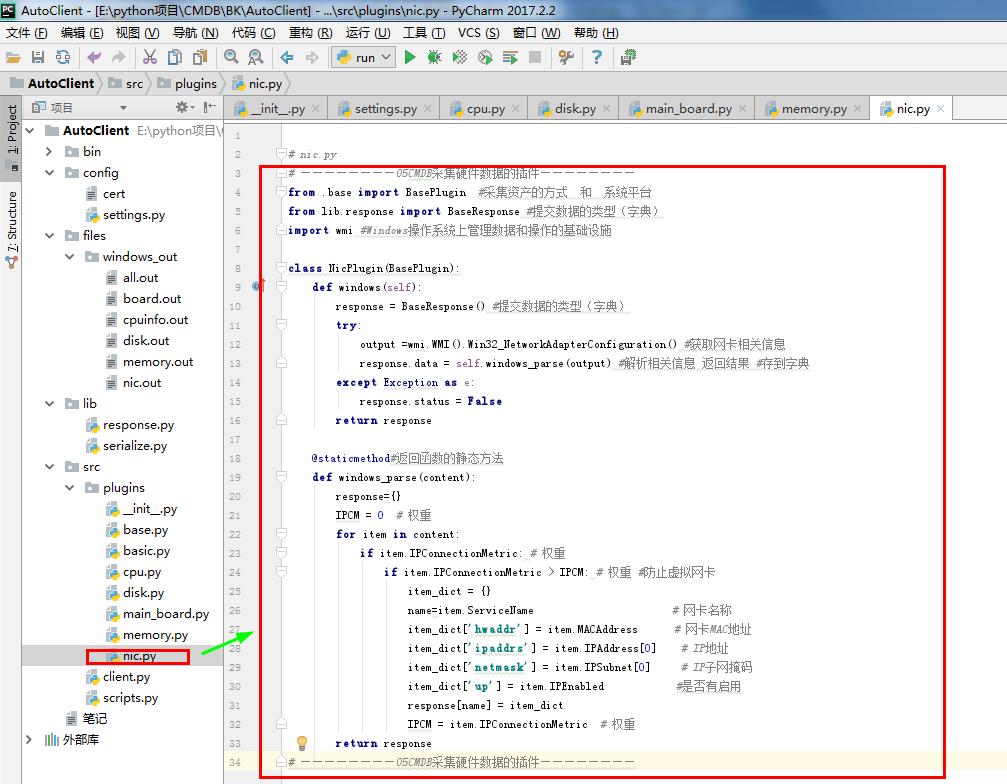
 # nic.py

 # ————————05CMDB采集硬件数据的插件————————

 from .base import BasePlugin  #采集资产的方式  和  系统平台

 from lib.response import BaseResponse #提交数据的类型(字典)

 import wmi #Windows操作系统上管理数据和操作的基础设施

 class NicPlugin(BasePlugin):

     def windows(self):

         response = BaseResponse() #提交数据的类型(字典)

         try:

             output =wmi.WMI().Win32_NetworkAdapterConfiguration() #获取网卡相关信息

             response.data = self.windows_parse(output) #解析相关信息 返回结果 #存到字典

         except Exception as e:

             response.status = False

         return response

     @staticmethod#返回函数的静态方法

     def windows_parse(content):

         response={}

         IPCM = 0  # 权重

         for item in content:

             if item.IPConnectionMetric: # 权重

                 if item.IPConnectionMetric > IPCM: # 权重 #防止虚拟网卡

                     item_dict = {}

                     name=item.ServiceName                       # 网卡名称

                     item_dict['hwaddr'] = item.MACAddress      # 网卡MAC地址

                     item_dict['ipaddrs'] = item.IPAddress[0]    # IP地址

                     item_dict['netmask'] = item.IPSubnet[0]     # IP子网掩码

                     item_dict['up'] = item.IPEnabled            #是否有启用

                     response[name] = item_dict

                     IPCM = item.IPConnectionMetric  # 权重

         return response

 # ————————05CMDB采集硬件数据的插件————————
# nic.py
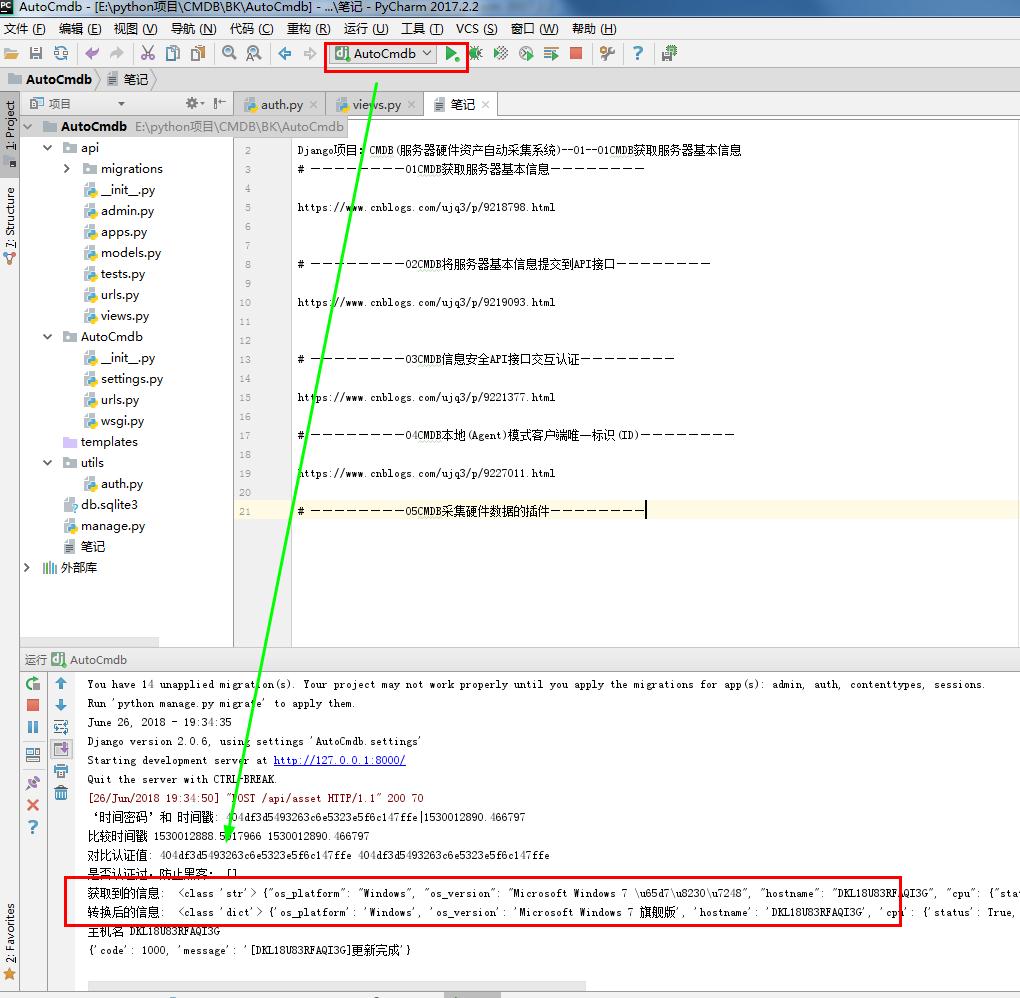
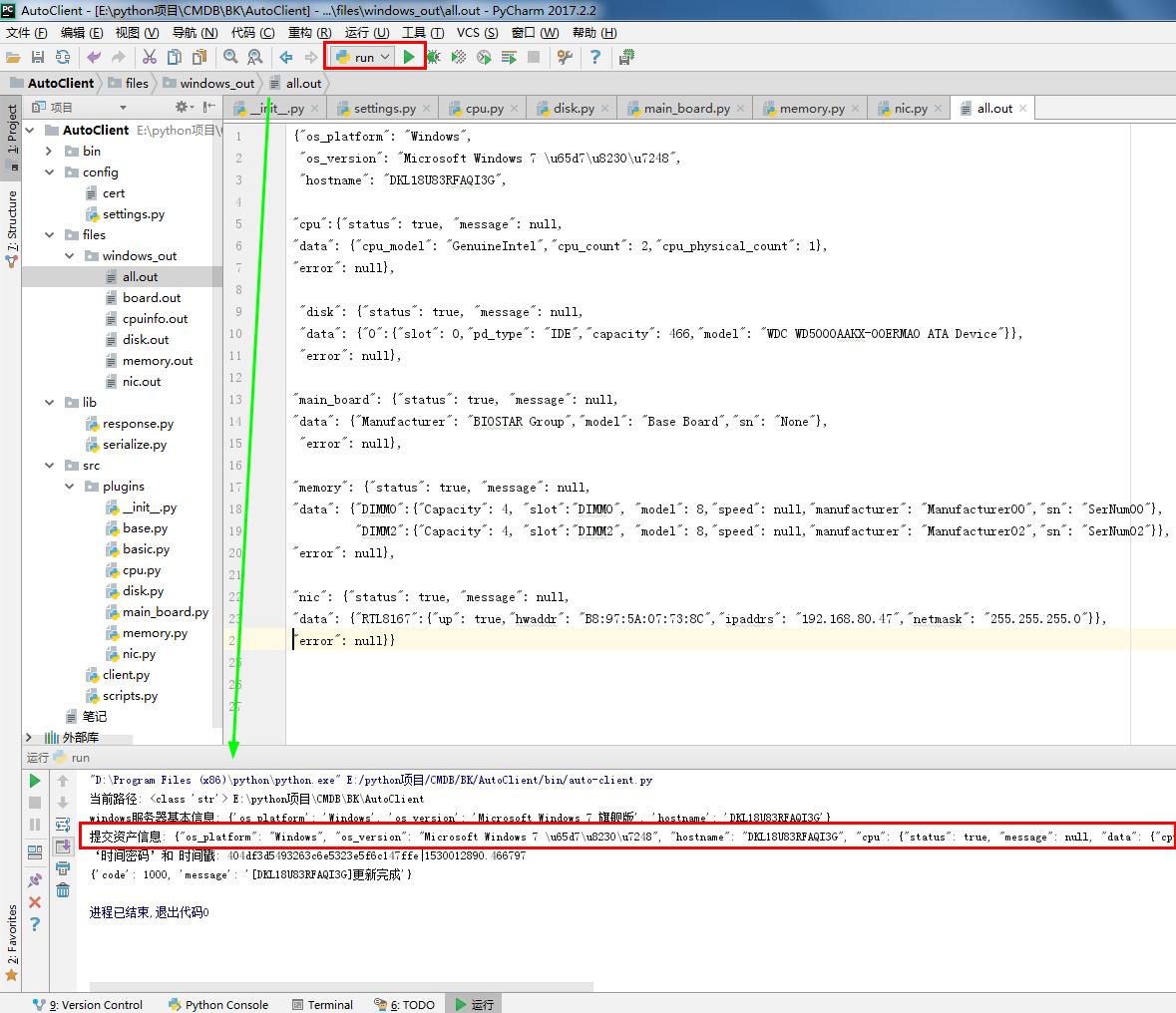
 {"os_platform": "Windows",

  "os_version": "Microsoft Windows 7 \u65d7\u8230\u7248",

  "hostname": "DKL18U83RFAQI3G",

 "cpu":{"status": true, "message": null,

 "data": {"cpu_model": "GenuineIntel","cpu_count": 2,"cpu_physical_count": 1},

 "error": null},

  "disk": {"status": true, "message": null,

  "data": {"":{"slot": 0,"pd_type": "IDE","capacity": 466,"model": "WDC WD5000AAKX-00ERMA0 ATA Device"}},

  "error": null},

 "main_board": {"status": true, "message": null,

 "data": {"Manufacturer": "BIOSTAR Group","model": "Base Board","sn": "None"},

  "error": null},

 "memory": {"status": true, "message": null,

 "data": {"DIMM0":{"Capacity": 4, "slot":"DIMM0", "model": 8,"speed": null,"manufacturer": "Manufacturer00","sn": "SerNum00"},

          "DIMM2":{"Capacity": 4, "slot":"DIMM2", "model": 8,"speed": null,"manufacturer": "Manufacturer02","sn": "SerNum02"}},

 "error": null},

 "nic": {"status": true, "message": null,

 "data": {"RTL8167":{"up": true,"hwaddr": "B8:97:5A:07:73:8C","ipaddrs": "192.168.80.47","netmask": "255.255.255.0"}},

 "error": null}}
all.out
 instance of Win32_BaseBoard

 {

     Caption = "Base Board";

     CreationClassName = "Win32_BaseBoard";

     Description = "Base Board";

     HostingBoard = TRUE;

     HotSwappable = FALSE;

     Manufacturer = "BIOSTAR Group";

     Name = "Base Board";

     PoweredOn = TRUE;

     Product = "G41D3+";

     Removable = FALSE;

     Replaceable = TRUE;

     RequiresDaughterBoard = FALSE;

     SerialNumber = "None";

     Status = "OK";

     Tag = "Base Board";

     Version = "6.0";

 };

 instance of Win32_BaseBoard

 {

         Caption = "基板";

         ConfigOptions = {};

         CreationClassName = "Win32_BaseBoard";

         Description = "基板";

         HostingBoard = TRUE;

         HotSwappable = FALSE;

         Manufacturer = "Dell Inc.         ";

         Name = "基板";

         PoweredOn = TRUE;

         Product = "03C38H";

         Removable = FALSE;

         Replaceable = TRUE;

         RequiresDaughterBoard = FALSE;

         SerialNumber = ".       .CN486432A91479.";

         Status = "OK";

         Tag = "Base Board";

         Version = "   ";

 };
board.out
 nstance of Win32_Processor

 {

     AddressWidth = 64;

     Architecture = 9;

     Availability = 3;

     Caption = "Intel64 Family 6 Model 23 Stepping 10";

     CpuStatus = 1;

     CreationClassName = "Win32_Processor";

     CurrentClockSpeed = 2715;

     CurrentVoltage = 13;

     DataWidth = 64;

     Description = "Intel64 Family 6 Model 23 Stepping 10";

     DeviceID = "CPU0";

     ExtClock = 200;

     Family = 11;

     L2CacheSize = 1024;

     L3CacheSize = 0;

     L3CacheSpeed = 0;

     Level = 6;

     LoadPercentage = 0;

     Manufacturer = "GenuineIntel";

     MaxClockSpeed = 2715;

     Name = "Intel(R) Celeron(R) CPU        E3500  @ 2.70GHz";

     NumberOfCores = 2;

     NumberOfLogicalProcessors = 2;

     PowerManagementSupported = FALSE;

     ProcessorId = "BFEBFBFF0001067A";

     ProcessorType = 3;

     Revision = 5898;

     Role = "CPU";

     SocketDesignation = "CPU 1";

     Status = "OK";

     StatusInfo = 3;

     SystemCreationClassName = "Win32_ComputerSystem";

     SystemName = "DKL18U83RFAQI3G";

     UpgradeMethod = 1;

     Version = "";

 };
cpu.out
 instance of Win32_DiskDrive

 {

     BytesPerSector = 512;

     Capabilities = {3, 4, 10};

     CapabilityDescriptions = {"Random Access", "Supports Writing", "SMART Notification"};

     Caption = "Colorful SL200 128GB";

     ConfigManagerErrorCode = 0;

     ConfigManagerUserConfig = FALSE;

     CreationClassName = "Win32_DiskDrive";

     Description = "磁盘驱动器";

     DeviceID = "\\\\.\\PHYSICALDRIVE0";

     FirmwareRevision = "";

     Index = 0;

     InterfaceType = "IDE";

     Manufacturer = "(标准磁盘驱动器)";

     MediaLoaded = TRUE;

     MediaType = "Fixed hard disk media";

     Model = "Colorful SL200 128GB";

     Name = "\\\\.\\PHYSICALDRIVE0";

     Partitions = 3;

     PNPDeviceID = "SCSI\\DISK&VEN_&PROD_COLORFUL_SL200_1\\4&112D75BA&0&000000";

     SCSIBus = 0;

     SCSILogicalUnit = 0;

     SCSIPort = 0;

     SCSITargetId = 0;

     SectorsPerTrack = 63;

     SerialNumber = "AA000000000000000431";

     Size = "";

     Status = "OK";

     SystemCreationClassName = "Win32_ComputerSystem";

     SystemName = "XY";

     TotalCylinders = "";

     TotalHeads = 255;

     TotalSectors = "";

     TotalTracks = "";

     TracksPerCylinder = 255;

 };

 instance of Win32_DiskDrive

 {

     BytesPerSector = 512;

     Capabilities = {3, 4, 10};

     CapabilityDescriptions = {"Random Access", "Supports Writing", "SMART Notification"};

     Caption = "TOSHIBA MQ01ABF050";

     ConfigManagerErrorCode = 0;

     ConfigManagerUserConfig = FALSE;

     CreationClassName = "Win32_DiskDrive";

     Description = "磁盘驱动器";

     DeviceID = "\\\\.\\PHYSICALDRIVE1";

     FirmwareRevision = "AM001J";

     Index = 1;

     InterfaceType = "IDE";

     Manufacturer = "(标准磁盘驱动器)";

     MediaLoaded = TRUE;

     MediaType = "Fixed hard disk media";

     Model = "TOSHIBA MQ01ABF050";

     Name = "\\\\.\\PHYSICALDRIVE1";

     Partitions = 3;

     PNPDeviceID = "SCSI\\DISK&VEN_TOSHIBA&PROD_MQ01ABF050\\4&112D75BA&0&010000";

     SCSIBus = 1;

     SCSILogicalUnit = 0;

     SCSIPort = 0;

     SCSITargetId = 0;

     SectorsPerTrack = 63;

     SerialNumber = "           Z5CKCTNMT";

     Signature = 3014350181;

     Size = "";

     Status = "OK";

     SystemCreationClassName = "Win32_ComputerSystem";

     SystemName = "XY";

     TotalCylinders = "";

     TotalHeads = 255;

     TotalSectors = "";

     TotalTracks = "";

     TracksPerCylinder = 255;

 };
disk.out
 instance of Win32_PhysicalMemory

 {

     BankLabel = "BANK0";

     Capacity = "";

     Caption = "Physical Memory";

     CreationClassName = "Win32_PhysicalMemory";

     DataWidth = 64;

     Description = "Physical Memory";

     DeviceLocator = "DIMM0";

     FormFactor = 8;

     InterleaveDataDepth = 1;

     InterleavePosition = 0;

     Manufacturer = "Manufacturer00";

     MemoryType = 17;

     Name = "Physical Memory";

     PartNumber = "ModulePartNumber00";

     PositionInRow = 1;

     SerialNumber = "SerNum00";

     Tag = "Physical Memory 0";

     TotalWidth = 64;

     TypeDetail = 128;

 };

 instance of Win32_PhysicalMemory

 {

     BankLabel = "BANK2";

     Capacity = "";

     Caption = "Physical Memory";

     CreationClassName = "Win32_PhysicalMemory";

     DataWidth = 64;

     Description = "Physical Memory";

     DeviceLocator = "DIMM2";

     FormFactor = 8;

     InterleaveDataDepth = 1;

     InterleavePosition = 0;

     Manufacturer = "Manufacturer02";

     MemoryType = 17;

     Name = "Physical Memory";

     PartNumber = "ModulePartNumber02";

     PositionInRow = 1;

     SerialNumber = "SerNum02";

     Tag = "Physical Memory 2";

     TotalWidth = 64;

     TypeDetail = 128;

 };

 instance of Win32_PhysicalMemory

 {

         Attributes = 0;

         BankLabel = "BANK 2";

         Capacity = "";

         Caption = "物理内存";

         ConfiguredClockSpeed = 1600;

         CreationClassName = "Win32_PhysicalMemory";

         DataWidth = 64;

         Description = "物理内存";

         DeviceLocator = "ChannelB-DIMM0";

         FormFactor = 12;

         Manufacturer = "830B";

         MemoryType = 24;

         Name = "物理内存";

         PartNumber = "NT4GC64B8HG0NS-DI ";

         SerialNumber = "AA6E1B6E";

         SMBIOSMemoryType = 24;

         Speed = 1600;

         Tag = "Physical Memory 1";

         TotalWidth = 64;

         TypeDetail = 128;

 };
memory.out
 instance of Win32_NetworkAdapterConfiguration

 {

     Caption = "[00000000] WAN Miniport (SSTP)";

     Description = "WAN Miniport (SSTP)";

     DHCPEnabled = FALSE;

     Index = 0;

     InterfaceIndex = 2;

     IPEnabled = FALSE;

     ServiceName = "RasSstp";

     SettingID = "{71F897D7-EB7C-4D8D-89DB-AC80D9DD2270}";

 };

 instance of Win32_NetworkAdapterConfiguration

 {

     Caption = "[00000001] WAN Miniport (IKEv2)";

     Description = "WAN Miniport (IKEv2)";

     DHCPEnabled = FALSE;

     Index = 1;

     InterfaceIndex = 10;

     IPEnabled = FALSE;

     ServiceName = "RasAgileVpn";

     SettingID = "{29898C9D-B0A4-4FEF-BDB6-57A562022CEE}";

 };

 instance of Win32_NetworkAdapterConfiguration

 {

     Caption = "[00000002] WAN Miniport (L2TP)";

     Description = "WAN Miniport (L2TP)";

     DHCPEnabled = FALSE;

     Index = 2;

     InterfaceIndex = 3;

     IPEnabled = FALSE;

     ServiceName = "Rasl2tp";

     SettingID = "{E43D242B-9EAB-4626-A952-46649FBB939A}";

 };

 instance of Win32_NetworkAdapterConfiguration

 {

     Caption = "[00000003] WAN Miniport (PPTP)";

     Description = "WAN Miniport (PPTP)";

     DHCPEnabled = FALSE;

     Index = 3;

     InterfaceIndex = 4;

     IPEnabled = FALSE;

     ServiceName = "PptpMiniport";

     SettingID = "{DF4A9D2C-8742-4EB1-8703-D395C4183F33}";

 };

 instance of Win32_NetworkAdapterConfiguration

 {

     Caption = "[00000004] WAN Miniport (PPPOE)";

     Description = "WAN Miniport (PPPOE)";

     DHCPEnabled = FALSE;

     Index = 4;

     InterfaceIndex = 5;

     IPEnabled = FALSE;

     ServiceName = "RasPppoe";

     SettingID = "{8E301A52-AFFA-4F49-B9CA-C79096A1A056}";

 };

 instance of Win32_NetworkAdapterConfiguration

 {

     Caption = "[00000005] WAN Miniport (IPv6)";

     Description = "WAN Miniport (IPv6)";

     DHCPEnabled = FALSE;

     Index = 5;

     InterfaceIndex = 6;

     IPEnabled = FALSE;

     ServiceName = "NdisWan";

     SettingID = "{9A399D81-2EAD-4F23-BCDD-637FC13DCD51}";

 };

 instance of Win32_NetworkAdapterConfiguration

 {

     Caption = "[00000006] WAN Miniport (Network Monitor)";

     Description = "WAN Miniport (Network Monitor)";

     DHCPEnabled = FALSE;

     Index = 6;

     InterfaceIndex = 7;

     IPEnabled = FALSE;

     ServiceName = "NdisWan";

     SettingID = "{5BF54C7E-91DA-457D-80BF-333677D7E316}";

 };

 instance of Win32_NetworkAdapterConfiguration

 {

     Caption = "[00000007] Realtek PCIe FE Family Controller";

     DatabasePath = "%SystemRoot%\\System32\\drivers\\etc";

     DefaultIPGateway = {"192.168.80.1"};

     DefaultTTL = 64;

     Description = "Realtek PCIe FE Family Controller";

     DHCPEnabled = TRUE;

     DHCPLeaseExpires = "20180622195709.000000+480";

     DHCPLeaseObtained = "20180622175709.000000+480";

     DHCPServer = "192.168.80.1";

     DNSDomainSuffixSearchOrder = {};

     DNSEnabledForWINSResolution = FALSE;

     DNSHostName = "DKL18U83RFAQI3G";

     DNSServerSearchOrder = {"192.168.80.1", "218.85.157.99"};

     DomainDNSRegistrationEnabled = FALSE;

     FullDNSRegistrationEnabled = TRUE;

     GatewayCostMetric = {0};

     Index = 7;

     InterfaceIndex = 11;

     IPAddress = {"192.168.80.54", "fe80::c912:33b9:df1d:90b7"};

     IPConnectionMetric = 20;

     IPEnabled = TRUE;

     IPFilterSecurityEnabled = FALSE;

     IPSecPermitIPProtocols = {};

     IPSecPermitTCPPorts = {};

     IPSecPermitUDPPorts = {};

     IPSubnet = {"255.255.255.0", ""};

     MACAddress = "B8:97:5A:07:73:8C";

     PMTUBHDetectEnabled = TRUE;

     PMTUDiscoveryEnabled = TRUE;

     ServiceName = "RTL8167";

     SettingID = "{57DC49CC-DC9F-4583-A411-F4837D4E5310}";

     TcpipNetbiosOptions = 0;

     WINSEnableLMHostsLookup = TRUE;

     WINSScopeID = "";

 };

 instance of Win32_NetworkAdapterConfiguration

 {

     Caption = "[00000008] WAN Miniport (IP)";

     Description = "WAN Miniport (IP)";

     DHCPEnabled = FALSE;

     Index = 8;

     InterfaceIndex = 8;

     IPEnabled = FALSE;

     ServiceName = "NdisWan";

     SettingID = "{2CAA64ED-BAA3-4473-B637-DEC65A14C8AA}";

 };

 instance of Win32_NetworkAdapterConfiguration

 {

     Caption = "[00000009] Microsoft ISATAP Adapter";

     Description = "Microsoft ISATAP Adapter";

     DHCPEnabled = FALSE;

     Index = 9;

     InterfaceIndex = 12;

     IPEnabled = FALSE;

     ServiceName = "tunnel";

     SettingID = "{409C2A87-0D21-4979-AC19-BD58EBDDC442}";

 };

 instance of Win32_NetworkAdapterConfiguration

 {

     Caption = "[00000010] RAS Async Adapter";

     Description = "RAS Async Adapter";

     DHCPEnabled = FALSE;

     Index = 10;

     InterfaceIndex = 9;

     IPEnabled = FALSE;

     ServiceName = "AsyncMac";

     SettingID = "{78032B7E-4968-42D3-9F37-287EA86C0AAA}";

 };

 instance of Win32_NetworkAdapterConfiguration

 {

     Caption = "[00000011] Microsoft 6to4 Adapter";

     Description = "Microsoft 6to4 Adapter";

     DHCPEnabled = FALSE;

     Index = 11;

     InterfaceIndex = 13;

     IPEnabled = FALSE;

     ServiceName = "tunnel";

     SettingID = "{4A3D2A58-3B35-4FAE-BE66-14F485520E20}";

 };

 instance of Win32_NetworkAdapterConfiguration

 {

     Caption = "[00000013] Microsoft ISATAP Adapter";

     Description = "Microsoft ISATAP Adapter";

     DHCPEnabled = FALSE;

     Index = 13;

     InterfaceIndex = 14;

     IPEnabled = FALSE;

     ServiceName = "tunnel";

     SettingID = "{DE650C82-C0E5-4561-9048-F05B56D0C30C}";

 };

 instance of Win32_NetworkAdapterConfiguration

 {

     Caption = "[00000015] Microsoft ISATAP Adapter";

     Description = "Microsoft ISATAP Adapter";

     DHCPEnabled = FALSE;

     Index = 15;

     InterfaceIndex = 15;

     IPEnabled = FALSE;

     ServiceName = "tunnel";

     SettingID = "{5196115C-0551-4B1C-AA16-D30B64FFB538}";

 };

 instance of Win32_NetworkAdapterConfiguration

 {

     Caption = "[00000016] VirtualBox Host-Only Ethernet Adapter";

     DatabasePath = "%SystemRoot%\\System32\\drivers\\etc";

     DefaultTTL = 64;

     Description = "VirtualBox Host-Only Ethernet Adapter";

     DHCPEnabled = FALSE;

     DNSDomainSuffixSearchOrder = {};

     DNSEnabledForWINSResolution = FALSE;

     DNSHostName = "DKL18U83RFAQI3G";

     DomainDNSRegistrationEnabled = FALSE;

     FullDNSRegistrationEnabled = TRUE;

     Index = 16;

     InterfaceIndex = 16;

     IPAddress = {"192.168.137.1", "fe80::8104:5b2a:19de:41e7"};

     IPConnectionMetric = 10;

     IPEnabled = TRUE;

     IPFilterSecurityEnabled = FALSE;

     IPSecPermitIPProtocols = {};

     IPSecPermitTCPPorts = {};

     IPSecPermitUDPPorts = {};

     IPSubnet = {"255.255.255.0", ""};

     MACAddress = "0A:00:27:00:00:10";

     PMTUBHDetectEnabled = TRUE;

     PMTUDiscoveryEnabled = TRUE;

     ServiceName = "VBoxNetAdp";

     SettingID = "{DF5268F5-C995-4010-984D-F9EA4C3889BE}";

     TcpipNetbiosOptions = 0;

     WINSEnableLMHostsLookup = TRUE;

     WINSScopeID = "";

 };

 instance of Win32_NetworkAdapterConfiguration

 {

     Caption = "[00000017] Microsoft ISATAP Adapter";

     Description = "Microsoft ISATAP Adapter";

     DHCPEnabled = FALSE;

     Index = 17;

     InterfaceIndex = 17;

     IPEnabled = FALSE;

     ServiceName = "tunnel";

     SettingID = "{C21107AF-5813-4D7B-A4C1-3C16CA00FA2C}";

 };
nic.out
Django项目:CMDB(服务器硬件资产自动采集系统)--05--05CMDB采集硬件数据的插件的更多相关文章
- Django项目:CMDB(服务器硬件资产自动采集系统)--12--08CMDB采集硬件数据日志记录
#settings.py # ————————01CMDB获取服务器基本信息———————— import os BASEDIR = os.path.dirname(os.path.dirname(o ...
- Django项目:CMDB(服务器硬件资产自动采集系统)--11--07CMDB文件模式测试采集硬件数据
#settings.py # ————————01CMDB获取服务器基本信息———————— import os BASEDIR = os.path.dirname(os.path.dirname(o ...
- Django项目:CMDB(服务器硬件资产自动采集系统)--06--06CMDB测试Linux系统采集硬件数据的命令01
#base.py # ————————01CMDB获取服务器基本信息———————— from config import settings #配置文件 class BasePlugin(object ...
- Django项目:CMDB(服务器硬件资产自动采集系统)--07--06CMDB测试Linux系统采集硬件数据的命令02
#settings.py """ Django settings for AutoCmdb project. Generated by 'django-admin sta ...
- Django项目:CMDB(服务器硬件资产自动采集系统)--10--06CMDB测试Linux系统采集硬件数据的命令05
cd /py/AutoClient/bin python3 auto-client.py /usr/local/python3/bin/pip install requests python3 aut ...
- Django项目:CMDB(服务器硬件资产自动采集系统)--03--03CMDB信息安全API接口交互认证
#settings.py """ Django settings for AutoCmdb project. Generated by 'django-admin sta ...
- Django项目:CMDB(服务器硬件资产自动采集系统)--02--02CMDB将服务器基本信息提交到API接口
AutoCmdb # urls.py """AutoCmdb URL Configuration The `urlpatterns` list routes URLs t ...
- Django项目:CMDB(服务器硬件资产自动采集系统)--04--04CMDB本地(Agent)模式客户端唯一标识(ID)
# client.py # ————————01CMDB获取服务器基本信息———————— from src import plugins #__init__.py from lib.serializ ...
- Django项目:CMDB(服务器硬件资产自动采集系统)--01--01CMDB获取服务器基本信息
AutoClient #settings.py # ————————01CMDB获取服务器基本信息———————— import os BASEDIR = os.path.dirname(os.pat ...
随机推荐
- Linux g++
Usage: g++ [options] file...Options: -pass-exit-codes Exit with highest error code from a p ...
- thinkphp 规则路由
规则路由是一种比较容易理解的路由定义方式,采用ThinkPHP设计的规则表达式来定义. 规则表达式 规则表达式通常包含静态地址和动态地址,或者两种地址的结合,例如下面都属于有效的规则表达式: 'my' ...
- 关于InputMethodManager的使用方法
InputMethodManager是一个用于控制显示或隐藏输入法面板的类(当然还有其他作用).获取InPutMethodManager的方法很简单. InputMethodManager imm = ...
- centos7 创建桌面快捷方式(chrome,eclipse)
在将eclipse-SDK-3.7.2-Linux-gtk.tar.gz解压到某个目录下之后,命令行进行如下编辑 vi /usr/share/applications/eclipse.desktop ...
- VS2010-MFC(字体和文本输出:文本输出)
转自:http://www.jizhuomi.com/software/241.html 上一节讲了CFont字体类,本节主要讲解文本输出的方法和实例. 文本输出过程 在文本输出到设备以前,我们需要确 ...
- JSON关联属性转换异常
问题:FastJSON在转换对象过程中,该对象还有关联属性,该属性还是一个对象,就出现栈溢出异常,会报一下错误,解决办法:在该属性类的一边加上@JSONField(serialize=false);有 ...
- 小程序开发之wepy框架
ps 本教程使用wepy 1.7+以上的版本 wepy-让小程序支持组件化开发的框架 鹅厂出品,用于开发自家产品的框架还是很良心的,框架设计思路上参照vue,但不是全部照搬,这点要注意. 对微信小程序 ...
- Nodejs之路(四)—— MongoDB&MySQL
一.MongoDB 1.1概述 MongoDB 是一个基于分布式文件存储的数据库.由 C++ 语言编写.旨在为 WEB 应用提供可扩展的高性能数据存储解决方案.MongoDB 是一个介于关系数据库和非 ...
- TortoiseGit可能遇到Permission denied (publickey).
1.检测是不是没设置公钥和私钥 2.公钥有没有添加到git账户里面去 3.检测如下图路径正确不正确
- Android开发 控件阴影详情
如何给控件设置阴影? <com.google.android.material.tabs.TabLayout android:id="@+id/tablayout" andr ...