
iOS定位权限请求时易犯的错误小结
起因
用户群反馈app可能请求了不合适的定位权限:始终定位。
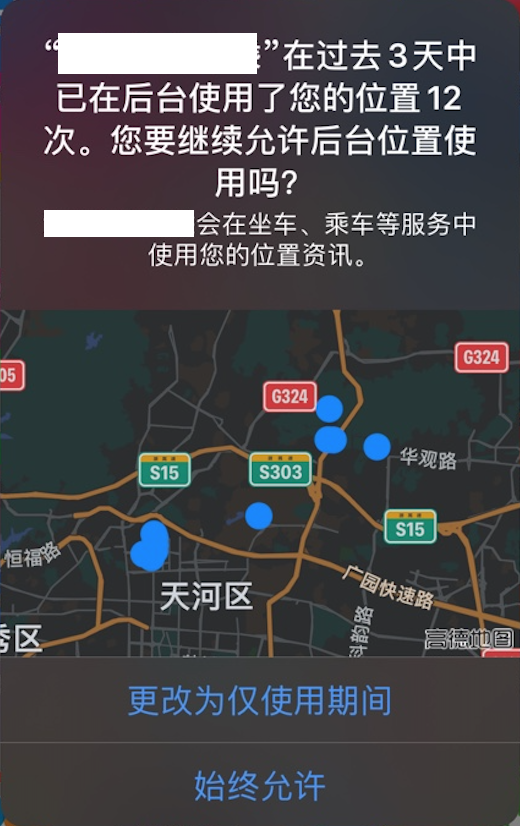
看到这个截图,根据经验判断可能是后台定位功能导致可能不得不请求始终定位权限。再加上之前提交审核时,苹果要求在plist文件中新增NSLocationAlwaysAndWhenInUseUsageDescription和NSLocationAlwaysUsageDescription键值对。猜测可能是对某些点的理解混淆了,因为这种用户体验的确不好。
解决思路
因为此项目是前同事遗留代码,自从接手后迭代次数比较有限。于是计划根据以下步骤进行排查和验证:
- 查现有代码和plist文件
- 查官方文档
- 改工程代码
- 提交审核,查看邮件提醒
- app退入后台,查看定位信息是否输出
查plist文件和权限请求代码
plist文件
以下键都已加入:
NSLocationAlwaysUsageDescription

NSLocationWhenInUseUsageDescription

NSLocationAlwaysAndWhenInUseUsageDescription
权限请求代码
全局搜索request,找到定位权限请求代码,发现
  if ([_locationManager respondsToSelector:@selector(requestWhenInUseAuthorization)]) {

            [_locationManager requestAlwaysAuthorization];

   }
查官方文档
plist文件配置
- NSLocationAlwaysUsageDescription
Discussion
Use this key if your iOS app accesses location information in the background, and you deploy to a target earlier than iOS 11. In that case, add both this key and NSLocationAlwaysAndWhenInUseUsageDescription to your app’s Info.plist file with the same message. Apps running on older versions of the OS use the message associated with NSLocationAlwaysUsageDescription, while apps running on later versions use the one assocated with NSLocationAlwaysAndWhenInUseUsageDescription.
If your app only needs location information when in the foreground, use NSLocationWhenInUseUsageDescription instead. For more information, see Choosing the Authorization Level for Location Services.
If you need location information in a macOS app, use NSLocationUsageDescription instead.
Important
This key is required if your iOS app uses APIs that access the user’s location at all times and deploys to targets earlier than iOS 11.
- NSLocationWhenInUseUsageDescription
Discussion
Use this key if your iOS app accesses location information only when running in the foreground. If your app needs location information when in the background, use NSLocationAlwaysAndWhenInUseUsageDescription instead. For more information, see Choosing the Authorization Level for Location Services.
If you need location information in a macOS app, use NSLocationUsageDescription instead.
Important
This key is required if your iOS app uses APIs that access the user’s location information while the app is running in the foreground.
- NSLocationAlwaysAndWhenInUseUsageDescription
Discussion
Use this key if your iOS app accesses location information while running in the background. If your app only needs location information when in the foreground, use NSLocationWhenInUseUsageDescription instead. For more information, see Choosing the Authorization Level for Location Services.
If you need location information in a macOS app, use NSLocationUsageDescription instead. If your iOS app deploys to versions earlier than iOS 11, see NSLocationAlwaysUsageDescription.
Important
This key is required if your iOS app uses APIs that access the user’s location information at all times.
对比可知:
- 如果app需要前台运行定位权限,需要配置NSLocationWhenInUseUsageDescription;
- 如果app需要后台运行定位权限,需要配置NSLocationAlwaysAndWhenInUseUsageDescription;如果适配iOS11之前版本,还需要配置NSLocationAlwaysUsageDescription
这几种键的区别主要在于区分app 前后台运行 时的权限配置。
权限请求代码
requestAlwaysAuthorization
When the user grants “Always” authorization to your app, your app can start any of the available location services while your app is running in the foreground or background. In addition, services that allow your app to be launched in the background continue to do so.
Important
Requesting “Always” authorization is discouraged because of the potential negative impacts to user privacy. You should request this level of authorization only when doing so offers a genuine benefit to the user.
requestWhenInUseAuthorization
You must call this method or the requestAlwaysAuthorization()method prior to using location services. If the user grants “when-in-use” authorization to your app, your app can start most (but not all) location services while it is in the foreground. (Apps cannot use any services that automatically relaunch the app, such as region monitoring or the significant location change service.) When started in the foreground, services continue to run in the background if your app has enabled background location updates in the Capabilities tab of your Xcode project. Attempts to start location services while your app is running in the background will fail. The system displays a location-services indicator in the status bar when your app moves to the background with active location services.
官方建议:
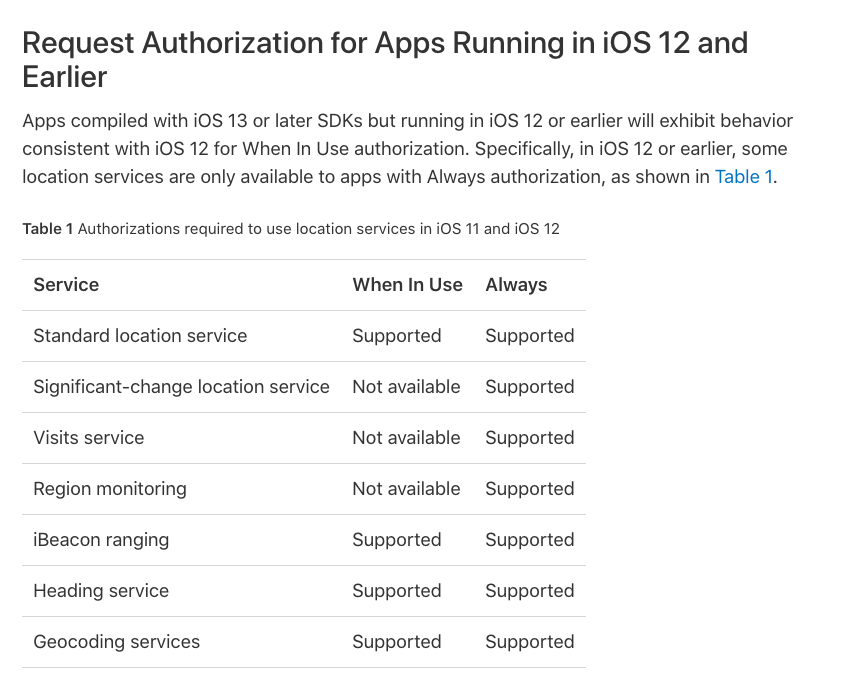
The type of authorization (“when-in-use” or “always”) that you request determines which location services your app can access and when it can use them:
When-in-use authorization. Your app can use most services but cannot use services that automatically relaunch the app. Your app must always start services while running in the foreground. If you enable the background location capability for your app, a suspended app will wake in the background to handle location events. However, if your app is not running, it will not be launched.
Always authorization. Your app can use all location services, and it can start those services from either the foreground or the background. If a location-related event occurs when your app is not running, the system launches your app and delivers the event.
官方更详细说明:
改工程代码
- 保持plist配置不变
- 修复请求方法:
  if ([_locationManager respondsToSelector:@selector(requestWhenInUseAuthorization)]) {

            [_locationManager requestWhenInUseAuthorization];

  }
提交审核,查看邮件提醒
新增version,打包上传,查看邮件提醒:并未提及定位权限有何问题。
app退入后台,查看定位信息是否输出
为验证app退到后台依旧可以定位,故实测退到后台后,gps回调方法中log是否持续输出,结果:会!
结论
plist权限配置的定义和通过代码请求权限不是绝对的一一对应关系,容易被误解,前同事也是在这个地方混淆了。这也是本bug出现的根本原因。
以后遇到类似易混淆概念,还是查好多篇相关官方文档,并充分理解后再写代码比较好。关于本知识点,网上有的教程可能会混淆,请注意鉴别。
- 让我们杜绝浅尝辄止,追求精益求精!
iOS定位权限请求时易犯的错误小结的更多相关文章
- javascript中易犯的错误有哪些
javascript中易犯的错误有哪些 一.总结 一句话总结: 比如循环中函数的使用 函数中this的指向谁(函数中this的使用) 变量的作用域 1.this.timer = setTimeout( ...
- 在向服务器发送请求时发生传输级错误。 (provider: TCP 提供程序, error: 0 - 远程主机强迫关闭了一个现有的连接。)
用VS2005+SQLSERVER2008开发C/S的程序,程序上线运行一段时间之后发现在某些功能偶尔出现如下的错误: 在向服务器发送请求时发生传输级错误. (provider: TCP 提供程序, ...
- Python 字典一个易犯的错误
一个易犯的错误,关于 Python 的传值(对于不可变量) 和 传引用(对于可变量),浅拷贝和深拷贝.废话不多说,看例子, 直接改变可变字典值,失败, >>> dic = dict. ...
- System.Data.SqlClient.SqlException: 在向服务器发送请求时发生传输级错误。 (provider: TCP 提供程序, error: 0 - 远程主机强迫关闭了一个现有的连接。) .
今天使用sql server 2008 R2管理器,进行SQL查询时,频率非常高的报错: System.Data.SqlClient.SqlException: 在向服务器发送请求时发生传输级错误. ...
- 在向server发送请求时发生传输级错误。 (provider: 共享内存提供程序, error: 0 - 管道的还有一端上无不论什么进程。
作者:卿笃军 原文地址:http://blog.csdn.net/qingdujun/article/details/36425825 SQL Server 2008 + VS2010 用C#编写的代 ...
- iOS提交iTunes审核时出现Invalid Binary错误
xcode5编译一个xcode4时写的代码,提交iTunes审核时出错. 1.iOS提交审核时出现Invalid Binary错误 2.收到邮件: iPhone 5 Optimization Requ ...
- 【PHP开发】用curl向https发请求时的35号错误
放了个假发现以前写的程序的模拟登陆不管用了,中间输出,发现curl向https发请求时没有返回数据,输出错误信息,得到: curl_errno($ch) -----> 35 curl_error ...
- C++设计实现算法时易犯错误
1.未初始化 指针未初始化为NULL,造成判断条件出错 数值未初始化为0,造成数组超界,内存泄漏 2. long long输入时 lld or I64d 写成d一定出错 3.gcc编译报错:程序中有游 ...
- js函数易犯的错误
1.定义一个js函数时不能写在另一个函数里面. 2.定义一个打开网页自动执行的函数,一定要注意加载的顺序.如果是不是自动执行的,而是等页面加载完后事件触发的,那写在任何地方都没问题. 错误的:
随机推荐
- iOS Animation 主流炫酷动画框架(特效)收集整理 #91
https://github.com/sxyx2008/DevArticles/issues/91
- Notepad++颜色配置
目前看着比较顺眼的notepad++配置,记录如下:
- BigData NoSQL —— ApsaraDB HBase数据存储与分析平台概览
一.引言 时间到了2019年,数据库也发展到了一个新的拐点,有三个明显的趋势: 越来越多的数据库会做云原生(CloudNative),会不断利用新的硬件及云本身的优势打造CloudNative数据库, ...
- 从HelloWorld看Knative Serving代码实现
摘要: Knative Serving以Kubernetes和Istio为基础,支持无服务器应用程序和函数的部署并提供服务.我们从部署一个HelloWorld示例入手来分析Knative Servin ...
- @loj - 2478@「九省联考 2018」林克卡特树
目录 @description@ @solution@ @part - 1@ @part - 2@ @accepted code@ @details@ @description@ 小 L 最近沉迷于塞 ...
- springmvc使用javabean作为请求参数
1 首先写两个javabean对象 person 和 address 代码如下.两个类之间的关系如代码中 package cn.bean.demo.bo; public class Person ...
- Project Euler Problem 8-Largest product in a series
直接暴力 写完才想到,代码写矬了,扫一遍就出结果了,哪还用我写的这么麻烦 ss = '''73167176531330624919225119674426574742355349194934 9698 ...
- halcon坐标转换(机器人坐标转换用)
#图像坐标r:=[431, 355, 507, 53, 507]c:=[505, 543, 316, 127, 883]#物理坐标(例如机器人坐标)r1:=[0, 2.0, -2.0, 10, -2. ...
- Python--day43--mysql唯一索引和外键变种之多对多
唯一索引:(unique关键字)unique 名字 (num) 外键的变种:
- H3C OSPF可选配置命令