
A Simple Introduction To Computer Networking
Most networking discussions are a jumble of acronyms. Forget the configuration details — what are the insights?
- Networking is about communication
- Text is the simplest way to communicate
- Protocols are standards for reading and writing text
Beneath the details, networking is an IM conversation. Here’s what I wish someone told me when learning how computers communicate.
TCP: The Text Layer
The Transmission Control Protocol (TCP) provides the handy illusion that we can “just” send text between two computers. TCP relies on lower
levels and can send binary data, but ignore that for now:
- TCP lets us Instant Message between computers
We IM with Telnet, the ‘notepad’ of networking: telnet sends and receives plain text using TCP. It’s a chat client peacefully free of ads and unsolicited buddy requests.
Let’s talk to Google using telnet (or putty,
a better utility):
telnet google.com 80

[connecting...]

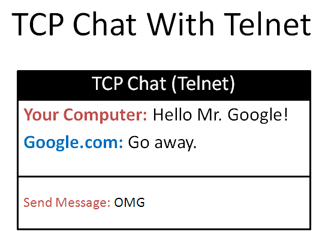
Hello Mr. Google!
We connect to google.com on port 80 (the default for web requests) and send the message “Hello Mr. Google!”. We press Enter a few times and await the reply:
<html>

...

<h1>Bad Request</h1>

Your client has issued a malformed or illegal request

...

</html>
Malformed? Illegal? The mighty Google is not pleased. It didn’t understand us and sent HTML telling the same.
But, we had a conversation: text went in, and text came back. In other words:
Protocols: The Forms To Fill Out
Unstructured chats are too carefree — how does the server know what we want to do? We need a protocol (standard way of communicating) if we’re going to make sense.
We use protocols all the time
- Putting “to” and “from” addresses in special places on an envelope
- Filling out bank forms (special place for account number, deposit amount, etc.)
- Saying “Roger” or “10-4” to indicate a radio request was understood
Protocols make communication clear.
Case Study: The HTTP Protocol
We see HTTP in every url: http://google.com/. What does it mean?
- Connect to server google.com (Using TCP, port 80 by default)
- Ask for the resource “/” (the default resource)
- Format the request using the Hypertext Transport Protocol
HTTP is the “form to fill out” when asking for the resource. Using the HTTP format, the above request looks like this:
GET / HTTP/1.0
Remember, it’s just text! We’re asking for a file, through an IM session, using the format: [Command] [Resource] [Protocol Name/Version].
This command is “IM’d” to the server (your browser adds extra info, a detail for another time). Google’s server returns this response:
HTTP/1.0 200 OK

Cache-Control: private, max-age=0

Date: Sun, 15 Mar 2009 03:13:39 GMT

Expires: -1

Content-Type: text/html; charset=ISO-8859-1

Set-Cookie: PREF=ID=5cc6…

Server: gws

Connection: Close

<html>

(Google web page, search box, and cute logo)

</html>
Yowza. The bottom part is HTML for the browser to display. But why the junk up top?
Well, suppose we just got the raw HTML to display. But what about errors: if the server crashed, the file wasn’t there, or google just didn’t like us?
Some metadata (data about data) is useful. When we order a book from Amazon we expect a packing slip describing the order: the intended recipient, price, return information, etc. You don’t want a naked book just thrown
on your doorstep.
Protocols are similar: the recipient wants to know if everything was OK. Here we see infamous status codes like 404 (resource not found) or 200 (everything OK). These headers aren’t the real data — they’re the packing slip from the server.
Insights From Protocols
Studying existing, popular systems is a great way to understand engineering decisions. Here are a few:
Binary vs Plain Text
Binary data is more efficient than text, but more difficult to debug and generate (how many hex editors
do you know to use?). Lower-level protocols, the backbone of the internet, use binary data to maintain performance. Application-level protocols (HTTP and above) use text data for ease of interoperability. You don’t have religious wars about endian issues with
HTTP.
Stateful vs. Stateless
Some protocols are stateful, which means the server remembers the chat with the client. With SMTP, for example, the client opens a connection and issues commands one at a time (such as adding recipients to an email), and closes the connection. Stateful communication
is useful in transactions that have many steps or conditions.
Stateless communication is simpler: you send the entire transaction as one request. Each “instant message” stands on its own and doesn’t need the others. HTTP is stateless: you can request a webpage without introducing yourself to the server.
Extensibility
We can’t think of everything beforehand. How do we extend old protocols for new users?
HTTP has a simple and effective “header” structure: a metadata preamble that looks like “Header:Value”.
If you don’t recognize the header sent (new client, old server) just ignore it. If you were expecting a header but don’t see it (old client, new server), just use a default. It’s like having an “Anything else to tell us?” section in a survey.
Error Correction & Reliability
It’s the job of lower-level protocols like TCP to make sure data is transmitted reliably. But higher-level protocols (like HTTP) need to make sure it’s the right data. How are errors handled and communicated? Can the client just retry
or does the server need to reset state?
HTTP comes with its own set of error codes to handle a variety of situations.
Availability
The neat thing about networking is that works on one computer. Memcached is a great service to cache data. And guess what? It uses plain-old text commands (over TCP) to save and retrieve data.
You don’t need complex COM objects or DLLs – you start a Memcached server, send text in, and get text out. It’s language-neutral and easy to access because any decent OS supports networking. You can even telnet into Memcached to debug it.
Wireless routers are similar: they have a control panel available through HTTP. There’s no “router configuration program” — you just connect to it with your browser. The router serves up webpages, and when you submit data it makes the necessary configuration
changes.
Protocols like HTTP are so popular you can assume the user has a client.
Layering Protocols
Protocols can be layered. We might write a resume, which is part of a larger application, which is stuffed into an envelope. Each segment has its own format, blissfully unaware of the others. Your envelope doesn’t care about the resume — it just wants the to:
and from: addresses written correctly.
Many protocols rely on HTTP because it’s so widely used (rather than starting from scratch, like Memcached, which needs efficiency). HTTP has well-understood methods to define resources (URLs) and commands (GET and POST), so why not use them?
Web services do just that. The SOAP protocol crams XML inside of HTTP commands. The REST protocol embraces HTTP and uses the existing verbs as much as possible.
Remember: It’s All Made Up
Networking involves human conventions. Because plain text is ubiquitous and easy to use, it is the basis for most protocols. And TCP is the simplest, most-supported way to exchange text.
Remembering that everything is a plain text IM conversation helps me wrap my head around the inevitable networking issues. And sometimes you need to jump into HTTP to understand compression and caching.
Don’t just memorize the details; see protocols as strategies to solve communication problems. Happy networking.
A Simple Introduction To Computer Networking的更多相关文章
- Computer Networking: A Top Down Approach
目录 Chapter 1: Computer Networks and the Internet 1. What is the Internet? 2. The Network Edge 3. The ...
- Note 2 for <Pratical Programming : An Introduction to Computer Science Using Python 3>
Book Imformation : <Pratical Programming : An Introduction to Computer Science Using Python 3> ...
- MIT Introduction to Computer Science and Programming (Lesson one )
MIT Introduction to Computer Science and Programming (Lesson one ) 这篇文是记载 MIT 计算机科学及编程导论 第一集 的笔记 Les ...
- Note 1 for <Pratical Programming : An Introduction to Computer Science Using Python 3>
Book Imformation : <Pratical Programming : An Introduction to Computer Science Using Python 3> ...
- Introduction to Computer Science and Programming in Python--MIT
学习总结--(Introduction to Computer Science and Programming in Python--MIT) 导论 主题 重新利用数据结构来表达知识 理解算法的复杂性 ...
- MITx: 6.00.1x Introduction to Computer Science and Programming Using Python Week 2: Simple Programs 4. Functions
ESTIMATED TIME TO COMPLETE: 18 minutes We can use the idea of bisection search to determine if a cha ...
- Introduction to Computer Networks(网络架构与七层参考模式)
Network Connectivity 1. Important terminologies 1) Link 设备连接的连线.Link本身既可以是有线的,也可以是无线的. 2) Node 设备.电脑 ...
- The Most Simple Introduction to Hypothesis Testing
https://www.youtube.com/watch?v=UApFKiK4Hi8
- An Introduction to Computer Thinking
1.Die Grundlage des Computers 1.1 Binärzahl in die Dezimalzahl umsetzen Bereiten nach Gewicht,dann b ...
随机推荐
- 1044 火星数字 (20 分)C语言
火星人是以 13 进制计数的: 地球人的 0 被火星人称为 tret. 地球人数字 1 到 12 的火星文分别为:jan, feb, mar, apr, may, jun, jly, aug, sep ...
- (一)unittest介绍
一.unittest框架四要素: test fixture 测试脚手架 test case 测试用例 test suite 一系列的测试用例,测试套件,用于组合一系列测试用例 test runner ...
- Eclipse中安装LEAP插件
点击eclipse中顶部菜单栏中 Help 项,选择 Install New Software... 项 在弹出安装窗口中点击 Add... 在弹出的添加安装软件的窗口中点击 Local... 选择插 ...
- 基于Jenkins的持续交付全流程设计与实践
1 从理论开始 什么是DevOps? 近年来,随着DevOps理念的逐渐深入人心,企业逐渐意识到从看似重复的手工劳动中实现自动化流程处理,对于提高企业劳动生产力已经非常重要,尤其是面向互联网的开发者, ...
- 最新idea注册激活(永久使用,亲测可用)
IDEA破解 一.2018版本 首先下载此破解jar包:破解jar包,将其放到合适的文件夹(首选IDEA的同级目录)进行管理: 进入IDEA的根目录,打开bin文件夹中的idea.exe.vmopti ...
- Objectarx 相交矩形求并集 面域转多段线
测试结果: 主要思路:拾取一个点作为矩形的插入点,分别以该点进行两次jig操作,就能得到白色的两个相交的polyline,之后需要变成红色的封闭多段线.做法就是:求出两个白色矩形的面域,然后通过boo ...
- .NET 在云原生时代的蜕变,让我在云时代脱颖而出
.NET 生态系统是一个不断变化的生态圈,我相信它正在朝着一个伟大的方向发展.有了开源和跨平台这两个关键优先事项,我们就可以放心了.云原生对应用运行时的不同需求,说明一个.NET Core 在云原生时 ...
- 区间dp - 全部按下一列石头
There is one last gate between the hero and the dragon. But opening the gate isn't an easy task. The ...
- 转:详解G1垃圾收集器
G1垃圾收集器入门 说明 concurrent: 并发, 多个线程协同做同一件事情(有状态) parallel: 并行, 多个线程各做各的事情(互相间无共享状态) 参考: What’s the dif ...
- C++中的四个智能指针
只能指针的行为类似常规指针,重要的区别是它负责自动释放所指向的对象.智能指针定义在memory头文件中. 1. auto_ptr(C++11已经舍弃) 由new expression获得的对象,在au ...