
笔记56 Mybatis快速入门(七)
相关概念介绍(二)
6.一级缓存
<1>在一个session里查询相同id的数据
 package mybatis.annotation;

 import java.io.IOException;

 import java.io.InputStream;

 import org.apache.ibatis.session.SqlSession;

 import org.apache.ibatis.session.SqlSessionFactory;

 import org.apache.ibatis.session.SqlSessionFactoryBuilder;

 import mybatis.pojo.Category;

 public class testL1Cache {

     public static void main(String[] args) throws IOException {

         // TODO Auto-generated method stub

         String resource = "mybatis-config.xml";

         InputStream inputStream = org.apache.ibatis.io.Resources.getResourceAsStream(resource);

         SqlSessionFactory sqlSessionFactory = new SqlSessionFactoryBuilder().build(inputStream);

         SqlSession session = sqlSessionFactory.openSession();

         Category category = session.selectOne("getCategory", 1);

         System.out.println(category);

         Category category2 = session.selectOne("getCategory", 1);

         System.out.println(category2);

         session.commit();

         session.close();

     }

 }
第一次会去数据库中取数据,但是第二次就不会访问数据库了,直接从session中获取。

<2>在不同的session里查询相同id的数据
         SqlSession session2 = sqlSessionFactory.openSession();

         Category category3 = session2.selectOne("getCategory", 1);

         System.out.println(category3);

         session2.commit();

         session2.close();
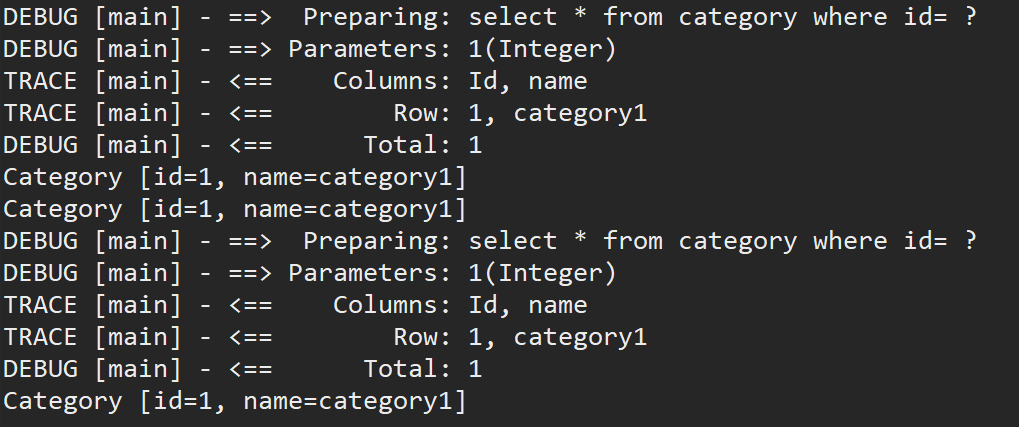
再打开一个session,获取同样的数据,可以看到需要执行sql语句,说明一级缓存是在session里面的。
7.二级缓存
只有一级缓存是,当在不同的session中获取相同数据时,会重复执行sql语句,通过配置二级缓存可以解决这一问题。
<1>启动二级缓存
     <settings>

         <!-- 打开延迟加载的开关 -->

         <setting name="lazyLoadingEnabled" value="true"/>

         <!-- 将积极加载改为消息加载,即按需加载 -->

         <setting name="aggressiveLazyLoading" value="false"/>

         <!-- 开启二级缓存 -->

         <setting name="cacheEnabled" value="true"/>

     </settings>
<2>在Category.xml中增加<cache>
<cache></cache>
<3>序列化Category
 package mybatis.pojo;

 import java.io.Serializable;

 import java.util.List;

 public class Category implements Serializable {

     /**

      *

      */

     private static final long serialVersionUID = 1L;

     private int id;

     private String name;

     private List<Product> products;

     public int getId() {

         return id;

     }

     public void setId(int id) {

         this.id = id;

     }

     public String getName() {

         return name;

     }

     public void setName(String name) {

         this.name = name;

     }

     public List<Product> getProducts() {

         return products;

     }

     public void setProducts(List<Product> products) {

         this.products = products;

     }

     public String toString() {

         return "Category [id=" + id + ", name=" + name + "]";

     }

 }
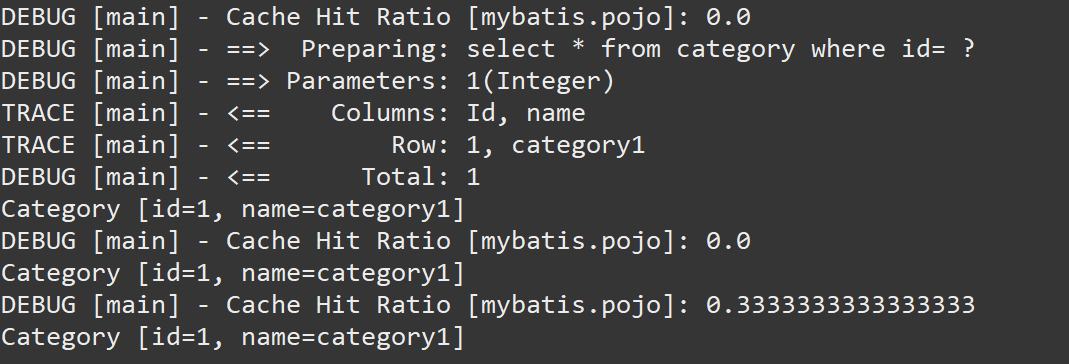
<4>执行相同的操作,在不同的session中查询相同的数据,只需执行一次sql语句,其余的都从缓存中读取。
8.c3p0连接池(mybatis整合C3P0数据库连接池)
<1>首先导入c3p0的jar包:c3p0-0.9.1.2.jar
<2>新建类C3P0DataSourceFactory
Mybatis使用C3P0,需要自己写个类继承UnpooledDataSourceFactory,然后指定dataSource为ComboPooledDataSource。
这个ComboPooledDataSource就是c3p0的数据源。
 package mybatis.c3p0;

 import org.apache.ibatis.datasource.unpooled.UnpooledDataSourceFactory;

 import com.mchange.v2.c3p0.ComboPooledDataSource;

 public class C3P0DataSourceFactory extends UnpooledDataSourceFactory {

     public C3P0DataSourceFactory() {

         this.dataSource = new ComboPooledDataSource();

     }

 }
<3>配置mybatis-config.xml,即修改数据源。
<dataSource type="mybatis.c3p0.C3P0DataSourceFactory">
<property name="driverClass" value="com.mysql.jdbc.Driver" />
<property name="jdbcUrl" value="jdbc:mysql://localhost:3306/test2?useUnicode=true&characterEncoding=UTF-8&autoReconnect=true&failOverReadOnly=false"/>
<property name="user" value="root" />
<property name="password" value="123456" />
<!-- 连接池初始化大小为3 -->
<property name="initialPoolSize" value="3"/>
<!-- 连接池最大为10 -->
<property name="maxPoolSize" value="10"/>
<!-- 连接池最小为3 -->
<property name="minPoolSize" value="3"/>
<!-- 连接池在无空闲连接可用时一次性最多创建的新数据库连接数 -->
<property name="acquireIncrement" value="5"/>
<!-- 连接的最大空闲时间,如果超过这个时间(秒),某个数据库连接还没有被使用,则会断开掉这个连接。如果为0,则永远不会断开连接,即回收此连接 -->
<property name="maxIdleTime" value="30"/> <!-- 最大的Statement数量 -->
<property name="maxStatements" value="500"/>
<!-- 每个连接启动的最大Statement数量 -->
<property name="maxStatementsPerConnection" value="50"/>
<!-- 同时运行的线程数 -->
<property name="numHelperThreads" value="5"/>
</dataSource>
<4>作为数据库连接池,无法在小规模访问里看到其效果,需要高并发才能体现出其效果,这里的测试代码只能表示正常运行,无法体现其优越性。运行测试类成功即可。
9.逆向工程
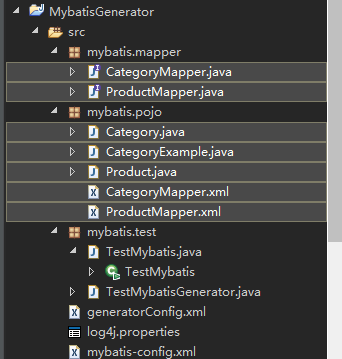
Mybatis Generator是一个用于Mybatis逆向工程的工具。 前面的例子都是先有pojo, mapper, xml, 然后再创建表。用逆向工程的方式,首先保证数据库里有表,然后通过Mybatis Generator生成pojo, mapper和xml。 可以节约时间,提高开发效率,降低出错机率。如下图所示:其中阴影部分的文件都是自动生成的。
<1>导入jar包:mybatis-generator-core-1.3.5.jar
<2>配置文件
在src目录下创建generatorConfig.xml
 <?xml version="1.0" encoding="UTF-8"?>

 <!DOCTYPE generatorConfiguration

   PUBLIC "-//mybatis.org//DTD MyBatis Generator Configuration 1.0//EN"

   "http://mybatis.org/dtd/mybatis-generator-config_1_0.dtd">

 <generatorConfiguration>

     <!--数据库驱动 -->

     <!-- 如果IDE(eclipse或者idea) 项目里导入了jar包,那么就不需要配置了jar包的绝对路径了 <classPathEntry

         location="e:/project/mybatis/lib/mysql-connector-java-5.0.8-bin.jar"/> -->

     <context id="DB2Tables" targetRuntime="MyBatis3">

         <commentGenerator>

             <property name="suppressDate" value="true" />

             <property name="suppressAllComments" value="false" />

         </commentGenerator>

         <!--数据库链接地址账号密码 -->

         <jdbcConnection driverClass="com.mysql.jdbc.Driver"

             connectionURL="jdbc:mysql://localhost/test2" userId="root" password="123456">

         </jdbcConnection>

         <javaTypeResolver>

             <property name="forceBigDecimals" value="false" />

         </javaTypeResolver>

         <!--生成Model类存放位置 -->

         <javaModelGenerator targetPackage="mybatis.pojo"

             targetProject="src">

             <property name="enableSubPackages" value="true" />

             <property name="trimStrings" value="true" />

         </javaModelGenerator>

         <!--生成映射文件存放位置 -->

         <sqlMapGenerator targetPackage="mybatis.pojo"

             targetProject="src">

             <property name="enableSubPackages" value="true" />

         </sqlMapGenerator>

         <!--生成Dao类存放位置 -->

         <javaClientGenerator type="XMLMAPPER"

             targetPackage="mybatis.mapper" targetProject="src">

             <property name="enableSubPackages" value="true" />

         </javaClientGenerator>

         <!--生成对应表及类名 -->

         <table tableName="category" domainObjectName="Category"

             enableCountByExample="false" enableUpdateByExample="false"

             enableDeleteByExample="false" enableSelectByExample="true"

             selectByExampleQueryId="false">

             <property name="my.isgen.usekeys" value="true" />

             <generatedKey column="id" sqlStatement="JDBC" />

         </table>

         <table tableName="product" domainObjectName="Product"

             enableCountByExample="false" enableUpdateByExample="false"

             enableDeleteByExample="false" enableSelectByExample="false"

             selectByExampleQueryId="false">

             <property name="my.isgen.usekeys" value="true" />

             <generatedKey column="id" sqlStatement="JDBC" />

         </table>

     </context>

 </generatorConfiguration>
这个配置文件有如下作用
1. 指定 mysql-jdbcjar 包的位置,如果项目中已经导入则不需要指定
2. 设置数据库链接账号密码
3. 指定pojo,mapper,xml分别生成的包名
4. 指定表名以及表名对应的类名
4.1 使用自增长键:
 <property name="my.isgen.usekeys" value="true" />

 <generatedKey column="id" sqlStatement="JDBC" />
<3>TestMybatisGenerator.java
运行成功之后,就会在对应位置生成pojo,xml,和mapper
 package mybatis.test;

 import java.io.IOException;

 import java.io.InputStream;

 import java.sql.SQLException;

 import java.util.ArrayList;

 import java.util.List;

 import org.mybatis.generator.api.MyBatisGenerator;

 import org.mybatis.generator.config.Configuration;

 import org.mybatis.generator.config.xml.ConfigurationParser;

 import org.mybatis.generator.exception.InvalidConfigurationException;

 import org.mybatis.generator.exception.XMLParserException;

 import org.mybatis.generator.internal.DefaultShellCallback;

 public class TestMybatisGenerator {

     public static void main(String[] args)

             throws IOException, XMLParserException, InvalidConfigurationException, SQLException, InterruptedException {

         // TODO Auto-generated method stub

         List<String> warnings = new ArrayList<String>();

         boolean overwrite = true;

         InputStream is = TestMybatisGenerator.class.getClassLoader().getResource("generatorConfig.xml").openStream();

         ConfigurationParser cp = new ConfigurationParser(warnings);

         Configuration config = cp.parseConfiguration(is);

         is.close();

         DefaultShellCallback callback = new DefaultShellCallback(overwrite);

         MyBatisGenerator myBatisGenerator = new MyBatisGenerator(config, callback, warnings);

         myBatisGenerator.generate(null);

         System.out.println("生成代码成功,刷新项目,查看文件,然后执行TestMybatis.java");

     }

 }
<4>配置文件mybatis-config.xml中添加新生成的CategoryMapper.xml映射。
<?xml version="1.0" encoding="UTF-8" ?>
<!DOCTYPE configuration
PUBLIC "-//mybatis.org//DTD Config 3.0//EN"
"http://mybatis.org/dtd/mybatis-3-config.dtd">
<configuration>
<settings>
<!-- 打开延迟加载的开关 -->
<setting name="lazyLoadingEnabled" value="true"/>
<!-- 将积极加载改为消息加载,即按需加载 -->
<setting name="aggressiveLazyLoading" value="false"/>
<!-- 开启二级缓存 -->
<setting name="cacheEnabled" value="true"/>
</settings>
<typeAliases>
<package name="mybatis.pojo" />
</typeAliases>
<plugins>
<plugin interceptor="com.github.pagehelper.PageInterceptor"></plugin>
</plugins>
<environments default="development">
<environment id="development">
<transactionManager type="JDBC" />
<dataSource type="POOLED">
<property name="driver" value="com.mysql.jdbc.Driver" />
<property name="url"
value="jdbc:mysql://localhost:3306/test2?characterEncoding=UTF-8&allowMultiQueries=true" />
<property name="username" value="root" />
<property name="password" value="123456" />
</dataSource>
</environment>
</environments>
<mappers>
<mapper resource="mybatis/pojo/CategoryMapper.xml" />
</mappers>
</configuration>
<5>TestMybatis
运行TestMybatis,执行自动生成的mapper,借助CategoryExample 进行模糊查询名称里出现了9的分类。
 package mybatis.test;

 import java.io.IOException;

 import java.io.InputStream;

 import java.util.List;

 import org.apache.ibatis.io.Resources;

 import org.apache.ibatis.session.SqlSession;

 import org.apache.ibatis.session.SqlSessionFactory;

 import org.apache.ibatis.session.SqlSessionFactoryBuilder;

 import mybatis.mapper.CategoryMapper;

 import mybatis.pojo.Category;

 import mybatis.pojo.CategoryExample;

 public class TestMybatis {

     public static void main(String[] args) throws IOException {

         // TODO Auto-generated method stub

         System.out.println("先运行TestMybatisGenerator创建mapper,pojo,xml 等文件,然后取消import里被注释的,以及接下来的注释,并执行代码");

         //

         String resource = "mybatis-config.xml";

         InputStream inputStream = Resources.getResourceAsStream(resource);

         SqlSessionFactory sqlSessionFactory = new SqlSessionFactoryBuilder().build(inputStream);

         SqlSession session = sqlSessionFactory.openSession();

         CategoryExample example = new CategoryExample();

         example.createCriteria().andNameLike("%9%");

         CategoryMapper mapper = session.getMapper(CategoryMapper.class);

         List<Category> cs = mapper.selectByExample(example);

         for (Category c : cs) {

             System.out.println(c.getName());

         }

     }

 }
Mybatis入门相关代码:https://github.com/lyj8330328/Mybatis
笔记56 Mybatis快速入门(七)的更多相关文章
- MyBatis学习笔记(一)——MyBatis快速入门
转自孤傲苍狼的博客:http://www.cnblogs.com/xdp-gacl/p/4261895.html 一.Mybatis介绍 MyBatis是一个支持普通SQL查询,存储过程和高级映射的优 ...
- 笔记50 Mybatis快速入门(一)
一.Mybatis简介 MyBatis 是一款优秀的持久层框架,它支持定制化 SQL.存储过程以及高级映射.MyBatis 避免了几乎所有的 JDBC 代码和手动设置参数以及获取结果集.MyBatis ...
- mybatis快速入门(七)-spring-mybatis整合
今天写写spring-mybatis整合吧,先写个原始dao类的整合,下一节在写个动态代理的整合,我就不写太详细了,因为前面的章节基本上都有了,我直接就一口气都写出来需要那些文件然后在直接贴代码,首先 ...
- 笔记55 Mybatis快速入门(六)
相关概念介绍(一) 1.日志 有时候需要打印日志,知道mybatis执行了什么样的SQL语句,以便进行调试.这时,就需要开启日志,而mybatis自身是没有带日志的,使用的都是第三方日志,这里介绍如何 ...
- 笔记54 Mybatis快速入门(五)
Mybatis中注解的使用 1.XML方式的CRUD 新增加接口CategoryMapper ,并在接口中声明的方法上,加上注解对比配置文件Category.xml,其实就是把SQL语句从XML挪到了 ...
- 笔记53 Mybatis快速入门(四)
动态SQL 1.if 假设需要对Product执行两条sql语句,一个是查询所有,一个是根据名称模糊查询.那么按照现在的方式,必须提供两条sql语句:listProduct和listProductBy ...
- 笔记52 Mybatis快速入门(三)
一.更多查询 1.模糊查询 修改Category.xml,提供listCategoryByName查询语句select * from category where name like concat(' ...
- 笔记51 Mybatis快速入门(二)
Mybatis的CRUD 1.修改配置文件Category.xml,提供CRUD对应的sql语句. <?xml version="1.0" encoding="UT ...
- MyBatis学习总结(一)——MyBatis快速入门
一.Mybatis介绍 MyBatis是一个支持普通SQL查询,存储过程和高级映射的优秀持久层框架.MyBatis消除了几乎所有的JDBC代码和参数的手工设置以及对结果集的检索封装.MyBatis可以 ...
随机推荐
- Python菜鸟之传参
Python菜鸟之传参 : 看上面enroll( )函数的调用传参 enroll("twiggy","M",city="上海", age=2 ...
- 从URL输入到页面展现,过程中发生了什么?
从在地址栏中输入了URL,到浏览器展现出页面整个过程中,大概经历了如下过程: 在浏览器地址中输入了URL并回车 域名解析 服务器处理请求 浏览器处理 网页的绘制 一.在浏览器地址中输入URL 首先解释 ...
- Linux入门命令
####常用的目录 /主目录 ① /root:存放启动Linux时启动的核心文件,包括一些连接文件以及镜像 ② /bin:binary的缩写,存放经常使用的命令 ③ /dev:Device(设备)的缩 ...
- 第九章 Service
2019-09-23 今天距离2020年刚好有一百天,希望在未来的百日里能不负期待 不忘初心,方得始终, 初心易得,始终难守. 一.Service 的概念 Kubernetes Service定义了这 ...
- Typora 精美而强大的Markdown编辑器 转
Typora 精美而强大的Markdown编辑器 Markdown编辑器千千万,可是有颜值.功能强并且免费的,就没有几个了.之前一直在用Mou,分屏预览模式方便得很,是一个非常好的选择.不过这篇可不是 ...
- rest framework之视图组件
一.APIView APIView继承的是和django中CBV模式下的View类.View类中的dispatch方法通过反射对不同的请求方法执行不同的函数.而APIView不仅拥有这个特性,而且重 ...
- vue之ref
ref 被用来给元素或子组件注册引用信息.引用信息将会注册在父组件的 $refs 对象上.如果在普通的 DOM 元素上使用,引用指向的就是 DOM 元素:如果用在子组件上,引用就指向组件. 1.ref ...
- 使用springBoot和mybatis整合时出现如下错误:org.apache.ibatis.binding.BindingException: Invalid bound statement (not found)解决方案
在pom.xml文件中添加如下: <build> <resources> <resource> & ...
- Angular.js分页代码
$scope.reloadList=function(){ $scope.findPage( $scope.pagina ...
- Android 在OnCreate()中获取控件高度与宽度
试过在OnCreate()中获取控件高度与宽度的童鞋都知道,getWidth()与getHeight()方法返回是0,具体原因 看一下Activity的生命周期 就会明白. 上代码: 方法一: int ...