
EF--封装三层架构IOC
- 为什么分层?
不分层封装的话,下面的代码就是上端直接依赖于下端,也就是UI层直接依赖于数据访问层,分层一定要依赖抽象,满足依赖倒置原则,所以我们要封装,要分层
下面这张图和传统的三层略有不同,不同之处在于,UI层不直接依赖于业务逻辑层,而是UI层依赖于业务逻辑抽象层IBLL,业务逻辑层不直接依赖于数据访问层,而是业务逻辑层依赖于数据访问抽象层IDAL
{

    SchoolDBEntities dbContext = new SchoolDBEntities();

    dbContext.Set<Student>().Where(s=>s.Student_ID == "");

}
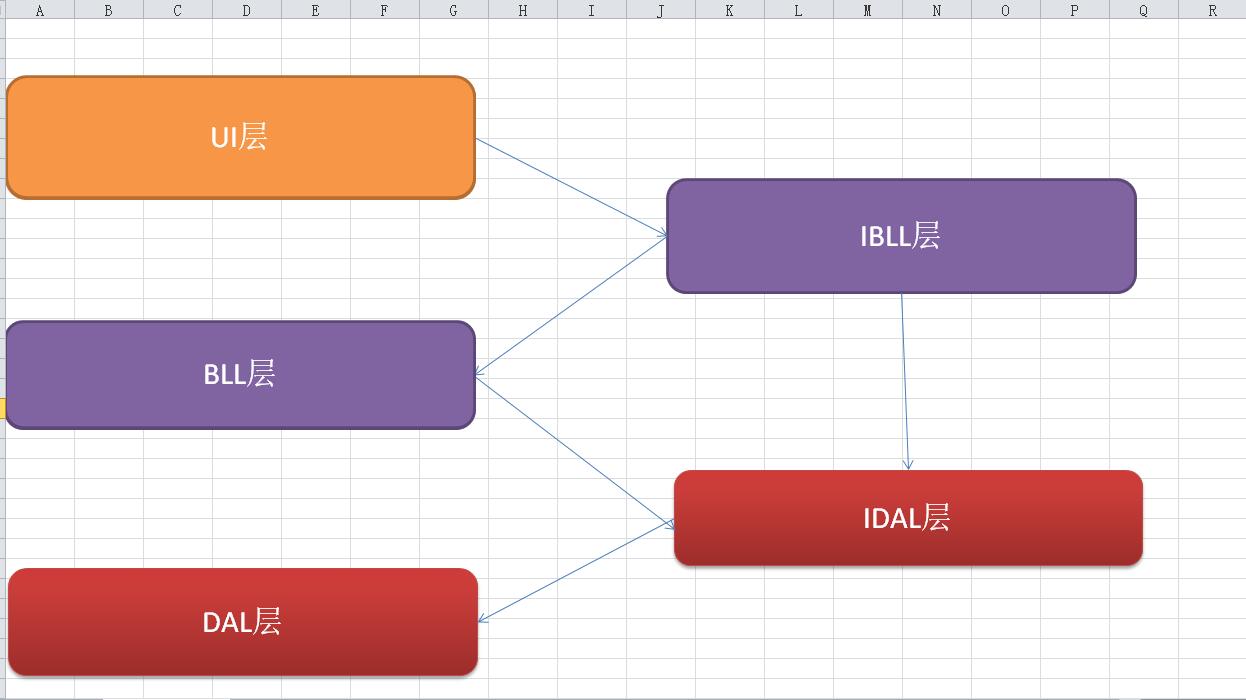
- 封装分层
1、David.General.EF.Bussiness.Interface(IBLL--业务逻辑抽象层)
继承IDisposable的目的是为了可以使用using,是为了释放Context
IBaseService相当于上图的IBLL(业务逻辑抽象层),DAL已经不存在了,因为EF已经取代了DAL层
namespace David.General.EF.Bussiness.Interface

{

    public interface IBaseService : IDisposable//可以使用using,是为了释放Context

    {

        #region Query

        /// <summary>

        /// 根据id主键查询实体

        /// </summary>

        /// <param name="id"></param>

        /// <returns></returns>

        T Find<T>(object id) where T : class;

        /// <summary>

        /// 提供对单表的查询

        /// 不推荐对外直接开放

        ///IQueryable支持表达式目录树

        /// </summary>

        /// <returns>IQueryable类型集合</returns>

        [Obsolete("尽量避免使用,using 带表达式目录树的 代替")]

        IQueryable<T> Set<T>() where T : class;

        /// <summary>

        /// 查询,传入表达式目录树

        /// </summary>

        /// <typeparam name="T"></typeparam>

        /// <param name="funcWhere">表达式目录树</param>

        /// <returns>IQueryable类型集合</returns>

        IQueryable<T> Query<T>(Expression<Func<T, bool>> funcWhere) where T : class;

        /// <summary>

        /// 分页查询

        /// </summary>

        /// <typeparam name="T"></typeparam>

        /// <typeparam name="S"></typeparam>

        /// <param name="funcWhere"></param>

        /// <param name="pageSize"></param>

        /// <param name="pageIndex"></param>

        /// <param name="funcOrderby"></param>

        /// <param name="isAsc"></param>

        /// <returns></returns>

        PageResult<T> QueryPage<T, S>(Expression<Func<T, bool>> funcWhere, int pageSize, int pageIndex, Expression<Func<T, S>> funcOrderby, bool isAsc = true) where T : class;

        #endregion

        #region Add

        /// <summary>

        /// 新增数据

        /// </summary>

        /// <param name="t"></param>

        /// <returns>返回带主键的实体</returns>

        T Insert<T>(T t) where T : class;

        /// <summary>

        /// 新增数据

        /// 多条sql 一个连接,事务插入

        /// </summary>

        /// <param name="tList"></param>

        IEnumerable<T> Insert<T>(IEnumerable<T> tList) where T : class;

        #endregion

        #region Update

        /// <summary>

        /// 更新数据

        /// </summary>

        /// <param name="t"></param>

        void Update<T>(T t) where T : class;

        /// <summary>

        /// 更新数据

        /// </summary>

        /// <param name="tList"></param>

        void Update<T>(IEnumerable<T> tList) where T : class;

        #endregion

        #region Delete

        /// <summary>

        /// 根据主键删除数据

        /// </summary>

        /// <param name="t"></param>

        void Delete<T>(int Id) where T : class;

        /// <su+mary>

        /// 删除数据

        /// </summary>

        /// <param name="t"></param>

        void Delete<T>(T t) where T : class;

        /// <summary>

        /// 删除数据

        /// </summary>

        /// <param name="tList"></param>

        void Delete<T>(IEnumerable<T> tList) where T : class;

        #endregion

        #region Other

        /// <summary>

        /// 立即保存全部修改

        /// 把增/删的savechange给放到这里,是为了保证事务的

        /// </summary>

        void Commit();

        /// <summary>

        /// 执行sql 返回集合

        /// </summary>

        /// <param name="sql"></param>

        /// <param name="parameters"></param>

        /// <returns></returns>

        IQueryable<T> ExcuteQuery<T>(string sql, SqlParameter[] parameters) where T : class;

        /// <summary>

        /// 执行sql,无返回

        /// </summary>

        /// <param name="sql"></param>

        /// <param name="parameters"></param>

        void Excute<T>(string sql, SqlParameter[] parameters) where T : class;

        #endregion

    }

}

public class PageResult<T>

{

    public int TotalCount { get; set; }

    public int PageIndex { get; set; }

    public int PageSize { get; set; }

    public List<T> DataList { get; set; }

}
2、David.General.EF.Bussiness.Service(业务逻辑实现层)
namespace David.General.EF.Bussiness.Service

{

    public class BaseService : IBaseService

    {

        #region Identity

        /// <summary>

        /// protected--保证只有子类可以看得见

        /// { get; private set; }--保证只有子类可以获取,子类不能修改,只有自己可以修改

        /// </summary>

        protected DbContext Context { get; private set; }

       /// <summary>

        /// 构造函数注入

        /// 一个请求一个,不能全局一个,应该一个实例一个

        /// </summary>

        /// <param name="context"></param>

        public BaseService(DbContext context)

        {

            this.Context = context;

        }

        #endregion Identity

        #region Query

        /// <summary>

        /// 通过Id得到实体

        /// </summary>

        /// <typeparam name="T"></typeparam>

        /// <param name="id"></param>

        /// <returns></returns>

        public T Find<T>(object id) where T : class

        {

            return this.Context.Set<T>().Find(id);

        }

        /// <summary>

        /// 不应该暴露给上端使用者,尽量少用

        /// </summary>

        /// <typeparam name="T"></typeparam>

        /// <returns></returns>

        [Obsolete("尽量避免使用,using 带表达式目录树的代替")]

        public IQueryable<T> Set<T>() where T : class

        {

            return this.Context.Set<T>();

        }

        /// <summary>

        /// 这才是合理的做法,上端给条件,这里查询

        /// </summary>

        /// <typeparam name="T"></typeparam>

        /// <param name="funcWhere"></param>

        /// <returns></returns>

        public IQueryable<T> Query<T>(Expression<Func<T, bool>> funcWhere) where T : class

        {

            return this.Context.Set<T>().Where<T>(funcWhere);

        }

        /// <summary>

        /// 分页查询

        /// </summary>

        /// <typeparam name="T"></typeparam>

        /// <typeparam name="S"></typeparam>

        /// <param name="funcWhere">查询条件表达式目录树</param>

        /// <param name="pageSize">页大小</param>

        /// <param name="pageIndex">页索引</param>

        /// <param name="funcOrderby">按什么字段排序</param>

        /// <param name="isAsc">升序还是降序</param>

        /// <returns></returns>

        public PageResult<T> QueryPage<T, S>(Expression<Func<T, bool>> funcWhere, int pageSize, int pageIndex, Expression<Func<T, S>> funcOrderby, bool isAsc = true) where T : class

        {

            var list = this.Set<T>();

            if (funcWhere != null)

            {

                list = list.Where<T>(funcWhere);

            }

            if (isAsc)

            {

                list = list.OrderBy(funcOrderby);

            }

            else

            {

                list = list.OrderByDescending(funcOrderby);

            }

            PageResult<T> result = new PageResult<T>()

            {

                DataList = list.Skip((pageIndex - ) * pageSize).Take(pageSize).ToList(),

                PageIndex = pageIndex,

                PageSize = pageSize,

                TotalCount = this.Context.Set<T>().Count(funcWhere)

            };

            return result;

        }

        #endregion

        #region Insert

        /// <summary>

        /// 插入

        /// </summary>

        /// <typeparam name="T"></typeparam>

        /// <param name="t"></param>

        /// <returns></returns>

        public T Insert<T>(T t) where T : class

        {

            this.Context.Set<T>().Add(t);

            return t;

        }

        /// <summary>

        /// 插入集合

        /// </summary>

        /// <typeparam name="T"></typeparam>

        /// <param name="tList"></param>

        /// <returns></returns>

        public IEnumerable<T> Insert<T>(IEnumerable<T> tList) where T : class

        {

            this.Context.Set<T>().AddRange(tList);

            return tList;

        }

        #endregion

        #region Update

        /// <summary>

        /// 是没有实现查询,直接更新的,需要Attach和State

        ///

        /// 如果是已经在context,只能再封装一个(在具体的service)

        /// </summary>

        /// <typeparam name="T"></typeparam>

        /// <param name="t"></param>

        public void Update<T>(T t) where T : class

        {

            if (t == null) throw new Exception("t is null");

            this.Context.Set<T>().Attach(t);//将数据附加到上下文,支持实体修改和新实体,重置为UnChanged

            this.Context.Entry<T>(t).State = EntityState.Modified;//全字段更新

        }

        /// <summary>

        /// 集合修改

        /// </summary>

        /// <typeparam name="T"></typeparam>

        /// <param name="tList"></param>

        public void Update<T>(IEnumerable<T> tList) where T : class

        {

            foreach (var t in tList)

            {

                this.Context.Set<T>().Attach(t);

                this.Context.Entry<T>(t).State = EntityState.Modified;

            }

        }

        /// <summary>

        /// 更新数据,指定更新哪些列,哪怕有些列值发生了变化,没有指定列也不能修改

        /// </summary>

        /// <typeparam name="T"></typeparam>

        /// <param name="t"></param>

        public void UpdateSpecifyFiled<T>(T t, List<string> filedList) where T : class

        {

            this.Context.Set<T>().Attach(t);//将数据附加到上下文

            foreach(var filed in filedList)

            {

                this.Context.Entry<T>(t).Property(filed).IsModified = true;//指定某字段被改过

            }

        }

        #endregion

        #region Delete

        /// <summary>

        /// 先附加 再删除

        /// </summary>

        /// <typeparam name="T"></typeparam>

        /// <param name="t"></param>

        public void Delete<T>(T t) where T : class

        {

            if (t == null) throw new Exception("t is null");

            this.Context.Set<T>().Attach(t);

            this.Context.Set<T>().Remove(t);

        }

        /// <summary>

        /// 还可以增加非即时commit版本的,

        /// 做成protected

        /// </summary>

        /// <typeparam name="T"></typeparam>

        /// <param name="Id"></param>

        public void Delete<T>(int Id) where T : class

        {

            T t = this.Find<T>(Id);//也可以附加

            if (t == null) throw new Exception("t is null");

            this.Context.Set<T>().Remove(t);

        }

        /// <summary>

        /// 删除集合

        /// </summary>

        /// <typeparam name="T"></typeparam>

        /// <param name="tList"></param>

        public void Delete<T>(IEnumerable<T> tList) where T : class

        {

            foreach (var t in tList)

            {

                this.Context.Set<T>().Attach(t);

            }

            this.Context.Set<T>().RemoveRange(tList);

        }

        #endregion

        #region Other

        /// <summary>

        /// 一次性提交

        /// </summary>

        public void Commit()

        {

            this.Context.SaveChanges();

        }

        /// <summary>

        /// sql语句查询

        /// </summary>

        /// <typeparam name="T"></typeparam>

        /// <param name="sql"></param>

        /// <param name="parameters"></param>

        /// <returns></returns>

        public IQueryable<T> ExcuteQuery<T>(string sql, SqlParameter[] parameters) where T : class

        {

            return this.Context.Database.SqlQuery<T>(sql, parameters).AsQueryable();

        }

        /// <summary>

        /// 执行sql语句

        /// </summary>

        /// <typeparam name="T"></typeparam>

        /// <param name="sql"></param>

        /// <param name="parameters"></param>

        public void Excute<T>(string sql, SqlParameter[] parameters) where T : class

        {

            DbContextTransaction trans = null;

            try

            {

                trans = this.Context.Database.BeginTransaction();

                this.Context.Database.ExecuteSqlCommand(sql, parameters);

                trans.Commit();

            }

            catch (Exception ex)

            {

                if (trans != null)

                    trans.Rollback();

                throw ex;

            }

        }

        public virtual void Dispose()

        {

            if (this.Context != null)

            {

                this.Context.Dispose();

            }

        }

        #endregion

    }

}
- 整合Unity,实现IOC,依赖注入解决问题
虽然封装完了,但是还是带来了2个问题,问题如下代码所示,所以我们需要解决下面两个问题
问题1:通过封装,完成了通过Service来完成对数据库的访问,但是右边 new StudentService()是细节,不满足依赖倒置原则,应该面向抽象编程
问题2:构造new StudentService()的时候需要一个Context,不能每次都SchoolDBEntities dbContext = new SchoolDBEntities();
{

    SchoolDBEntities dbContext = new SchoolDBEntities();

    using (IStudentService iStudentService = new StudentService(dbContext))

    {

        Student student = iStudentService.Find<Student>("");

        Student student1 = new Student();

        student1.Student_ID = "";

        student1.Student_Name = "Student1";

        iStudentService.Insert(student1);

        iStudentService.Commit();

    }

}
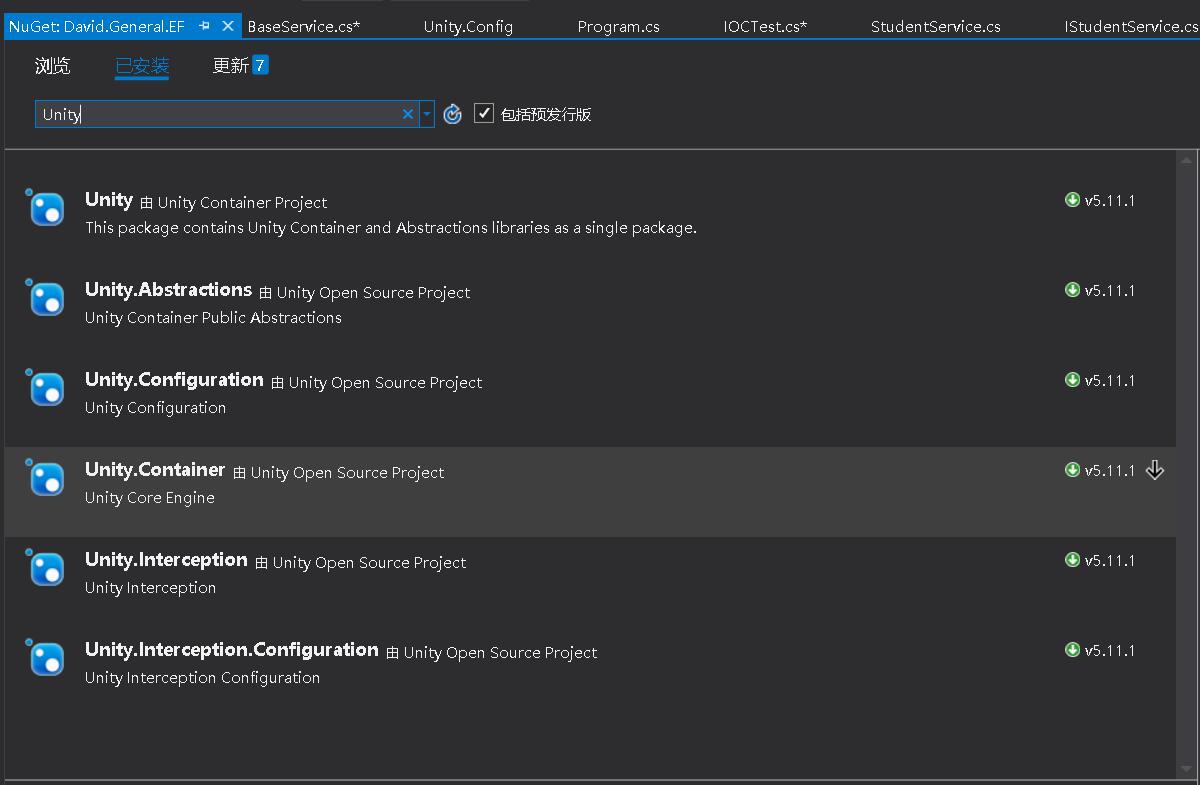
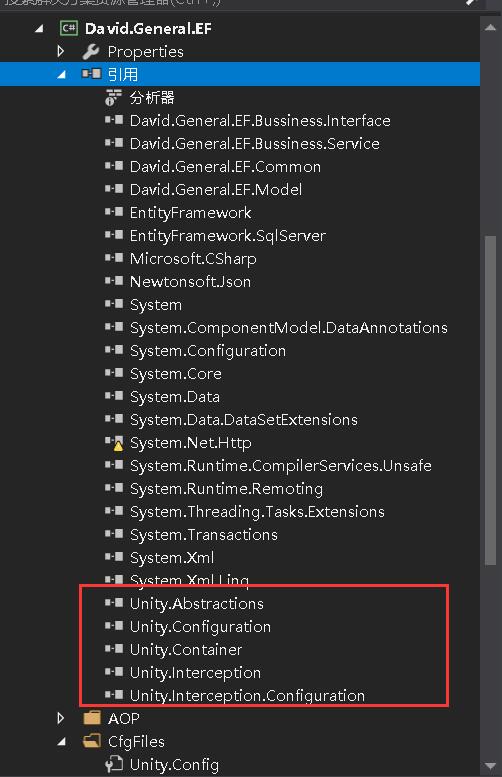
1、Nuget引入Unity相关dll
2、配置Unity.Config
.2.1、给BaseService注入DbContext
<register type="System.Data.Entity.DbContext, EntityFramework" mapTo="David.General.EF.Model.SchoolDBEntities,David.General.EF.Model"/>
type中逗号前是完整类型名称,也就是命名空间System.Data.Entity+类名DbContext,逗号后是dll名称EntityFramework
mapTo中逗号前是完整类型名称,也就是命名空间David.General.EF.Model+类名SchoolDBEntities,逗号后是dll名称David.General.EF.Model
2.2、给IStudentService注入StudentService
<register type="David.General.EF.Bussiness.Interface.IStudentService,David.General.EF.Bussiness.Interface" mapTo="David.General.EF.Bussiness.Service.StudentService, David.General.EF.Bussiness.Service">
type中逗号前是完整类型名称,也就是命名空间David.General.EF.Bussiness.Interface+接口名IStudentService,逗号后是dll名称David.General.EF.Bussiness.Interface
mapTo中逗号前是完整类型名称,也就是命名空间David.General.EF.Bussiness.Service+类名StudentService,逗号后是dll名称David.General.EF.Bussiness.Service
<configuration>

  <configSections>

    <section name="unity" type="Microsoft.Practices.Unity.Configuration.UnityConfigurationSection, Unity.Configuration"/>

  </configSections>

  <unity>

    <sectionExtension type="Microsoft.Practices.Unity.InterceptionExtension.Configuration.InterceptionConfigurationExtension, Unity.Interception.Configuration"/>

    <containers>

      <container name="MyContainer">

        <extension type="Interception"/>

        <register type="System.Data.Entity.DbContext, EntityFramework" mapTo="David.General.EF.Model.SchoolDBEntities,David.General.EF.Model"/>

        <register type="David.General.EF.Bussiness.Interface.IStudentService,David.General.EF.Bussiness.Interface" mapTo="David.General.EF.Bussiness.Service.StudentService, David.General.EF.Bussiness.Service">

        </register>

      </container>

    </containers>

  </unity>

</configuration>
3、调用服务
如下调用代码和截图所示
首先:我们构建学生服务的时候,没有出现细节StudentService
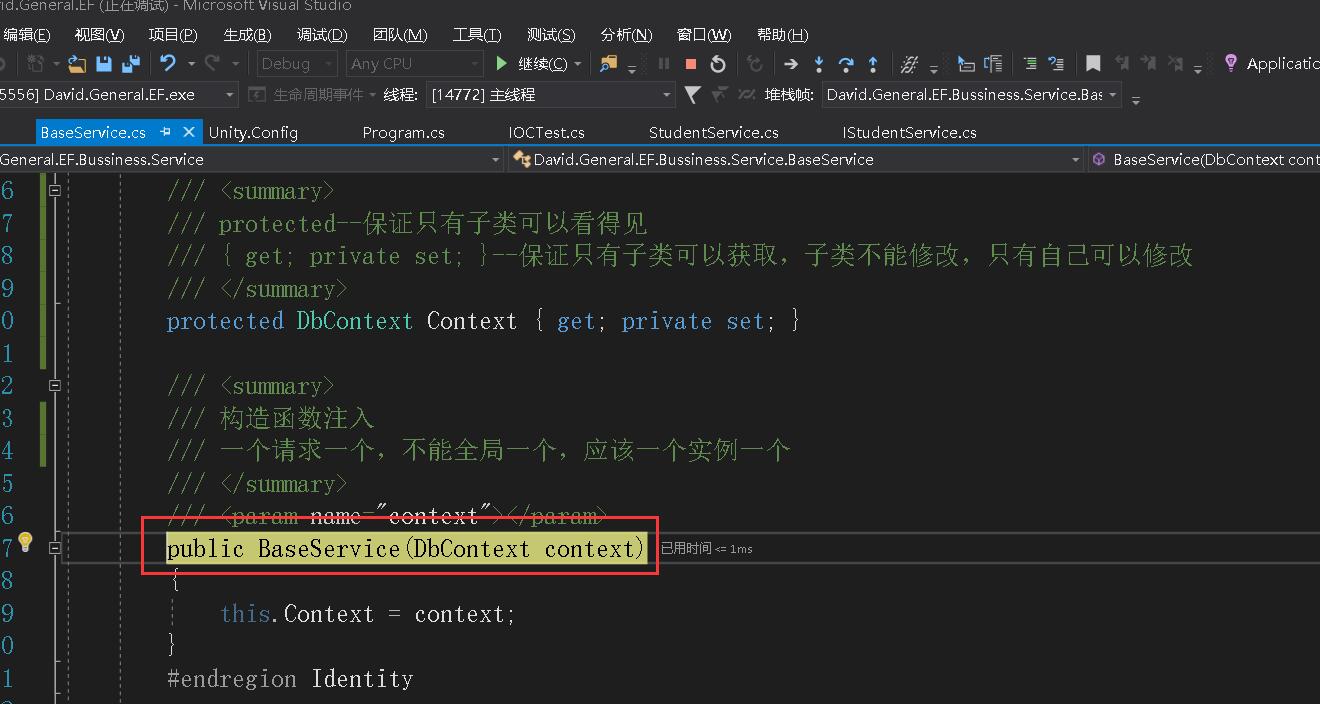
其次:在构建学生服务的时候,没有显式的去传入DbContext,StudentService继承BaseService,StudentService的构造函数的参数DbContext是来源于BaseService,而BaseService依赖的DbContext是通过构造函数注入进来的
{

  //UnityConfig配置只用初始化一次,所以我们把读取UnityConfig配置封装一下

  //使用单例模式,l利用静态构造函数只初始化1次的特点,达到配置只初始化1次

  Unity.IUnityContainer container = ContainerFactory.GetContainer();

  //IOC:去掉细节依赖,降低耦合,增强扩展性

  using (IStudentService iStudentService = container.Resolve<IStudentService>())

  {

    Student student = iStudentService.Find<Student>("");

    //测试指定更新

    Student oldStudent = new Student()

    {

      Student_ID = "",

      Student_Name = "猪猪",
      Student_Sex = "男"

    };

    List<string> filedList = new List<string>();

    filedList.Add("Student_Name");

    iStudentService.UpdateSpecifyFiled<Student>(oldStudent, filedList);

    iStudentService.Commit();

  }
}
namespace David.General.EF.Bussiness.Service

{

    public class StudentService : BaseService,IStudentService

    {

        public StudentService(DbContext context) : base(context)

        {

        }

        /// <summary>

        /// 记录学生打架

        /// </summary>

        /// <param name="student"></param>

        public void RecordStudentFight(Student student)

        {

            base.Insert(student);

            this.Commit();

        }

    }

}

EF--封装三层架构IOC的更多相关文章
- 转载——Asp.Net MVC+EF+三层架构的完整搭建过程
转载http://www.cnblogs.com/zzqvq/p/5816091.html Asp.Net MVC+EF+三层架构的完整搭建过程 架构图: 使用的数据库: 一张公司的员工信息表,测试数 ...
- 基于EF+WCF的通用三层架构及解析
分享基于EF+WCF的通用三层架构及解析 本项目结合EF 4.3及WCF实现了经典三层架构,各层面向接口,WCF实现SOA,Repository封装调用,在此基础上实现了WCFContext,动态服务 ...
- 分享基于EF+WCF的通用三层架构及解析
本项目结合EF 4.3及WCF实现了经典三层架构,各层面向接口,WCF实现SOA,Repository封装调用,在此基础上实现了WCFContext,动态服务调用及一个分页的实例. 1. 项目架构图: ...
- MVC项目实践,在三层架构下实现SportsStore-01,EF Code First建模、DAL层等
SportsStore是<精通ASP.NET MVC3框架(第三版)>中演示的MVC项目,在该项目中涵盖了MVC的众多方面,包括:使用DI容器.URL优化.导航.分页.购物车.订单.产品管 ...
- 三层架构搭建(asp.net mvc + ef)
第一次写博客,想了半天先从简单的三层架构开始吧,希望能帮助到你! 简单介绍一下三层架构, 三层架构从上到下分:表现层(UI),业务逻辑层(BLL),数据访问层(DAL)再加上数据模型(Model),用 ...
- 关于对javaUtils封装和三层架构的笔记
1.什么是三层架构: 三层架构(3-tier architecture) 通常意义上的三层架构就是将整个业务应用划分为:界面层(User Interface layer).业务逻辑层(Business ...
- 服务器文档下载zip格式 SQL Server SQL分页查询 C#过滤html标签 EF 延时加载与死锁 在JS方法中返回多个值的三种方法(转载) IEnumerable,ICollection,IList接口问题 不吹不擂,你想要的Python面试都在这里了【315+道题】 基于mvc三层架构和ajax技术实现最简单的文件上传 事件管理
服务器文档下载zip格式 刚好这次项目中遇到了这个东西,就来弄一下,挺简单的,但是前台调用的时候弄错了,浪费了大半天的时间,本人也是菜鸟一枚.开始吧.(MVC的) @using Rattan.Co ...
- java:Session(概述,三层架构实例(实现接口封装JDBC),Session实现简单购物车实例)
1.Session概述: Session:在计算机中,尤其是在网络应用中,称为“会话控制”.Session 对象存储特定用户会话所需的属性及配置信息.这样,当用户在应用程序的 Web 页之间跳转时,存 ...
- .NETCore+EF+MySql+Autofac简单三层架构
前言 其实就是一个简单依赖注入的三层架构.记录一下,大佬们就不用看下去了.重点在最后面,可以直接拖到底去看. 正文 1.贴代码 1.整体的一个结构.大佬们应该一眼就看明白了. 2.MySqlConte ...
随机推荐
- 如何高效实用 Git
Git 工作流 只要项目是多人参与的,那么就需要使用正确的 Git 工作流程. 下面介绍一个简单有效的工作流程. 场景 假设有一个项目,要开发下一代的 Facebook,你就是这个项目的技术 lead ...
- 分布式缓存Redis的持久化方式RDB和AOF
一.前言 Redis支持两种方式的持久化,RDB和AOF.RDB会根据指定的规则“定时”将内存中的数据存储到硬盘上,AOF会在每次执行命令后将命令本身记录下来.两种持久化方式可以单独使用其中一种,但更 ...
- mysql数据库的备份与数据恢复
一.定时备份数据库 前段时间工作中搭建了HttpRunnerManager的接口自动化测试平台,由于平台中没有提供用例下载的功能及权限管理功能,自己也不会写前端,于是就想了办法,那就是备份数据库,如 ...
- 爬虫之协程,selenium
1.什么是代理?代理和爬虫之间的关联是什么? 2.在requests的get和post方法常用的参数有哪些?分别有什么作用?(四个参数) - url headers parmas/data proxi ...
- laravel 操作多数据库总结
laravel 操作多数据库总结 读写分离 env配置 DB_CONNECTION=mysql DB_HOST=xxxxxx DB_PORT=xxx DB_DATABASE=xx DB_USERNAM ...
- 小程序--->scroll-view组件不能触发相应滚动事件
小程序scroll-view组件不能触发相应滚动事件 在制作加载更多时会发现不能触发相应事件,一般情况下首先要查看两个必要的属性scroll-view的高度是否设置,第二就是scroll-view的滚 ...
- 加快Chrome网页开启速度
谷歌浏览器一直是众多大神心中的最爱,但是对于启动速度还是有一些纠结,这里找到一个好方法可以加快一些启动的速度,亲测有效. 1.地址栏输入chrome://flags: 2.启用"覆盖软件渲染 ...
- An internal error occurred during: "Launching New_configuration". Path for project must have only on
在Eclipse中按照如下操作 Project -> Properties -> Run/Debug Settings: 1. select "Launching New_con ...
- how to convert wstring to string
#define _CRT_SECURE_NO_WARNINGS #include <iostream> #include <string> #include <local ...
- Codeforces_818
A.winners总数为(k+1)diplomas. #include<bits/stdc++.h> using namespace std; long long n,k; int mai ...