
解决fixed在苹果手机抖动问题/头部底部固定布局
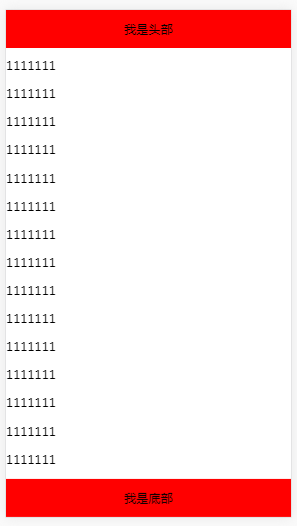
1)absolute与height:100%
<!DOCTYPE html>
<html>
<head>
<meta charset="utf-8">
<meta name="viewport" content="initial-scale=1.0, maximum-scale=1.0, user-scalable=no" />
<title></title>
<style>
html{height: 100%;}
body{padding:0px;margin:0px;overflow: hidden;height: 100%;}
header{height: 50px;line-height: 50px;background: red;text-align: center;}
section{height: 100%;overflow-y: auto;}
.content{padding-bottom: 100px;}
footer{height: 50px;line-height: 50px;background: red;position: absolute;width: 100%;bottom: 0px;text-align: center;}
</style>
</head>
<body>
<header>我是头部</header>
<section>
<div class="content"></div>
</section>
<footer>我是底部</footer>
</body>
</html>
2) flex与 height: 100vh
<!DOCTYPE html>
解决fixed在苹果手机抖动问题/头部底部固定布局的更多相关文章
- 解决安卓手机input获取焦点时会将底部固定定位按钮顶起的问题
一个页面上有个固定在底部的按钮,页面中有个input框,点击input框获取焦点时,在苹果手机上没事,但在安卓手机上弹出的键盘会将按钮顶起来,这就很不好看了,想了个办法解决一下.之前一直觉得用inpu ...
- 在safari上,解决fixed失效问题
一个页面中有头部.底部和中间内容区域,底部固定在屏幕底端. 头部header 内容main 底部footer 方法一.在main上使用fixed定位,加上overflow-y属性. .main { p ...
- ListView在列表的头部和底部添加布局——addHeaderView,addFooterView
addHeaderView()方法:主要是向listView的头部添加布局addFooterView()方法:主要是向listView的底部添加布局 以addHeaderView为例: View he ...
- 【微信小程序】view顶部固定或底部固定 + scroll-view中的元素view也可以使用position:fixed;固定选中元素位置
1.顶端固定核心代码如下: <view class="page__hd" style="position:fixed; top:0;width: 750rpx;&q ...
- 微信小程序之顶部固定和底部固定
顶部固定 <view style="position:fixed;top:0;"> ...... </view> 底部固定 <view style=& ...
- jQuery&CSS 顶部和底部固定浮动工具栏 兼容IE6
http://www.cnblogs.com/lhj588/archive/2013/04/02/2994639.html —————————————————————————————————————— ...
- css3 的 calc()函数在布局中的使用----头部高度固定,页面正好占满一屏
最近项目遇到一个布局需求,头部高度固定,页面需要刚好占满一屏幕. 如下示意图: 方法:使用calc .wrap{ position: relative; margin-left: 24px; marg ...
- Android 仿QQ首页的消息和电话的切换,首页的头部(完全用布局控制)
Android 仿QQ首页的消息和电话的切换,首页的头部(完全用布局控制) 首先贴上七个控制布局代码 1.title_text_sel.xml 字体颜色的切换 放到color文件夹下面 <?xm ...
- 解决 scroll() position:fixed 抖动、导航菜单固定头部(底部)跟随屏幕滚动
一.导航栏或者页脚正常情况下固定在页面的相应位置,当页面滚动后,导航栏或者页脚固定在页面的顶部或者底部的情景 一般就是将该块的代码样式的position设置为fixed.固定在顶部的话,将top设置为 ...
随机推荐
- 闲聊ROOT权限——ROOT权限的前世今生
近期工作一直非常忙.居然慢慢地疏远了CSDN的博客,然而在工作中遇到问题,又会被多次的引导至CSDN,故笔者抽出时间也将自己学习的成果与大家分享在这里,希望能帮助到须要帮助的人. 本文将从几个方面,由 ...
- 传智播客JDBC视频教程
视频介绍: 一些视频教程通过浅显案例来让刚開始学习的人感到轻松,可是课程中编写的代码不能直接应用于项目中:而本套视频教程正好相反,视频解说者李勇老师以技术见长.性格朴实无华.不善于幽默搞笑.李勇老师编 ...
- 数组方法-->map()
map()方法: Array.map((数组元素, 数组元素的下标, 数组本身)=>{}[,thisArray]) 1.调用时在数组内部发生了一次从 0 到 length-1 的循环: 2.返回 ...
- Bing Maps进阶系列一:初识Bing Maps地图服务
Bing Maps进阶系列一:初识Bing Maps地图服务 Bing Maps提供了一组WCF的地图服务,使用这些服务我们可以方便的在自己的应用系统里实现地理位置搜索等相关功能.他们分别是地理编码服 ...
- go语言笔记——append底层实现和Cpp vector无异,只是有返回值,double后返回了新的vector地址而已
切片的复制与追加 如果想增加切片的容量,我们必须创建一个新的更大的切片并把原分片的内容都拷贝过来.下面的代码描述了从拷贝切片的 copy 函数和向切片追加新元素的 append 函数. 示例 7.12 ...
- Java经典算法之冒泡排序(Bubble Sort)
原理:比较相邻的两个值,将值大的元素交换至右端 思路:依次比较相邻的两个数,将小数放在前面,大数放在后面.即在第一趟:首先比较第1个和第2个数,将小数放前,大数放后.然后比较第2个数和第3个数,将小数 ...
- Windows和Centos下Docker的安装配置
Windows和Centos下Docker的安装配置 windows环境下的安装(win10) 在Windows系统上需要利用toolbox来安装Docker,现在 Docker 有专门的 Win10 ...
- c++ pow函数
函数名称: pow 函数原型: double pow( double x, double y ); 函数功能: 计算x的y次幂 例:z=pow(x,y); x=9,y=8 z就是9 ...
- EF--ModelFirst
EF框架有三种基本的方式:DB First,Model First,Code First.这里简单的说一下Model First,适合没有基础的同学照着做,学习基础的东西. 1.建立一个类库项目,这个 ...
- 注解配置AOP切面编程
1.导入先关jar包 2.编写applicationContext.xml,配置开启注解扫描和切面注解扫描 <?xml version="1.0" encoding=&quo ...