
docker映射端口与ssh访问或容器访问
映射端口
-d 后台执行
-p映射端口
--privileged 可以使用systemctl
# docker run --privileged -d -p 9000:80 jiqing9006/centos:httpd /sbin/init

e2e33ac1fb2acdef86c995c79eb746fb552417b112210bc5353de74a2f63e4e7
访问容器
root@ThinkPad:/home/jiqing# docker ps -q

e2e33ac1fb2a

root@ThinkPad:/home/jiqing# docker exec -it e2e33ac1fb2a /bin/bash
开启httpd服务
systemctl restart httpd
外部访问
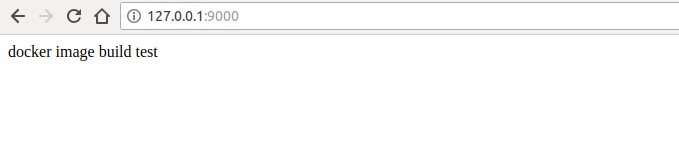
$ sudo netstat -anpl|grep :9000

tcp6       0      0 :::9000                 :::*                    LISTEN      10352/docker-proxy
修改容器密码,默认root的密码是随机的,需要修改一下
[root@e2e33ac1fb2a /]# passwd root

Changing password for user root.

New password:

BAD PASSWORD: The password is shorter than 8 characters

Retype new password:

passwd: all authentication tokens updated successfully.
配置完密码,把22端口映射出去,就可以远程访问了。
安装sshd
[root@e2e33ac1fb2a /]# yum install openssh-server

Loaded plugins: fastestmirror, ovl

base                                                     | 3.6 kB     00:00

extras                                                   | 3.4 kB     00:00

updates                                                  | 3.4 kB     00:00

Loading mirror speeds from cached hostfile

 * base: mirrors.163.com

 * extras: mirrors.zju.edu.cn

 * updates: mirror.bit.edu.cn

Resolving Dependencies

--> Running transaction check

---> Package openssh-server.x86_64 0:7.4p1-13.el7_4 will be installed

--> Processing Dependency: openssh = 7.4p1-13.el7_4 for package: openssh-server-7.4p1-13.el7_4.x86_64

--> Processing Dependency: fipscheck-lib(x86-64) >= 1.3.0 for package: openssh-server-7.4p1-13.el7_4.x86_64

--> Processing Dependency: libwrap.so.0()(64bit) for package: openssh-server-7.4p1-13.el7_4.x86_64

--> Processing Dependency: libfipscheck.so.1()(64bit) for package: openssh-server-7.4p1-13.el7_4.x86_64

--> Running transaction check

---> Package fipscheck-lib.x86_64 0:1.4.1-6.el7 will be installed

--> Processing Dependency: /usr/bin/fipscheck for package: fipscheck-lib-1.4.1-6.el7.x86_64

---> Package openssh.x86_64 0:7.4p1-13.el7_4 will be installed

---> Package tcp_wrappers-libs.x86_64 0:7.6-77.el7 will be installed

--> Running transaction check

---> Package fipscheck.x86_64 0:1.4.1-6.el7 will be installed

--> Finished Dependency Resolution

Dependencies Resolved

================================================================================

 Package                 Arch         Version               Repository     Size

================================================================================

Installing:

 openssh-server          x86_64       7.4p1-13.el7_4        updates       458 k

Installing for dependencies:

 fipscheck               x86_64       1.4.1-6.el7           base           21 k

 fipscheck-lib           x86_64       1.4.1-6.el7           base           11 k

 openssh                 x86_64       7.4p1-13.el7_4        updates       509 k

 tcp_wrappers-libs       x86_64       7.6-77.el7            base           66 k

Transaction Summary

================================================================================

Install  1 Package (+4 Dependent packages)

Total download size: 1.0 M

Installed size: 3.0 M

Is this ok [y/d/N]: y

Downloading packages:

(1/5): fipscheck-1.4.1-6.el7.x86_64.rpm                    |  21 kB   00:00

(2/5): openssh-7.4p1-13.el7_4.x86_64.rpm                   | 509 kB   00:00

(3/5): fipscheck-lib-1.4.1-6.el7.x86_64.rpm                |  11 kB   00:00

(4/5): openssh-server-7.4p1-13.el7_4.x86_64.rpm            | 458 kB   00:00

(5/5): tcp_wrappers-libs-7.6-77.el7.x86_64.rpm             |  66 kB   00:00

--------------------------------------------------------------------------------

Total                                              1.2 MB/s | 1.0 MB  00:00

Running transaction check

Running transaction test

Transaction test succeeded

Running transaction

  Installing : fipscheck-lib-1.4.1-6.el7.x86_64                             1/5

  Installing : fipscheck-1.4.1-6.el7.x86_64                                 2/5

  Installing : openssh-7.4p1-13.el7_4.x86_64                                3/5

  Installing : tcp_wrappers-libs-7.6-77.el7.x86_64                          4/5

  Installing : openssh-server-7.4p1-13.el7_4.x86_64                         5/5

  Verifying  : openssh-7.4p1-13.el7_4.x86_64                                1/5

  Verifying  : openssh-server-7.4p1-13.el7_4.x86_64                         2/5

  Verifying  : fipscheck-1.4.1-6.el7.x86_64                                 3/5

  Verifying  : fipscheck-lib-1.4.1-6.el7.x86_64                             4/5

  Verifying  : tcp_wrappers-libs-7.6-77.el7.x86_64                          5/5

Installed:

  openssh-server.x86_64 0:7.4p1-13.el7_4

Dependency Installed:

  fipscheck.x86_64 0:1.4.1-6.el7      fipscheck-lib.x86_64 0:1.4.1-6.el7

  openssh.x86_64 0:7.4p1-13.el7_4     tcp_wrappers-libs.x86_64 0:7.6-77.el7

Complete!
启动sshd
[root@e2e33ac1fb2a /]# systemctl restart sshd
外部ssh访问
root@ThinkPad:/home/jiqing# ssh root@172.17.0.1

root@172.17.0.1's password:

Last login: Sun May  6 16:55:21 2018 from gateway

[root@e2e33ac1fb2a ~]#
更新镜像
root@ThinkPad:/home/jiqing# docker ps

CONTAINER ID        IMAGE                     COMMAND             CREATED             STATUS              PORTS                  NAMES

e2e33ac1fb2a        jiqing9006/centos:httpd   "/sbin/init"        16 minutes ago      Up 16 minutes       0.0.0.0:9000->80/tcp   peaceful_kilby

root@ThinkPad:/home/jiqing# docker commit e2e33ac1fb2a jiqing9006/centos:httpd

sha256:0824bbef68beae4530c9b6e8997bb4685339865bd521ec1262ffdacf6a9dd0f8

root@ThinkPad:/home/jiqing# docker images

REPOSITORY                        TAG                 IMAGE ID            CREATED             SIZE

jiqing9006/centos                 httpd               0824bbef68be        7 seconds ago       496MB
上传到hub中
root@ThinkPad:/home/jiqing# docker push jiqing9006/centos:httpd

The push refers to repository [docker.io/jiqing9006/centos]

611121574145: Pushed

79655226b20c: Layer already exists

6572279f7725: Layer already exists

a4fc816997be: Layer already exists

43e653f84b79: Layer already exists

httpd: digest: sha256:47ae6da07149aecba4944351e4f61fa887b52ad4fad16e6e1e8c4fda0a457151 size: 1367
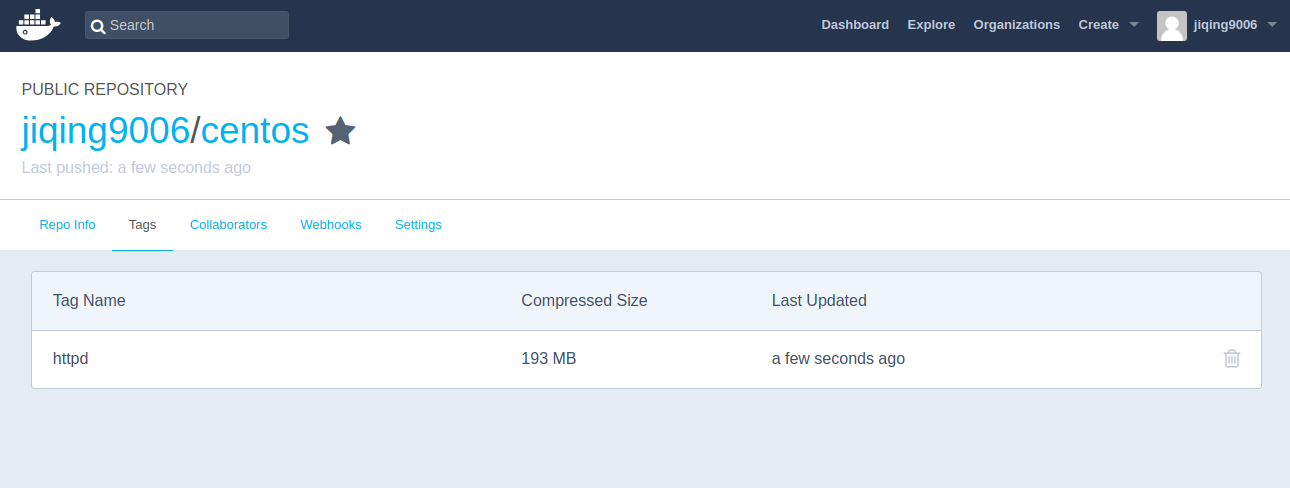
hub库会更新哦!
docker映射端口与ssh访问或容器访问的更多相关文章
- docker 映射端口穿透内置防火墙
一.问题现象 1.现象举例: # 自制的springboot项目的dockerfile # springboot 其实就是一个简单的hello-world程序,写了一个HelloController ...
- docker发现端口是tcp6的 导致无法访问前端
最近偶尔发现一个比较奇怪的现象,netstat 查看监听的服务端口时,却只显示了 tcp6 的监控, 但是服务明明是可以通过 tcp4 的 ipv4 地址访问的,那为什么没有显示 tcp4 的监听呢? ...
- 聊聊docker那些端口问题
今天来系统聊一聊docker的端口,常见的有容器内程序端口.容器端口.主机端口.Dockerfile中EXPOSE端口.docker-compose和docker run中的port等. 貌似很多端口 ...
- Docker基础-端口映射与容器互联
1.端口映射实现访问容器 1.从外部访问容器应用 在启动容器的时候,如果不指定对应的参数,在容器外部是无法通过网络来访问容器内部的网络应用和服务的. 当容器中运行一些网络应用,要让外部访问这些应用时, ...
- 解决docker容器启动时候无法映射端口的问题
当我们停止防火墙后,docker容器启动映射端口可能无法映射端口,这个时候需要重建docker0网桥. 详细的错误是这样的: docker: Error response from daemon: d ...
- docker容器添加对外映射端口
一般在运行容器时,我们都会通过参数 -p(使用大写的-P参数则会随机选择宿主机的一个端口进行映射)来指定宿主机和容器端口的映射,例如 docker run -it -d --name [contain ...
- Docker 更改容器映射端口
1.编辑容器的配置文件进行更改端口: docker run 运行启动时 -p 可以指定容器启动映射端口 ( ) 可以编辑配置文件 进行修改:(需要重启docker 服务 不止是是容器 才能生效.只能重 ...
- docker学习端口映射---第二章节
一.运行一个web应用 首先,下载一个docker镜像: [root@k8s-01 ~]# docker pull training/webapp 运行webapp的容器: [root@k8s-01 ...
- docker之容器访问和网络连接(三)
前言 当一台服务器上部署了多个应用容器,它们直接可能需要相互通信,比如web应用容器需要访问mysql数据库容器. 主机访问容器 通过映射端口的形式我们可以在外部访问容器内的服务 # 将主机的127. ...
随机推荐
- C++暂停黑窗口
C++中采用system("pause");来暂停黑窗口,那么操纵系统就会将窗口暂停,显示“请按任意键继续. . .” 我们用VS执行代码是,若直接按键盘的F5(开始调试),那么窗 ...
- 树莓派 -- oled 续(2) python
上文中的代码通过wiringPi的API调用devfs API来显示图片. 这里分析的Python代码也通过类似的方法来显示图片. 主要用到了两个Library. import spidev impo ...
- win10永久激活
现在我们可以看下当前系统的激活状态,查看方法"WIN+R"打开运行对话框,输入命令slmgr.vbs -xpr,点击确定,这样可以查看到当前系统的激活信息.大家可以发现,虽然小编系 ...
- 【分治】输出前k大的数
描述 给定一个数组,统计前k大的数并且把这k个数从大到小输出. 输入第一行包含一个整数n,表示数组的大小.n < 100000.第二行包含n个整数,表示数组的元素,整数之间以一个空格分开.每个整 ...
- 关于No Spring WebApplicationInitializer types detected on classpath的提示,tomcat 卡主
No Spring WebApplicationInitializer types detected on classpath 下一句:Initializing Spring root WebAppl ...
- [luoguP1058] 立体图(超级大模拟(¬︿̫̿¬☆))
传送门 看到题后整个人成了mengbier 但是仔细分析一下就很简单了,先确定好输出的图的长和宽. 然后从输入的矩形的左上角的最下面的开始填充,顺序是从下到上,从左到右,从后往前. 填充的时候直接覆盖 ...
- 【Tomcat】Tomcat Connector的三种运行模式【bio、nio、apr】
Tomcat Connector(Tomcat连接器)有bio.nio.apr三种运行模式 bio bio(blocking I/O,阻塞式I/O操作),表示Tomcat使用的是传统的Java I/O ...
- Python基础之 一列表
列表模块:listlen(list):列表元素个数max(list):列表元素最大值min(list):列表元素最小值list(seq):将元组转为列表list.append(obj):列表末尾添加新 ...
- hdu - 1068 Girls and Boys (二分图最大独立集+拆点)
http://acm.hdu.edu.cn/showproblem.php?pid=1068 因为没有指定性别,所以要拆点,把i拆分i和i’ 那么U=V-M (M是最大匹配,U最大独立集,V是顶点数) ...
- Google Protocol Buffer 的使用(二)
一.protobuf应用场景 protobuf 在Java中的应用场景可以是序列化和反序列化,流可以通过文件或者通过网络TCP/UDP等方式传输.新建一个.proto文件 syntax = " ...