
centos 7 源代码 mysql-5.7.2 安装
CENTOS

MYSQL 5.7

下载MySQL 5.7

https://dev.mysql.com/downloads/mysql/5.7.html#downloads
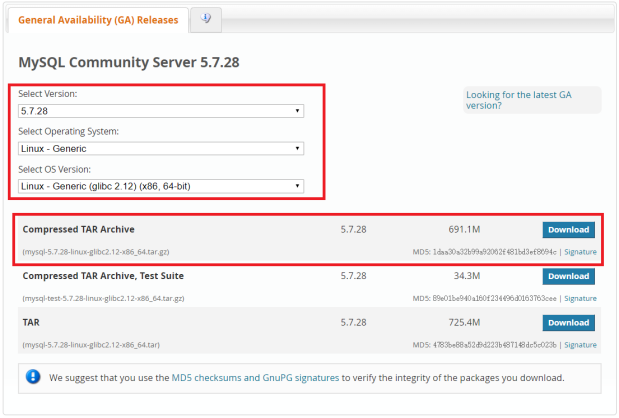
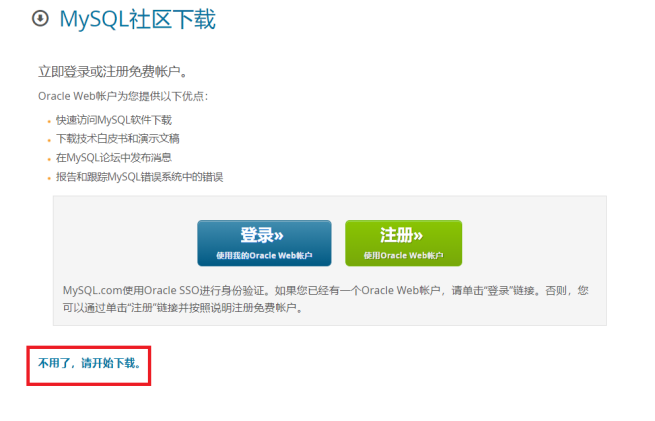
cd /usr/local/src

解压安装和配置

文件夹    文件夹内容

/usr/bin    客户端和脚本

/usr/sbin    Mysqld服务器

/var/lib/mysql    日志文件和数据库

/usr/share/info    信息格式的手册

/usr/share/man    Unix手册

/usr/include/mysql    头文件

/usr/lib/mysl    库

/usr/share/mysql    错误信息、字符集、示例配置文件等

源代码安装需要一些开发工具

()cmake    http://www.cmake.org/

()make    http://www.gun.org/software/make/    3.7.5+

()ansi c++   gcc 4.2.+

()perl    运行test版本所需要

()rpm    rpm包管理器,rpmbuild 工具

yum list installed mysql

yum list installed mariadb

rpm -qa | grep "mysql\|mariadb"

rpm -e --nodeps mariadb

rpm -e --nodeps mysql

yum install -y cmake make gcc-c++ perl wget

wget https://cdn.mysql.com//Downloads/MySQL-5.7/mysql-5.7.28-linux-glibc2.12-x86_64.tar.gz -P /usr/local/src

tar -xvf mysql-5.7.-linux-glibc2.-x86_64.tar.gz

mv mysql-5.7.-linux-glibc2.-x86_64/ mysql

mkdir /data && mv mysql /data/mysql

groupadd mysql

useradd mysql -g mysql

mkdir -p /data/mysql && cd /data

chown -R mysql

chgrp -R mysql

cp /etc/my.cnf /etc/my.cnf.bak

echo '[mysqld]

basedir=/data/mysql

datadir=/data/mysql/data

socket=/tmp/mysql.sock

user=mysql

character-set-server = utf8mb4

collation-server = utf8mb4_general_ci

init_connect='SET NAMES utf8mb4'

lower_case_table_names =

port =

tmpdir = /tmp' > /etc/my.cnf

cd /data/mysql/

./bin/mysqld --initialize --user=mysql --basedir=/data/mysql --datadir=/data/mysql/data

.....

--11T04::.409894Z  [Note] A temporary password is generated for root@localhost: N9YJ7swptw.X

cd /data/mysql/support-files/

./mysql.server start

Starting MySQL.Logging to '/data/mysql/data/localhost.localdomain.err'.

 SUCCESS!

cd /data/mysql/

./bin/mysql -uroot -p'N9YJ7swptw.X'

mysql: [Warning] Using a password on the command line interface can be insecure.

Welcome to the MySQL monitor.  Commands end with ; or \g.

Your MySQL connection id is

Server version: 5.7.

Copyright (c) , , Oracle and/or its affiliates. All rights reserved.

Oracle is a registered trademark of Oracle Corporation and/or its

affiliates. Other names may be trademarks of their respective

owners.

Type 'help;' or '\h' for help. Type '\c' to clear the current input statement.

登录成功设置root密码:

mysql> set password=password('Huixst.9');

Query OK,  rows affected,  warning (0.00 sec)

设置远程连接:

mysql> GRANT ALL PRIVILEGES ON *.* TO root@'%' identified by 'Huixst.9';

Query OK,  rows affected,  warning (0.00 sec)

mysql> flush privileges;

Query OK,  rows affected (0.00 sec)

mysql> \q

Bye

cp /data/mysql/support-files/mysql.server /etc/init.d/mysqld

service mysqld stop

ln -s /data/mysql/bin/mysql /usr/bin/mysql

cd

service mysqld start

chkconfig --add mysqld

chkconfig --list mysqld

chkconfig mysqld on

[root@localhost ~]# mysql -uroot -p'Huixst.9'

mysql: [Warning] Using a password on the command line interface can be insecure.

Welcome to the MySQL monitor.  Commands end with ; or \g.

Your MySQL connection id is

Server version: 5.7. MySQL Community Server (GPL)

Copyright (c) , , Oracle and/or its affiliates. All rights reserved.

Oracle is a registered trademark of Oracle Corporation and/or its

affiliates. Other names may be trademarks of their respective

owners.

Type 'help;' or '\h' for help. Type '\c' to clear the current input statement.

mysql> show databases;

+--------------------+

| Database           |

+--------------------+

| information_schema |

| mysql              |

| performance_schema |

| sys                |

+--------------------+

 rows in set (0.00 sec)

mysql> create database cacti;

Query OK,  row affected (0.00 sec)

mysql> show create database cacti\G

*************************** . row ***************************

       Database: cacti

Create Database: CREATE DATABASE `cacti` /*!40100 DEFAULT CHARACTER SET utf8mb4 */

 row in set (0.00 sec)

mysql> show create database cacti\g

+----------+-------------------------------------------------------------------+

| Database | Create Database                                                   |

+----------+-------------------------------------------------------------------+

| cacti    | CREATE DATABASE `cacti` /*!40100 DEFAULT CHARACTER SET utf8mb4 */ |

+----------+-------------------------------------------------------------------+

 row in set (0.00 sec)

mysql> show databases;

+--------------------+

| Database           |

+--------------------+

| information_schema |

| cacti              |

| mysql              |

| performance_schema |

| sys                |

+--------------------+

 rows in set (0.00 sec)

mysql> drop database cacti;

Query OK,  rows affected (0.00 sec)

mysql> show engines\g

+--------------------+---------+----------------------------------------------------------------+--------------+------+------------+

| Engine             | Support | Comment                                                        | Transactions | XA   | Savepoints |

+--------------------+---------+----------------------------------------------------------------+--------------+------+------------+

| MRG_MYISAM         | YES     | Collection of identical MyISAM tables                          | NO           | NO   | NO         |

| CSV                | YES     | CSV storage engine                                             | NO           | NO   | NO         |

| MyISAM             | YES     | MyISAM storage engine                                          | NO           | NO   | NO         |

| BLACKHOLE          | YES     | /dev/null storage engine (anything you write to it disappears) | NO           | NO   | NO         |

| PERFORMANCE_SCHEMA | YES     | Performance Schema                                             | NO           | NO   | NO         |

| InnoDB             | DEFAULT | Supports transactions, row-level locking, and foreign keys     | YES          | YES  | YES        |

| ARCHIVE            | YES     | Archive storage engine                                         | NO           | NO   | NO         |

| MEMORY             | YES     | Hash based, stored in memory, useful for temporary tables      | NO           | NO   | NO         |

| FEDERATED          | NO      | Federated MySQL storage engine                                 | NULL         | NULL | NULL       |

+--------------------+---------+----------------------------------------------------------------+--------------+------+------------+

 rows in set (0.00 sec)

Support 为某种引擎状态

DEFAULT 当前为默认引擎

YES 可以使用

NO 不能使用
centos 7 源代码 mysql-5.7.2 安装的更多相关文章
- CentOS 7数据库mysql和mariadb手动安装冲突的问题解决
由于确定使用mysql,那只有卸载mariadb了. 一.首先查看当前安装的mariadb包 rpm -qa|grep mariadb 本人得到结果是:mariadb-libs-5.5.44-2.el ...
- CentOS 6.6 MySQL 8.0详细安装步骤
1.备份服务器上MySQL数据库 [root@localhost ] # mysqldump -h localhost -u root -proot --databases Surpass --rou ...
- 1分钟完美安装最新CentOS+Nginx+PHP-FPM+MySQL
PHP 5.3.1 MySQL 5.0.89 Nginx 0.8.33 或 0.7.65 (可选) 现在,我们可以快速全自动搞定 CentOS + Nginx + PHP-FPM + MySQL 的安 ...
- CentOS 6.6 下源码编译安装MySQL 5.7.5
版权声明:转自:http://www.linuxidc.com/Linux/2015-08/121667.htm 说明:CentOS 6.6 下源码编译安装MySQL 5.7.5 1. 安装相关工具# ...
- CentOS 5.5 Nginx+JDK+MySQL+Tomcat(jsp)成功安装案例
在CentOS 5.5中安装Nginx+jdk+mysql+tomcat是非常容易的.只需yum安装环境包和nginx.解压安装jdk和tomcat.配置profile文件.server.xml和ng ...
- CentOS学习笔记--MySQL安装
MySQL安装 Linux中使用最广泛的数据库就是MySQL,使用在线yum的方式安装的版本落后MySQL网站好几个小版本,本节亲自测试安装新版的MySQL. 测试机器环境: VMware Works ...
- CentOS下MySQL 5.7编译安装
CentOS下MySQL 5.7编译安装 文章目录 安装依赖包 下载相应源码包 添加mysql用户 预编译 编译安装 启动脚本,设置开机自启动 /etc/my.cnf,仅供参考 初始化数据库 设置 ...
- centos mysql 数据存储目录安装位置
rpm -ql mysql查看安装位置 MYSQL默认的数据文件存储目录为/var/lib/mysql.假如要把目录移到/home/data下需要进行下面几步: 1.home目录下建立data目录 c ...
- Centos 升级MySQL版本或者Yum安装Mysql5.6
Centos 升级MySQL版本或者Yum安装Mysql5.6 1.从MySQL Yum仓库下载最新的rpm文件:http://dev.mysql.com/downloads/repo/yum/Cen ...
- CentOS下的Mysql的安装和使用
1.使用安装命令 :yum -y install mysql mysql-server mysql-devel 安装完成却发现Myserver安装缺失,在网上找原因,原来是因为CentOS 7上把My ...
随机推荐
- 从源码学习使用 node-delegates
node-delegates 是 TJ 大神所写的一个简单的小工具,源码只有 157 行,作用在于将外部对象接受到的操作委托到内部属性进行处理,也可以理解为讲对象的内部属性暴露到外部,简化我们所需要书 ...
- ssm整合的springmvc.xml的配置
<?xml version="1.0" encoding="UTF-8"?><beans xmlns="http://www.spr ...
- delphi读写INI系统配置文件
delphi读写INI系统配置文件 一.调用delphi内建单元 uses System.IniFiles; .使用类TIniFile .类TIniFile的主要方法和函数: {$IFDEF MSWI ...
- 我们可以从英特尔® SPMD 程序编译器中学到什么?
英特尔® SPMD 程序编译器俗称为“ISPC”,它流畅地展示了 CPU 多核 SIMD 语言.GPU 计算语言.数据并行 C++ 扩展和嵌入式应用或领域特定计算语言的重要未来发展方向.具体而言,本文 ...
- APP安全_Android渗透环境
Android渗透 移动APP大多通过WEB API服务的方式与服务端进行交互,这种模式把移动安全和web安全绑在一起.常见的web漏洞在移动APP中也存在,比如SQL注入,文件上传,中间件/serv ...
- Hbase概述
一.HBASE概述 Hadoop Database NoSQL 面向列 提供实时更新查询 .... 是一个高可靠性 高性能 面向列 可伸缩的分布式存储系统 利用hbase技术可以在廉价的PC ...
- POJ2411 Mondriaan's Dream 【状压dp】
没错,这道题又是我从LZL里的博客里剽过来的,他的题真不错,真香. 题目链接:http://poj.org/problem?id=2411 题目大意:给一个n * m的矩形, 要求用 1 * 2的小方 ...
- [转帖]PKI技术原理(收集 整理 归纳)
PKI技术原理(收集 整理 归纳) https://blog.51cto.com/3layer/20430 总结归纳的 灰常好.. 7layer关注8人评论39427人阅读2007-03-14 11: ...
- spring boot 项目开发常用目录结构
在spring boot开发中一些常用的目录划分 转载自https://blog.csdn.net/Auntvt/article/details/80381756: 一.代码层结构 根目录:net.c ...
- 【LOJ】#2983. 「WC2019」数树
LOJ2983. 「WC2019」数树 task0 有\(i\)条边一样答案就是\(y^{n - i}\) task1 这里有个避免容斥的方法,如果有\(i\)条边重复我们要算的是\(y^{n - i ...