
Spring Cloud Config(二):基于Git搭建配置中心
1、简述
本文选用Git作为配置仓库,新建两个环境的配置文件夹,dev 和 test,文件夹中分别存放 Config Client 端的配置文件,目录结构如下:
├ ─ ─ dev
└ ─ ─ config-client-dev.properties
├ ─ ─ test
└ ─ ─ config-client-test.properties
2、Config Server 搭建
2.1、Maven依赖
Config Server 是一个基于Spring Boot的web应用,我们首先需要做的就是在pom中引入Spring Cloud Config Server的依赖。
<dependency>

	<groupId>org.springframework.cloud</groupId>

	<artifactId>spring-cloud-config-server</artifactId>

</dependency>
2.2、Config Server配置
# 配置中心名称

spring.application.name=lkf-config-git

# 配置中心端口号

server.port=1000

# 配置git仓库地址

spring.cloud.config.server.git.uri=https://github.com/liukaifeng/lkf-cloud

# 配置文件查找路径

spring.cloud.config.server.git.search-paths=config-repo/dev

# 配置中心api前缀

spring.cloud.config.server.prefix=lkf
2.3、启用Config Server
最后就是启用Config Server,只需要加上@EnableConfigServer即可
@SpringBootApplication

@EnableConfigServer

public class GitConfigApplication {

	public static void main(String[] args) {

		SpringApplication.run(GitConfigApplication.class, args);

	}

}
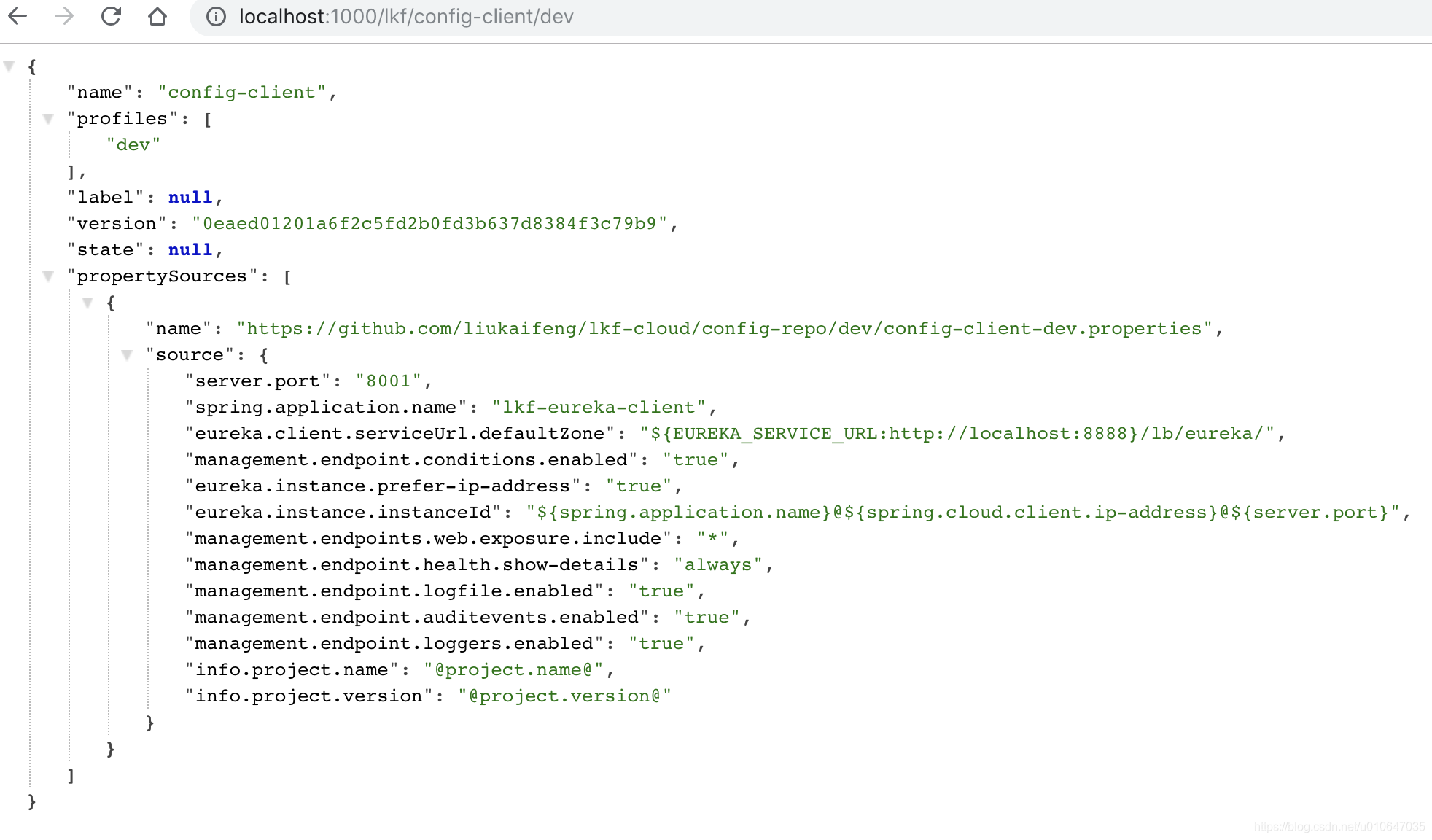
配置后完成后启动应用,Config Server就开始工作了,访问地址:
http://localhost:1000/lkf/config-client/dev 看到了刚刚配置文件中的配置信息,到此配置中心服务端搭建完成。
3、Config Client 使用
3.1、Maven依赖
Config Client 是一个基于Spring Boot的web应用,我们首先需要做的就是在pom中引入Spring Cloud Config Client的依赖。
<dependency>

    <groupId>org.springframework.cloud</groupId>

    <artifactId>spring-cloud-starter-config</artifactId>

</dependency>
3.2、Config Client配置
我们需要做一些配置使Config Client知道Config Server的地址,以及应用自身配置的信息,如:应用名字,环境,配置的版本等信息,以下是配置:
#配置环境

spring.cloud.config.profile=dev

#配置中心地址

spring.cloud.config.uri=http://localhost:1000/lkf

#配置文件名称

spring.cloud.config.name=config-client
配置完成后,启动应用,Config Client就会自动从Config Server获取配置,并注册到注册中心,访问注册中心地址:http://localhost:8888/

至此,Config Client 已成功从配置中心拉取并解析成功配置并注册到了注册中心。另外在应用启动日志中也可以看到拉取配置信息的日志:
Fetching config from server at : http://localhost:1000/lkf

2018-11-03 22:48:47.951 [main] DEBUG org.springframework.web.client.RestTemplate - Created GET request for "http://localhost:1000/lkf/config-client/dev"

2018-11-03 22:48:48.015 [main] DEBUG org.springframework.web.client.RestTemplate - Setting request Accept header to [application/json, application/*+json]

2018-11-03 22:48:49.130 [main] DEBUG org.springframework.web.client.RestTemplate - GET request for "http://localhost:1000/lkf/config-client/dev" resulted in 200 (null)

2018-11-03 22:48:49.132 [main] DEBUG org.springframework.web.client.RestTemplate - Reading [class org.springframework.cloud.config.environment.Environment] as "application/json;charset=UTF-8" using [org.springframework.http.converter.json.MappingJackson2HttpMessageConverter@273842a6]

2018-11-03 22:48:49.150 [main] INFO  o.s.c.c.client.ConfigServicePropertySourceLocator - Located environment: name=config-client, profiles=[dev], label=null, version=0eaed01201a6f2c5fd2b0fd3b637d8384f3c79b9, state=null

2018-11-03 22:48:49.150 [main] DEBUG o.s.c.c.client.ConfigServicePropertySourceLocator - Environment config-client has 1 property sources with 13 properties.

2018-11-03 22:48:49.150 [main] INFO  o.s.c.b.c.PropertySourceBootstrapConfiguration - Located property source: CompositePropertySource {name='configService', propertySources=[MapPropertySource@466319810 {name='configClient', properties={config.client.version=0eaed01201a6f2c5fd2b0fd3b637d8384f3c79b9}}, MapPropertySource@219812012 {name='https://github.com/liukaifeng/lkf-cloud/config-repo/dev/config-client-dev.properties', properties={server.port=8001, spring.application.name=lkf-eureka-client, eureka.client.serviceUrl.defaultZone=${EUREKA_SERVICE_URL:http://localhost:8888}/lb/eureka/, management.endpoint.conditions.enabled=true, eureka.instance.prefer-ip-address=true, eureka.instance.instanceId=${spring.application.name}@${spring.cloud.client.ip-address}@${server.port}, management.endpoints.web.exposure.include=*, management.endpoint.health.show-details=always, management.endpoint.logfile.enabled=true, management.endpoint.auditevents.enabled=true, management.endpoint.loggers.enabled=true, info.project.name=@project.name@, info.project.version=@project.version@}}]}

2018-11-03 22:48:49.150 [main] DEBUG o.s.core.env.PropertySourcesPropertyResolver - Could not find key 'logging.config:' in any property source
Spring Cloud Config(二):基于Git搭建配置中心的更多相关文章
- Spring Cloud Config、Apollo、Nacos配置中心选型及对比
Spring Cloud Config.Apollo.Nacos配置中心选型及对比 1.Nacos 1.1 Nacos主要提供以下四大功能 2.Spring Cloud Config 3.Apollo ...
- Spring Cloud Config 使用Bus的动态配置中心
server端配置 POM文件 <dependency> <groupId>org.springframework.boot</groupId> <artif ...
- Spring cloud config client获取不到配置中心的配置
Spring cloud client在配置的时候,配置文件要用 bootstrap.properties 贴几个说明的链接.但是觉得说的依然不够详细,得空详查. 链接1 链接2 链接3 原文地址:h ...
- Spring Cloud Config(三):基于JDBC搭建配置中心
1.简介 本文主要内容是基于jdbc搭建配置中心,使应用从配置中心读取配置信息并成功注册到注册中心,关于配置信息表结构仅供参考,大家可以根据具体需要进行扩展. 2.Config Server 搭建 2 ...
- 9.Spring Cloud Config统一管理微服务配置
Spring Cloud Config统一管理微服务配置 9.1. 为什么要统一管理微服务配置 9.2. Spring Cloud Config简介 Spring Cloud Config为分布式系统 ...
- 一起来学Spring Cloud | 第七章:分布式配置中心(Spring Cloud Config)
上一章节,我们讲解了服务网关zuul,本章节我们从git和本地两种存储配置信息的方式来讲解springcloud的分布式配置中心-Spring Cloud Config. 一.Spring Cloud ...
- Spring Cloud学习笔记【九】配置中心Spring Cloud Config
Spring Cloud Config 是 Spring Cloud 团队创建的一个全新项目,用来为分布式系统中的基础设施和微服务应用提供集中化的外部配置支持,它分为服务端与客户端两个部分.其中服务端 ...
- spring boot 2.0.3+spring cloud (Finchley)6、配置中心Spring Cloud Config
https://www.cnblogs.com/cralor/p/9239976.html Spring Cloud Config 是用来为分布式系统中的基础设施和微服务应用提供集中化的外部配置支持, ...
- Spring Cloud系列(六):配置中心
在使用Spring Boot的时候,我们往往会在application.properties配置文件中写一些值,供应用使用,这样做的好处是可以在代码中引用这些值,当这些值需要作出修改的时候,可以直接修 ...
随机推荐
- (二)手动配置第一个HelloWorld程序
上例的HelloWorld是由Android sutudio 自动生成的,现在我们手动来配置. 1. 重新创建工程 2. 创建空的Activity 生成的MainActivity.java 文件: p ...
- (六)Spring Boot之日志配置-logback和log4j2
一.简介 支持日志框架:Java Util Logging, Log4J2 and Logback,默认是使用logback 配置方式: 默认配置文件配置 引用外部配置文件配置 二.默认配置文件配置( ...
- LeetCode 1103. Distribute Candies to People
1103. Distribute Candies to People(分糖果||) 链接:https://leetcode-cn.com/problems/distribute-candies-to- ...
- K最近邻算法项目实战
这里我们用酒的分类来进行实战练习 下面来代码 1.把酒的数据集载入到项目中 from sklearn.datasets import load_wine #从sklearn的datasets模块载入数 ...
- scss语法格式(常用版记录)
这篇文章是我自己在学习Scss时的笔记~ 更多学习可以参照官网(链接:https://www.sass.hk/docs/) 一,Scss语法格式 1.嵌套规则 2.父选择器&(伪类嵌套 ...
- CPU的基本组成
1.CPU是用来运算的(加法运算.乘法运算.逻辑运算(与.或.非)等) 2.运算操作涉及到数据输入(input).处理.数据输出(output).A和B是输入数据,加法运算时处理.C是输出数据. 3. ...
- [Vuex系列] - Module的用法(终篇)
于使用单一状态树,应用的所有状态会集中到一个比较大的对象.当应用变得非常复杂时,store 对象就有可能变得相当臃肿.为了解决以上问题,Vuex 允许我们将 store 分割成模块(module).每 ...
- SpringDataJPA第二天讲义
第1章 Spring Data JPA的概述 1.1 Spring Data JPA概述 Spring Data JPA 是 Spring 基于 ORM 框架.JPA 规范的基础上封装的 ...
- 【Distributed】网站跨域解决方案
一.概述 1.1 什么是网站跨域 1.2 网站跨域报错案例 二.五种网站跨域解决方案 三.使用JSONP解决网站跨域[1] 3.1 前端代码 3.2 后端代码 四.使用设置响应头允许跨域[2] 4.1 ...
- c# 动态获取http通过post传来的json数据
//获取http通过post传来的json数据 using Newtonsoft.Json; public HttpResponseMessage Query() { var request=Syst ...