
Centos7下安装Elasticsearch 5.6.6
环境
因为elasticsearch是用java编写的,所以需要先安装JDK
ES 5,安装需要 JDK 8 以上
ES 6.5,安装需要 JDK 11 以上
ES 7.2.1,内置了 JDK 12
安装jdk11
yum -y install java-11-openjdk.x86_64
使用 wget 命令下载
wget https://artifacts.elastic.co/downloads/elasticsearch/elasticsearch-5.6.6.tar.gz
安装elasticsearch
1、解压elasticsearch到 /usr/local 目录下
tar -zxvf elasticsearch-5.6.6.tar.gz -C /usr/local/
2、elasticsearch默认是不支持用root用户来启动的,需要添加专门的用户
cd /usr/local

useradd elastic

chown -R elastic:elastic elasticsearch-5.6.6/

su elastic

./elasticsearch-5.6.6/bin/elasticsearch -d
2、进入到解压的elasticsearch包目录下、启动参数 -d 指的是后台运行
cd /usr/local/elasticsearch-5.6.6/

./bin/elasticsearch -d
3、使用 curl http://localhost:9200/ 查看是否运行,如果返回如下信息则标示运行正常
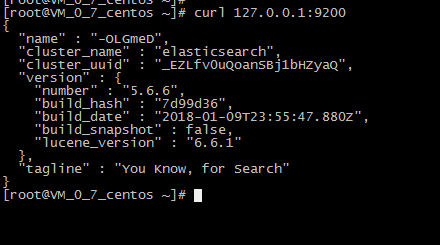
4、elasticsearch默认restful-api的端口是9200 不支持Ip地址,只能在本机用http://localhost:9200来访问。如果需要改变,需要修改配置文件。
默认情况下 Elasticsearch 的 RESTful 服务只有本机才能访问,也就是说无法从主机访问虚拟机中的服务。
可以修改 /etc/elasticsearch/config/elasticsearch.yml 文件,将注释的 network.host 和 http.port 放开,并配置正确的IP(或者0.0.0.0)
cd /usr/local/elasticsearch-5.6.6

vim config/elasticsearch.yml
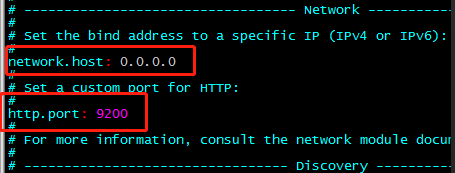
5、先将Elasticsearch 关闭,然后启动;
关闭方法:输入命令: ps -ef | grep elasticsearch ,找到进程,然后kill掉就行了;
启动方法:输入命令:su elastic , 然后输入 ./bin/elasticserach -d
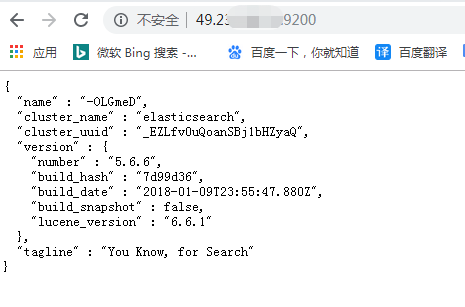
6、在谷歌浏览器中打开:http://{server_IP}:9200/
问题
1、问题一:启动elasticsearch报错如下:Java HotSpot(TM) 64-Bit Server VM warning: INFO: os::commit_memory(0x0000000085330000, 2060255232, 0) failed; error='Cannot allocate memory' (errno=12)

解决方法:
由于elasticsearch5.0默认分配jvm空间大小为2g,修改jvm空间分配: vim config/jvm.options
-Xms2g

-Xmx2g
修改为
-Xms512m

-Xmx512m
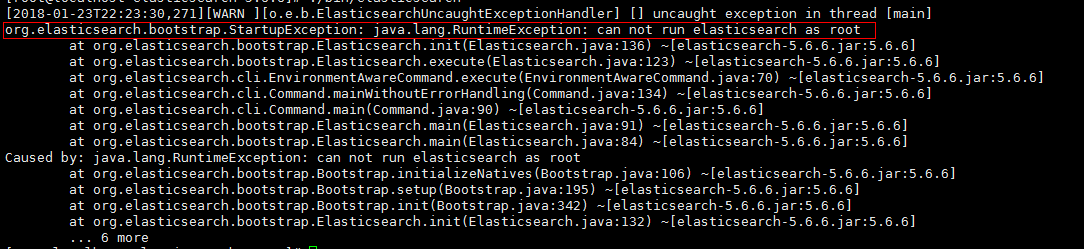
2、问题二:启动elasticsearch报错如下:org.elasticsearch.bootstrap.StartupException: java.lang.RuntimeException: can not run elasticsearch as root
解决方法:
原因是elasticsearch默认是不支持用root用户来启动的,需要添加专门的用户。
cd /usr/local

useradd elastic

chown -R elastic:elastic elasticsearch-5.6.6/

su elastic

./elasticsearch-5.6.6/bin/elasticsearch -d
3、问题三:启动报错如下
ERROR: [3] bootstrap checks failed
[1]: max file descriptors [4096] for elasticsearch process is too low, increase to at least [65536]
[2]: max number of threads [1775] for user [elastic] is too low, increase to at least [2048]
[3]: max virtual memory areas vm.max_map_count [65530] is too low, increase to at least [262144]
解决方法:
(1)[1]: max file descriptors [4096] for elasticsearch process is too low, increase to at least [65536]
[2]: max number of threads [1775] for user [elastic] is too low, increase to at least [2048]
先切换到root账户下面,使用 vi /etc/security/limits.conf ,增加如下内容
elastic soft nofile 65536

elastic hard nofile 65536

elastic soft nproc 2048

elastic hard nproc 2048
(2)[3]: max virtual memory areas vm.max_map_count [65530] is too low, increase to at least [262144]
使用 vim /etc/sysctl.conf ,增加如下的内容
vm.max_map_count=262144
输入:sysctl -p ,如下所示

(3)重新启动elasticsearch
su elastic

cd /usr/local/elasticsearch-5.6.6

./bin/elasticsearch -d
安装moloch
下载地址:https://files.molo.ch/builds/centos-7/moloch-1.8.0-1.x86_64.rpm
https://www.cnblogs.com/yaoyaojcy/p/11727122.html
https://www.cnblogs.com/yaoyaojcy/p/11731738.html
Centos7下安装Elasticsearch 5.6.6的更多相关文章
- centos7下安装elasticSearch错误总结(单节点模式)
1.首先确定你安装了jdk,版本需要1.8以上 2.上传elasticsearchjar包,只需配置一个文件即可 修改配置文件config/elasticsearch.yml network.h ...
- CentOS7 下 安装 supervisor以及使用
CentOS7 下 安装 supervisor 以及使用 手动安装 [注] linux环境必须安装 python 1.获取supervisor包:[https://pypi.python.org/py ...
- Linux CentOs7 下安装 redis
Linux CentOs7 下安装 redis 请将以下命令放入linux命令行中运行 如果安装过程前没有安装GCC请先安装 命令如下 $ yum install gcc-c++ $ wget ht ...
- Centos7下安装配置Redsocks
Redsocks是一个开源的网络程序,代码依赖开源的libevent网络库.Redsocks允许你将所有TCP连接重定向到SOCKS或HTTPS代理,比如Shadowsocks(Centos7下安装配 ...
- CentOS7下安装SVN服务端
CentOS7下安装SVN服务 1. yum命令即可方便的完成安装# sudo yum install subversion 测试安装是否成功:# svnserve --version 更改svn的默 ...
- 记录Linux下安装elasticSearch时遇到的一些错误
记录Linux下安装elasticSearch时遇到的一些错误 http://blog.sina.com.cn/s/blog_c90ce4e001032f7w.html (2016-11-02 22: ...
- ES1:Windows下安装ElasticSearch
ElasticSearch(简称ES)是一个基于Lucene的分布式全文搜索服务器,本随笔演示在Windows安装ElasticSearch和用于管理ES的Head插件. ElasticSearch官 ...
- centOS7下安装GUI图形界面
1.如何在centOS7下安装GUI图形界面 当你安装centOS7服务器版本的时候,系统默认是不会安装GUI的图形界面程序,这个需要手动安装CentOS7 Gnome GUI包. 2.在系统下使用命 ...
- CentOS7下安装MySQL并配置远程连接
一.CentOS7下安装MySQL数据库 CentOS7默认的安装包里面已经没有 MySQL-Server安装包了,远程镜像中也没有了. 默认的是MariaDB (MySQL的一个分支,开发这个分支的 ...
随机推荐
- 【Leetcode_easy】657. Robot Return to Origin
problem 657. Robot Return to Origin 题意: solution1: class Solution { public: bool judgeCircle(string ...
- oracle jdk和openjdk区别;idea如何加载jdk源码并调试jdk代码
两个jdk的区别 oracle jdk是sun/oracle(甲骨文)公司的,部分jdk开源:相对比较稳定,使用的比较多. openjdk是完全开源的,据说是官方oracle唯一承认的开源版本. id ...
- 【数据库开发】windows下hiredis的编译(主要是包括一些异步编程的错误)
果然,高端的程序员真心是鸟都不鸟windows的,Redis的客户端找了一圈愣是没有C++的windows版本 我要做个windows上的C++的服务器都没办法和redis交互 github上所有能试 ...
- 学习笔记:oracle之win10安装卸载oracle 11gR2步骤及常见问题解决
1.win10下安装oracle11g 1.1 工具原料 oracle11g安装包(64位) 1.2 步骤方法 1.在Oracle官网下载安装包,下载后,得到的文件如图所示: 2.将两个文件进行解压缩 ...
- [转帖]彻底弄懂UTF-8、Unicode、宽字符、locale
彻底弄懂UTF-8.Unicode.宽字符.locale linux后端开发 已关注 彻底弄懂UTF-.Unicode.宽字符.locale unicode 是字符集 utf-8是编码格式.. ...
- Hadoop配置环境变量Program~2的用法
[学习笔记] 3)配置环境变量:(环境变量中的~1,~2,~3的用法)i)JAVA_HOME:注意C:\Program Files目录存在空格,变成C:\Progra~1\Java\jdk1.8.0_ ...
- sqlite lib导入
依赖 1.System.Data.SQLite 2.SqlKata //https://www.nuget.org/profiles/SQLite //http://system.data.sqlit ...
- js — 字符串
目录 1. 拼接字符串 2. 获取字符的方法 3. 字符串操作方法(切片) 4. 字符串位置方法 - 索引 5. trim()方法 6. 字符串大小写转换方法 字符串 typeof 用于校验当前变量的 ...
- 2019牛客多校一 H. XOR (线性基)
大意: 给定序列, 求所有异或和为$0$的子序列大小之和. 先求出线性基, 假设大小为$r$. 对于一个数$x$, 假设它不在线性基内, 那么贡献为$2^{n-r-1}$ 因为它与其余不在线性基内数的 ...
- 安装本地jar包
(1)安装在本地maven库 假设我们需要引入的包为 myjar-1.0.jar (1.1)打开cmd,进入myjar-1.0.jar所在的目录 (1.2)执行如下命令:mvn install:ins ...