
Centos7下安装Elasticsearch 5.6.6
环境
因为elasticsearch是用java编写的,所以需要先安装JDK
ES 5,安装需要 JDK 8 以上
ES 6.5,安装需要 JDK 11 以上
ES 7.2.1,内置了 JDK 12
安装jdk11
yum -y install java-11-openjdk.x86_64
使用 wget 命令下载
wget https://artifacts.elastic.co/downloads/elasticsearch/elasticsearch-5.6.6.tar.gz
安装elasticsearch
1、解压elasticsearch到 /usr/local 目录下
tar -zxvf elasticsearch-5.6.6.tar.gz -C /usr/local/
2、elasticsearch默认是不支持用root用户来启动的,需要添加专门的用户
cd /usr/local

useradd elastic

chown -R elastic:elastic elasticsearch-5.6.6/

su elastic

./elasticsearch-5.6.6/bin/elasticsearch -d
2、进入到解压的elasticsearch包目录下、启动参数 -d 指的是后台运行
cd /usr/local/elasticsearch-5.6.6/

./bin/elasticsearch -d
3、使用 curl http://localhost:9200/ 查看是否运行,如果返回如下信息则标示运行正常
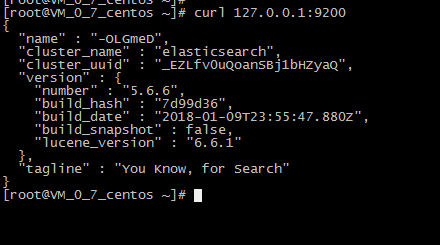
4、elasticsearch默认restful-api的端口是9200 不支持Ip地址,只能在本机用http://localhost:9200来访问。如果需要改变,需要修改配置文件。
默认情况下 Elasticsearch 的 RESTful 服务只有本机才能访问,也就是说无法从主机访问虚拟机中的服务。
可以修改 /etc/elasticsearch/config/elasticsearch.yml 文件,将注释的 network.host 和 http.port 放开,并配置正确的IP(或者0.0.0.0)
cd /usr/local/elasticsearch-5.6.6

vim config/elasticsearch.yml
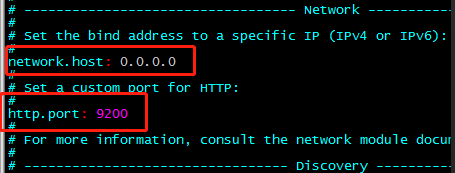
5、先将Elasticsearch 关闭,然后启动;
关闭方法:输入命令: ps -ef | grep elasticsearch ,找到进程,然后kill掉就行了;
启动方法:输入命令:su elastic , 然后输入 ./bin/elasticserach -d
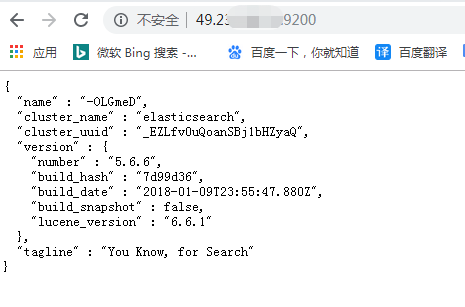
6、在谷歌浏览器中打开:http://{server_IP}:9200/
问题
1、问题一:启动elasticsearch报错如下:Java HotSpot(TM) 64-Bit Server VM warning: INFO: os::commit_memory(0x0000000085330000, 2060255232, 0) failed; error='Cannot allocate memory' (errno=12)

解决方法:
由于elasticsearch5.0默认分配jvm空间大小为2g,修改jvm空间分配: vim config/jvm.options
-Xms2g

-Xmx2g
修改为
-Xms512m

-Xmx512m
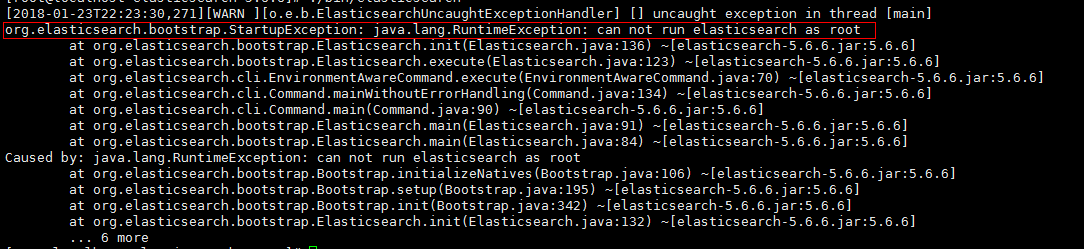
2、问题二:启动elasticsearch报错如下:org.elasticsearch.bootstrap.StartupException: java.lang.RuntimeException: can not run elasticsearch as root
解决方法:
原因是elasticsearch默认是不支持用root用户来启动的,需要添加专门的用户。
cd /usr/local

useradd elastic

chown -R elastic:elastic elasticsearch-5.6.6/

su elastic

./elasticsearch-5.6.6/bin/elasticsearch -d
3、问题三:启动报错如下
ERROR: [3] bootstrap checks failed
[1]: max file descriptors [4096] for elasticsearch process is too low, increase to at least [65536]
[2]: max number of threads [1775] for user [elastic] is too low, increase to at least [2048]
[3]: max virtual memory areas vm.max_map_count [65530] is too low, increase to at least [262144]
解决方法:
(1)[1]: max file descriptors [4096] for elasticsearch process is too low, increase to at least [65536]
[2]: max number of threads [1775] for user [elastic] is too low, increase to at least [2048]
先切换到root账户下面,使用 vi /etc/security/limits.conf ,增加如下内容
elastic soft nofile 65536

elastic hard nofile 65536

elastic soft nproc 2048

elastic hard nproc 2048
(2)[3]: max virtual memory areas vm.max_map_count [65530] is too low, increase to at least [262144]
使用 vim /etc/sysctl.conf ,增加如下的内容
vm.max_map_count=262144
输入:sysctl -p ,如下所示

(3)重新启动elasticsearch
su elastic

cd /usr/local/elasticsearch-5.6.6

./bin/elasticsearch -d
安装moloch
下载地址:https://files.molo.ch/builds/centos-7/moloch-1.8.0-1.x86_64.rpm
https://www.cnblogs.com/yaoyaojcy/p/11727122.html
https://www.cnblogs.com/yaoyaojcy/p/11731738.html
Centos7下安装Elasticsearch 5.6.6的更多相关文章
- centos7下安装elasticSearch错误总结(单节点模式)
1.首先确定你安装了jdk,版本需要1.8以上 2.上传elasticsearchjar包,只需配置一个文件即可 修改配置文件config/elasticsearch.yml network.h ...
- CentOS7 下 安装 supervisor以及使用
CentOS7 下 安装 supervisor 以及使用 手动安装 [注] linux环境必须安装 python 1.获取supervisor包:[https://pypi.python.org/py ...
- Linux CentOs7 下安装 redis
Linux CentOs7 下安装 redis 请将以下命令放入linux命令行中运行 如果安装过程前没有安装GCC请先安装 命令如下 $ yum install gcc-c++ $ wget ht ...
- Centos7下安装配置Redsocks
Redsocks是一个开源的网络程序,代码依赖开源的libevent网络库.Redsocks允许你将所有TCP连接重定向到SOCKS或HTTPS代理,比如Shadowsocks(Centos7下安装配 ...
- CentOS7下安装SVN服务端
CentOS7下安装SVN服务 1. yum命令即可方便的完成安装# sudo yum install subversion 测试安装是否成功:# svnserve --version 更改svn的默 ...
- 记录Linux下安装elasticSearch时遇到的一些错误
记录Linux下安装elasticSearch时遇到的一些错误 http://blog.sina.com.cn/s/blog_c90ce4e001032f7w.html (2016-11-02 22: ...
- ES1:Windows下安装ElasticSearch
ElasticSearch(简称ES)是一个基于Lucene的分布式全文搜索服务器,本随笔演示在Windows安装ElasticSearch和用于管理ES的Head插件. ElasticSearch官 ...
- centOS7下安装GUI图形界面
1.如何在centOS7下安装GUI图形界面 当你安装centOS7服务器版本的时候,系统默认是不会安装GUI的图形界面程序,这个需要手动安装CentOS7 Gnome GUI包. 2.在系统下使用命 ...
- CentOS7下安装MySQL并配置远程连接
一.CentOS7下安装MySQL数据库 CentOS7默认的安装包里面已经没有 MySQL-Server安装包了,远程镜像中也没有了. 默认的是MariaDB (MySQL的一个分支,开发这个分支的 ...
随机推荐
- 第六章 Realm及相关对象——《跟我学Shiro》
转发地址:https://www.iteye.com/blog/jinnianshilongnian-2022468 目录贴:跟我学Shiro目录贴 6.1 Realm [2.5 Realm]及[3. ...
- maven项目创建.m2文件夹
创建为.m2.,m2前后都要有点,然后去掉后面的点 settings.xml文件如下: <?xml version="1.0" encoding="UTF-8&qu ...
- Windows服务操作帮助类
/// <summary> /// 打开系统服务 /// </summary> /// <param name="serviceName">系统 ...
- SpringBoot Profile使用详解及配置源码解析
在实践的过程中我们经常会遇到不同的环境需要不同配置文件的情况,如果每换一个环境重新修改配置文件或重新打包一次会比较麻烦,Spring Boot为此提供了Profile配置来解决此问题. Profile ...
- python邮件发送自动化测试报告
话不多说直接贴代码 # encoding: utf-8import smtplib #发送邮件模块from email.mime.text import MIMEText #邮件内容from emai ...
- js前端 多条件筛选查询
一.前言 在做项目中,遇到多条件筛选案例.实现完成以后,我将我做的代码分享在这里,希望可以帮助到其他朋友. 二.效果截图 三.实现代码 首先我先类型.类别.职位分成三块来处理,如果传到服务器端的话,就 ...
- python 脚本bak文件还原mssql数据库
# -*- coding=utf-8 -*- import pyodbc from datetime import datetime import pymssql import decimal cla ...
- java源码 -- AbstractList
AbstractList AbstractList是实现List接口的抽象类,AbstractList抽象类与List接口的关系类似于AbstractCollection抽象类与Collection接 ...
- VC++类型转换
一.其他数据类型转换为字符串 短整型(int) itoa(i,temp,10):///将i转换为字符串放入temp中,最后一个数便是十进制 itoa(i,temp,2):///按二进制方式转换 长整型 ...
- LeetCode. 颠倒二进制位
题目要求: 颠倒给定的 32 位无符号整数的二进制位. 示例: 输入: 00000010100101000001111010011100 输出: 001110010111100000101001010 ...