
查看TensorFlow的版本以及安装路径
查看TensorFlow的版本以及安装路径
进入到Python环境
import tensorflow as tf

tf.__version__   # 查看版本

tf.__path__	     # 查看安装路径
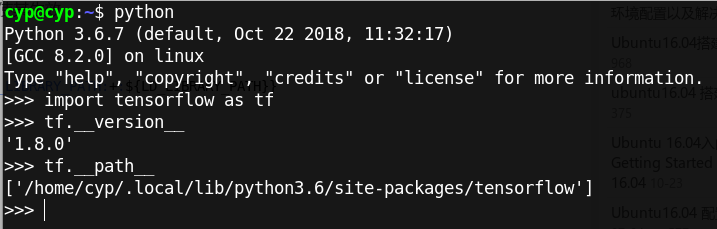
查看TensorFlow版本的另一种方法
sudo pip3 show tensorflow-gpu   # GPU版

sudo pip3 show tensorflow       # 非GPU版
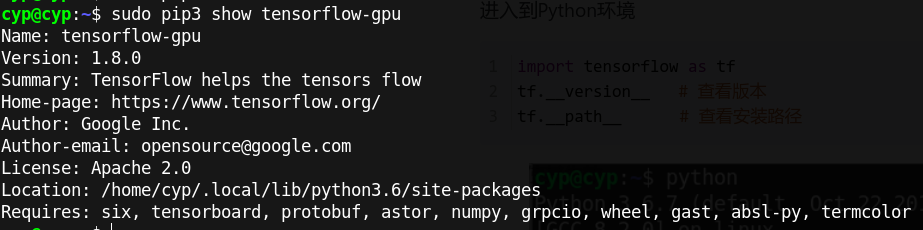
查看TensorFlow版本的另一种方法
$ python

Python 3.6.7 (default, Oct 22 2018, 11:32:17)

[GCC 8.2.0] on linux

Type "help", "copyright", "credits" or "license" for more information.

>>> from tensorflow.python.client import device_lib

>>> device_lib.list_local_devices()
输出
2019-05-18 21:36:53.492143: I tensorflow/core/platform/cpu_feature_guard.cc:140] Your CPU supports instructions that this TensorFlow binary was not compiled to use: AVX2 FMA

2019-05-18 21:36:53.606863: I tensorflow/stream_executor/cuda/cuda_gpu_executor.cc:898] successful NUMA node read from SysFS had negative value (-1), but there must be at least one NUMA node, so returning NUMA node zero

2019-05-18 21:36:53.607366: I tensorflow/core/common_runtime/gpu/gpu_device.cc:1356] Found device 0 with properties:

name: GeForce MX150 major: 6 minor: 1 memoryClockRate(GHz): 1.341

pciBusID: 0000:01:00.0

totalMemory: 1.96GiB freeMemory: 1.27GiB

2019-05-18 21:36:53.607382: I tensorflow/core/common_runtime/gpu/gpu_device.cc:1435] Adding visible gpu devices: 0

2019-05-18 21:36:53.826350: I tensorflow/core/common_runtime/gpu/gpu_device.cc:923] Device interconnect StreamExecutor with strength 1 edge matrix:

2019-05-18 21:36:53.826381: I tensorflow/core/common_runtime/gpu/gpu_device.cc:929]      0

2019-05-18 21:36:53.826388: I tensorflow/core/common_runtime/gpu/gpu_device.cc:942] 0:   N

2019-05-18 21:36:53.826499: I tensorflow/core/common_runtime/gpu/gpu_device.cc:1053] Created TensorFlow device (/device:GPU:0 with 1017 MB memory) -> physical GPU (device: 0, name: GeForce MX150, pci bus id: 0000:01:00.0, compute capability: 6.1)

[name: "/device:CPU:0"

device_type: "CPU"

memory_limit: 268435456

locality {

}

incarnation: 1057080042639158477

, name: "/device:GPU:0"

device_type: "GPU"

memory_limit: 1067384832

locality {

  bus_id: 1

  links {

  }

}

incarnation: 9801033547599324942

physical_device_desc: "device: 0, name: GeForce MX150, pci bus id: 0000:01:00.0, compute capability: 6.1"

]
另一种方法
查看tensorflow-gpu的版本:
pip list
查看TensorFlow的版本以及安装路径的更多相关文章
- linux rpm问题:怎样查看rpm安装包的安装路径
x rpm问题:怎样查看rpm安装包的安装路径 2010-07-12 21:19:15 标签:rpm linux 路径 休闲 职场 rpm -qpl xxxxxx.rpm 1.如何安装rpm软件包 ...
- Linux中查看某 个软件的安装路径
本人qq群也有许多的技术文档,希望可以为你提供一些帮助(非技术的勿加). QQ群: 281442983 (点击链接加入群:http://jq.qq.com/?_wv=1027&k=29Lo ...
- 查看已安装tensorflow版本以及安装路径
查看版本: import tensorflow as tf tf.__version__ 查看安装路径: tf.__path__
- pip 查看软件包 可用版本并安装; pip 查看 numpy 可用版本并安装
最近需要安装 numpy 的旧版本,发现不知道如何查看可以安装旧版本,解决方法在此进行记录: 然后找到你对应的版本进行安装就可以了: 保持更新,更多精彩内容,请关注 cnblogs.com/xuyao ...
- linux下查看和设置软件的安装路径
1:你可以通过whereis 软件名来查找系统里的文件位置 比如你想查找eclipse文件,那么就: [root@localhost ~]# whereis eclipse 会显示: eclipse: ...
- 查看python和NumPy版本和安装路径
记录查看Python和NumPy版本以及路径的几条命令 # 查看Python版本及路径 python -V python -c "import sys;print(sys.executabl ...
- TensorFlow GPU版本的安装与调试
笔者采用python3.6.7+TensorFlow1.12.0+CUDA10.0+CUDNN7.3.1构建环境 PC端配置为GTX 1050+Intel i7 7700HQ 4核心8线程@2.8GH ...
- linux下如何查看一个服务所在的安装路径?
当接手一个不是自己维护的linux服务器,我们常常会想要看看该服务器上是否安装了某个服务,这个服务安装的路径在哪? redis 是开发过程中常常会用到的一个服务,我这里就以这个服务为例,进行说明. 1 ...
- arcgis python 获得arcgis的版本和安装路径
import arcpy # Use the dictionary iteritems to iterate through # the key/value pairs from GetInstall ...
随机推荐
- python 粘包现象
一. 粘包现象 1. 粘包现象的由来(1)TCP属于长连接,当服务端与一个客户端进行了连接以后,其他客户端需要(排队)等待.若服务端想要连接另一个客户端,必须首先断开与第一个客户端的连接. (2)缓冲 ...
- springboot-定时任务-单线程
import org.slf4j.Logger; import org.slf4j.LoggerFactory; import org.springframework.scheduling.annot ...
- JavaScript基本入门02
目录 JavaScript基础入门 02 条件语句 if 语句 if .. else 语句 switch 结构 循环语句 while 循环 continue 关键字 do...while语句 for ...
- 当你使用Pycharm编译程序的时候,遇到了这个问题,该怎么办?please select a valid interpreter
1.打开settings(CTRL + ALT + S)或者 file---setting 2.搜索 Interpreter 3.安装一个python的解释器,自行去官网下载,安装的时候,记得勾选配置 ...
- JMeter—压力测试&性能测试工具
安装 下载 官方网站下载最新版本: http://jmeter.apache.org/download_jmeter.cgi,使用JMeter依赖jdk,建议安装jdk 1.6版本以上. 环境变量配置 ...
- server 2008 R2 DHCP服务器部署
安装DHCP服务器 和上一篇文章中安装IIS 7.0一样,我们在安装DHCP服务器的时候也要用到Windows Server 2008的服务器安装器. 首先打开服务器管理器,点击开始菜单——>管 ...
- vue $refs获取dom元素
1.今天做vue项目有个获取dom节点,主要目的是获取节点让滚动到顶部 首先在滑动容器去添加ref <div class="contentScroll" ref=" ...
- VMware HorizonView虚拟化桌面TLS问题处理
问题描述 公司虚拟化桌面环境内,进出口事业部同事在使用"中国贸易单一窗口"登录系统时,其系统本地控件无法启动WSS服务,端口显示使用61231,并反复提示安装控件. 排查过程 首先 ...
- 啃掉Hadoop系列笔记(02)-Hadoop运行环境搭建
一.新增一个普通用户bigdata
- 基于Docker 搭建 Jenkins
⒈下载镜像 要使用最新的LTS: docker pull jenkins/jenkins:lts 要使用最新的每周 docker pull jenkins/jenkins ⒉运行 docker run ...