
(十)Activitivi5之启动流程/完成任务的时候设置流程变量
一、启动流程的时候设置流程变量
1.1 案例
    /**

     * 启动流程实例

     */

    @Test

    public void start() {

        Student student=new Student();

        student.setId(1);

        student.setName("张三");

        Map<String, Object> variables=new HashMap<String,Object>();

        variables.put("days", 2);

        variables.put("date", new Date());

        variables.put("reason", "发烧");

        variables.put("student", student);

        ProcessInstance instance=processEngine.getRuntimeService() // 运行时Service

            .startProcessInstanceByKey("StudentLeaveProcess",variables);   // 流程定义表act_re_procdef的KEY字段值

        System.out.println("流程实例ID:"+instance.getId());

        System.out.println("流程定义ID:"+instance.getProcessDefinitionId());

    }
- 如上述例子流程启动之后,任何任务节点都可以通过excutionId获取到流程变量的值。

    /**

     * 获取流程变量数据

     */

    @Test

    public void getVariableValues(){

        RuntimeService runtimeService=processEngine.getRuntimeService();

        String excutionId="52501";

        Integer days=(Integer) runtimeService.getVariable(excutionId, "days");

         Date date=(Date) runtimeService.getVariableLocal(excutionId, "date");

        String reason=(String) runtimeService.getVariable(excutionId, "reason");

        Student student=(Student) runtimeService.getVariable(excutionId, "student");

        System.out.println("请假天数:"+days);

        System.out.println("请假日期:"+date);

        System.out.println("请假原因:"+reason);

        System.out.println("请假对象:"+student.getId()+","+student.getName());

    }
二、完成任务的时候设置流程变量
2.1 需求
- 在完成某个任务节点之后设置流程变量,接下来的任务节点都可以使用这个流程变量。
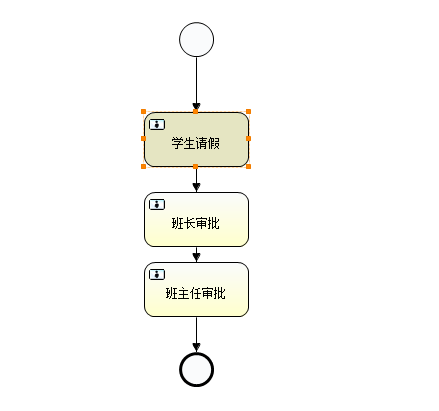 比如,当完成“学生请假”任务节点之后设置流程变量,然后在“班长审批”和“班主任审批”节点就可以获取该流程变量。
2.2 案例
/**

     * 完成任务

     */

    @Test

    public void test_completeTask2() {

        Student student=new Student();

        student.setId(1);

        student.setName("张三");

        Map<String, Object> variables=new HashMap<String,Object>();

        variables.put("days", 2);

        variables.put("date", new Date());

        variables.put("reason", "发烧");

        variables.put("student", student);

        processEngine.getTaskService().complete("62504",variables);

    }
    /**

     * 获取流程变量数据

     */

    @Test

    public void getVariableValues(){

        RuntimeService runtimeService=processEngine.getRuntimeService();

        String excutionId="62501";

        Integer days=(Integer) runtimeService.getVariable(excutionId, "days");

         Date date=(Date) runtimeService.getVariableLocal(excutionId, "date");

        String reason=(String) runtimeService.getVariable(excutionId, "reason");

        Student student=(Student) runtimeService.getVariable(excutionId, "student");

        System.out.println("请假天数:"+days);

        System.out.println("请假日期:"+date);

        System.out.println("请假原因:"+reason);

        System.out.println("请假对象:"+student.getId()+","+student.getName());

    }
(十)Activitivi5之启动流程/完成任务的时候设置流程变量的更多相关文章
- Unary模式下客户端创建 default-executor 和 resolver-executor 线程和从启动到执行grpc_connector_connect的主要流程
(原创)C/C/1.25.0-dev grpc-c/8.0.0, 使用的例子是自带的例子GreeterClient 创建 default-executor 和 resolver-executor 线程 ...
- activiti7启动流程实例,动态设置assignee人
package com.zcc.activiti03; import org.activiti.engine.ProcessEngine;import org.activiti.engine.Proc ...
- linux基础-第十四单元 Linux网络原理及基础设置
第十四单元 Linux网络原理及基础设置 三种网卡模式图 使用ifconfig命令来维护网络 ifconfig命令的功能 ifconfig命令的用法举例 使用ifup和ifdown命令启动和停止网卡 ...
- Android Framework层Power键关机流程(二,关机流程)
二,关机流程 从前一篇博文我们知道,当用户长按Power键时会弹出(关机.重启,飞行模式等选项)对话框,我们点击关机,则会弹出关机确认对话框.那么从选项对话框到关机确认对话框又是一个什么流程呢.下面我 ...
- MD中bitmap源代码分析--设置流程
1. 同步/异步刷磁盘 Bitmap文件写磁盘分同步和异步两种: 1) 同步置位:当盘阵有写请求时,对应的bitmap文件相应bit被置位,bitmap内存页被设置了DIRTY标志.而在下发写请求给磁 ...
- Slickflow.NET 开源工作流引擎高级开发(一) -- 流程外部事件的调用和变量存储实现
前言:流程实现基本流转功能外,通常也需要调用外部事件,用于和业务系统的交互,同时存储一些流程变量,用于追踪和记录业务数据变化对流程流转的影响. 1. 流程事件 流程执行过程中,伴随各种事件的发生,而且 ...
- JBPM4.4_jBPM4.4的流程定义语言(设计流程)
1. jBPM4.4的流程定义语言(设计流程) 1.1. process(流程) 是.jpdl.xml的根元素,可以指定的属性有: 属性名 作用说明 name 流程定义的名称,用于显示. key 流程 ...
- 以太网驱动的流程浅析(一)-Ifconfig主要流程【原创】
以太网驱动的流程浅析(一)-Ifconfig主要流程 Author:张昺华 Email:920052390@qq.com Time:2019年3月23日星期六 此文也在我的个人公众号以及<Lin ...
- 【干货分享】流程DEMO-固定资产转移流程
流程名: 固定资产转移 业务描述: 固定资产从某员工转移至另一员工,转出人与转入人必须不同 流程相关文件: 流程包.xml 流程说明: 直接导入流程包文件,即可使用本流程 表单: 流程: ...
随机推荐
- Echarts常用API(echarts和echartsInstance)
一.echarts上的方法 一般在项目中引入echarts之后,可以获得一个全局的echarts对象. 1.下面是几个比较常用的echarts方法 echarts.init() 创建一个echarts ...
- The First Python man in Github
Python date VS(可视化了一下前几名) 查了下Github上星星最多的Python man 或许这就是目标吧 刚刚改了github.
- 如何确认oracle客户端中的TNSNAMES中的service_name
在我们安装oracle的客户端,或者PLSQL develop的时候,需要在oracle的安装目录下修改TNSNAME中配置你要连接的数据库的TNS参数.配置好了可以通过命令行使用tnsping命令测 ...
- Apache配置参数的优化
查看apache开启那些模块: apachectl -t -D DUMP_MODULES 1)KeepAlive On/Off KeepAlive指的是保持连接活跃,换一句话说,如果将KeepAliv ...
- 【产品】C转B
http://www.woshipm.com/pmd/2780830.html 这篇文章总结的不错.
- Django中使用Bootstrap----带view.py视图函数(也就是项目下的脚本文件)
一.Django中使用Bootstrap 1.首先建立工程,建立工程请参照:https://www.cnblogs.com/effortsing/p/10394511.html 2.在Firstdja ...
- 【Leetcode_easy】720. Longest Word in Dictionary
problem 720. Longest Word in Dictionary 题意: solution1: BFS; class Solution { public: string longestW ...
- 第二十一章 授予身份及切换身份——《跟我学Shiro》
目录贴:跟我学Shiro目录贴 在一些场景中,比如某个领导因为一些原因不能进行登录网站进行一些操作,他想把他网站上的工作委托给他的秘书,但是他不想把帐号/密码告诉他秘书,只是想把工作委托给他:此时和我 ...
- sonar:windows重启sonar
登录后操作
- Qt598x64vs2017.Kit(构建套件)(安装Qt598x86vs2015)
1.Qt598-->工具-->选项 1.1. 1.2. 2.20191120 想起 上面第一张图的配置编译器的地方,就想着 Qt598x64vs2017 配置成编译x86,于是将 上面图中 ...