
C# DataTable 类使用
命名空间:
程序集:
System.Data.Common.dll
参考连接:https://docs.microsoft.com/zh-cn/dotnet/api/system.data.datatable?view=netcore-3.1
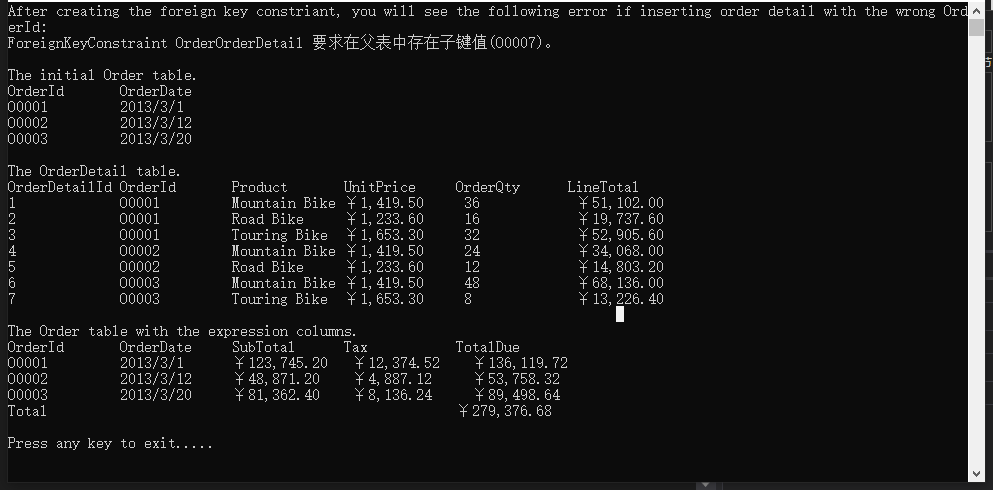
下面示例显示如何创建两个DataTable,并将他们添加到DataSet中
using System;

    using System.Data;

    class Program

    {

        static void Main(string[] args)

        {

            // Create two tables and add them into the DataSet

            DataTable orderTable = CreateOrderTable();

            DataTable orderDetailTable = CreateOrderDetailTable();

            DataSet salesSet = new DataSet();

            salesSet.Tables.Add(orderTable);

            salesSet.Tables.Add(orderDetailTable);

            // Set the relations between the tables and create the related constraint.

            salesSet.Relations.Add("OrderOrderDetail", orderTable.Columns["OrderId"], orderDetailTable.Columns["OrderId"], true);

            Console.WriteLine("After creating the foreign key constriant, you will see the following error if inserting order detail with the wrong OrderId: ");

            try

            {

                DataRow errorRow = orderDetailTable.NewRow();

                errorRow[0] = 1;

                errorRow[1] = "O0007";

                orderDetailTable.Rows.Add(errorRow);

            }

            catch (Exception e)

            {

                Console.WriteLine(e.Message);

            }

            Console.WriteLine();

            // Insert the rows into the table

            InsertOrders(orderTable);

            InsertOrderDetails(orderDetailTable);

            Console.WriteLine("The initial Order table.");

            ShowTable(orderTable);

            Console.WriteLine("The OrderDetail table.");

            ShowTable(orderDetailTable);

            // Use the Aggregate-Sum on the child table column to get the result.

            DataColumn colSub = new DataColumn("SubTotal", typeof(Decimal), "Sum(Child.LineTotal)");

            orderTable.Columns.Add(colSub);

            // Compute the tax by referencing the SubTotal expression column.

            DataColumn colTax = new DataColumn("Tax", typeof(Decimal), "SubTotal*0.1");

            orderTable.Columns.Add(colTax);

            // If the OrderId is 'Total', compute the due on all orders; or compute the due on this order.

            DataColumn colTotal = new DataColumn("TotalDue", typeof(Decimal), "IIF(OrderId='Total',Sum(SubTotal)+Sum(Tax),SubTotal+Tax)");

            orderTable.Columns.Add(colTotal);

            DataRow row = orderTable.NewRow();

            row["OrderId"] = "Total";

            orderTable.Rows.Add(row);

            Console.WriteLine("The Order table with the expression columns.");

            ShowTable(orderTable);

            Console.WriteLine("Press any key to exit.....");

            Console.ReadKey();

        }

        private static DataTable CreateOrderTable()

        {

            DataTable orderTable = new DataTable("Order");

            // Define one column.

            DataColumn colId = new DataColumn("OrderId", typeof(String));

            orderTable.Columns.Add(colId);

            DataColumn colDate = new DataColumn("OrderDate", typeof(DateTime));

            orderTable.Columns.Add(colDate);

            // Set the OrderId column as the primary key.

            orderTable.PrimaryKey = new DataColumn[] { colId };

            return orderTable;

        }

        private static DataTable CreateOrderDetailTable()

        {

            DataTable orderDetailTable = new DataTable("OrderDetail");

            // Define all the columns once.

            DataColumn[] cols ={

                                  new DataColumn("OrderDetailId",typeof(Int32)),

                                  new DataColumn("OrderId",typeof(String)),

                                  new DataColumn("Product",typeof(String)),

                                  new DataColumn("UnitPrice",typeof(Decimal)),

                                  new DataColumn("OrderQty",typeof(Int32)),

                                  new DataColumn("LineTotal",typeof(Decimal),"UnitPrice*OrderQty")

                              };

            orderDetailTable.Columns.AddRange(cols);

            orderDetailTable.PrimaryKey = new DataColumn[] { orderDetailTable.Columns["OrderDetailId"] };

            return orderDetailTable;

        }

        private static void InsertOrders(DataTable orderTable)

        {

            // Add one row once.

            DataRow row1 = orderTable.NewRow();

            row1["OrderId"] = "O0001";

            row1["OrderDate"] = new DateTime(2013, 3, 1);

            orderTable.Rows.Add(row1);

            DataRow row2 = orderTable.NewRow();

            row2["OrderId"] = "O0002";

            row2["OrderDate"] = new DateTime(2013, 3, 12);

            orderTable.Rows.Add(row2);

            DataRow row3 = orderTable.NewRow();

            row3["OrderId"] = "O0003";

            row3["OrderDate"] = new DateTime(2013, 3, 20);

            orderTable.Rows.Add(row3);

        }

        private static void InsertOrderDetails(DataTable orderDetailTable)

        {

            // Use an Object array to insert all the rows .

            // Values in the array are matched sequentially to the columns, based on the order in which they appear in the table.

            Object[] rows = {

                                 new Object[]{1,"O0001","Mountain Bike",1419.5,36},

                                 new Object[]{2,"O0001","Road Bike",1233.6,16},

                                 new Object[]{3,"O0001","Touring Bike",1653.3,32},

                                 new Object[]{4,"O0002","Mountain Bike",1419.5,24},

                                 new Object[]{5,"O0002","Road Bike",1233.6,12},

                                 new Object[]{6,"O0003","Mountain Bike",1419.5,48},

                                 new Object[]{7,"O0003","Touring Bike",1653.3,8},

                             };

            foreach (Object[] row in rows)

            {

                orderDetailTable.Rows.Add(row);

            }

        }

        private static void ShowTable(DataTable table)

        {

            foreach (DataColumn col in table.Columns)

            {

                Console.Write("{0,-14}", col.ColumnName);

            }

            Console.WriteLine();

            foreach (DataRow row in table.Rows)

            {

                foreach (DataColumn col in table.Columns)

                {

                    if (col.DataType.Equals(typeof(DateTime)))

                        Console.Write("{0,-14:d}", row[col]);

                    else if (col.DataType.Equals(typeof(Decimal)))

                        Console.Write("{0,-14:C}", row[col]);

                    else

                        Console.Write("{0,-14}", row[col]);

                }

                Console.WriteLine();

            }

            Console.WriteLine();

        }

    }
C# DataTable 类使用的更多相关文章
- C#操作DataTable类
一.DataTable简介 (1)构造函数 名称 说明 DataTable() 不带参数初始化DataTable 类的新实例 DataTable(string tableName) 用指定的表名初始 ...
- 【转载】C#的DataTable类Clone及Copy方法的区别
在C#中的Datatable类中,Clone方法和Copy方法都可以用来复制当前的DataTable对象,但DataTable类中的Clone方法和Copy方法还是有区别的,Clone方法只复制结构信 ...
- ADO.NET中DataTable类的使用
DataTable类将关系数据表示为表格形式.在创建DataTable之前,必须包含System.Data名称空间.ADO.NET提供了一个DataTable类来独立创建和使用数据表.它也可以和Dat ...
- DataTable类
DataTable是一个使用非常多的类,记得我在刚刚开始学习.Net的时候就已经了解并用过这个类,但如今再来看看,才发现这个类非常之复杂,复杂表现在哪些地方呢?主要是这个类与其他很多类都有关联,也就是 ...
- C#使用DataSet类、DataTable类、DataRow类、OleDbConnection类、OleDbDataAdapter类编写简单数据库应用
//注意:请使用VS2010打开以下的源代码. //源代码地址:http://pan.baidu.com/s/1j9WVR using System; using System.Collections ...
- NPOI将xls文件解析为DataTable类数据
using System; using System.Collections.Generic; using System.Linq; using System.Text; using System.I ...
- C# DataTable的詳細用法
转载别人的转载,原作者都不知道了 在项目中经常用到DataTable,如果DataTable使用得当,不仅能使程序简洁实用,而且能够提高性能,达到事半功倍的效果,现对DataTable的使用技巧进行一 ...
- 深入详解DataTable
在学习DataTable知识之前,我们有必要了解下ADO.NET.以下摘自MSDN: ADO.NET 对 Microsoft SQL Server 和 XML 等数据源以及通过 OLE DB 和 XM ...
- DataTable详解,以及dataview
原文地址:http://www.cnblogs.com/moss_tan_jun/archive/2010/09/20/1832131.html 得到DataTable 得到DataTable有许多方 ...
- DataTable使用技巧总结【转】
一.DataTable简介 ()构造函数 DataTable() 不带参数初始化DataTable 类的新实例. DataTable(string tableName) 用指定的表名初始化DataTa ...
随机推荐
- Coqui TTS合成语音
工具介绍 Coqui TTS是一个用于语音转文本的高性能深度学习模型库.提供1100种语言的预训练模型,提供训练新模型和微调已有模型的工具,提供数据集分析工具.XTTS-v2版本支持16种语言: En ...
- moectf2023的一些题
[moectf]GUI 这是一道win32窗口程序 找到线程的回调函数 sub_740C94这个函数里有很多函数,意义不明,实际并不会对输入的字符串做出改变 回调函数里下断点,然后单步动调 sub_7 ...
- C#日期类型转化总结【转化,农历,节气,星期】
转为日期类型 将8位日期字符串转换为日期格式 dateStr = "20220203"; System.IFormatProvider format=new System.Glob ...
- 怎么禁用 vscode 中点击 go 包名时自动打开浏览器跳转到 pkg.go.dev
本文引用怎么禁用 vscode 中点击 go 包名时自动打开浏览器跳转到 pkg.go.dev 在 vscode 设置项中配置 gopls 的 ui.navigation.importShortcut ...
- Kali Linux上安装Openvas 漏洞分析器
第一步:安装 apt-get update apt-get install openvas openvas-setup 第二步:自定义密码 openvas-stop #停止openvas服务 open ...
- 【报错解决】【Linux】Name or service not known
# 配置文件位置 /etc/sysconfig/network-scripts/ # nano ifcfg-eth0查看网卡配置,确认dns已配置,且网关已配置 在虚拟机中添加临时路由网关(要与物理主 ...
- 如何调整Linux系统为正确时区
如果你的 Linux 系统时区配置不正确,必需要手动调整到正确的当地时区.NTP 对时间的同步处理只计算当地时间与 UTC 时间的偏移量,因此配置一个 NTP 对时间进行同步并不能解决时区不正确的问题 ...
- Qt开源作品44-超级曲线图表
按照国际惯例,先吹吹牛,QCustomPlot这个开源图表组件,作者绝对是全宇宙Qt领域的天花板,设计的极其巧妙和精美,各种情况都考虑到了,将每个功能细分到不同的类,每个类负责管理自己的绘制和各种属性 ...
- Qt编写的项目作品10-本地摄像头综合应用示例
一.功能特点 同时支持 QCamera.ffmpeg.v4l2 三种内核解析本地摄像头. 提供函数 findCamera 自动搜索环境中的所有本地摄像头设备,搜索结果信号发出. 支持自动搜索和指定设备 ...
- 网页端IM通信技术快速入门:短轮询、长轮询、SSE、WebSocket
本文来自"糊糊糊糊糊了"的分享,原题<实时消息推送整理>,有优化和改动. 1.写在前面 对Web端即时通讯技术熟悉的开发者来说,我们回顾网页端IM的底层通信技术,从短轮 ...