
改造jsp项目的alert框和confirm框
背景
之前项目的模态框改造完成,业务也想把页面中的提示框和确认框也改造一下;这里记录一下改造中的细节。
之前项目中的提示框和确认框用的是浏览器自带的 alert 和 confirm。改造之前无法支持业务一些复杂一点的需求,遂将之改造;
实现
弹框层级设计参考了 element 和 antd,默认样式也是复用了他们的样式。层级从父到子如下所示
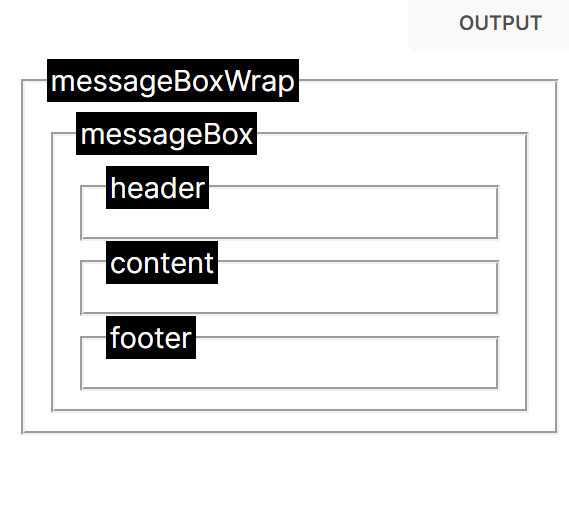
messageBoxWrap 是弹出框包裹层和遮罩层。messageBox 是弹出框本身,里面包含了标题,内容,按钮。
而且因为默认 confirm 框会有返回值,所以这里改造后的也就返回了一个 Promise,并且只会 resolve(true) 或者 resolve(false)。
// type 区分是 alert 还是 confirm

// paramSting 表示提示框的内容,项目中没有自定义标题的需求,所以这里提示框都用统一的标题

function showMessagebox(type, paramString) {

  //获取项目顶层的document,弹框显示需要覆盖顶层页面

  var topDoc = window.top.document;

  var mainFrameSet = topDoc.querySelector("#setMain");

  var mainFrameSetParent = mainFrameSet.parentNode;

  var topDocBody = window.top.document.body;

  //创建弹框盒子,添加遮罩层

  return new Promise((resolve, reject) => {

      // 具体实现

  });

}
注意事项
有几个注意的点是
- 创建弹框时需要禁用键盘事件,弹框消失后启用键盘事件,防止弹框还未消失,使用 tab+enter去了其他页面的情况
- 需要避免有一个弹框存在的情况下,重复点击创建弹框
然后是具体实现。
添加默认样式
/*弹框的默认样式;*/

var messageBoxWrap_class = "modernMessagebox";

var messageBoxWrap_style =

  "width:100%;height:100%;position:fixed;top:0;left:0;text-align:center;";

var messageBox_style =

  "user-select:none;display: inline-block;width: 420px;padding: 10px 0px 20px;vertical-align: middle;background-color: #fff;border-radius: 4px;border: 1px solid #ebeef5;font-size:18px;box-shadow: 0 2px 12px 0 rgba(0, 0, 0, .1);text-align: left;";

var header_style =

  "padding: 10px 16px 10px;font-size:14px;display:flex;justify-content: space-between;";

var content_style = "padding: 10px 15px;color: #606266;font-size: 14px;";

var footer_style = "padding: 5px 15px 0;text-align: right;";

var button_style =

  "display: inline-block;line-height: 1;wite-space: nowrap;cursor: pointer;background: #fff;border: 1px solid #dcdfe6;color: #606266;-webkit-appearance: none;text-align:center;box-sizing:border-box;outline:0;margin:0;transition:.1s;font-weight:500;padding:10px 16px;font-size:12px;border-radius:3px;";

var button_primary =

  "color: #fff;background: rgb(11, 87, 208);border: 1px solid rgb(11, 87, 208);border-radius: 20px 20px;";
创建 messageBoxWrap,添加遮罩层
var messageBoxWrap = document.createElement("div");

messageBoxWrap.setAttribute("tabindex", "-1"); // 设置使其不能通过tab键聚焦

messageBoxWrap.className = messageBoxWrap_class + Date.now(); // 每次弹框的类名都是唯一的

// 使 messageBoxWrap 覆盖在顶层 window 上

messageBoxWrap.style = messageBoxWrap_style + ";width:" + topDocBody.clientWidth + "px;";
创建 messageBox,添加 header,content,footer
1、创建messageBox
var messageBox = document.createElement("div");

messageBox.className = "messageBox";

messageBox.style = messageBox_style;
2、创建 header
//创建 header

var header = document.createElement("div");

header.className = "messageBox_header";

header.style = header_style;

var headerText = document.createElement("div");

headerText.textContent = "提示";

var headerBtn = document.createElement("div");

headerBtn.style = "cursor:pointer;text-align:right;";

headerBtn.textContent = "x";

headerBtn.onclick = function () {

  mainFrameSetParent.removeChild(messageBoxWrap);

  enableKeyboard();

};
当点击头部的关闭按钮时,在顶层文档对象(mainFrameSetParent)中移除弹框。这里 enableKeyboard
表示移除弹框后恢复键盘事件。因为有时候业务操作飞快,有时候因为电脑卡,弹框还没完全关闭,使用键盘操作去到了其他页面,导致弹框显示在了其他页面。
3、创建 content 包裹层
//创建 content 包裹层

var contentBox = document.createElement("div");

contentBox.className = "messageBox_content";

contentBox.style = content_style;

contentBox.textContent = paramString;
4、创建 footer
这里如果使 confirm 框,则多一个取消按钮
//创建 footer

var footer = document.createElement("div");

footer.className = "messageBox_footer";

footer.style = footer_style;

var yesBtn = document.createElement("button");

yesBtn.style = button_style + button_primary;

yesBtn.textContent = type === "confirm" ? "确认" : "确定";

yesBtn.onclick = function () {

  if (type === "alert") {

    if (currentAlertBoxCount > 0) {

      currentAlertBoxCount--;

    }

  }

  resolve(true);

  mainFrameSetParent.removeChild(messageBoxWrap);

  enableKeyboard(); // 关闭弹框后恢复键盘事件

};

if (type === "confirm") {

  var noBtn = document.createElement("button");

  noBtn.style =

    button_style + "margin-left: 10px;border-radius: 20px 20px;";

  noBtn.textContent = "取消";

  noBtn.onclick = function () {

    resolve(false);

    mainFrameSetParent.removeChild(messageBoxWrap);

    enableKeyboard(); // 关闭弹框后恢复键盘事件

  };

}

footer.appendChild(yesBtn);

if (type === "confirm") {

  footer.appendChild(noBtn);

}
5、将创建的弹框插入顶层文档
创建弹框时,使焦点聚焦到弹框,并且禁用键盘事件。
messageBox.appendChild(header);

messageBox.appendChild(contentBox);

messageBox.appendChild(footer);

messageBoxWrap.appendChild(messageBox);

//将创建好的弹框插入顶层 document

mainFrameSetParent.appendChild(messageBoxWrap);

messageBoxWrap.focus();

disableKeyboard();
6、页面调用弹出框
设置 currentAlertBoxCount 代表 alert 框的数量,避免同时出现多个弹框
var currentAlertBoxCount = 0;

async function modernConfirm(str) {

  return await showMessagebox("confirm", str);

}

async function modernAlert(str) {

  if(currentAlertBoxCount>0){

    return

  }

  currentAlertBoxCount++;

  return await showMessagebox("alert", str);

}
完整代码
/*弹框的默认样式;*/

var messageBoxWrap_class = "modernMessagebox";

var messageBoxWrap_style =

  "width:100%;height:100%;position:fixed;top:0;left:0;text-align:center;";

var messageBox_style =

  "user-select:none;display: inline-block;width: 420px;padding: 10px 0px 20px;vertical-align: middle;background-color: #fff;border-radius: 4px;border: 1px solid #ebeef5;font-size:18px;box-shadow: 0 2px 12px 0 rgba(0, 0, 0, .1);text-align: left;";

var header_style =

  "padding: 10px 16px 10px;font-size:14px;display:flex;justify-content: space-between;";

var content_style = "padding: 10px 15px;color: #606266;font-size: 14px;";

var footer_style = "padding: 5px 15px 0;text-align: right;";

var button_style =

  "display: inline-block;line-height: 1;wite-space: nowrap;cursor: pointer;background: #fff;border: 1px solid #dcdfe6;color: #606266;-webkit-appearance: none;text-align:center;box-sizing:border-box;outline:0;margin:0;transition:.1s;font-weight:500;padding:10px 16px;font-size:12px;border-radius:3px;";

var button_primary =

  "color: #fff;background: rgb(11, 87, 208);border: 1px solid rgb(11, 87, 208);border-radius: 20px 20px;";

var currentAlertBoxCount = 0;

//弹框时禁用键盘事件,弹框消失后启用键盘事件,防止弹框还未消失,使用 tab+enter去了其他页面的情况

let keyboardDisabled = false;

function disableKeyboard() {

  keyboardDisabled = true;

  document.addEventListener("keydown", handleKeyDown);

}

function enableKeyboard() {

  keyboardDisabled = false;

  document.removeEventListener("keydown", handleKeyDown);

}

function handleKeyDown(event) {

  if (keyboardDisabled) {

    event.preventDefau1t();

  }

}

// type 区分是 alert 还是 confirm

// paramSting 表示提示框的内容,项目中没有自定义标题的需求,所以这里提示框都用统一的标题

function showMessagebox(type, paramString) {

  //获取项目顶层的document,弹框显示需要覆盖顶层页面

  var topDoc = window.top.document;

  var mainFrameSet = topDoc.querySelector("#setMain");

  var mainFrameSetParent = mainFrameSet.parentNode;

  var topDocBody = window.top.document.body;

  //创建弹框盒子,添加遮罩层

  return new Promise((resolve, reject) => {

    var messageBoxWrap = document.createElement("div");

    messageBoxWrap.setAttribute("tabindex", "-1");

    messageBoxWrap.className = messageBoxWrap_class + Date.now();

    messageBoxWrap.style = messageBoxWrap_style + ";width:" + topDocBody.clientWidth + "px;";

    var messageBox = document.createElement("div");

    messageBox.className = "messageBox";

    messageBox.style = messageBox_style;

    //创建 header

    var header = document.createElement("div");

    header.className = "messageBox_header";

    header.style = header_style;

    var headerText = document.createElement("div");

    headerText.textContent = "提示";

    var headerBtn = document.createElement("div");

    headerBtn.style = "cursor:pointer;text-align:right;";

    headerBtn.textContent = "x";

    headerBtn.onclick = function () {

      mainFrameSetParent.removeChild(messageBoxWrap);

      enableKeyboard();

    };

    header.appendChild(headerText);

    header.appendChild(headerBtn);

    //创建 content 包裹层

    var contentBox = document.createElement("div");

    contentBox.className = "messageBox_content";

    contentBox.style = content_style;

    contentBox.textContent = paramString;

    //创建 footer

    var footer = document.createElement("div");

    footer.className = "messageBox_footer";

    footer.style = footer_style;

    var yesBtn = document.createElement("button");

    yesBtn.style = button_style + button_primary;

    yesBtn.textContent = type === "confirm" ? "确认" : "确定";

    yesBtn.onclick = function () {

      if (type === "alert") {

        if (currentAlertBoxCount > 0) {

          currentAlertBoxCount--;

        }

      }

      resolve(true);

      mainFrameSetParent.removeChild(messageBoxWrap);

      enableKeyboard();

    };

    if (type === "confirm") {

      var noBtn = document.createElement("button");

      noBtn.style =

        button_style + "margin-left: 10px;border-radius: 20px 20px;";

      noBtn.textContent = "取消";

      noBtn.onclick = function () {

        resolve(false);

        mainFrameSetParent.removeChild(messageBoxWrap);

        enableKeyboard();

      };

    }

    footer.appendChild(yesBtn);

    if (type === "confirm") {

      footer.appendChild(noBtn);

    }

    messageBox.appendChild(header);

    messageBox.appendChild(contentBox);

    messageBox.appendChild(footer);

    messageBoxWrap.appendChild(messageBox);

    //将创建好的弹框插入顶层 document

    mainFrameSetParent.appendChild(messageBoxWrap);

    messageBoxWrap.focus();

    disableKeyboard();

  });

}

async function modernConfirm(str) {

  return await showMessagebox("confirm", str);

}

async function modernAlert(str) {

  if(currentAlertBoxCount>0){

    return

  }

  currentAlertBoxCount++;

  return await showMessagebox("alert", str);

}
改造jsp项目的alert框和confirm框的更多相关文章
- jquery仿alert提示框、confirm确认对话框、prompt带输入的提示框插件[附实例演示]
jquery仿alert提示框.confirm确认对话框.prompt带输入的提示框插件实例演示 第一步:引入所需要的jquery插件文件: http://www.angelweb.cn/Inc/eg ...
- 如何在我自己的web 项目的jsp页面中添加链接,直接让别人通过内网在我的电脑上下载文件
今天接到一个任务,将昨天年会的视频,音频,图片等放在公司自己的服务器上,使连接同一个路由器的(即同一个内网)的同事可以通过内网下载视频(通过内网下载,可以提高下载速度). 备注:本次用的是tomcat ...
- 一个电商项目的Web服务化改造
一个电商项目的Web服务化改造 项目,早期是随便瞎做的,没啥架构,连基本的设计也没. 有需求,实现需求,再反复修改. 大致就是这么做的. 最近,项目要重新架构,和某boss协商的结果是,采用阿里开源的 ...
- 为什么项目的jar包会和tomcat的jar包冲突?
为什么项目的jar包会和tomcat的jar包冲突? 碰到这个问题,猜测tomcat启动时会将自己的lib和项目的lib在逻辑上归并为一个大的lib,但是并没有做版本区分以及去重,这样相同的包可能就有 ...
- Eclipse中修改Web项目的URL访问路径
背景 访问路径,也就是指在浏览器中访问该web系统时的根路径,比如http://localhost:8080/xxxx/index.jsp 这里的xxxx,也就是request.getContext ...
- Unity中加入Android项目的Build步骤
转载请注明本文出自大苞米的博客(http://blog.csdn.net/a396901990),谢谢支持! 简介: 有的项目需要在Android中加入Unity功能,例如ANDROID应用中嵌入Un ...
- Eclipse 启动Tomcat后web项目的classes的子文件夹中没有calss文件
Eclipse 启动Tomcat后web项目的classes的子文件夹中没有calss文件. 经网上查得以下方法可解决 把properties属性里的java compiler-->buildi ...
- 干货|人人都是翻译项目的Master
在平时的工作中,我们都会经常查阅一些英文文档来解决平时遇到的问题和拓宽视野.看到好的文章或者书籍有没有想要和小伙伴分享的冲动,那么我们一起来翻译吧- 翻译主张 "信 达 雅" .& ...
- Tomcat下使用C3P0配置JNDI数据源(在项目的META-INF目录下创建context.xml的文件)
一.C3P0下载 C3P0下载地址:http://sourceforge.net/projects/c3p0/files/?source=navbar 下载完成之后得到一个压缩包
- Android项目的targetSDK>=23,在低于Android6.0的部分测试机(类似华为)上运行时出现的系统权限问题
相信大家对Android6.0以上的动态权限已经有所了解,很多童鞋也已经跃跃欲试地将自己项目的targetSDK升级到了23及其以上,很不幸的是我也成为了其中一员,然而我还是图样图森破了,升级之后的问 ...
随机推荐
- K8S基本概念和组件
特点 便携性 无论公有云.私有云.混合云还是多云架构都全面支持 可扩展 模块化.可插拔.可挂载.可组合,支持各种形式的扩展 自修复 自保持应用状态.自重启.自复制.自缩放,声明式语法 组件 etcd ...
- C#/.NET/.NET Core技术前沿周刊 | 第 32 期(2025年3.24-3.31)
前言 C#/.NET/.NET Core技术前沿周刊,你的每周技术指南针!记录.追踪C#/.NET/.NET Core领域.生态的每周最新.最实用.最有价值的技术文章.社区动态.优质项目和学习资源等. ...
- 测试工作中用到的MongoDB命令
1.远程连接MongoDB mongo host:port/dbname (host和port根据自己需要修改) 连接成功页面如下: 2.显示所有数据库 show dbs 3.切换到oversea-a ...
- 🎀SpringBoot启动创建系统托盘及功能
简介 SpringBoot启动时,创建系统托盘,提供打开主程序及退出功能. 实现 启动类添加构造函数 public TjtoolApplication() { initUI(); } private ...
- windows里的一些常用的dos命令
--------------------------------------------- 1. 中断命令执行 Ctrl + Z 2. 文件/目录 cd 切换目录 例:cd // 显示当前目录 ...
- 题解:CF280B Maximum Xor Secondary
由于正求次大值比较困难,不如逆向思考. 由次大值来找最大值,即对于每个 iii,找到一个 jjj,满足 j<ij<ij<i 并且 ai<aja_i<a_jai<a ...
- LLM Agent的构建:OpenAI官方指南解读
本文是对 OpenAI 近期发布的<A Practical Guide to Building Agents>的读后感与总结 Agent火爆的背景 大型语言模型(LLM)处理复杂.多步骤任 ...
- ArcGIS Desktop 10.7 完美汉化安装教程
1,下载文件并解压缩,双击[Esri ArcGIS Desktop v10.7.0.exe] 2.在安装向导中选择[Next] 3.选中[I accept the master agreement]我 ...
- P6790 [SNOI2020] 生成树 题解
感觉很多题解都说的不是很清楚?如何将三操作与二操作合并起来一起处理好像都没有提到.(也有可能是我太菜了,看了半天才懂) 思路 考虑这个图一定是一个广义串并联图.为什么呢? 广义串并联图的定义是不存在一 ...
- Python 潮流周刊#102:微软裁员 Faster CPython 团队(摘要)
本周刊由 Python猫 出品,精心筛选国内外的 250+ 信息源,为你挑选最值得分享的文章.教程.开源项目.软件工具.播客和视频.热门话题等内容.愿景:帮助所有读者精进 Python 技术,并增长职 ...