
继续聊WPF——动态数据模板
我为啥称之为“动态数据模板”?先看看下面的截图,今天,我们就是要实现这种功能。
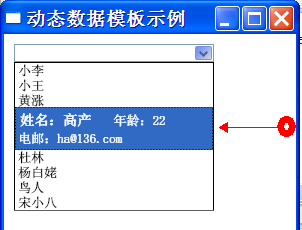
大概是这样的,我们定义的DataTemplate是通过触发器动态应用到 ComboBoxItem 上。
- public class Person
- {
- public string Name { get; set; }
- public int Age { get; set; }
- public string Email { get; set; }
- public override string ToString()
- {
- return Name;
- }
- }
- <Window.Resources>
- <!--
- 当项高亮显示时使用的数据模板
- -->
- <DataTemplate x:Key="hightlightTmp">
- <Grid>
- <Grid.RowDefinitions>
- <RowDefinition Height="auto"/>
- <RowDefinition Height="auto"/>
- </Grid.RowDefinitions>
- <StackPanel Margin="0,5,0,0" Grid.Row="0" Orientation="Horizontal">
- <TextBlock Margin="2,0" FontWeight="Bold" FontSize="14">
- <TextBlock.Text>
- <Binding Path="Name"
- StringFormat="姓名:{0}"/>
- </TextBlock.Text>
- </TextBlock>
- <TextBlock Margin="20,0">
- <TextBlock.Text>
- <Binding Path="Age"
- StringFormat="年龄:{0}"/>
- </TextBlock.Text>
- </TextBlock>
- </StackPanel>
- <TextBlock Margin="0,2,0,5" Grid.Row="1">
- <TextBlock.Text>
- <Binding Path="Email"
- StringFormat="电邮:{0}"/>
- </TextBlock.Text>
- </TextBlock>
- </Grid>
- </DataTemplate>
- ..............
- </Window.Resources>
- <Window.Resources>
- ................
- <!-- 项样式 -->
- <Style x:Key="cmbStyle" TargetType="{x:Type ComboBoxItem}">
- <Style.Triggers>
- <Trigger Property="IsHighlighted" Value="True">
- <Setter Property="ContentTemplate"
- Value="{StaticResource hightlightTmp}"/>
- </Trigger>
- </Style.Triggers>
- </Style>
- </Window.Resources>
- <Grid>
- <ComboBox x:Name="cmb" Margin="10,10"
- Height="24" Width="200"
- HorizontalAlignment="Left"
- VerticalAlignment="Top"
- ItemContainerStyle="{StaticResource cmbStyle}"/>
- </Grid>
- public Window1()
- {
- InitializeComponent();
- this.cmb.ItemsSource = new Person[]
- {
- new Person{Name="小李",Age=22,Email="suk211@163.com"},
- new Person{Name="小王",Age=20,Email="minat@126.com"},
- new Person{Name="黄涨",Age=21,Email="laned2@21cn.com"},
- new Person{Name="高产",Age=22,Email="ha@136.com"},
- new Person{Name="杜林",Age=21,Email="null@yaahoo.com"},
- new Person{Name="杨白姥",Age=50,Email="cYang@21cn.com"},
- new Person{Name="鸟人",Age=31,Email="bgl@ask.net.cn"},
- new Person{Name="宋小八",Age=28,Email="xde227@123h.com"}
- };
- }
继续聊WPF——动态数据模板的更多相关文章
- WPF 动态更换模板
Window x:Class="模板选择器.MainWindow" xmlns="http://schemas.microsoft.com/winfx/2006/xaml ...
- WPF 寻找数据模板中的元素
<Window x:Class="Wpf180706.Window11" xmlns="http://schemas.microsoft.com/wi ...
- 转载 WPF -- 控件模板 (ControlTemplate)(一) https://blog.csdn.net/qq_23018459/article/details/79899838
ControlTemplate(控件模板) https://blog.csdn.net/qq_23018459/article/details/79899838 WPF包含数据模板和控件模板,其中 ...
- [WPF系列]-数据邦定之DataTemplate 根据对象属性切换模板
引言 书接上回[WPF系列-数据邦定之DataTemplate],本篇介绍如何根据属性切换模板(DataTemplate) 切换模板的两种方式: 使用DataTemplateSelecto ...
- WPF中的数据模板使用方式之一:ContentControl、ContentTemplate和TemplateSelector的使用
在WPF中,数据模板是非常强大的工具,他是一块定义如何显示绑定的对象的XAML标记.有两种类型的控件支持数据模板:(1)内容控件通过ContentTemplate属性支持数据模板:(2)列表控件通过I ...
- WPF 动态列(DataGridTemplateColumn) 绑定数据 (自定义控件)对象绑定
原文:WPF 动态列(DataGridTemplateColumn) 绑定数据 (自定义控件)对象绑定 WPF 动态列(DataGridTemplateColumn) 绑定数据 (自定义控件) 上面的 ...
- WPF 后台获得 数据模板里的内容控件(DataTemplate)
原文:WPF 后台获得 数据模板里的内容控件(DataTemplate) 假如 <Window.Resources> 里 有一个 Datatemplate 我想获得TextBlo ...
- WPF的ComboBox 数据模板自定义
WPF的ComboBox 有些时候不能满足用户需求,需要对数据内容和样式进行自定义,下面就简要介绍一下用数据模板(DataTemplate)的方式对ComboBox 内容进行定制: 原型设计如下: 步 ...
- WPF中的数据模板(DataTemplate)(转)
原文地址 http://www.cnblogs.com/zhouyinhui/archive/2007/03/30/694388.html WPF中的数据模板(DataTemplate) ...
随机推荐
- 使用webpack构建本地服务器
想不想让你的浏览器监听你的代码的修改,并自动刷新显示修改后的结果,其实Webpack提供一个可选的本地开发服务器,这个本地服务器基于node.js构建,可以实现你想要的这些功能,不过它是一个单独的组件 ...
- nginx监听相同端口,根据域名请求不同的server
nginx监听相同端口,根据域名请求不同的server 学习了:https://blog.csdn.net/liaosiqian/article/details/54861270 注意其中用的是rew ...
- TestNG+Maven+IDEA环境搭建
TestNG+Maven+IDEA环境搭建 前言: 主要进行TestNG测试环境的搭建 所需环境: 1.IDEA UItimate 2.JDK 3.Maven 一.创建工程 File –>new ...
- Unity Android && Ant Automate Build 之一
这几天抽空研究下Android SDK 自动化打包.顺便温习下Unity 与 Android 交互机制. 一.Unity 与 Android 的 消息传递机制 Example: 导出 Android ...
- Python趣味实用小工具
代码地址如下:http://www.demodashi.com/demo/12918.html python 趣味实用小工具 概述 用python实现的三个趣味实用小工具: 图片转Execl工具 , ...
- iOS开发-Swift获取手机设备信息(UIDevice)
使用UiDevice获取设备信息 获取设备名称 let name = UIDevice.currentDevice().name 获取设备系统名称 let systemName = UIDevice. ...
- HttpClient POST 的 UTF-8 编码问题
http://www.360doc.com/content/09/0915/15/61497_6003890.shtml不 过在实际使用中, 还是发现按照最基本的方式调用 HttpClient 时, ...
- linux 网络性能优化
最近在对程序进行调优,涉及到了网络通信,学习了一下对网络调优的方法,网上的资料很多,针对软件优化方面,大体上主要有两种方式:一是网卡参数,另一个是内核参数. 一. 网卡参数优化 针对网卡参数优化,需要 ...
- php中的可变变量、可变函数、匿名函数
1.可变变量 简而言之:获取一个普通变量的值作为这个可变变量的变量名. 如: $a = "hello"; $$a = " world"; /* $a 的值为&q ...
- Phaser实现源代码剖析
Phaser是一个能够反复利用的同步栅栏.功能上与CyclicBarrier和CountDownLatch相似,只是提供更加灵活的使用方法.也就是说,Phaser的同步模型与它们几乎相同. 一般运用的 ...