
iOS原生推送(APNS)进阶iOS10推送图片、视频、音乐
前言
我们首先要在AppDelegate里面进行iOS的适配,可以参考这篇文章
iOS原生推送(APNS)的实现,
如果已经适配过了请忽略。
程序实现
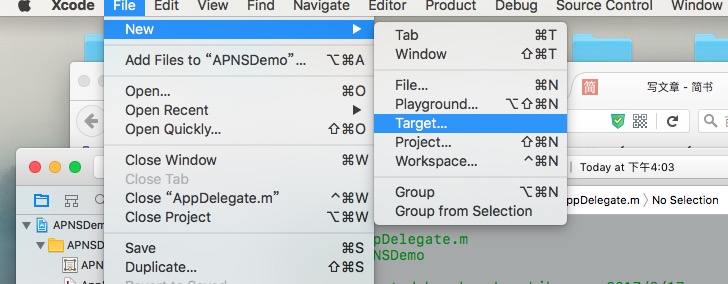
Xcode打开项目,File-->New-->Target;
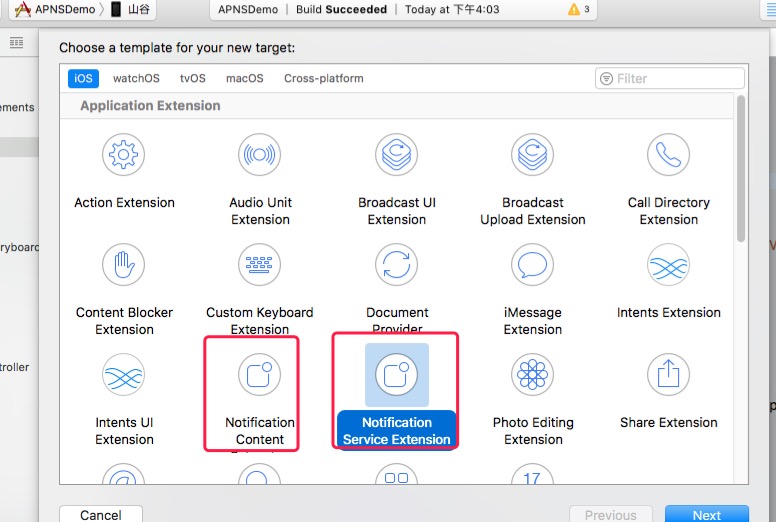
然后分别选UNNotificationServiceExtension、UNNotificationContent创建Target;
然后在UNNotificationServiceExtension的- (void)didReceiveNotificationRequest:(UNNotificationRequest *)request withContentHandler:(void (^)(UNNotificationContent * _Nonnull))contentHandler {}方法中添加下面的代码;
NSMutableArray *actionMutableArr = [[NSMutableArray alloc] initWithCapacity:1];

UNNotificationAction * actionA  =[UNNotificationAction actionWithIdentifier:@"ActionA" title:@"不感兴趣" options:UNNotificationActionOptionAuthenticationRequired];

UNNotificationAction * actionB = [UNNotificationAction actionWithIdentifier:@"ActionB" title:@"不感兴趣" options:UNNotificationActionOptionDestructive];

UNNotificationAction * actionC = [UNNotificationAction actionWithIdentifier:@"ActionC" title:@"进去瞅瞅" options:UNNotificationActionOptionForeground];

UNTextInputNotificationAction * actionD = [UNTextInputNotificationAction actionWithIdentifier:@"ActionD" title:@"作出评论" options:UNNotificationActionOptionDestructive textInputButtonTitle:@"send" textInputPlaceholder:@"say some thing"];

[actionMutableArr addObjectsFromArray:@[actionA,actionB,actionC,actionD]];

if (actionMutableArr.count) {

UNNotificationCategory * notficationCategory = [UNNotificationCategory categoryWithIdentifier:@"categoryNoOperationAction" actions:actionMutableArr intentIdentifiers:@[@"ActionA",@"ActionB",@"ActionC",@"ActionD"] options:UNNotificationCategoryOptionCustomDismissAction];

[[UNUserNotificationCenter currentNotificationCenter] setNotificationCategories:[NSSet setWithObject:notficationCategory]];

}
上面的方法是添加推送消息下面的事件(进入应用查看,取消查看,快捷回复)的,如果你的应用不需要可以忽略;
self.contentHandler = contentHandler;
self.bestAttemptContent = [request.content mutableCopy];
self.bestAttemptContent.categoryIdentifier = @"categoryNoOperationAction";
// Modify the notification content here...
// self.bestAttemptContent.title = [NSString stringWithFormat:@"点击查看更多内容"];
NSDictionary *dict = self.bestAttemptContent.userInfo;
// NSDictionary *notiDict = dict[@"aps"];
NSString *mediaUrl = [NSString stringWithFormat:@"%@",dict[@"media"][@"url"]];
NSLog(@"%@",mediaUrl);
if (!mediaUrl.length) {
self.contentHandler(self.bestAttemptContent);
}
[self loadAttachmentForUrlString:mediaUrl withType:dict[@"media"][@"type"] completionHandle:^(UNNotificationAttachment *attach) {
if (attach) {
self.bestAttemptContent.attachments = [NSArray arrayWithObject:attach];
}
self.contentHandler(self.bestAttemptContent);
}];
//处理视频,图片的等多媒体

- (void)loadAttachmentForUrlString:(NSString *)urlStr

withType:(NSString *)type

completionHandle:(void(^)(UNNotificationAttachment *attach))completionHandler{

__block UNNotificationAttachment *attachment = nil;

NSURL *attachmentURL = [NSURL URLWithString:urlStr];

NSString *fileExt = [self fileExtensionForMediaType:type];

NSURLSession *session = [NSURLSession sessionWithConfiguration:[NSURLSessionConfiguration defaultSessionConfiguration]];

[[session downloadTaskWithURL:attachmentURL

completionHandler:^(NSURL *temporaryFileLocation, NSURLResponse *response, NSError *error) {

if (error != nil) {

NSLog(@"%@", error.localizedDescription);

} else {

NSFileManager *fileManager = [NSFileManager defaultManager];

NSURL *localURL = [NSURL fileURLWithPath:[temporaryFileLocation.path stringByAppendingString:fileExt]];

[fileManager moveItemAtURL:temporaryFileLocation toURL:localURL error:&error];

NSError *attachmentError = nil;

attachment = [UNNotificationAttachment attachmentWithIdentifier:@"" URL:localURL options:nil error:&attachmentError];

if (attachmentError) {

NSLog(@"%@", attachmentError.localizedDescription);

}

}

completionHandler(attachment);

}] resume];

}

- (NSString *)fileExtensionForMediaType:(NSString *)type {

NSString *ext = type;

if ([type isEqualToString:@"image"]) {

ext = @"jpg";

}

if ([type isEqualToString:@"video"]) {

ext = @"mp4";

}

if ([type isEqualToString:@"audio"]) {

ext = @"mp3";

}

return [@"." stringByAppendingString:ext];

}
上面的这两段代码是当推送消息来了后,我们将mdeia下的url内的文件下载到本地,然后将路径交给系统,进而实现推送多媒体文件的目的;
这里说一下必须注意的两个坑、个坑、坑:
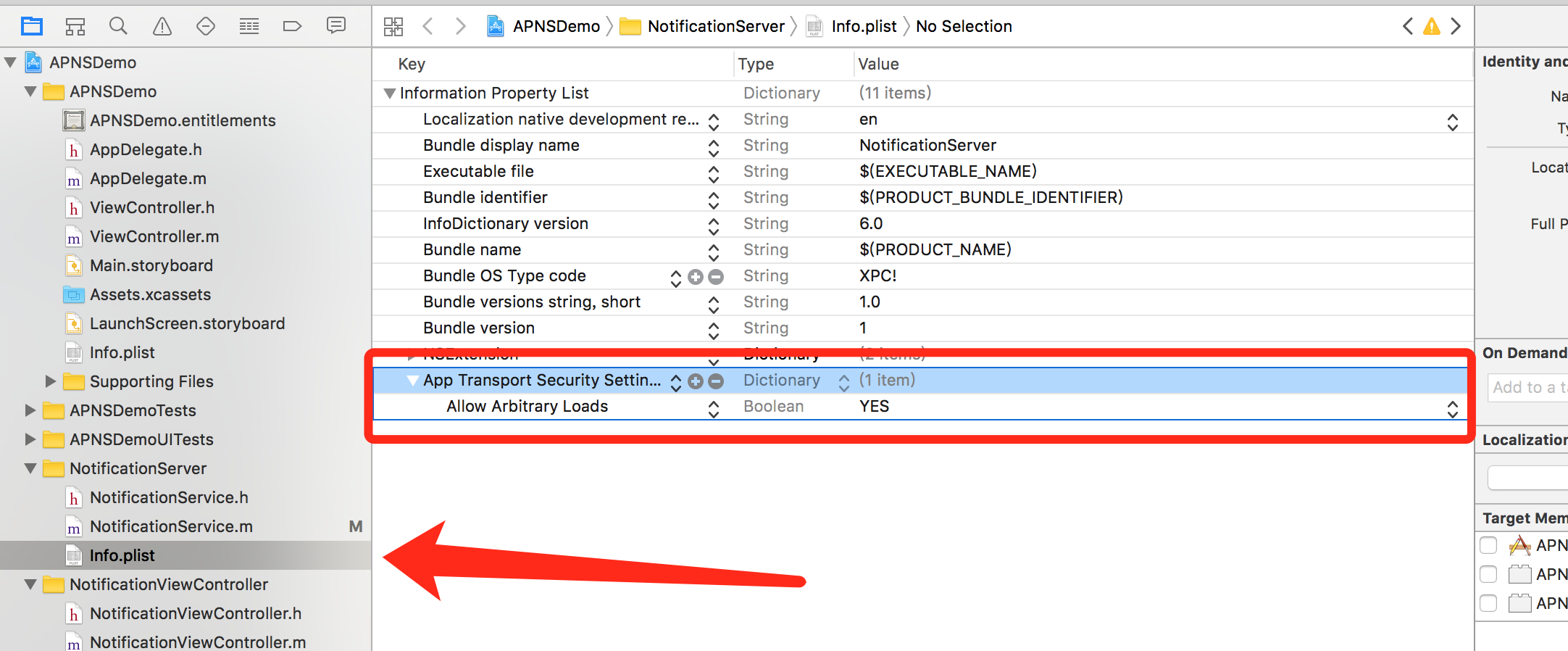
1.将UNNotificationServiceExtension中的pilst文件中添加
(1)在Info.plist中添加NSAppTransportSecurity类型Dictionary。
(2)在NSAppTransportSecurity下添加NSAllowsArbitraryLoads类型Boolean,值设为YES
这是因为从iOS9开始苹果不允许直接http访问,加上这两个字段就可以访问http,如果你不添加,只有你推送https的media文件才能被下载,http则不能被下载;
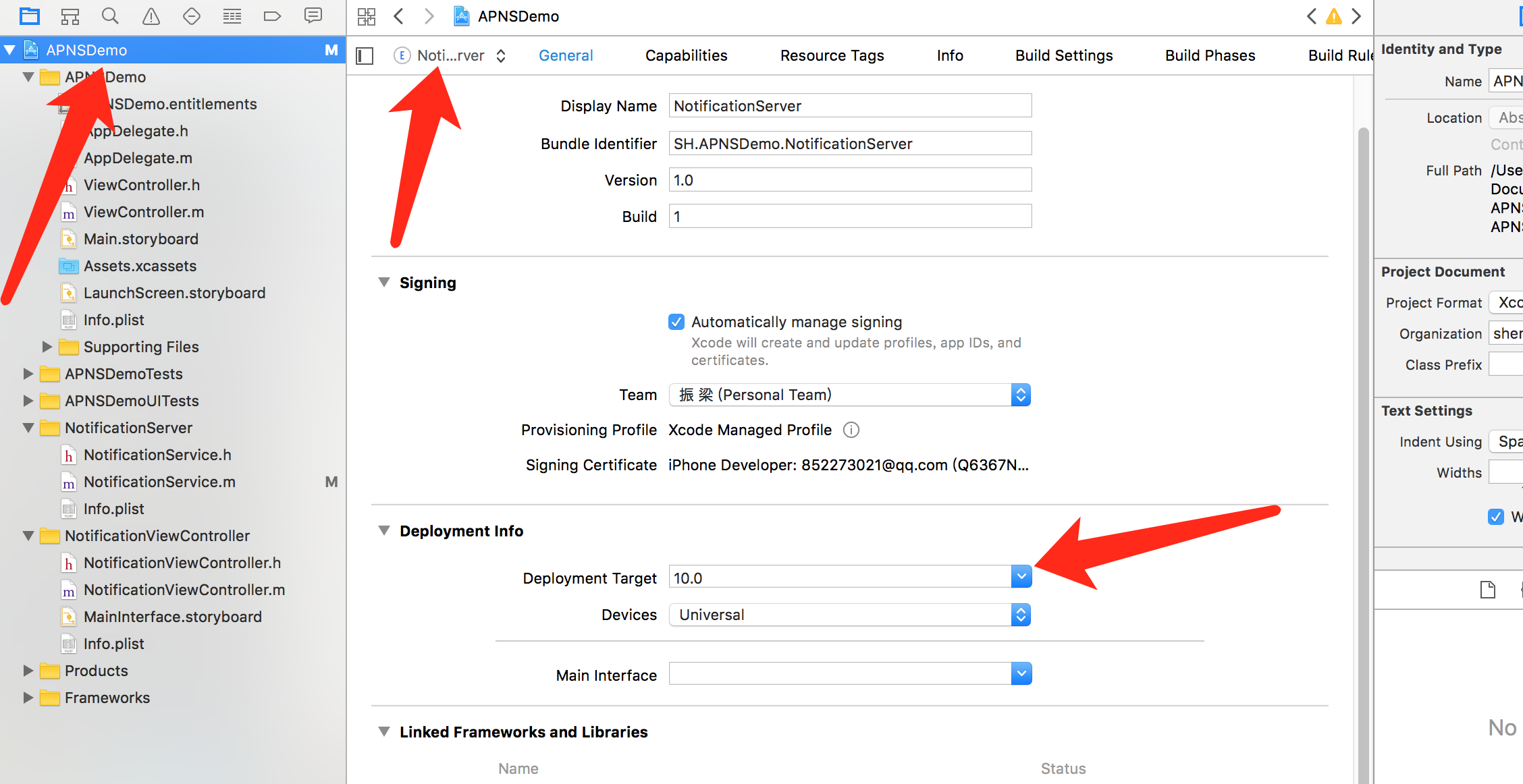
2.选中工程---> UNNotificationServiceExtension所对应的Target-->Deploy Target设置为iOS10,因为是从iOS10才支持推送多媒体文件,它默认是从当前Xocde支持的最高版本,比如小编的手机版本iOS10.0.2,它默认是iOS 10.2.0.刚开始小编没有修改,推送死活出不来图片,只有文字;后台检查才发现这里是从iOS 10.2.0支持的,心中一万个草泥马崩腾而过;
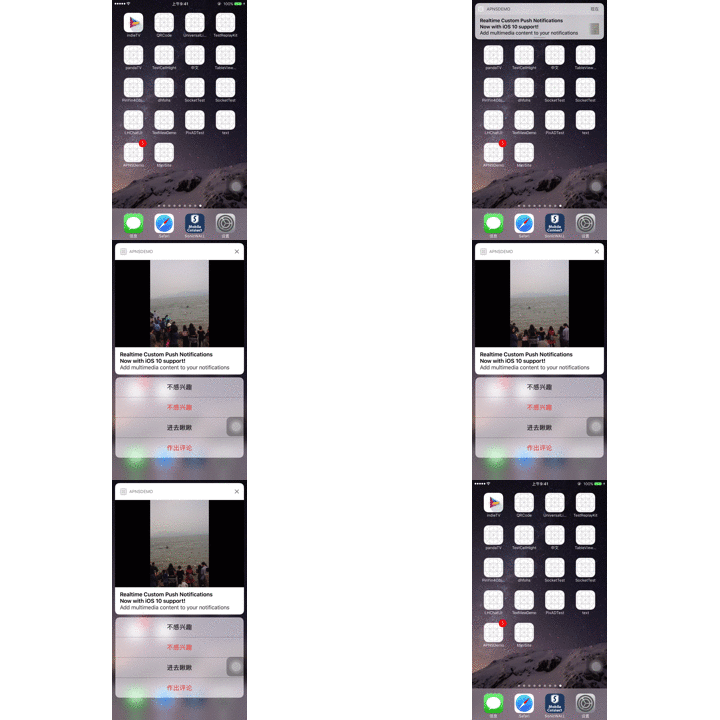
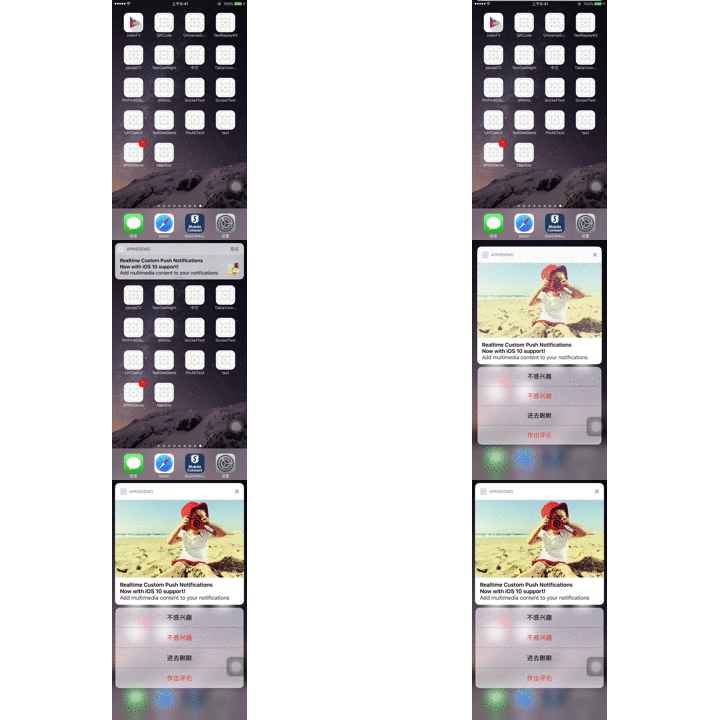
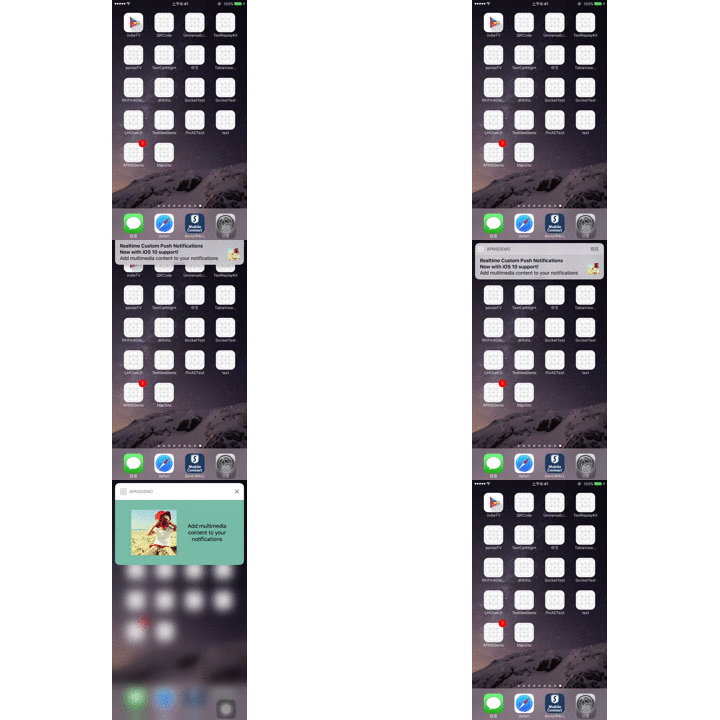
忙活了这么多还是看一下效果吧,我只做了图片与视频,声音应该差别不大。
推送视频效果图
推送图片效果图
自定义推送的UI
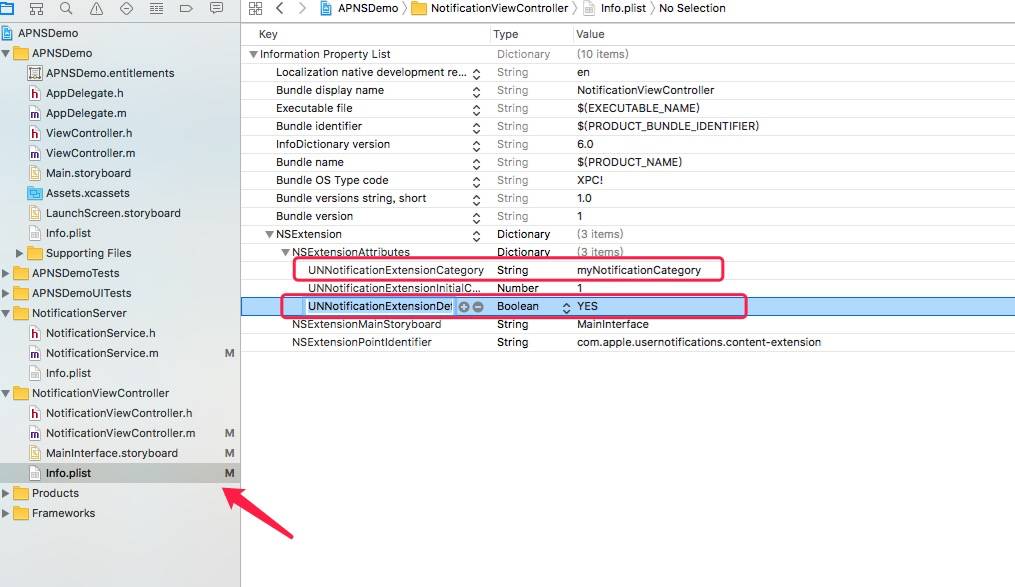
1、在UNNotificationServiceExtension的- (void)didReceiveNotificationRequest:(UNNotificationRequest *)request withContentHandler:(void (^)(UNNotificationContent * _Nonnull))contentHandler方法内为self.bestAttemptContent添加categoryIdentifier
self.bestAttemptContent.categoryIdentifier = @"myNotificationCategory";
然后将这个categoryIdentifier粘贴在UNNotificationContent的infoplist内NSExtension-->NSExtensionAttributes-->UNNotificationExtensionCategory的字段内;然后在下面在添加一个字段UNNotificationExtensionDefaultContentHidden设置bool值为YES,这里是隐藏系统的UI;
- 在上面的下载多媒体文件的- (void)loadAttachmentForUrlString:(NSString *)urlStr withType:(NSString *)type completionHandle:(void(^(UNNotificationAttachment *attach))completionHandler;方法内添加
NSMutableDictionary * dict = [self.bestAttemptContent.userInfo mutableCopy];

[dict setObject:[NSData dataWithContentsOfURL:localURL] forKey:@"image"];

self.bestAttemptContent.userInfo = dict;
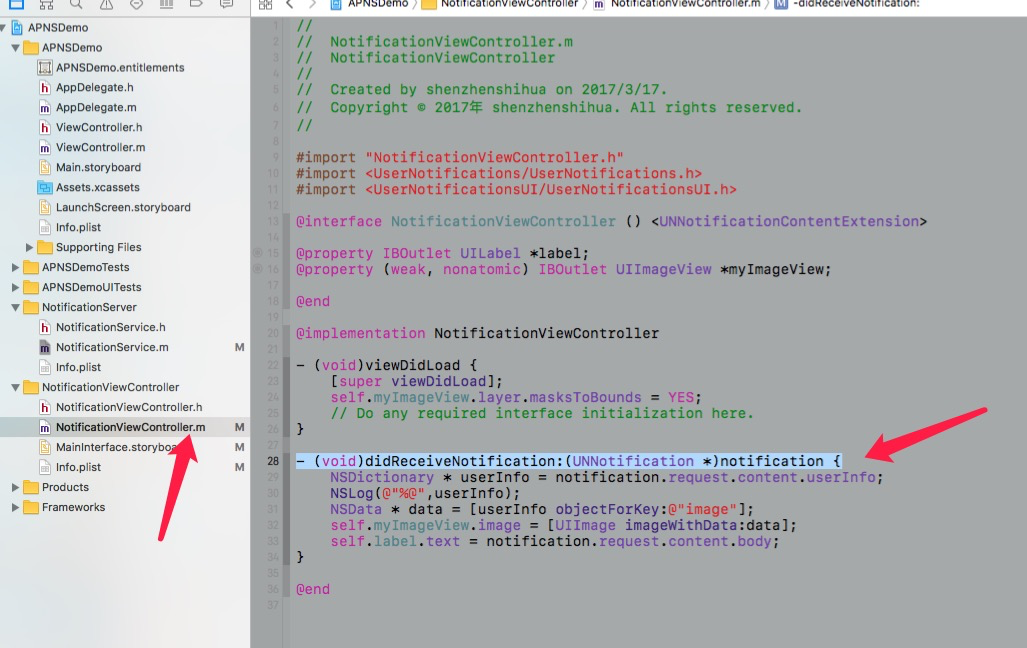
我这里是将图片的Data数据放到推送的userInfo里面,然后在自定义UI的UNNotificationContent内获取这个Date,然后加载UI;
3、 在UNNotificationContent的maininterface.storyboard内部将UI做好,然后在UNNotificationContent的- (void)didReceiveNotification:(UNNotification *)notification ;方法内进行UI加载。
UI运行效果
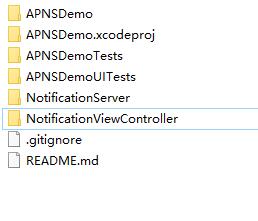
项目结构图
 iOS原生推送(APNS)进阶iOS10推送图片、视频、音乐
注:本文著作权归作者,由demo大师代发,拒绝转载,转载需要作者授权
iOS原生推送(APNS)进阶iOS10推送图片、视频、音乐的更多相关文章
- iOS开发 iOS10推送必看
iOS10更新之后,推送也是做了一些小小的修改,下面我就给大家仔细说说.希望看完我的这篇文章,对大家有所帮助. 一.简单入门篇---看完就可以简单适配完了 相对简单的推送证书以及环境的问题,我就不在这 ...
- iOS的推送机制APNs:本地推送&远程推送
本地推送: 本地推送主要应用在备忘录,闹钟等本地的,基于时间定时的消息提醒.本篇不做详细描述. 远程推送:APNS(苹果推送通知服务) iOS远程推送机制的原理及流程: 注册推送(橙色部分):若该Ap ...
- iOS 消息推送(APNs) 傻瓜式教程
也可以去我的简书页面查看这篇文章 首先: 1.做iOS消息推送需要真机测试 2.做iOS消息推送需要有付费的开发者账号 是否继续看帖? 先学习一下相关的知识吧! 因为中途可能会遇到一些问题,这篇文章或 ...
- iOS10推送必看UNNotificationServiceExtension
转:http://www.cocoachina.com/ios/20161017/17769.html (收录供个人学习用) iOS10推送UNNotificationServic 招聘信息: 产品经 ...
- iOS10 推送通知详解(UserNotifications)
iOS10新增加了一个UserNotificationKit(用户通知框架)来整合通知相关的API,UserNotificationKit框架增加了很多令人惊喜的特性: 更加丰富的推送内容:现在可以设 ...
- iOS10 推送通知 UserNotifications
简介 新框架 获取权限 获取用户设置 注册APNS,获取deviceToken 本地推送流程 远程推送流程 通知策略(Category+Action) 附件通知 代理回调 简介 iOS10新增了Use ...
- IOS 推送消息 php做推送服务端
IOS推送消息是许多IOS应用都具备的功能,最近也在研究这个功能,参考了很多资料终于搞定了,下面就把步骤拿出来分享下: iOS消息推送的工作机制可以简单的用下图来概括: Provider是指某个iPh ...
- .NET向APNS苹果消息推送通知
一.Apns简介: Apns是苹果推送通知服务. 二.原理: APNs会对用户进行物理连接认证,和设备令牌认证(简言之就是苹果的服务器检查设备里的证书以确定其为苹果设备):然后,将服务器的信息接收并且 ...
- Easy APNs Provider 消息推送测试工具
1.Easy APNs Provider 简介 Easy APNs Provider 是一款为 iOS.Mac App 提供推送测试的小工具. App Store 下载地址 Easy APNs Pro ...
随机推荐
- AC日记——绿豆蛙的归宿 codevs 2488
绿豆蛙的归宿 思路: topsort+期望dp: 代码: #include <cstdio> #include <cstring> #include <iostream& ...
- Java的Hashtable类(转)
文章来源:http://blog.csdn.net/zhna123_2011/article/details/6741479 ps:直接copy 哈希表是一种重要的存储方式,也是一种常见的检索方法.其 ...
- Java 反射调用的一种优化
写一些Java框架的时候,经常需要通过反射get或者set某个bean的field,比较普通的做法是获取field后调用java.lang.reflect.Field.get(Object),但每次都 ...
- [ZOJ3522]Hide and seek
题意:给一棵带边权的树,多次询问$(x,y,l)$表示如果加一条连接$x$和$y$的长为$l$的边,所有点到$x$和到$y$的最短路减少了多少 先把题目中的图放上来(雾 考虑用lct维护,先把路径提出 ...
- 【kruscal】【最小生成树】poj2421 Constructing Roads
SB题,求最小生成树,其中有些边已经给您建好啦. 随意暴力即可. #include<cstdio> #include<algorithm> #include<cstrin ...
- python3开发进阶-Django框架的中间件的五种用法和逻辑过程
阅读目录 什么是中间件 中间件的执行流程 中间件的逻辑过程 一.什么是中间件? 官方的说法:中间件是一个用来处理Django的请求和响应的框架级别的钩子.它是一个轻量.低级别的插件系统,用于在全局范围 ...
- 会话对应的线程id
http://blog.csdn.net/sqlserverdiscovery/article/details/7968117
- 谁说 JavaScript 很简单了?
转载请注明出处,保留原文链接以及作者信息 本文介绍了 JavaScript 初学者应该知道的一些技巧和陷阱.如果你是老司机,就当做回顾了,哪里有写的不好的地方欢迎指出. 1. 你是否尝试过对一个数字数 ...
- easyUI中datagrid控制获取指定行数的数据
直接上代码: var rows=$('#detail').datagrid('getRows');//获取所有当前加载的数据行 var row=rows[0];// 行数从 0 开始 项目中代码: v ...
- android 电话薄先10位匹配,若是无法匹配,则换成7位匹配
案例 1: 假设您保存的有:A:04165191666. B:5191666. 来电号码是:04165191666 由于是7位匹配,所以A和B都能够匹配到.可是最佳匹配还是A,最后显示A: 来电 ...