
android——相对布局,表格布局
1.相对布局
RelativeLayout 又称作相对布局,也是一种非常常用的布局。和LinearLayout 的排列规则不同,RelativeLayout 显得更加随意一些,它可以通过相对定位的方式让控件出现在布局的任何位置。也正因为如此,RelativeLayout 中的属性非常多,不过这些属性都是有规律可循的,其实并不难理解和记忆。
<RelativeLayout xmlns:android="http://schemas.android.com/apk/res/android"

android:layout_width="match_parent"

android:layout_height="match_parent" >

<Button

android:id="@+id/button1"

android:layout_width="wrap_content"

android:layout_height="wrap_content"

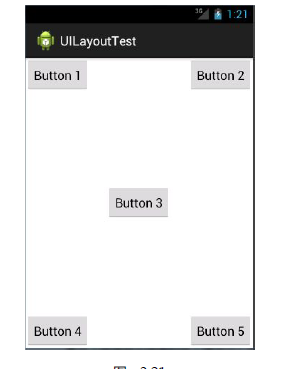
android:layout_alignParentLeft="true"

android:layout_alignParentTop="true"

android:text="Button 1" />

<Button

android:id="@+id/button2"

android:layout_width="wrap_content"

android:layout_height="wrap_content"

android:layout_alignParentRight="true"

android:layout_alignParentTop="true"

android:text="Button 2" />

<Button

android:id="@+id/button3"

android:layout_width="wrap_content"

android:layout_height="wrap_content"

android:layout_centerInParent="true"

android:text="Button 3" />

<Button

android:id="@+id/button4"

android:layout_width="wrap_content"

android:layout_height="wrap_content"

android:layout_alignParentBottom="true"

android:layout_alignParentLeft="true"

android:text="Button 4" />

<Button

android:id="@+id/button5"

android:layout_width="wrap_content"

android:layout_height="wrap_content"

android:layout_alignParentBottom="true"

android:layout_alignParentRight="true"

android:text="Button 5" />

</RelativeLayout>
效果图为
2.表格布局
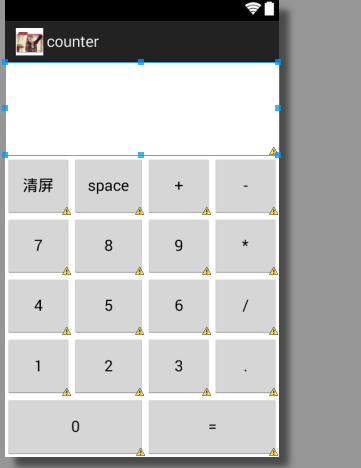
TableLayout 允许我们使用表格的方式来排列控件,这种布局也不是很常用,你只需要了解一下它的基本用法就可以了。既然是表格,那就一定会有行和列,在设计表格时我们尽量应该让每一行都拥有相同的列数,这样的表格也是最简单的。不过有时候事情并非总会顺从我们的心意,当表格的某行一定要有不相等的列数时,就需要通过合并单元格的方式来应对。
 <TableLayout xmlns:android="http://schemas.android.com/apk/res/android"

     xmlns:tools="http://schemas.android.com/tools"

     android:layout_width="match_parent"

     android:layout_height="match_parent"

     android:stretchColumns="*"

     tools:context="com.calc.minicalculator.MainActivity" >

          <TextView

         android:id="@+id/textView1"

         android:layout_width="match_parent"

         android:layout_height="109dp"

         android:layout_gravity="center_horizontal|top"

         android:gravity="right|center_vertical"

         android:text=""

         android:textSize="40dp"

         android:textStyle="bold" />

          <TableRow

              android:layout_weight="1"

              android:id="@+id/tableRow1"

              android:layout_width="wrap_content"

              android:layout_height="match_parent" >

              <Button

                  android:id="@+id/button1"

                  android:layout_width="wrap_content"

                  android:layout_height="match_parent"

                  android:text="清屏" />

              <Button

                  android:id="@+id/button2"

                  android:layout_width="wrap_content"

                  android:layout_height="match_parent"

                  android:text="space" />

              <Button

                  android:id="@+id/button3"

                  android:layout_width="wrap_content"

                  android:layout_height="match_parent"

                  android:text="+" />

              <Button

                  android:id="@+id/button4"

                  android:layout_width="wrap_content"

                  android:layout_height="match_parent"

                  android:text="-" />

          </TableRow>

          <TableRow

              android:layout_weight="1"

              android:id="@+id/tableRow2"

              android:layout_width="wrap_content"

              android:layout_height="match_parent" >

              <Button

                  android:id="@+id/button5"

                  android:layout_width="wrap_content"

                  android:layout_height="match_parent"

                  android:text="7" />

              <Button

                  android:id="@+id/button6"

                  android:layout_width="wrap_content"

                  android:layout_height="match_parent"

                  android:text="8" />

              <Button

                  android:id="@+id/button7"

                  android:layout_width="wrap_content"

                  android:layout_height="match_parent"

                  android:text="9" />

              <Button

                  android:id="@+id/button8"

                  android:layout_width="wrap_content"

                  android:layout_height="match_parent"

                  android:text="*" />

          </TableRow>

          <TableRow

              android:layout_weight="1"

              android:id="@+id/tableRow3"

              android:layout_width="wrap_content"

              android:layout_height="match_parent" >

              <Button

                  android:id="@+id/button9"

                  android:layout_width="wrap_content"

                  android:layout_height="match_parent"

                  android:text="4" />

              <Button

                  android:id="@+id/button10"

                  android:layout_width="wrap_content"

                  android:layout_height="match_parent"

                  android:text="5" />

              <Button

                  android:id="@+id/button11"

                  android:layout_width="wrap_content"

                  android:layout_height="match_parent"

                  android:text="6" />

              <Button

                  android:id="@+id/button12"

                  android:layout_width="wrap_content"

                  android:layout_height="match_parent"

                  android:text="/" />

          </TableRow>

          <TableRow

              android:layout_weight="1"

              android:id="@+id/tableRow4"

              android:layout_width="wrap_content"

              android:layout_height="match_parent" >

              <Button

                  android:id="@+id/button13"

                  android:layout_width="wrap_content"

                  android:layout_height="match_parent"

                  android:text="1" />

              <Button

                  android:id="@+id/button14"

                  android:layout_width="wrap_content"

                  android:layout_height="match_parent"

                  android:text="2" />

              <Button

                  android:id="@+id/button15"

                  android:layout_width="wrap_content"

                  android:layout_height="match_parent"

                  android:text="3" />

              <Button

                  android:id="@+id/button19"

                  android:layout_width="wrap_content"

                  android:layout_height="match_parent"

                  android:text="." />

          </TableRow>

          <TableRow

              android:layout_weight="1"

              android:id="@+id/tableRow5"

              android:layout_width="wrap_content"

              android:layout_height="match_parent"

           >

              <Button

                  android:id="@+id/button17"

                  android:layout_width="wrap_content"

                  android:layout_height="match_parent"

                  android:text="0"

                 android:layout_span="2"

                  />

              <Button

                  android:id="@+id/button16"

                  android:layout_width="wrap_content"

                  android:layout_height="match_parent"

                  android:text="="

                   android:layout_span="2"/>

          </TableRow>

 </TableLayout>
效果图:
android——相对布局,表格布局的更多相关文章
- 第24讲 UI_布局 之帧布局 表格布局 绝对布局
第24讲 UI_布局 之帧布局 表格布局 绝对布局 3. FrameLayout(帧布局) 帧布局是从屏幕的左上角(0,0)坐标开始布局,多个组件层叠排序,后一个组件总会将前一个组件所覆盖,除非最后一 ...
- Android布局— — —表格布局
表格布局 以表格的形式来显示界面中的控件,表格的每一行为一个TableRow,每当一个控件添加到TableRow中,就生成一个单元格. 语法格式: <TableLayout xmlns:andr ...
- .Net程序猿玩转Android开发---(8)表格布局TableLayout
表格布局TableLayout是Android中比較经常使用的一个布局控件,既然是表格,肯定有行和列,TableLayout中的行有TableRow组成.列依据每行控件的数量来确定 假如第一行有3个控 ...
- Android 自学之表格布局 TableLayout
表格布局(TableLayout),表格布局采用行.列的形式来管理UI组件,TableLayout并不需要明确的声明多少行,多少列,而是通过TableRow.其他组件来控制表格的行数和列数. 每次想T ...
- Android中的表格布局TableLayout
表格布局最基本的三个属性: XML代码实例: <?xml version="1.0" encoding="utf-8"?> <LinearLa ...
- Android笔记(十) Android中的布局——表格布局
TableLayout运行我们使用表格的方式来排列控件,它的本质依然是线性布局.表格布局采用行.列的形式来管理控件,TableLayout并不需要明确的声明包含多少行多少列,而是通过添加TableRo ...
- Android之TableLayout表格布局
1.相关属性 1.1.常用属性 android:collapseColumns 设置需要被隐藏的列的序列号 android:shrinkColumns 设置允许被收缩的列的序列号 android:st ...
- android:TableLayout表格布局详解
1.TableLayout简介2.TableLayout行列数的确定3.TableLayout可设置的属性详解4.一个包含4个TableLayout布局的实例及效果图一.Tablelayout简介 ...
- Android开发-之五大布局
在html中大家都知道布局是什么意思了,简单来说就是将页面划分模块,比如html中的div.table等.那么Android中也是这样的.Android五大布局让界面更加美化,开发起来也更加方便.当然 ...
- 【转】TableLayout(表格布局)
转自:http://www.cnblogs.com/zhangs1986/archive/2013/01/17/2864536.html TableLayout(表格布局) 表格布局模型以行列的形式管 ...
随机推荐
- spring注解总结
• @Controller 表示 负责注册一个bean 到spring 上下文中,bean 的ID 默认为类名称开头字母小写,表示某类是一个控制器组件 • @Service 表示负责注册一个bea ...
- (4)WebApi 跨域问题
在做Web开发中,常常会遇到跨域的问题,到目前为止,已经有非常多的跨域解决方案. 通过自己的研究以及在网上看了一些大神的博客,写了一个Demo 首先新建一个webapi的程序,如下图所示: 由于微软已 ...
- 剑指Offer-【面试题03:二维数组中的查找】
package com.cxz.question3; /* * 在一个二维数组中,每一行都按照从左到右递增的顺序排序,每一列都按照从上到下递增的顺序排序. * 请完成一个函数,输入这样的一个二维数组和 ...
- 收缩SQL Server数据库文件
收缩整个数据库 DBCC SHRINKDATABASE (dbName) 收缩单个文件DBCC SHRINKFILE (FileName) 查找所有的文件名称USE dbNameEXEC sp_hel ...
- VirusAnti_didiwei使用说明
前言 前段时间说要写的一个专杀框架敌敌畏,后改为强撸敌敌畏,以彰显样本查杀时的气势,现在第一版已经完成了,如下图所示,使用的时候强烈建议控制台使用放大模式,这样就可以看见我花了半天才画好了logo , ...
- 分享篇——我的Java学习路线
虽然之前我是开发出身,但是我学习的语言是Objective-c,这个语言使用起来范围比较窄,对于自动化学习来说也是无用武之地,所以我自己学习了Java,对于一个有开发经验的人来说学习一门新语言相对来说 ...
- 自己用的jquery经常用的工具command
var Cmd = { Entity: { QueryString: {}, }, RootPath: function () { var pathName = window.location.pat ...
- iOS UIColor RGB HEX
+(UIColor *)colorWithR:(CGFloat)r g:(CGFloat)g b:(CGFloat)b a:(CGFloat)a{ return [UIColor colorWithR ...
- iOS Swift 数组 交换元素的两种方法
swap(&arr[fromIndexPath.row], &arr[to.row]) (arr[fromIndexPath.row],arr[to.row]) = (arr[to.r ...
- brew管理node的版本
摘要 nvm可以.brew怎么去切换不同的node版本 转载请注明出处:http://my.oschina.net/uniquejava/blog/491030 brew详解:http://stack ...