
012 Android Palette颜色选择器的使用
1.页面总体使用线性布局(LinearLayout)
2.将Toolbar(顶部菜单栏)拖入design模式下的设计界面中
3.颜色选择器需要在build.gradle中手动的添加
compile 'com.android.support:palette-v7:28.0.0'
4.代码
(1)XML文件布局
<?xml version="1.0" encoding="utf-8"?>

<LinearLayout xmlns:android="http://schemas.android.com/apk/res/android"

    xmlns:app="http://schemas.android.com/apk/res-auto"

    xmlns:tools="http://schemas.android.com/tools"

    android:layout_width="match_parent"

    android:layout_height="match_parent"

    android:orientation="vertical"

    tools:context=".MainActivity">

    <android.support.v7.widget.Toolbar

        android:id="@+id/toolbar"

        android:layout_width="match_parent"

        android:layout_height="wrap_content"

        android:background="?attr/colorPrimary"

        android:minHeight="?attr/actionBarSize"

        android:theme="?attr/actionBarTheme">

        <TextView

            android:id="@+id/textView"

            android:layout_width="wrap_content"

            android:layout_height="wrap_content"

            android:layout_gravity="center"

            android:text="TextView" />

    </android.support.v7.widget.Toolbar>

    <ImageView

        android:id="@+id/imageView"

        android:layout_width="match_parent"

        android:layout_height="match_parent"

        android:scaleType="fitXY"

        app:srcCompat="@mipmap/img1" />

</LinearLayout>
(2)java后台代码
package com.lucky.test12;

import android.graphics.Bitmap;

import android.graphics.BitmapFactory;

import android.support.annotation.Nullable;

import android.support.v7.app.AppCompatActivity;

import android.os.Bundle;

import android.support.v7.graphics.Palette;

import android.support.v7.widget.Toolbar;

import android.view.View;

import android.widget.ImageView;

import android.widget.TextView;

public class MainActivity extends AppCompatActivity {

    Toolbar toolbar;  //天坑:Toolbar有两个版本,导包一定要正确

    TextView textView1;

    ImageView imageView;

    //android res目录下存储的图片都是以int类型的数存储的

    int pictureArray[]={R.mipmap.img1,R.mipmap.img2,R.mipmap.img3,R.mipmap.img4,R.mipmap.img5};

    int i=0;

    @Override

    protected void onCreate(Bundle savedInstanceState) {

        super.onCreate(savedInstanceState);

        setContentView(R.layout.activity_main);

        toolbar=findViewById(R.id.toolbar);

        textView1=findViewById(R.id.textView);

        imageView=findViewById(R.id.imageView);

        //为图片设置点击事件,当图片被点击时,更换图片并更改toolbar的背景颜色

        imageView.setOnClickListener(new View.OnClickListener() {

            @Override

            public void onClick(View v) {

                i++;

                i=i%pictureArray.length;

                imageView.setImageResource(pictureArray[i]); //为imageview组件设置要显示的图片

                Bitmap bitmap=BitmapFactory.decodeResource(getResources(),pictureArray[i]);

                Palette.generateAsync(bitmap, new Palette.PaletteAsyncListener() {

                    @Override

                    public void onGenerated(@Nullable Palette palette) {

                        Palette.Swatch swatch=palette.getVibrantSwatch();

                        if(swatch!=null){

                            toolbar.setBackgroundColor(swatch.getRgb());

                            textView1.setTextColor(swatch.getTitleTextColor());

                        }

                    }

                });

            }

        });

    }

}
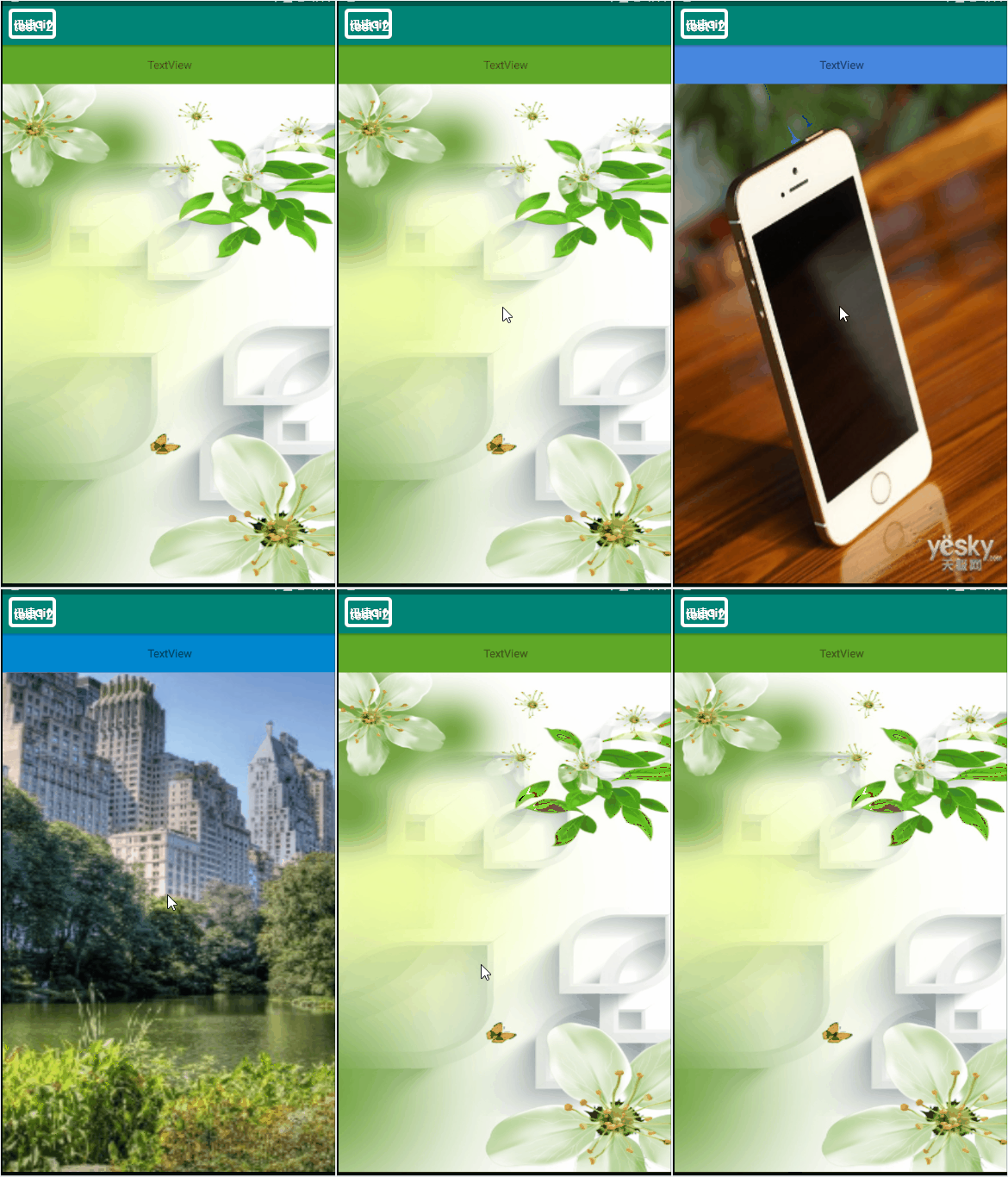
5.效果图
源码:test12
说明:点击图片,会切换显示的图片,并改变toolbar的背景颜色
012 Android Palette颜色选择器的使用的更多相关文章
- Android颜色选择器介绍
使用Android的颜色选择器可以让我们的view在不同状态下显示不同的颜色. 1.Android中ListView 选择某项改变该行字体颜色 2.文件位置 res/color/filename.xm ...
- 自定义实现简单的Android颜色选择器(附带源码)
在写Android App过程中需要一个简单的颜色选择器,Android自带的ColorPicker和网上的一些ColorPicker都太高端了,都实现了颜色渐变功能,我要的不需要那么复杂,只想提供几 ...
- Android 颜色渲染(一) 颜色选择器 ColorPickerDialog剖析
版权声明:本文为博主原创文章,未经博主允许不得转载. Android 颜色选择器之ColorPickerDialog剖析 有这样一个需求,可以让用户自定义背景颜色,这就需要提供一个颜色选择器给用户. ...
- Android圆环形颜色选择器:HoloColorPicker
HoloColorPicker实现圆环形颜色选择器,可以改变颜色饱和度来选择颜色.选择颜色时,可以用手指沿着圆环滑动一个滑块,从而选择颜色. 添加以下XML至你的布局中: ? 1 2 3 4 < ...
- Android 主题和选择器
今天在做底部tab的时候因为样式都一样 所以就自定义一个style 这样省的写很多重复的样式(懒懒懒懒), 修改的话直接在样式里修改省去一个一个修改一样的代码 1 在values/styles.xml ...
- Android View 背景选择器编写技巧
在项目中选择器的使用是非常多的,以下是本人在项目中的一些常用的背景选择器的写法 带边框下划线背景选择器效果图: 上面布局中放了10个CheckBox,然后设置了CheckBox的背景图片位,背景选择器 ...
- UWP 颜色选择器(ColorPicker) 和 自定义的Flyout(AdvancedFlyout)
ColorPicker 故事背景 项目里面需要一个像Winfrom里面那样的颜色选择器,如下图所示: 在网上看了一下.没有现成的东东可以拿来使用.大概查看了一下关于颜色的一些知识,想着没人种树,那就由 ...
- 改造过的JS颜色选择器
项目中用到颜色选择功能,在网上找了个颜色选择器,自己改了改代码.做成了一个可动态加载的颜色选择器. 把代码贴上,当是记录. /*Copyright(c)2009,www.supersite.me*/ ...
- HTML5的input color系统颜色选择器
前两天,我写了一篇<推荐两款jQuery色盘选择器>介绍,那是使用JavaScript实现的色盘,今天我给大家介绍HTML5的色盘选择器.HTML5有一个input类型为color,即颜色 ...
随机推荐
- 哪些 IT 职位难以替代,竞争力强?
原文出自知乎:http://www.zhihu.com/question/24795311 有10多年的软件行业经验,只针对软件行业来回答这个问题: 很少有无法替代的职位,只能说替代的成本高低而已. ...
- Leetcode:Merge k Sorted Lists分析和实现
题目大意是传入一个链表数组lists,每个链表都由若干个链接的链表结点组成,并且每个链表结点记录一个整数.题目保证传入的链表中的整数按从小到大进行排序. 题目要求我们输出一个新的链表,这个链表中应该包 ...
- error:crosses initialization of ...的解决办法
switch(c) { case 0x01: int temp = a + b; .... break; case 0x02: break; default:break; } 此时会报如题所示错误 原 ...
- 使用composer安装laravel5.4
composer create-project --prefer-dist laravel/laravel blog 后面的是文件目录
- SpringAOP02 自定义注解
1 自定义注解 1.1 创建自定义注解 从java5开始就可以利用 @interface 来定义自定义注解 技巧01:注解不能直接干扰程序代码的运行(即:注解的增加和删除操作后,代码都可以正常运行) ...
- ROS naviagtion analysis: move_base
博客转载自:https://blog.csdn.net/u013158492/article/details/50483123 这是navigation的第一篇文章,主要通过分析ROS代码级实现,了解 ...
- jQuery--全选、反选、取消
主要知识点: prop()--主要检查和设置checked attr()是针对所有属性,prop()是针对checked和selected等单一存在的,判断他们的true或者false. find() ...
- 3.Hive中查看数据来源文件和具体位置方法
虚拟列 -- 当 hive 产生了非预期的或 null 的时候,可以通过虚拟列进行诊断,判断哪行数据出现问题 INPUT__FILE__NAME (输入文件名)map任务读入File的全路径 ...
- Part5核心初始化_lesson2---设置svc模式
我们的Linux系统以及bootloader是工作在SVC模式!!怎么把处理器设置为SVC模式呢? CPSR寄存器或者SPSR寄存器最低5位可以设置模式,把该5位设置为0b10011, start.s ...
- 【转】.net 在线播放各类视频
原文地址:http://blog.csdn.net/hefeng_aspnet/article/details/9704857 一.后台拼字符串动态加载写法 前台调用代码 <!DOCTYPE h ...