
修改select样式,vue select
    <style>

        .selectbox{ width: 200px; display: inline-block; overflow-x: hidden; height: 28px; line-height: 28px; font-size: 0;  background:#fff url(images/selectbg.png) right center no-repeat; border: 1px solid #dcdbdb; vertical-align: middle;}

        .selectbox select{cursor: pointer; padding: 0 8px; height: 28px; line-height: 28px; font-size: 12px; width:118%; padding-right: 18%; background:none; border: none;}

        .selectbox select option{ padding:5px;}

    </style>

    <div class="selectbox">

        <select>

            <option>默认值</option>

            <option>选项之</option>

        </select>

    </div>
    <style>

                  .selectbox select {

                padding: 6px 30px 6px 15px;

                background: #fff;

                width: 440px;

                height: 30px;

                text-align: left;

                vertical-align: middle;

                border: 1px solid #94c1e7;

                -moz-border-radius: 6px;

                -webkit-border-radius: 6px;

                border-radius: 3px;

                -webkit-appearance: none;

                -moz-appearance: none;

                appearance: non

                cursor: pointer;

                outline: none;

            }

            /*LABEL FOR SELECT*/

            label.selectbox {

                position: relative;

                display: inline-block;

            }

            /*DOWNWARD ARROW (25bc)*/

            label.selectbox::after {

                content: "\25bc";

                position: absolute;

                top: 0;

                right: 0;

                bottom: 0;

                width: 30px;

                line-height: 30px;

                vertical-align: middle;

                text-align: center;

                background: #94c1e7;

                color: #2984ce;

                -moz-border-radius: 0 6px 6px 0;

                -webkit-border-radius: 0 6px 6px 0;

                border-radius: 0 6px 6px 0;

                pointer-events: none;

            }

    </style>

                  <label class="selectbox">

                    <select name="" id="">

                        <option value="张三">张三</option>

                        <option value="李四">李四</option>

                        <option value="王五">王五</option>

                        <option value="赵六">赵六</option>

                    </select>

                </label>
<!Doctype>

<html>

<head>

    <meta charset="utf-8">

    <style>

        select {

            width: 185pt;

            height: 40pt;

            line-height: 40pt;

            padding-right: 20pt;

            text-indent: 4pt;

            text-align: left;

            vertical-align: middle;

            border: 1px solid #94c1e7;

            -moz-border-radius: 6px;

            -webkit-border-radius: 6px;

            border-radius: 6px;

            -webkit-appearance: none;

            -moz-appearance: none;

            appearance: none;

            font-family: SimHei;

            font-size: 18pt;

            font-weight: 500;

            color: RGBA(102, 102, 102, 0.7);

            cursor: pointer;

            outline: none;

        }

        /*LABEL FOR SELECT*/

        label {

            position: relative;

            display: inline-block;

        }

        /*DOWNWARD ARROW (25bc)*/

        label::after {

            content: "\25bc";

            position: absolute;

            top: 0;

            right: 0;

            bottom: 0;

            width: 20pt;

            line-height: 40pt;

            vertical-align: middle;

            text-align: center;

            background: #94c1e7;

            color: #2984ce;

            -moz-border-radius: 0 6px 6px 0;

            -webkit-border-radius: 0 6px 6px 0;

            border-radius: 0 6px 6px 0;

            pointer-events: none;

        }

    </style>

</head>

<body>

<div id="app">

    <div class="selectbox">

        <label>

            <select v-model="selected">

                <option v-for="(item,index) of options" :value="item.value">{{item.value}}</option>

            </select>

        </label>

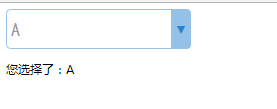
        <p>您选择了:<span>{{selected}}</span></p>

    </div>

</div>

<script src="../vue.js"></script>

<script>

    var app = new Vue({

        el: "#app",

        data: {

            options: [{

                text: 'One',

                value: 'A'

            }, {

                text: 'Two',

                value: 'B'

            }, {

                text: 'Three',

                value: 'C'

            }],

            selected:'B'

        }

    });

</script>

</body>

</html>
修改select样式,vue select的更多相关文章
- 修改 页面中默认的select样式
select样式定制: select { /*Chrome和Firefox里面的边框是不一样的,所以复写了一下*/ border: solid 1px #000; /*很关键:将默认的select选择 ...
- 打造自定Select样式
打造自定Select样式 我们为什么要自定义select样式? 1.select最大的一个缺陷就是不能自定义下拉按钮的样式. 效果图: 在线演示地址: http://www.smallui.com/j ...
- CSS select样式优化 含jquery代码
CSS 下拉选择菜单基本的CSS样式不怎么好看,通过一些简单的样式优化,可以得到如下图这样的: html结构如下: <div class="sel_wrap"> < ...
- SELECT样式,兼容IE6
<!DOCTYPE html PUBLIC "-//W3C//DTD XHTML 1.0 Transitional//EN" "http://www.w3.org/ ...
- jqueryMobile中select样式自定义
要去掉引入的jqueryMobile给下拉框组件的样式,有两种办法. 第一种:全局的去掉所有的下拉框样式: <link rel="stylesheet" href=" ...
- select样式重置
div{ //用div的样式代替select的样式 width: 200px; ...
- CSS效果:CSS select样式优化 含jquery代码
CSS 下拉选择菜单基本的CSS样式不怎么好看,通过一些简单的样式优化,可以得到如下图这样的: html结构如下: <div class="sel_wrap"> < ...
- 通过css属性hack完成select样式美化,并兼容IE
最近在重构时遇到了select样式问题,并且需要在不影响语义化的情况下,兼容IE8. 经过一番的百度后始终没有找到合适的纯CSS解决方案,最后换了一下思路,大胆使用了属性hack: 在chrome和F ...
- vue select下拉框绑定默认值
vue select下拉框绑定默认值: 首先option要加value值,以便v-model可以获取到对应选择的值 一.当没有绑定v-model,直接给对应的option加selected属性 二.当 ...
- html select options & vue h render
html select options & vue h render https://developer.mozilla.org/en-US/docs/Web/HTML/Element/opt ...
随机推荐
- JAVA学习一 对象数组
对象数组 今天在写一个代码,才发现自己对于对象数组的理解是不够的,那么就讲讲自己现在的理解. 对于数组中的每一个元素都是一个针对对象的引用 他会指向你的具体的一个堆上的对象,它本身知识一个地址值,与其 ...
- 为WPF中DropShadowBitmapEffect提供轻量级的替代品
原文:为WPF中DropShadowBitmapEffect提供轻量级的替代品 为WPF中DropShadowBitmapEffect提供轻量级的替代品 ...
- guacamole实现虚拟键盘
要做的事情比较简单,就是先实例化一个虚拟键盘,然后监听事件即可. js代码 //虚拟键盘数据 var a = {"language":"en_US"," ...
- Virtual Host on Apache(Apache上建立虚拟主机)
0. Introduction Usually, we want to build two or more websites on a web server, but we have only one ...
- Unity3d工具方法小集
1.获取垂直水平方向上的输入: float moveHorizontal = Input.GetAxis("Horizontal"); float moveVertical = I ...
- [译]Python - socket.error: Cannot assign requested address
原文来源: https://stackoverflow.com/questions/48306528/python-socket-error-cannot-assign-requested-addre ...
- Sql Express数据备份和还原
参考文章:在SQL Server Express版本中没有代理功能如何自动备份数据库 首先用以下脚本,生成可以自动备份数据库的存储过程: USE [master] GO SET ANSI_NULLS ...
- lintcode-51-上一个排列
51-上一个排列 给定一个整数数组来表示排列,找出其上一个排列. 注意事项 排列中可能包含重复的整数 样例 给出排列[1,3,2,3],其上一个排列是[1,2,3,3] 给出排列[1,2,3,4],其 ...
- 《学习OpenCV》课后习题解答8
题目:(P126) 本章完整讲述了基本的输入/输出编程以及OpenCV的数据结构.下面的练习是基于前面的知识做一些应用,为后面大程序的实现提供帮助. a.创建一个程序实现以下功能:(1)从视频文件中读 ...
- Python创建目录文件夹
Python对文件的操作还算是方便的,只需要包含os模块进来,使用相关函数即可实现目录的创建. 主要涉及到三个函数 1.os.path.exists(path) 判断一个目录是否存在 2.os.mak ...