
Linq 左连接 left join
Suppose you have a tblRoom and tblUserInfo. Now, you need to select all the rooms regardless of whether the room has user information or not. This calls for a LEFT JOIN which will select everything from the LEFT side (the room side) regardless of the join on the right side. Here is the example.
假如你有两张表tblRoom(房 间表)和tblUserInfo(住户表)。
现在你需要检索出所有房间的信息,而不管这个房间是否有人居住。这就需要进行LEFT JOIN(左外连接),左外连接会检索出LEFT JOIN左边表中的所有行,而不管右边的表是否有匹配项。下面是一个例子:
var list = from r in dc.tblRooms

                          join ui in dc.tblUserInfos

                          on r.UserName equals ui.UserNameinto userrooms

                          from ur in userrooms.DefaultIfEmpty()

                          select new

                           {

                               FirstName = (ur.FirstName == null) ? "N/A" : ur.FirstName,

                               LastName = (ur.LastName == null) ? "N/A" : ur.LastName,

                               RoomName = r.Name

                           };
he anonymous type replaces the "null" FirstName and LastName with "N/A" (not available).
使用"N/A"(不可得)代替 FirstName 和 LastName 值为"null"的情况。
另附:Linq实现多个表 LEFT JOIN 如下
目标SQL语句(多表 LEFT JOIN 查询)
SELECT id, name, jname, cname

        FROM userinfo u

        LEFT JOIN job j on u.job = j.jid

        LEFT JOIN city c on u.city = c.cid
Linq To Sql 实现三个表 LEFT JOIN 如下:
var list = (

    from u in dc.userinfos

        join j in dc.jobs on u.job equals j.jid into j_join

    from x in j_join.DefaultIfEmpty()

        join c in dc.cities on u.city equals c.cid into c_join

    from v in c_join.DefaultIfEmpty()

    select new

    {

        id = u.id,

        name = u.name,

        jname = x.jname,

        cname = v.cname,

        /*u1=u,x1=x,v1=v*/

        //不要用对象的方式 因为对象可能为null那么对象.属性就会抛异常

    }

    ).ToList();

    for (var i = ; i < list.Count(); i++)

    {

        Console.WriteLine(list[i].name + '\t' + list[i].jname + '\t' + list[i].cname); //字段为null不报异常

        //Console.WriteLine(list[i].u1.name+'\t'+list[i].x1.jname+'\t'+list[i].v1.cname+"\r\n"); //对象x1 v1 有可能为null 抛异常

    }

    Console.ReadLine();
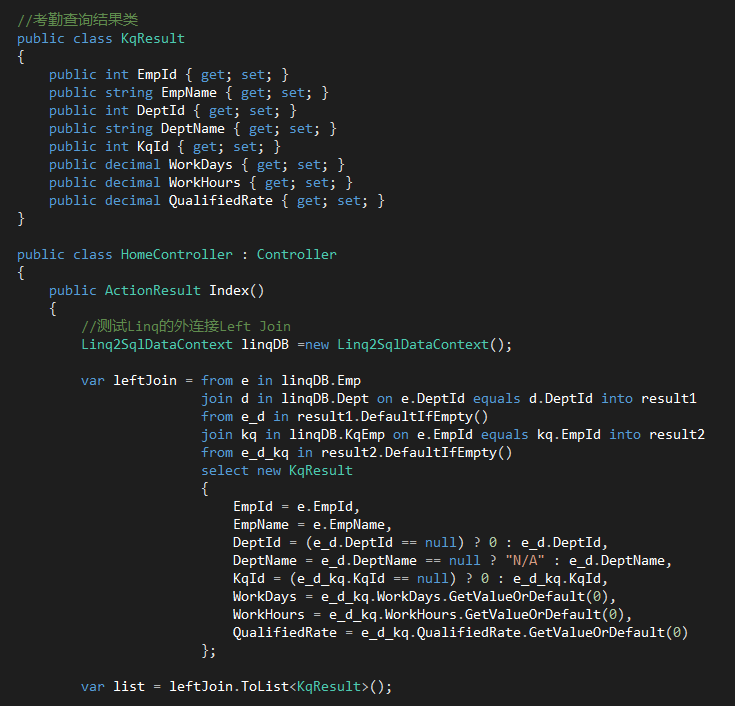
3个表 LEFT JOIN 例子:
Emp(员工表)、Dept(部门表)、KqEmp(人员考勤信息表)
Linq 左连接 left join的更多相关文章
- GroupBy分组的运用和linq左连接
最简单的分组 var conHistoryList = conHistoryData.GroupBy(g => g.personId); 就是conHistoryData是一个IQueryabl ...
- 数据库左连接left join、右连接right join、内连接inner join on 及 where条件查询的区别
join on 与 where 条件的执行先后顺序: join on 条件先执行,where条件后执行:join on的条件在连接表时过滤,而where则是在生成中间表后对临时表过滤 left joi ...
- 左连接LEFT JOIN 连接自己时的查询结果测试
#左连接LEFT JOIN 连接自己时的查询结果测试 #左连接LEFT JOIN 连接自己时的查询结果(都会出现两个重复字段),两个表都有as后只能查询相等条件merchant_shop_id非nul ...
- EF Linq中的左连接Left Join查询
linq中的join是inner join内连接,就是当两个表中有一个表对应的数据没有的时候那个关联就不成立. 比如表A B的数据如下 from a in A join b in B on a.BId ...
- Linq Left Join;linq左连接 (转载)
来源 https://www.cnblogs.com/xinjian/archive/2010/11/17/1879959.html 准备一些测试数据,如下: use Test Create tabl ...
- 数据库中的左连接(left join)和右连接(right join)区别
Left Join / Right Join /inner join相关 关于左连接和右连接总结性的一句话: 左连接where只影向右表,右连接where只影响左表. Left Join select ...
- Oracle 左连接 left join、右连接right join说明
Oracle 左.右连接 + 在等号 左边表示右连接 获取右表所有记录,即使左表没有对应匹配的记录. + 在等号 右边表示左连接 获取左表所有记录,即使右表没有对应匹配的记录. 例子: selec ...
- C# linq左连接与分组
1.左连接使用DefaultIfEmpty(): 2.分组时候判断newper.FirstOrDefault() == null ? null: newper.ToList()这个经常出错误,如果不判 ...
- linq 左连接后实现与主表一对一关系数据
var query1 = from r in _residentRepository.GetAll() join i in _inLogRepository.GetAll() on r.Id equa ...
随机推荐
- textView 添加超链接(两种实现方式)
在textView添加超链接,有两种方式,第一种通过HTML格式化你的网址,一种是设置autolink,让系统自动识别超链接,下面为大家介绍下这两种方法的实现 在textView添加超链接,有两种方式 ...
- Java中的阻塞和非阻塞IO包各自的优劣思考(经典)
Java中的阻塞和非阻塞IO包各自的优劣思考 NIO 设计背后的基石:反应器模式,用于事件多路分离和分派的体系结构模式. 反应器(Reactor):用于事件多路分离和分派的体系结构模式 通常的,对一个 ...
- C# 通用类型转换方法
在程序开发过程中经常需要进行数据的类型转换,而且如果一个字段的类型改成另一个类型时,所有相关的类型转换的地方都要跟着修改,不但造成了很多重复转换的代码而且修改字段类型时额外修改相关转换代码的工作量也很 ...
- python学习笔记(三):文件操作和集合
对文件的操作分三步: 1.打开文件获取文件的句柄,句柄就理解为这个文件 2.通过文件句柄操作文件 3.关闭文件. 文件基本操作: f = open('file.txt','r') #以只读方式打开一个 ...
- 第十九章 MySQL Cluster(待续)
··········
- Vue 简单的总结二
表单输入绑定 数据双向绑定 v-model 绑定相同的属性 当属性变化绑定的标签内容也跟着变化 v-model 只能应用像在input textare select 标签 v-model.lazy 懒 ...
- Pandas:表计算与数据分析
目录 Pandas之Series Pandas之DataFrame 一.pandas简单介绍 1.pandas是一个强大的Python数据分析的工具包.2.pandas是基于NumPy构建的. 3.p ...
- Android 4学习(9):用户界面 - THE ANDROID WIDGET TOOLBOX
Android内置了很多View,包括: TextView EditText Chronometer ListView Spinner Button ToggleButton ImageButton ...
- 如何将serialport接收的字符串转换成十六进制数c#
关注 baihe_591 baihe_591 本版等级: #1 得分:0回复于: 2008-06-02 09:44:00 Byte[] byte=new Byte[1];byte=0xf1;por ...
- fcntl详细说明
功能描述:根据文件描述词来操作文件的特性. #include <unistd.h>#include <fcntl.h> int fcntl(int fd, int cmd); ...