
mysql三:表操作
一、存储引擎介绍
存储引擎即表类型,mysql根据不同的表类型会有不同的处理机制。
详见:点击查看
二、表的介绍
表相当于文件,表中的一条记录就相当于文件的一行内容,不同的是,表中的一条记录有对应的标题,称为表的字段。
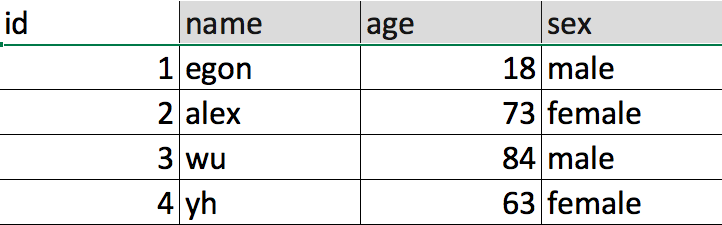
id,name,qq,age称为字段,其余的,一行内容称为一条记录。
三、创建表
#语法:

create table 表名(

字段名1 类型[(宽度) 约束条件],

字段名2 类型[(宽度) 约束条件],

字段名3 类型[(宽度) 约束条件]

);

#注意:

1. 在同一张表中,字段名是不能相同

2. 宽度和约束条件可选

3. 字段名和类型是必须的
mysql> create  database db2 charset utf8;

Query OK, 1 row affected (0.01 sec)

mysql> use db2

Database changed

mysql> create table t1(

    -> id int,

    -> name varchar(50),

    -> sex enum('male', 'female'),

    -> age int(3)

    -> );

Query OK, 0 rows affected (0.01 sec)

mysql> show tables;

+---------------+

| Tables_in_db2 |

+---------------+

| t1            |

+---------------+

1 row in set (0.00 sec)

mysql> desc t1;

+-------+-----------------------+------+-----+---------+-------+

| Field | Type                  | Null | Key | Default | Extra |

+-------+-----------------------+------+-----+---------+-------+

| id    | int(11)               | YES  |     | NULL    |       |

| name  | varchar(50)           | YES  |     | NULL    |       |

| sex   | enum('male','female') | YES  |     | NULL    |       |

| age   | int(3)                | YES  |     | NULL    |       |

+-------+-----------------------+------+-----+---------+-------+

4 rows in set (0.01 sec)

mysql> select id,name,sex,age from t1;

Empty set (0.00 sec)

mysql> select * from t1;

Empty set (0.00 sec)
创表示例
mysql> insert into t1 values (1,'egon','male',18), (2,'alex','female',81);

Query OK, 2 rows affected (0.00 sec)

Records: 2  Duplicates: 0  Warnings: 0

mysql> select * from t1;

+------+------+--------+------+

| id   | name | sex    | age  |

+------+------+--------+------+

|    1 | egon | male   |   18 |

|    2 | alex | female |   81 |

+------+------+--------+------+

2 rows in set (0.00 sec)

mysql> insert into t1(id) values

    -> (3),

    -> (4);

Query OK, 2 rows affected (0.01 sec)

Records: 2  Duplicates: 0  Warnings: 0

mysql> select * from t1;

+------+------+--------+------+

| id   | name | sex    | age  |

+------+------+--------+------+

|    1 | egon | male   |   18 |

|    2 | alex | female |   81 |

|    3 | NULL | NULL   | NULL |

|    4 | NULL | NULL   | NULL |

+------+------+--------+------+

4 rows in set (0.00 sec)
往表中插入数据
特别需要注意:字段匹配顺序和表中最后一个字段不能加逗号。
四、查看表结构
mysql> describe t1;

+-------+-----------------------+------+-----+---------+-------+

| Field | Type                  | Null | Key | Default | Extra |

+-------+-----------------------+------+-----+---------+-------+

| id    | int(11)               | YES  |     | NULL    |       |

| name  | varchar(50)           | YES  |     | NULL    |       |

| sex   | enum('male','female') | YES  |     | NULL    |       |

| age   | int(3)                | YES  |     | NULL    |       |

+-------+-----------------------+------+-----+---------+-------+

4 rows in set (0.00 sec)

mysql> show create table t1\G;  # 查看表结构详细结构,可以添加\G
类似的show create table mysql.user\G; 执行查看,可以解决在屏幕比较小时,“----”显示混乱的问题。
五、数据类型
详见:点击插看
六、表完整性约束
详见:点击查看
七、修改表结构
语法:

1. 修改表名

      ALTER TABLE 表名

                          RENAME 新表名;

2. 增加字段

      ALTER TABLE 表名

                          ADD 字段名  数据类型 [完整性约束条件…],    # 添加多个字段

                          ADD 字段名  数据类型 [完整性约束条件…];

      ALTER TABLE 表名

                          ADD 字段名  数据类型 [完整性约束条件…]  FIRST;   # 添加新字段到第一个

      ALTER TABLE 表名

                          ADD 字段名  数据类型 [完整性约束条件…]  AFTER 字段名;   # 添加新字段到指定字段之后

3. 删除字段

      ALTER TABLE 表名

                          DROP 字段名;

4. 修改字段————主要针对字段类型和字段名称

      ALTER TABLE 表名

                          MODIFY  字段名 数据类型 [完整性约束条件…];    # 修改字段类型

      ALTER TABLE 表名

                          CHANGE 旧字段名 新字段名 旧数据类型 [完整性约束条件…];    # 修改字段名称

      ALTER TABLE 表名

                          CHANGE 旧字段名 新字段名 新数据类型 [完整性约束条件…];
示例:

mysql> use db2

Reading table information for completion of table and column names

You can turn off this feature to get a quicker startup with -A

Database changed

mysql> create table service;

ERROR 1113 (42000): A table must have at least 1 column

mysql> create table service(id int);

Query OK, 0 rows affected (0.02 sec)

# 1、修改存储引擎

mysql> alter table service

    -> engine=innodb;

Query OK, 0 rows affected (0.02 sec)

Records: 0  Duplicates: 0  Warnings: 0

mysql> create table student10(id int);

Query OK, 0 rows affected (0.01 sec)

# 2、添加字段

mysql> alter table student10

    -> add name varchar(20) not null,

    -> add age int(3) not null default 22;

Query OK, 0 rows affected (0.02 sec)

Records: 0  Duplicates: 0  Warnings: 0

mysql> alter table student10

    -> add stu_num varchar(10) not null after name;    # after关键词,添加到name字段后

Query OK, 0 rows affected (0.02 sec)

Records: 0  Duplicates: 0  Warnings: 0

mysql> alter table student10

    -> add sex enum('male', 'female') default 'male' first;    # first关键词,添加到最前面

Query OK, 0 rows affected (0.01 sec)

Records: 0  Duplicates: 0  Warnings: 0

mysql> select * from student10;

Empty set (0.00 sec)

mysql> describe student10;    # 查看表结构

+---------+-----------------------+------+-----+---------+-------+

| Field   | Type                  | Null | Key | Default | Extra |

+---------+-----------------------+------+-----+---------+-------+

| sex     | enum('male','female') | YES  |     | male    |       |

| id      | int(11)               | YES  |     | NULL    |       |

| name    | varchar(20)           | NO   |     | NULL    |       |

| stu_num | varchar(10)           | NO   |     | NULL    |       |

| age     | int(3)                | NO   |     | 22      |       |

+---------+-----------------------+------+-----+---------+-------+

5 rows in set (0.00 sec)

# 3、删除字段

mysql> alter table student10

    -> drop sex;

Query OK, 0 rows affected (0.02 sec)

Records: 0  Duplicates: 0  Warnings: 0

mysql> alter table service add mac varchar(20);

Query OK, 0 rows affected (0.02 sec)

Records: 0  Duplicates: 0  Warnings: 0

mysql> alter table service drop mac;

Query OK, 0 rows affected (0.02 sec)

Records: 0  Duplicates: 0  Warnings: 0

mysql> describe student10;

+---------+-------------+------+-----+---------+-------+

| Field   | Type        | Null | Key | Default | Extra |

+---------+-------------+------+-----+---------+-------+

| id      | int(11)     | YES  |     | NULL    |       |

| name    | varchar(20) | NO   |     | NULL    |       |

| stu_num | varchar(10) | NO   |     | NULL    |       |

| age     | int(3)      | NO   |     | 22      |       |

+---------+-------------+------+-----+---------+-------+

4 rows in set (0.00 sec)

# 4、修改字段类型modify

mysql> alter table student10

    -> modify age int(3);

Query OK, 0 rows affected (0.02 sec)

Records: 0  Duplicates: 0  Warnings: 0

mysql> alter table student10

    -> modify id int(11) not null primary key auto_increment;    # 修改为主键

Query OK, 0 rows affected (0.04 sec)

Records: 0  Duplicates: 0  Warnings: 0

mysql> select * from student10;

Empty set (0.01 sec)

mysql> describe student10;

+---------+-------------+------+-----+---------+----------------+

| Field   | Type        | Null | Key | Default | Extra          |

+---------+-------------+------+-----+---------+----------------+

| id      | int(11)     | NO   | PRI | NULL    | auto_increment |

| name    | varchar(20) | NO   |     | NULL    |                |

| stu_num | varchar(10) | NO   |     | NULL    |                |

| age     | int(3)      | YES  |     | NULL    |                |

+---------+-------------+------+-----+---------+----------------+

4 rows in set (0.00 sec)

# 5、增加约束(针对已有的主键添加auto_increment)

mysql> alter table student10 modify id int(11) not null primary key auto_increment;

ERROR 1068 (42000): Multiple primary key defined

mysql> alter table student10 modify id int(11) not null auto_increment;

Query OK, 0 rows affected (0.01 sec)

Records: 0  Duplicates: 0  Warnings: 0

mysql> describe student10;

+---------+-------------+------+-----+---------+----------------+

| Field   | Type        | Null | Key | Default | Extra          |

+---------+-------------+------+-----+---------+----------------+

| id      | int(11)     | NO   | PRI | NULL    | auto_increment |

| name    | varchar(20) | NO   |     | NULL    |                |

| stu_num | varchar(10) | NO   |     | NULL    |                |

| age     | int(3)      | YES  |     | NULL    |                |

+---------+-------------+------+-----+---------+----------------+

4 rows in set (0.00 sec)

# 6、对已经存在的表添加复合主键

mysql> alter table service

    -> add host_ip varchar(24),

    -> add port int(4);

Query OK, 0 rows affected (0.02 sec)

Records: 0  Duplicates: 0  Warnings: 0

mysql> describe service;

+---------+-------------+------+-----+---------+-------+

| Field   | Type        | Null | Key | Default | Extra |

+---------+-------------+------+-----+---------+-------+

| id      | int(11)     | YES  |     | NULL    |       |

| host_ip | varchar(24) | YES  |     | NULL    |       |

| port    | int(4)      | YES  |     | NULL    |       |

+---------+-------------+------+-----+---------+-------+

3 rows in set (0.00 sec)

mysql> alter table service

    -> add primary key(host_ip, port);    # 增加复合主键,经测试必须是这个字段存在

Query OK, 0 rows affected (0.02 sec)

Records: 0  Duplicates: 0  Warnings: 0

mysql> describe service;

+---------+-------------+------+-----+---------+-------+

| Field   | Type        | Null | Key | Default | Extra |

+---------+-------------+------+-----+---------+-------+

| id      | int(11)     | YES  |     | NULL    |       |

| host_ip | varchar(24) | NO   | PRI | NULL    |       |

| port    | int(4)      | NO   | PRI | NULL    |       |

+---------+-------------+------+-----+---------+-------+

3 rows in set (0.00 sec)

# 7、删除主键

# a.删除自增约束

mysql> describe student10;

+---------+-------------+------+-----+---------+----------------+

| Field   | Type        | Null | Key | Default | Extra          |

+---------+-------------+------+-----+---------+----------------+

| id      | int(11)     | NO   | PRI | NULL    | auto_increment |

| name    | varchar(20) | NO   |     | NULL    |                |

| stu_num | varchar(10) | NO   |     | NULL    |                |

| age     | int(3)      | YES  |     | NULL    |                |

+---------+-------------+------+-----+---------+----------------+

4 rows in set (0.00 sec)

mysql> alter table student10

    -> modify name varchar(10) not null primary key;

ERROR 1068 (42000): Multiple primary key defined

mysql> alter table student10

    -> drop primary key;

ERROR 1075 (42000): Incorrect table definition; there can be only one auto column and it must be defined as a key

mysql> alter table student10

    -> modify id int(11) not null;

Query OK, 0 rows affected (0.02 sec)

Records: 0  Duplicates: 0  Warnings: 0

mysql> describe student10;

+---------+-------------+------+-----+---------+-------+

| Field   | Type        | Null | Key | Default | Extra |

+---------+-------------+------+-----+---------+-------+

| id      | int(11)     | NO   | PRI | NULL    |       |

| name    | varchar(20) | NO   |     | NULL    |       |

| stu_num | varchar(10) | NO   |     | NULL    |       |

| age     | int(3)      | YES  |     | NULL    |       |

+---------+-------------+------+-----+---------+-------+

4 rows in set (0.00 sec)

# b.删除主键

mysql> alter table student10

    -> drop primary key;

Query OK, 0 rows affected (0.03 sec)

Records: 0  Duplicates: 0  Warnings: 0

mysql> describe student10;

+---------+-------------+------+-----+---------+-------+

| Field   | Type        | Null | Key | Default | Extra |

+---------+-------------+------+-----+---------+-------+

| id      | int(11)     | NO   |     | NULL    |       |

| name    | varchar(20) | NO   |     | NULL    |       |

| stu_num | varchar(10) | NO   |     | NULL    |       |

| age     | int(3)      | YES  |     | NULL    |       |

+---------+-------------+------+-----+---------+-------+

4 rows in set (0.01 sec)

# 8、添加主键(和删除主键挪移了位置,因为不想新增一个表)

mysql> alter table student10

    -> modify name varchar(10) not null primary key;

Query OK, 0 rows affected (0.02 sec)

Records: 0  Duplicates: 0  Warnings: 0

mysql> describe student10;

+---------+-------------+------+-----+---------+-------+

| Field   | Type        | Null | Key | Default | Extra |

+---------+-------------+------+-----+---------+-------+

| id      | int(11)     | NO   |     | NULL    |       |

| name    | varchar(10) | NO   | PRI | NULL    |       |

| stu_num | varchar(10) | NO   |     | NULL    |       |

| age     | int(3)      | YES  |     | NULL    |       |

+---------+-------------+------+-----+---------+-------+

4 rows in set (0.01 sec)

# 9、添加主键和自动增长(多主键是不允许的,主键是唯一,非空的但是可以多个字段联合成一个主键)

mysql> alter table student10

    -> modify id int not null primary key auto_increment;

ERROR 1068 (42000): Multiple primary key defined

mysql> alter table student10

    -> drop primary key;

Query OK, 0 rows affected (0.02 sec)

Records: 0  Duplicates: 0  Warnings: 0

mysql> alter table student1

    -> modify id int not null primary key auto_increment;

ERROR 1146 (42S02): Table 'db2.student1' doesn't exist

mysql> alter table student10

    -> modify id int not null primary key auto_increment;    # 添加主键和自动增长成功

Query OK, 0 rows affected (0.02 sec)

Records: 0  Duplicates: 0  Warnings: 0

mysql> describe student10;

+---------+-------------+------+-----+---------+----------------+

| Field   | Type        | Null | Key | Default | Extra          |

+---------+-------------+------+-----+---------+----------------+

| id      | int(11)     | NO   | PRI | NULL    | auto_increment |

| name    | varchar(10) | NO   |     | NULL    |                |

| stu_num | varchar(10) | NO   |     | NULL    |                |

| age     | int(3)      | YES  |     | NULL    |                |

+---------+-------------+------+-----+---------+----------------+

4 rows in set (0.00 sec)
示例和练习
八、复制表
1、复制表结构+记录
key不会复制:主键、外键和索引。
create table t1 select host,user from mysql.user;
mysql> select host, user from mysql.user;

+-----------+---------------+

| host      | user          |

+-----------+---------------+

| localhost | mysql.session |

| localhost | mysql.sys     |

| localhost | root          |

+-----------+---------------+

3 rows in set (0.00 sec)

mysql> create table t1 select host,user from mysql.user;   # 查询出结果不输出屏幕直接传给新表

Query OK, 3 rows affected (0.02 sec)

Records: 3  Duplicates: 0  Warnings: 0

mysql> select * from t1;

+-----------+---------------+

| host      | user          |

+-----------+---------------+

| localhost | mysql.session |

| localhost | mysql.sys     |

| localhost | root          |

+-----------+---------------+

3 rows in set (0.00 sec)

mysql> desc t1;   # 查看key是否复制

+-------+----------+------+-----+---------+-------+

| Field | Type     | Null | Key | Default | Extra |

+-------+----------+------+-----+---------+-------+

| host  | char(60) | NO   |     |         |       |

| user  | char(32) | NO   |     |         |       |

+-------+----------+------+-----+---------+-------+

2 rows in set (0.00 sec)
2、只复制表结构
方法一:故意设置一个不成立的条件
mysql> select host,user from mysql.user where 1>5;      # 条件不成立,查不到任何数据

Empty set (0.00 sec)

mysql> create table t2 select host,user from mysql.user where 1>5;

Query OK, 0 rows affected (0.02 sec)

Records: 0  Duplicates: 0  Warnings: 0

mysql> desc t2;

+-------+----------+------+-----+---------+-------+

| Field | Type     | Null | Key | Default | Extra |

+-------+----------+------+-----+---------+-------+

| host  | char(60) | NO   |     |         |       |

| user  | char(32) | NO   |     |         |       |

+-------+----------+------+-----+---------+-------+

2 rows in set (0.00 sec)
方法二:利用like
create table t3 like mysql.user;
mysql> create table t3 like mysql.user;

Query OK, 0 rows affected (0.03 sec)

mysql> desc t3;

+------------------------+-----------------------------------+------+-----+-----------------------+-------+

| Field                  | Type                              | Null | Key | Default               | Extra |

+------------------------+-----------------------------------+------+-----+-----------------------+-------+

| Host                   | char(60)                          | NO   | PRI |                       |       |

| User                   | char(32)                          | NO   | PRI |                       |       |

| Select_priv            | enum('N','Y')                     | NO   |     | N                     |       |

| Insert_priv            | enum('N','Y')                     | NO   |     | N                     |       |

| Update_priv            | enum('N','Y')                     | NO   |     | N                     |       |

| Delete_priv            | enum('N','Y')                     | NO   |     | N                     |       |

| Create_priv            | enum('N','Y')                     | NO   |     | N                     |       |

| Drop_priv              | enum('N','Y')                     | NO   |     | N                     |       |

| Reload_priv            | enum('N','Y')                     | NO   |     | N                     |       |

| Shutdown_priv          | enum('N','Y')                     | NO   |     | N                     |       |

| Process_priv           | enum('N','Y')                     | NO   |     | N                     |       |

| File_priv              | enum('N','Y')                     | NO   |     | N                     |       |

| Grant_priv             | enum('N','Y')                     | NO   |     | N                     |       |

| References_priv        | enum('N','Y')                     | NO   |     | N                     |       |

| Index_priv             | enum('N','Y')                     | NO   |     | N                     |       |

| Alter_priv             | enum('N','Y')                     | NO   |     | N                     |       |

| Show_db_priv           | enum('N','Y')                     | NO   |     | N                     |       |

| Super_priv             | enum('N','Y')                     | NO   |     | N                     |       |

| Create_tmp_table_priv  | enum('N','Y')                     | NO   |     | N                     |       |

| Lock_tables_priv       | enum('N','Y')                     | NO   |     | N                     |       |

| Execute_priv           | enum('N','Y')                     | NO   |     | N                     |       |

| Repl_slave_priv        | enum('N','Y')                     | NO   |     | N                     |       |

| Repl_client_priv       | enum('N','Y')                     | NO   |     | N                     |       |

| Create_view_priv       | enum('N','Y')                     | NO   |     | N                     |       |

| Show_view_priv         | enum('N','Y')                     | NO   |     | N                     |       |

| Create_routine_priv    | enum('N','Y')                     | NO   |     | N                     |       |

| Alter_routine_priv     | enum('N','Y')                     | NO   |     | N                     |       |

| Create_user_priv       | enum('N','Y')                     | NO   |     | N                     |       |

| Event_priv             | enum('N','Y')                     | NO   |     | N                     |       |

| Trigger_priv           | enum('N','Y')                     | NO   |     | N                     |       |

| Create_tablespace_priv | enum('N','Y')                     | NO   |     | N                     |       |

| ssl_type               | enum('','ANY','X509','SPECIFIED') | NO   |     |                       |       |

| ssl_cipher             | blob                              | NO   |     | NULL                  |       |

| x509_issuer            | blob                              | NO   |     | NULL                  |       |

| x509_subject           | blob                              | NO   |     | NULL                  |       |

| max_questions          | int(11) unsigned                  | NO   |     | 0                     |       |

| max_updates            | int(11) unsigned                  | NO   |     | 0                     |       |

| max_connections        | int(11) unsigned                  | NO   |     | 0                     |       |

| max_user_connections   | int(11) unsigned                  | NO   |     | 0                     |       |

| plugin                 | char(64)                          | NO   |     | mysql_native_password |       |

| authentication_string  | text                              | YES  |     | NULL                  |       |

| password_expired       | enum('N','Y')                     | NO   |     | N                     |       |

| password_last_changed  | timestamp                         | YES  |     | NULL                  |       |

| password_lifetime      | smallint(5) unsigned              | YES  |     | NULL                  |       |

| account_locked         | enum('N','Y')                     | NO   |     | N                     |       |

+------------------------+-----------------------------------+------+-----+-----------------------+-------+

45 rows in set (0.00 sec)

mysql> select * from t3;

Empty set (0.01 sec)
create table t3 like mysql.user;
九、删除表
DROP TABLE 表名;
mysql> drop table t2;

Query OK, 0 rows affected (0.01 sec)

mysql> show tables;

+---------------+

| Tables_in_db3 |

+---------------+

| t1            |

+---------------+

1 row in set (0.00 sec)
mysql三:表操作的更多相关文章
- MySQL 数据表操作
MySQL 数据表操作 创建MySQL数据表需要以下信息: -表名: -表字段名: -定义每个表字段: 一.创建数据表 1)mysql> create table table_name (c ...
- 数据库 MySQL 之 表操作、存储引擎
数据库 MySQL 之 表操作.存储引擎 浏览目录 创建(复制) 删除 修改 查询 存储引擎介绍 一.创建(复制) 1.语法: 1 2 3 4 5 CREATE TABLE 表名( 字段名1 ...
- mysql连表操作是先连表还是先查询条件
mysql连表操作是先连表还是先查询条件 一.总结 一句话总结: 连表操作时:先根据查询条件和查询字段确定驱动表,确定驱动表之后就可以开始连表操作了,然后再在缓存结果中根据查询条件找符合条件的数据 1 ...
- Database学习 - mysql 数据库 表操作
mysql 数据库 表操作 创建数据表 基本语法格式: 创建数据表: create table 表名( 字段名 datatype 约束, 字段名 datatype 约束, ...... ) 修改表名 ...
- mysql 数据表操作 目录
mysql 数据表操作 存储引擎介绍 mysql 使用存储引擎 mysql 数据表的增删改查 mysql 数据类型 mysql 约束条件
- Mysql 库表操作初识
Mysql 库表操作初识 终端登录mysql 这里只演示win下, cmd 终端. 至于怎么在win下, linux, mac安装, 感觉这是一个入门级的百度搜索问题, 安装都搞不定, 确实有点尴尬, ...
- Mysql常用表操作 | 单表查询
160905 常用表操作 1. mysql -u root -p 回车 输入密码 2. 显示数据库列表 show databases 3. 进入某数据库 use database data ...
- MySQL数据库——表操作
I.表操作 一.创建表 基本语法如下: create table 表名( 列名 类型 是否可以为空, 列名 类型 是否可以为空 )ENGINE=InnoDB DEFAULT CHARSET=utf8: ...
- MySQL数据库-表操作-SQL语句(二)
1. MySQL多表查询 1.1 外键约束 为了消除多张表查询出现的笛卡尔积的现象,MySQL在建表并进行多表之间的关键查询可以使用外键关联查询. 外键:从表1(sub)的某列引用(ref)另外一个表 ...
- 浅谈MySQL多表操作
字段操作 create table tf1( id int primary key auto_increment, x int, y int ); # 修改 alter table tf1 modif ...
随机推荐
- python基础之内建函数(二)
(7)max() 函数:返回列表.元祖或字符串中最大的元素,注意:字母“大于”数字.小写字母“大于”大写字母(字母排序是根据ASCII码表排的) 例如: >>>num = list ...
- 对于自我管理 ObjectContextManager的测试
书接上文, 把代码改为多线程, public class Threads { public static void allStart() { for (int i = 0; i < 10; ...
- 洛谷 P1579 哥德巴赫猜想(升级版)
嗯... 这或许也算一道数论题吧... 题目链接:https://www.luogu.org/problemnew/show/P1579 这道题的说明好像只会扰乱人的思路....然后就是这道题的细节比 ...
- springboot整合activemq加入会签,自动重发机制,持久化
消费者客户端成功接收一条消息的标志是:这条消息被签收. 消费者客户端成功接收一条消息一般包括三个阶段: 1.消费者接收消息,也即从MessageConsumer的receive方法返 ...
- 【MySQL】20个经典面试题
转自:https://blog.csdn.net/suifenglie/article/details/78919045 Part1:经典题目 1.MySQL的复制原理以及流程 基本原理流程,3个线程 ...
- Qt 学习之路 2(39):遍历容器
Qt 学习之路 2(39):遍历容器 豆子 2013年1月16日 Qt 学习之路 2 29条评论 上一节我们大致了解了有关存储容器的相关内容.对于所有的容器,最常用的操作就是遍历.本章我们将详细了解有 ...
- Spring Eureka的使用入门--服务端与客户端
接上篇: Eureka作为注册中心,连接服务端与客户端: 服务端: 依赖包: apply plugin: 'org.springframework.boot' apply plugin: 'io.sp ...
- vue2.0小小记录
1.关于路由跳转方法:push this.$router.push({name:'master',params:{id:'参数'}}); //name和params搭配,刷新的话,参数会消失 this ...
- redis cluster 集群部署
准备工作 1. 安装docker curl -s https://get.docker.com/ | sh 注:一键安装的事最新版docker.已安装docker可跳过此步骤 2. 获取基础镜像 do ...
- python3 模块安装列表
pip install scrapy pip install twisted pip install BeautifulSoup4 pip install lxml pip install Pillo ...