
微信JS-SDK实现自定义分享功能,分享给朋友,分享到朋友圈
分享出去的内容,可以通过jssdk进行修改。
1.配置jssdk
Wx_config.html
<?php

import("@.ORG.jssdk");

$jssdk = new JSSDK(C('oauth_config.appid'), C('oauth_config.appsecret'));

$signPackage = $jssdk->GetSignPackage();

?>

<script src="http://res.wx.qq.com/open/js/jweixin-1.0.0.js"></script>

<script>

	wx.config({

		debug: false,

		appId: '<?php echo $signPackage["appId"];?>',

		timestamp: '<?php echo $signPackage["timestamp"];?>',

		nonceStr: '<?php echo $signPackage["nonceStr"];?>',

		signature: '<?php echo $signPackage["signature"];?>',

		jsApiList: [

			'onMenuShareTimeline',

			'onMenuShareAppMessage',

			'chooseImage',

        	'uploadImage'

      	]

  	});

</script>
2.加入分享给朋友,分享到朋友圈事件
<script>

// 微信JSSDK开发

wx.ready(function () {

    // 分享给朋友

    wx.onMenuShareAppMessage({

      title: '{sh:$wxShare.title}', // 商品名

      desc: '{sh:$wxShare.desc}', // 店铺名

      link: '{sh:$wxShare.link}', // 商品购买地址

      imgUrl: '{sh:$wxShare.imgUrl}', // 分享的图标

      fail: function (res) {

        alert(JSON.stringify(res));

      }

    });

    // 分享到朋友圈

    wx.onMenuShareTimeline({

      title: '{sh:$wxShare.title}', // 商品名

      link: '{sh:$wxShare.link}', // 商品购买地址

      imgUrl: '{sh:$wxShare.imgUrl}', // 分享的图标

      fail: function (res) {

        alert(JSON.stringify(res));

      }

    });

});

</script>
3.后台获取wxShare数据
/**** 获取微信分享数据 ****/

$shop_id = $this->_get('shop_id','intval');

$wxShare['title'] = $goodsData['name'];

$wxShare['desc']  = $store['name'];

$wxShare['imgUrl']= $this->siteUrl.$goodsData['logoimg'];

$wxShare['link']  = $this->siteUrl.U('Goods/info',array('id'=>$goodsData['id'],'shop_id'=>$shop_id));

$this->assign('wxShare',$wxShare);
这里的地址,必须为绝对地址。否则相对地址,微信无法识别。
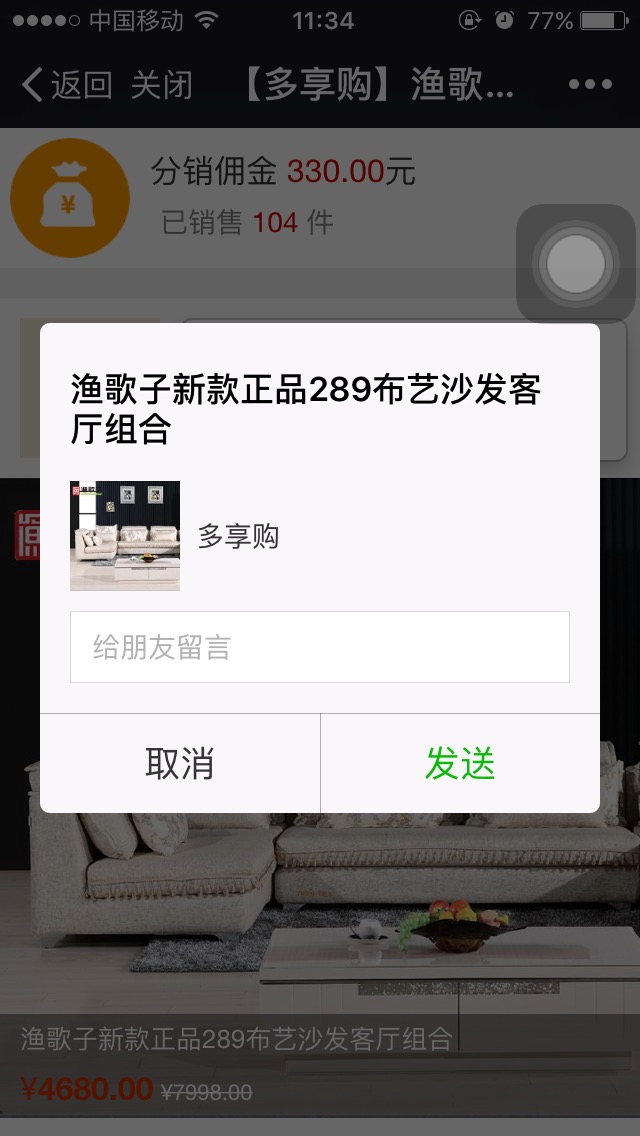
如果不设置,就会是默认的标题,默认的logo,默认的详情。
设置了事件,就会按照自己想要的内容分享出去。
4.我要分销页面,源码
<!DOCTYPE html>
<head>
<meta content="text/html; charset=utf-8" http-equiv="Content-Type" />
<meta charset="utf-8" />
<meta content="width=device-width, initial-scale=1.0, maximum-scale=1.0, user-scalable=0,user-scalable=no" name="viewport" />
<meta content="yes" name="apple-mobile-web-app-capable" />
<meta content="black" name="apple-mobile-web-app-status-bar-style" />
<meta name="format-detection" content="telephone=no" />
<title>【{sh:$store.name}】{sh:$goodsData.name}</title>
<link type="text/css" rel="stylesheet" href="{sh::PUB}css/bootstrap.min.css">
<link type="text/css" rel="stylesheet" href="{sh::PUB}css/font-awesome.min.css">
<script src="{sh::PUB}js/jquery-1.10.2.min.js" type="text/javascript"></script>
<style>
body {
background-color: #EFEFEF;
min-width: 320px;
max-width: 640px;
margin: 0 auto;
}
.item-bottom {
position: absolute;
left: 0px;
bottom: 0px;
background: rgba(0, 0, 0, 0.4) none repeat scroll !important;
width: 100%;
color: #fff;
line-height: 25px;
padding-right: 5px;
text-align: left;
font-size: 13px;
padding-left: 10px;
}
.qrcode img {
width: 95%;
}
.qrcode strong {
color: #cc0033;
text-align: center;
padding: 20px;
display: block
}
.tip .title {
height: 30px;
margin: 10px;
vertical-align: middle;
line-height: 30px;
}
.tip .title img {
padding: 5px;
float: left;
}
.tip .title div {
width: 100%;
margin-left: 5px;
height: 1px;
background-color: #cc0033;
}
.tip .content {
margin-left: 15px;
margin-right: 15px;
color: gray;
}
.tip .content strong {
color: black;
}
.row_1 {
width: 100%;
display: -webkit-box;
background-color: white;
margin-bottom: 15px;
}
.row_2 {
width: 100%;
position: relative;
background-color: white;
}
.row_2_1 {
display: -webkit-box;
margin-bottom: 10px;
}
.popover {
display: inline;
left: 80px;
top: 10px;
width: 70%;
}
.headimg {
margin: 10px 10px;
}
.item-img {
position: relative;
}
.price {
color: #CC3300;
font-size: 16px;
}
.money {
display: inline-grid;
font-size: 16px;
padding: 10px 5px 5px 5px;
}
.sale {
font-size: 14px;
padding-left: 10px;
color: gray;
}
.money_img {
width: 70px;
padding: 5px;
}
.popover-content {
font-size: 14px;
}
</style>
</head>
<body>
<div class="row_1">
<div class="left"><img class="money_img" src="{sh::RES}public/img/t2.png"></span>
</div>
<div class="right">
<div class="money">分销佣金
<font color='#CC0000'>{sh:$commission}</font>元</div>
<div class="sale">已销售
<font color='#CC0000'>
<php>echo ($goodsData['salecount'] + $goodsData['fakemembercount']);</php>
</font>件</div>
</div>
</div>
<div class="row_2">
<if condition="$wxuserData.nickname neq ''">
<div clas="row_2_1">
<div class="left"><img src="{sh:$wxuserData.headimgurl}" width="70px" class="headimg"></div>
<div class="popover right">
<div class="arrow"></div>
<div class="popover-content">
<p>我是
<font color='#FF9900'>{sh:$wxuserData.nickname}</font>,
<br/><span>我为<font color='#FF9900'>{sh:$store.name}</font>代言。</span></p>
</div>
</div>
</div>
</if>
<div class="row_2_2">
<div class="item-img">
<img class="item-img-logo" src="{sh:$goodsData.logoimg}" width="100%">
<div class="item-bottom">
<span>{sh:$goodsData.name}</span>
<div>
<span class="price">¥<strong>{sh:$goodsData.price}</strong></span>
<small><s>¥{sh:$goodsData.oprice}</s></small>
</div>
</div>
</div>
</div>
<div class="row_2_3 qrcode text-center">
<img src="{sh:$goodsData.qrcode}" width="100%">
<strong>长按二维码 识别图中二维码</strong>
</div>
</div>
<div class="row_3 tip">
<div class="title">
<i class="fa fa-sitemap"></i><span> 分销如何赚钱</span>
</div>
<div class="content">
<div>
<strong>第一步:</strong>转发商品链接或商品二维码图片给微信好友;
<br/>
<br/>
<strong>第二步:</strong>从您转发的链接或图片进入商城的好友,系统将自动锁定成为您的客户,他们在微信商城中购买任何商品,您都可以获得分销佣金;
<br/>
<br/>
<strong>第三步:</strong>您可以在分销中查看【我的团队】和【分销佣金】。好友确认收货后,佣金可提现。
<br/>
<br/>
</div>
</div>
</div>
<include file="./Tpl/Store/Public/Public_foot.html" />
</body>
<include file="./Tpl/Store/Wx_config.html"/>
<script>
// 微信JSSDK开发
wx.ready(function () {
// 分享给朋友
wx.onMenuShareAppMessage({
title: '{sh:$wxShare.title}', // 商品名
desc: '{sh:$wxShare.desc}', // 店铺名
link: '{sh:$wxShare.link}', // 商品购买地址
imgUrl: '{sh:$wxShare.imgUrl}', // 分享的图标
fail: function (res) {
alert(JSON.stringify(res));
}
});
// 分享到朋友圈
wx.onMenuShareTimeline({
title: '{sh:$wxShare.title}', // 商品名
link: '{sh:$wxShare.link}', // 商品购买地址
imgUrl: '{sh:$wxShare.imgUrl}', // 分享的图标
fail: function (res) {
alert(JSON.stringify(res));
}
});
});
</script>
</html>
微信JS-SDK实现自定义分享功能,分享给朋友,分享到朋友圈的更多相关文章
- 微信分享功能引入页面-控制分享时候调用的标题、图片、url和微信按钮隐藏显示控制
1.设置分享调用的标题.图片.url预览. 2.控制右上角三个点按钮的隐藏显示(和底部工具栏的显示隐藏--未测试). 3.判断网页是否在微信中被调用. <!doctype html> &l ...
- 微信js sdk上传多张图片
微信js sdk上传多张图片,微信上传多张图片 该案例已tp3.2商城为例 直接上代码: php代码: public function ind(){ $appid="111111111111 ...
- 实战微信JS SDK开发:贺卡制作与播放(1)
前段时间忙于CanTK 2.0的开发,所以博客一直没有更新.CanTK 2.0主要增强了游戏和富媒体的开发,现在编码和测试基本完成了,等文档完成了再正式发布,里面有不少激动人心的功能,等发布时再一一细 ...
- 微信JS SDK接入的几点注意事项
微信JS SDK接入,主要可以先参考官网说明文档,总结起来有几个步骤: 1.绑定域名:先登录微信公众平台进入“公众号设置”的“功能设置”里填写“JS接口安全域名”.备注:登录后可在“开发者中心”查看对 ...
- 微信开发(2):微信js sdk分享朋友圈,朋友,获取config接口注入权限验证(转)
进行微信开发已经一阵子了,从最初的什么也不懂,到微信授权登录,分享,更改底部菜单,素材管理,等. 今天记录一下微信jssdk 的分享给朋友的功能,获取config接口注入. 官方文档走一下简单说:四步 ...
- 微信JS SDK配置授权,实现分享接口
微信开放的JS-SDK面向网页开发者提供了基于微信内的网页开发工具包,最直接的好处就是我们可以使用微信分享.扫一扫.卡券.支付等微信特有的能力.7月份的时候,因为这个分享的证书获取问题深深的栽了一坑, ...
- 微信js sdk分享开发摘记java版
绑定域名和引入js的就不说了 废话不说直接上代码 public void share(HttpServletRequest request) throws Exception { StringBuff ...
- 微信js SDK接口
微信JS-SDK说明文档 http://mp.weixin.qq.com/wiki/7/aaa137b55fb2e0456bf8dd9148dd613f.html 一.微信登录功能 在进行微信OAut ...
- 微信JS SDK Demo
微信JS-SDK 分享到朋友圈 分享给朋友 分享到QQ 拍照或从手机相册中选图 识别音频并返回识别结果 使用微信内置地图查看位置原文:http://www.cnblogs.com/txw1958/p/ ...
- 微信js sdk动态引用
一般情况下,微信的js-sdk只需要直接引用script即可 <script src="http://res.wx.qq.com/open/js/jweixin-1.0.0.js&qu ...
随机推荐
- Vector3函数理解-计算两向量之间的角度
1.已知两个向量dirA,dirB.Vector3 dirA = new Vector3(-1,1,0); Vector3 dirB = new Vector3(-1,1,1);2.使向量处于同一个平 ...
- 控制语句1:真假与if 语句
一.真假与运算符 1.1 真假的划分.查看 任何数据都可以分为两类:True 与 False False : 0,None,空的数据结构例如:[] ,{},str1 = '' True :除了上面情 ...
- 【费用流】bzoj1221 [HNOI2001] 软件开发
几乎为“线性规划与网络流24题”中的餐巾问题. 这里把S看成毛巾的来源,T看成软件公司,我们的目的就是让每天的毛巾满足要求(边满流). 引用题解: [问题分析] 网络优化问题,用最小费用最大流解决. ...
- C#实现文件与二进制互转并存入数据库
这篇文章主要介绍了C#实现文件与二进制互转并存入数据库,本文直接给出代码实例,代码中包含详细注释,需要的朋友可以参考下 //这个方法是浏览文件对象 private void button1_C ...
- VBox自动启动websrv 并开机启动所有的虚拟机
由于项目需要,在Ubuntu 16.04的Server版本中安装了一个virtualbox,并利用phpvirtualbox来管理虚拟机 需要在宿主机启动之后将所有的虚拟机也启动,因此用以下方式进行处 ...
- Spring-Kafka 2.0.0发送API翻译
Kafka Template–2.2.0 api KafkaTemplate KafkaTemplate这个类包装了个生产者,来提供方便的发送数据到kafka的topic里面. 同步和异步的方法都有, ...
- CentOS7 编译安装golang和rpm安装golang
编译安装 1.下载golang二进制安装包: https://storage.googleapis.com/golang/go1.9.linux-amd64.tar.gz 2.解压安装包到指定目录,此 ...
- python 绘图---2D、3D散点图、折线图、曲面图
python中绘制2D曲线图需要使用到Matplotlib,Matplotlib 是一个 Python 的 2D绘图库,它以各种硬拷贝格式和跨平台的交互式环境生成出版质量级别的图形,通过 Matplo ...
- Kali Linux破解wifi密码(WEP)
WEP是无线路由器最初广泛使用的一种加密方式,这种加密方式非常容易被破解. 目前很少有人使用wep加密方式,但是还是会有. 建议:使用WPA/WPA2做为加密方式. 抓包和"破解wpa/wp ...
- hexo多主题切换
今天看到一个朋友在github上面的issue 大概问题就是怎么在不同的电脑上面使用 git有个这么个东西Submoudle中文叫做子模块 具体使用教程看这里Git-工具-子模块 这里只说怎么搞hex ...