
Information Management System
Information Management System
一.代码部分
#include <stdio.h>

#include <stdlib.h>

#include <string.h>

#include <windows.h>

typedef struct STU {

	char name[20];

	char sex[5];

	char num[20];

	char _class[20];

	char score[5];

};

void home(void) {							//显示进入画面

	printf("\n\n\n\n");

	printf("================================================================================\n\n");

	printf("================================================================================\n\n");

	printf("*************************欢迎使用学生成绩管理系统*******************************\n\n");

	printf("-----------------------------------------------------------------制作人:Sogger\n\n");

	printf("****************************----Welcome!----************************************\n\n");

	printf("================================================================================\n\n");

	printf("================================================================================\n\n");

	printf("														请按任意键进入学生成绩管理系统\n\n\n\n\n");

	system("pause >nul");

	system("cls");

}

void end(void) {							//显示结束画面

	printf("\n\n\n");

	printf("================================================================================\n\n");

	printf("================================================================================\n\n");

	printf("*************************感谢使用学生成绩管理系统***********************************\n\n");

	printf("********************************************************************************\n\n");

	printf("================================================================================\n\n");

	printf("请按任意键退出学生管理系统\n");

	system("pause >nul");

	exit(0);

}

void Output(struct STU* stu2) {					//对成绩排行进行输出

	system("cls");

	int i;

	printf("															成绩排行如下\n\n");

	printf("\t姓名\t性别\t学号\t\t班级\t\t线代成绩\n");

	for (i = 0; i < 10; i++) {

		printf("	%s	%s	%s	%s	%s\n", stu2[i].name, stu2[i].sex, stu2[i].num, stu2[i]._class, stu2[i].score);

	}

}

void ScoreTotal(struct STU* stu) {				//对成绩进行排行

	struct STU temp;

	int i,j;

	for (i = 0; i < 9; i++) {

		for (int j = i + 1; j < 10; j++) {

			if (stu[j].score > stu[i].score) {

				temp = stu[j];

				stu[j] = stu[i];

				stu[i] = temp;

			}

		}

	}

	Output(stu);

}

int main() {

	FILE* fp;

	STU stu[10],stu2[10];

	int i,a;

	char temp[10][20];

	char stu1[10][100];

	system("title 学生成绩管理系统");					//设置标题

	system("mode con cols=80 lines=25");				//调节窗口高度宽度

	system("color F5");									//调节背景和字体颜色

	home();

	for (i = 0; i < 10; i++) {

		printf("															请录入学生信息\n\n");

		printf("	学生%d\n\n", i+1);

		printf("	姓名\t性别\t学号\t\t班级\t\t线代成绩\n");

		printf("	");

		scanf("%s	%s	%s	%s	%s", stu[i].name, stu[i].sex, stu[i].num, stu[i]._class, &stu[i].score);

		strcpy(temp[i], stu[i].name);

		strcat(temp[i], ".txt");

		if ((fp = fopen(temp[i], "w+")) == NULL) {

			printf("File open error!\n");

			exit(0);

		}

		fprintf(fp, "%s %s %s %s %s", stu[i].name, stu[i].sex, stu[i].num, stu[i]._class, stu[i].score);

		if (fclose(fp)) {

			printf("Can not close the file!\n");

			exit(0);

		}

		system("cls");						//清空当前界面

	}

	printf("														以下是十位同学的信息\n\n");

	printf("\t姓名\t性别\t学号\t\t班级\t\t线代成绩\n");

	for (i = 0; i < 10; i++) {

		if ((fp= fopen(temp[i], "r")) == NULL) {

			printf("File open error!\n");

			exit(0);

		}

		strcpy(stu2[i].name, stu[i].name);

		fscanf(fp, "%s %s %s %s %s", stu2[i].name, stu2[i].sex, stu2[i].num, stu2[i]._class, stu2[i].score);

		printf("	%s	%s	%s	%s	%s\n", stu2[i].name, stu2[i].sex, stu2[i].num, stu2[i]._class, stu2[i].score);

	}

	printf("\n\n\n			  是否查看排行?\n		  【1】是		【2】	否\n");

	printf("\t\t\t\t");

	scanf("%d", &a);

	if (a == 1) ScoreTotal(stu2);

	if (fclose(fp)) {

		printf("Can not close the file!\n");

		exit(0);

	}

	system("pause >nul");						//暂停且不显示任何东西

	system("cls");

	end();

	return 0;

}
二.运行截图
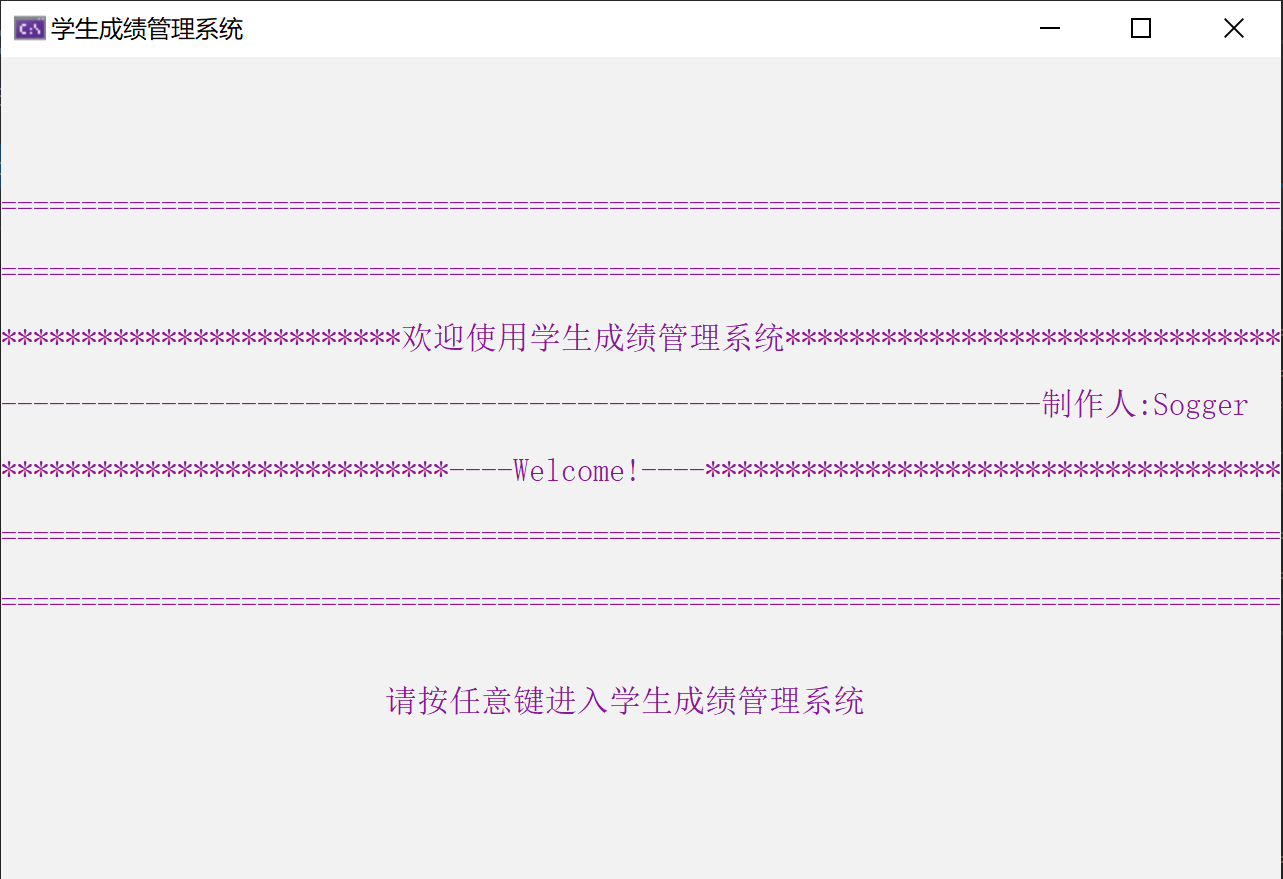

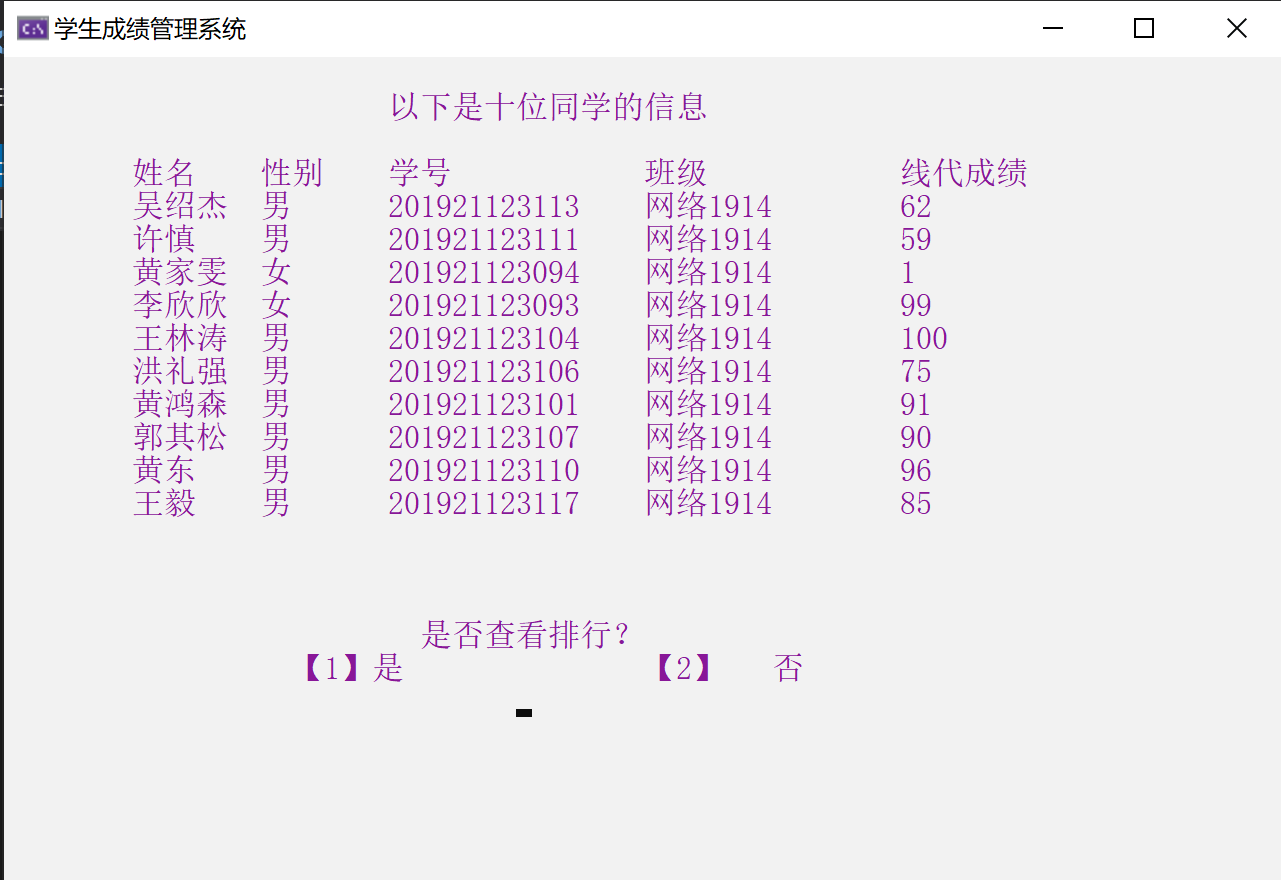
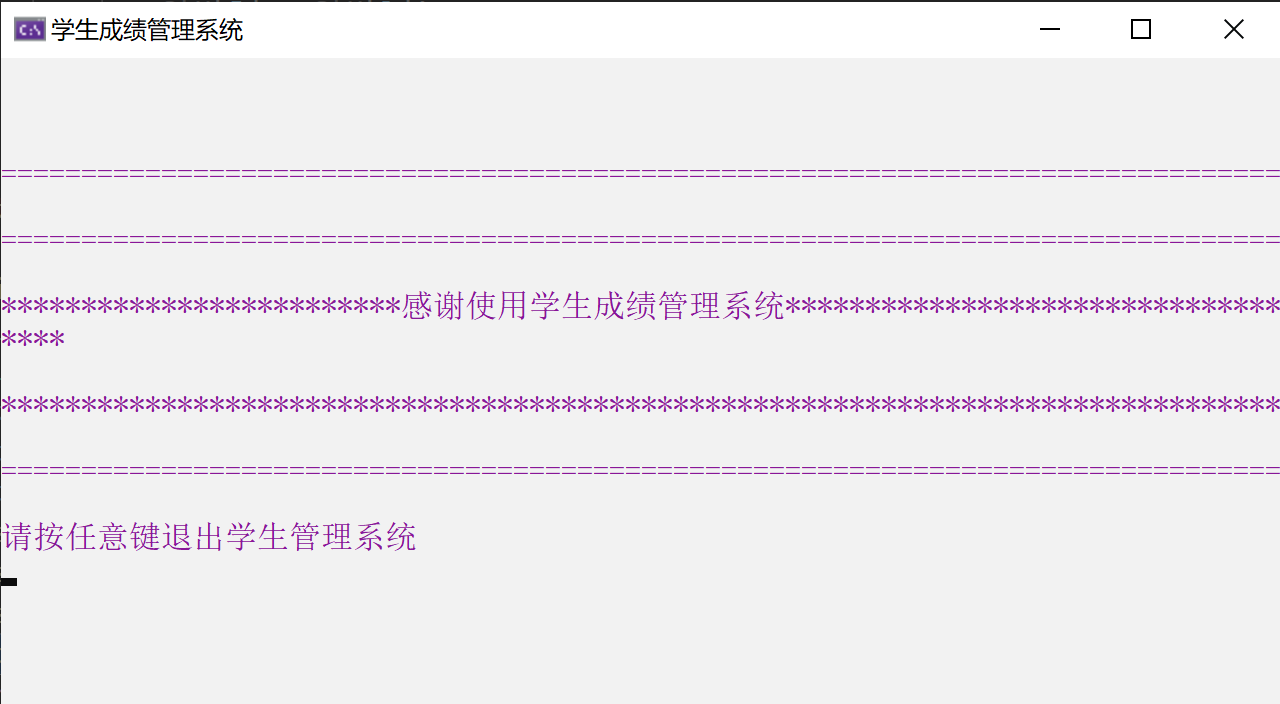
三.system()函数的简单介绍
函数名:system() (需加头文件<stdlib.h>后才可以调用)
功能:实际上相当于执行一个DOS命令
用法: system("DOS命令");
下面介绍几个用法:
(1)system("color 颜色参数")
作用:改变屏幕窗口的背景色和文字颜色
参数选择:颜色属性由两个十六进制数字指定 ,第一个为背景色,第二个则为文字颜色
每个数字可以为以下任何值之一:
参数:0 = 黑色 1 = 蓝色 2 = 绿色 3 = 浅绿色 4 = 红色 5 = 紫色 6 = 黄色 7 = 白色 8 = 灰色
9 = 淡蓝色 A = 淡绿色 B = 淡浅绿色 C = 淡红色 D = 淡紫色 E = 淡黄色 F = 亮白色
如:添加代码 system("color 9F"),可以将屏幕窗口背景色设置为蓝色,文字颜色设置为白色。
注意:1. 如果只给定一个参数,则只设置背景色。如:system("color 9"),背景色为蓝色,文字颜色不变
2.如果没有给定任何参数,如:system("color"),该命令会将颜色还原到cmd启动时的默认颜色
(2)system("pause")
作用:暂停程序运行,以便于在屏幕上观察程序的执行结果
正常情况下,在运行结果后面会显示:按任意键继续. . .
这时候就很烦躁了,强迫症看着会很不爽,于是...
如果不想显示提示,可以使用输出重定向命令:
system("pause >nul");
这样屏幕上就不再显示“按任意键继续. . .”的提示了~~~~
注意:是nul,不是null !!!
大于号>,表示将命令结果输出重定向到文件、打印机等其他设备中
nul是DOS中的一个虚拟的空设备,">nul"表示把命令产生的屏幕显示信息重定向(>)到虚拟空设备
(nul),这样在屏幕上就不会显示pause命令的执行结果了~~
(3)system("cls")
作用:清除屏幕信息...
(4)system("title 标题内容")
作用:为程序调试的DOS窗口加上标题
效果如下:、
(5)system("mode con cols=窗口长度 lines=窗口宽度")
作用:调整DOS窗口的高度和宽度
。。。
。。。
。。。
。。。
Information Management System的更多相关文章
- 2015年5月9日 student information management system
/*大作业SIMS*///头文件 #ifndef __FUNC_C__ #define __FUNC_C__ #include <stdio.h> #include <stdlib. ...
- content management system
Defination of CMS: The definition of a CMS is an application (more likely web-based), that provides ...
- Database Management System 基础01:管理自己的任何事
前言 系列文章:[传送门] 这Database Management System 系列准备也慢慢的写出来了.Database Management是我学习的一块,这块出的也许比较慢.比较忙吧,坚持每 ...
- Network management system scheduling for low power and lossy networks
In one embodiment, a network management system (NMS) determines an intent to initialize a request-re ...
- Analysis of requirement specification of parking management system
Analysis of requirement specification of parking management system PURPOSE OF THE SYSTEM The parking ...
- Information Management Policy(信息管理策略)的使用范例
基础知识 很多人都会定期收拾自己的书架或者抽屉,把里面过旧的资料拿走,为新的资料腾出空间来,这样既可以节省空间,而且当冗余资料过多的时候也会降低你查找的速度和效率.那么,在企业的SharePoint中 ...
- Main Memory Object-Relational Database Management System
Main Memory Object-Relational Database Management System FastDBMain Memory Relational Database Manag ...
- Oracle Product Hub / Product Lifecycle Management / Product Information Management / Advanced Produc
In this Document Goal Solution 1. Master List showing sample code for APIs in Product Data Hub ...
- HR-人力资源管理系统(Human Resources Management System,HRMS)
人力资源管理系统(Human Resources Management System,HRMS),是指组织或社会团体运用系统学理论方法,对企业的人力资源管理方方面面进行分析.规划.实施.调整,提高企业 ...
随机推荐
- CentOS 7 ETCD集群配置大全
目录 前言 环境准备 安装 静态集群 配置 node01 配置文件 node02 配置文件 node03 配置文件 启动测试 查看集群状态 生成TLS证书 etcd证书创建 安装cfssl工具集 生成 ...
- 机器学习十大算法总览(含Python3.X和R语言代码)
引言 一监督学习 二无监督学习 三强化学习 四通用机器学习算法列表 线性回归Linear Regression 逻辑回归Logistic Regression 决策树Decision Tree 支持向 ...
- js人民币转大写
<input type="text" oninput="OnInput (event)" value="1234567"> &l ...
- JSSDK制作思路
需求:对外提供一个js的SDK.相当于在原有的原生SDK基础上包装一层方法. SDK原生的方法通过JSExport 协议可以让js调用到原生的方法.你可以写一个协议继承JSExport ,将需要对js ...
- js练习- 给你一个对象,求有几层
// 比如这个a中,就有四层.如何算出这四层 const a = { b: 1, c() {}, d: { e: 2, f: { g: 3, h: { i: 4, }, }, j: { k: 5, } ...
- ELK filebeat的安装
安装参考官方文档: https://www.elastic.co/guide/en/beats/filebeat/current/filebeat-installation.html 注意事项: Fr ...
- 2017 CCPC秦皇岛 E题 String of CCPC
BaoBao has just found a string of length consisting of 'C' and 'P' in his pocket. As a big fan of ...
- CodeForces1006F-Xor-Paths
F. Xor-Paths time limit per test 3 seconds memory limit per test 256 megabytes input standard input ...
- unity3d 动态添加地面贴图 草地
TerrainData.splatPrototypes = ]{ new SplatPrototype() { texture=Caodi, //Texture2D的贴图 normalMap=null ...
- 【Selenium】自动进入网页,出现弹窗被卡住
问题现象: 使用命令:driver.get("http://127.0.0.1/zentao/user-login.html") 进入网页,出现如下弹窗,无法进入 解决方法: #d ...