
request对象的方法
request对象封装的是请求的数据,由服务器创建,作为实参传递给Servlet的方法,一个请求对应一个request对象,request对象可以获得请求数据。
1、获取请求行信息
(1)get提交
<body bgcolor="#f5f5dc">
<center>
<h3>登录</h3>
<form action="http://localhost:8080/MyServlet_war_exploded/abc" method="get">
用户名:<input type="text" name="myname" size=""><br>
密 码:<input type="password" name="mypassword" size="" ><br><br>
<input type="reset" value="取消">
<input type="submit" value="登录">
</form> </center>
</body>
 protected void doGet(HttpServletRequest request, HttpServletResponse response) throws ServletException, IOException {

        ServletOutputStream out=response.getOutputStream();

        String method= request.getMethod();

        System.out.println(method);

        String URI=request.getRequestURI();

        System.out.println(URI);

        StringBuffer URL=request.getRequestURL();

        System.out.println(URL);

        String path=request.getContextPath();

        System.out.println(path);

    }
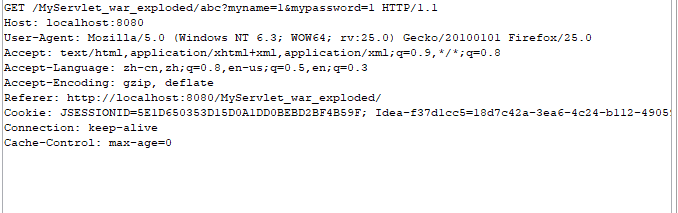
运行结果:
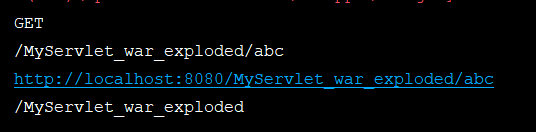
getMethod():获取提交方式

getRequestURI():URI

getRequestURL():URL

getContextPath():项目名称
(2)post提交
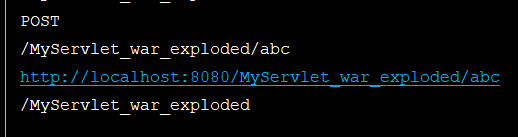

2、获取请求头信息
(1)获取请求头的一条信息:
    protected void doGet(HttpServletRequest request, HttpServletResponse response) throws ServletException, IOException  {

        String header=request.getHeader("Host");

        System.out.println(header);

    }

(2)获取请求头的所有信息:
 protected void doGet(HttpServletRequest request, HttpServletResponse response) throws ServletException, IOException  {

        Enumeration<String> headerNames=request.getHeaderNames();//获取键的名字

        while(headerNames.hasMoreElements()){

            String headerName= headerNames.nextElement();

            String headerValue=request.getHeader(headerName);

            System.out.println(headerName+":"+headerValue);

        }

    }


3、获取用户信息
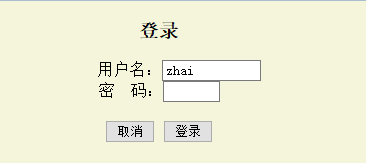
(1)get提交:
<center>
<h3>登录</h3>
<form action="http://localhost:8080/MyServlet_war_exploded/abc" method="get">
用户名:<input type="text" name="userName" size=""><br>
密 码:<input type="password" name="password" size="" ><br><br>
<input type="reset" value="取消">
<input type="submit" value="登录">
</form> </center>
   protected void doGet(HttpServletRequest request, HttpServletResponse response) throws ServletException, IOException  {

        String name=request.getParameter("userName");

        String password=request.getParameter("password");

        System.out.println(name+":"+password);

    }
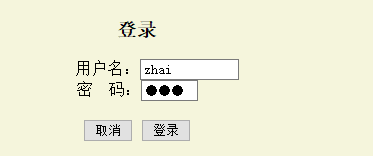

(2)post提交:
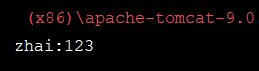
post提交与get提交的运行结果相同。
4、对用户提交的数据的同键不同值的处理
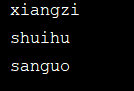
(1)获取提交数据的值:
<form action="http://localhost:8080/MyServlet_war_exploded/abc" method="post">
<input type="checkbox" name="book" value="xiangzi">《骆驼祥子》<br>
<input type="checkbox" name="book" value="xiyou">《西游记》<br>
<input type="checkbox" name="book" value="shuihu">《水浒传》<br>
<input type="checkbox" name="book" value="hongloumemg">《红楼梦》<br>
<input type="checkbox" name="book" value="sanguo">《三国演义》<br>
<input type="reset" value="取消">
<input type="submit" value="确定">
</form>

  protected void doPost(HttpServletRequest request, HttpServletResponse response) throws ServletException, IOException {

    String[] books= request.getParameterValues("book");

    if(books!=null){

        for(String shu:books){

            System.out.println(shu);

        }

    }

    }
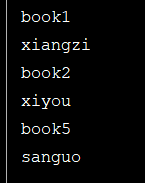
(2)获取名字:
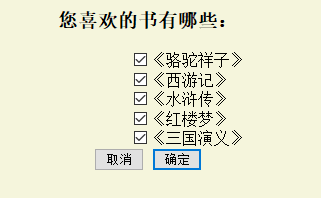
<center>
<h3>您喜欢的书有哪些:</h3>
<form action="http://localhost:8080/MyServlet_war_exploded/abc" method="post">
<input type="checkbox" name="book1" value="xiangzi">《骆驼祥子》<br>
<input type="checkbox" name="book2" value="xiyou">《西游记》<br>
<input type="checkbox" name="book3" value="shuihu">《水浒传》<br>
<input type="checkbox" name="book4" value="hongloumemg">《红楼梦》<br>
<input type="checkbox" name="book5" value="sanguo">《三国演义》<br>
<input type="reset" value="取消">
<input type="submit" value="确定">
</form>
</center>
protected void doPost(HttpServletRequest request, HttpServletResponse response) throws ServletException, IOException {

 Enumeration<String> names=request.getParameterNames();

 while(names.hasMoreElements()){

     System.out.println(names.nextElement());

 }

    }

(3) 获取键和值:
public class MyServlet extends HttpServlet {

    protected void doPost(HttpServletRequest request, HttpServletResponse response) throws ServletException, IOException {

        Map<String,String[]> map=request.getParameterMap();

        for(Map.Entry<String,String[]> entry:map.entrySet()){

            System.out.println(entry.getKey());

            for(String str:entry.getValue()){

                System.out.println(str);

            }

        }

 }

request对象的方法的更多相关文章
- request对象的方法及其参数的传递
先设计一个简单的登录界面index.htm: <html><head><title>request的使用</title></head>< ...
- day65 request对象,以及方法,response对象,render,redirect
这里的都是我们会频繁使用到的,用得多了自然就会了,我们写项目都是少不了这些用法的,所以这就把老师的博客粘过来就好了, Request对象 官方文档 属性 所有的属性应该被认为是只读的,除非另有说明. ...
- request对象多种方法封装表单数据
public void doGet(HttpServletRequest request, HttpServletResponse response) throws ServletException, ...
- java webservice服务器端获取request对象的三种方式
有的时候在webservice里我们需要获取request对象和response对象,比如想要获得客户端的访问ip的时候就需要这么做,下面说三种方式,当然三种方式可能是针对不同方式部署webservi ...
- webservice服务器端获取request对象的三种方式
有的时候在webservice里我们需要获取request对象和response对象,比如想要获得客户端的访问ip的时候就需要这么做,下面说三种方式,当然三种方式可能是针对不同方式部署webservi ...
- Request对象与Response对象
1.Request对象 Request对象是来获取请求消息的,是由服务器(Tomcat)创建的. Request对象继承体系结构: ServletRequest -- 接口 ...
- Request对象的主要方法
setAttribute(String name,Object):设置名字为name的request的參数值 getAttribute(String name):返回由name指定的属性值 getAt ...
- Java面试题之Request对象的主要方法
setAttribute(String name,Object):设置名字为name的request的参数值 getAttribute(String name):返回由name指定的属性值 getAt ...
- JAVA-JSP内置对象之request对象的其他方法
相关资料:<21天学通Java Web开发> request对象的其他方法1.request对象除了可以用来获得请求参数,还可以用来获得HTTP标头及其他信息. 方法 ...
随机推荐
- centos7单机安装kafka,进行生产者消费者测试
[转载请注明]: 原文出处:https://www.cnblogs.com/jstarseven/p/11364852.html 作者:jstarseven 码字挺辛苦的..... 一.k ...
- Go最火的Gin框架简单入门
Gin 介绍 Gin 是一个 Golang 写的 web 框架,具有高性能的优点,,基于 httprouter,它提供了类似martini但更好性能(路由性能约快40倍)的API服务.官方地址:htt ...
- python+unittest框架第四天unittest之断言(一)
unittest中的测试断言分两天总结,hhh其实内容不多,就是懒~ 断言的作用是什么? 答:设置测试断言以后,能帮助我们判断测试用例执行结果. 我们先看下unittest支持的断言有哪些: 对上面 ...
- react native https
1. ios解决方案 1.1 Xcode打开工程,Libraries -> RCTNetworking -> RCTHTTPRequestHandler.mm -> #pragma ...
- java 路径问题
java路径存在两种写法"/"和"\\" String path="D:\\1.txt"; String path1="D:/1. ...
- 电话面试总结(问的很细).md
String 和其他基本类型有什么区别 Tip 基本类型有几种 为什么要给String创建一个常量池而不给其他类创建常量池 常量池的定义是什么 垃圾回收机制是如何运行的 对新生代和老年代不同的处理机制 ...
- 以后可得记住了--Python笔试面试题小结
1.字符串处理 将字符串中的数字替换成其两倍的值,例如: 修改前:"AS7G123m (d)F77k" 修改后:"AS14G246m (d)F154k" 个 ...
- Java生产者消费者的三种实现
Java生产者消费者是最基础的线程同步问题,java岗面试中还是很容易遇到的,之前没写过多线程的代码,面试中被问到很尬啊,面完回来恶补下.在网上查到大概有5种生产者消费者的写法,分别如下. 用sync ...
- PySpark SQL 相关知识介绍
title: PySpark SQL 相关知识介绍 summary: 关键词:大数据 Hadoop Hive Pig Kafka Spark PySpark SQL 集群管理器 PostgreSQL ...
- Java NIO 上
概述: NIO主要有三大核心部分:Channel(通道),Buffer(缓冲区), Selector. 传统IO基于字节流和字符流进行操作,而NIO基于Channel和Buffer(缓冲区)进行操作, ...