
request对象的方法
request对象封装的是请求的数据,由服务器创建,作为实参传递给Servlet的方法,一个请求对应一个request对象,request对象可以获得请求数据。
1、获取请求行信息
(1)get提交
<body bgcolor="#f5f5dc">
<center>
<h3>登录</h3>
<form action="http://localhost:8080/MyServlet_war_exploded/abc" method="get">
用户名:<input type="text" name="myname" size=""><br>
密 码:<input type="password" name="mypassword" size="" ><br><br>
<input type="reset" value="取消">
<input type="submit" value="登录">
</form> </center>
</body>
 protected void doGet(HttpServletRequest request, HttpServletResponse response) throws ServletException, IOException {

        ServletOutputStream out=response.getOutputStream();

        String method= request.getMethod();

        System.out.println(method);

        String URI=request.getRequestURI();

        System.out.println(URI);

        StringBuffer URL=request.getRequestURL();

        System.out.println(URL);

        String path=request.getContextPath();

        System.out.println(path);

    }
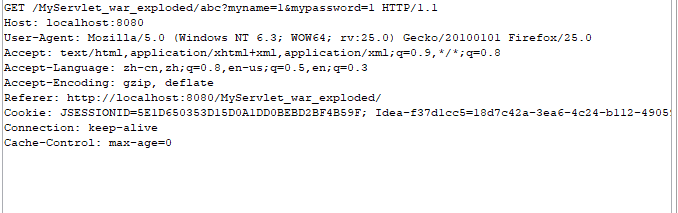
运行结果:
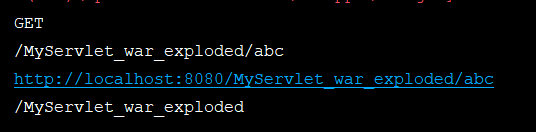
getMethod():获取提交方式

getRequestURI():URI

getRequestURL():URL

getContextPath():项目名称
(2)post提交
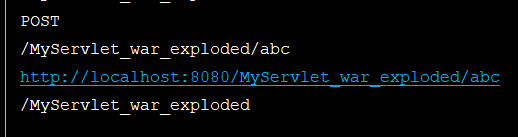

2、获取请求头信息
(1)获取请求头的一条信息:
    protected void doGet(HttpServletRequest request, HttpServletResponse response) throws ServletException, IOException  {

        String header=request.getHeader("Host");

        System.out.println(header);

    }

(2)获取请求头的所有信息:
 protected void doGet(HttpServletRequest request, HttpServletResponse response) throws ServletException, IOException  {

        Enumeration<String> headerNames=request.getHeaderNames();//获取键的名字

        while(headerNames.hasMoreElements()){

            String headerName= headerNames.nextElement();

            String headerValue=request.getHeader(headerName);

            System.out.println(headerName+":"+headerValue);

        }

    }


3、获取用户信息
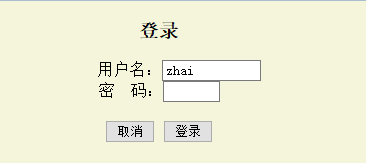
(1)get提交:
<center>
<h3>登录</h3>
<form action="http://localhost:8080/MyServlet_war_exploded/abc" method="get">
用户名:<input type="text" name="userName" size=""><br>
密 码:<input type="password" name="password" size="" ><br><br>
<input type="reset" value="取消">
<input type="submit" value="登录">
</form> </center>
   protected void doGet(HttpServletRequest request, HttpServletResponse response) throws ServletException, IOException  {

        String name=request.getParameter("userName");

        String password=request.getParameter("password");

        System.out.println(name+":"+password);

    }
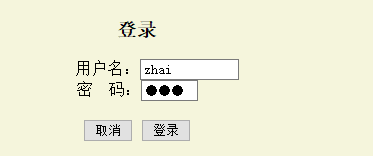

(2)post提交:
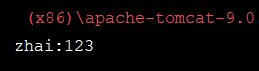
post提交与get提交的运行结果相同。
4、对用户提交的数据的同键不同值的处理
(1)获取提交数据的值:
<form action="http://localhost:8080/MyServlet_war_exploded/abc" method="post">
<input type="checkbox" name="book" value="xiangzi">《骆驼祥子》<br>
<input type="checkbox" name="book" value="xiyou">《西游记》<br>
<input type="checkbox" name="book" value="shuihu">《水浒传》<br>
<input type="checkbox" name="book" value="hongloumemg">《红楼梦》<br>
<input type="checkbox" name="book" value="sanguo">《三国演义》<br>
<input type="reset" value="取消">
<input type="submit" value="确定">
</form>

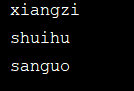
  protected void doPost(HttpServletRequest request, HttpServletResponse response) throws ServletException, IOException {

    String[] books= request.getParameterValues("book");

    if(books!=null){

        for(String shu:books){

            System.out.println(shu);

        }

    }

    }
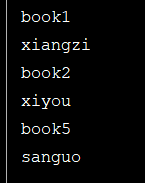
(2)获取名字:
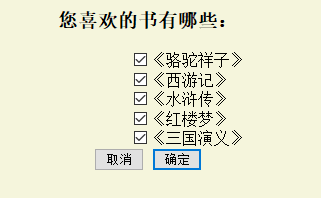
<center>
<h3>您喜欢的书有哪些:</h3>
<form action="http://localhost:8080/MyServlet_war_exploded/abc" method="post">
<input type="checkbox" name="book1" value="xiangzi">《骆驼祥子》<br>
<input type="checkbox" name="book2" value="xiyou">《西游记》<br>
<input type="checkbox" name="book3" value="shuihu">《水浒传》<br>
<input type="checkbox" name="book4" value="hongloumemg">《红楼梦》<br>
<input type="checkbox" name="book5" value="sanguo">《三国演义》<br>
<input type="reset" value="取消">
<input type="submit" value="确定">
</form>
</center>
protected void doPost(HttpServletRequest request, HttpServletResponse response) throws ServletException, IOException {

 Enumeration<String> names=request.getParameterNames();

 while(names.hasMoreElements()){

     System.out.println(names.nextElement());

 }

    }

(3) 获取键和值:
public class MyServlet extends HttpServlet {

    protected void doPost(HttpServletRequest request, HttpServletResponse response) throws ServletException, IOException {

        Map<String,String[]> map=request.getParameterMap();

        for(Map.Entry<String,String[]> entry:map.entrySet()){

            System.out.println(entry.getKey());

            for(String str:entry.getValue()){

                System.out.println(str);

            }

        }

 }

request对象的方法的更多相关文章
- request对象的方法及其参数的传递
先设计一个简单的登录界面index.htm: <html><head><title>request的使用</title></head>< ...
- day65 request对象,以及方法,response对象,render,redirect
这里的都是我们会频繁使用到的,用得多了自然就会了,我们写项目都是少不了这些用法的,所以这就把老师的博客粘过来就好了, Request对象 官方文档 属性 所有的属性应该被认为是只读的,除非另有说明. ...
- request对象多种方法封装表单数据
public void doGet(HttpServletRequest request, HttpServletResponse response) throws ServletException, ...
- java webservice服务器端获取request对象的三种方式
有的时候在webservice里我们需要获取request对象和response对象,比如想要获得客户端的访问ip的时候就需要这么做,下面说三种方式,当然三种方式可能是针对不同方式部署webservi ...
- webservice服务器端获取request对象的三种方式
有的时候在webservice里我们需要获取request对象和response对象,比如想要获得客户端的访问ip的时候就需要这么做,下面说三种方式,当然三种方式可能是针对不同方式部署webservi ...
- Request对象与Response对象
1.Request对象 Request对象是来获取请求消息的,是由服务器(Tomcat)创建的. Request对象继承体系结构: ServletRequest -- 接口 ...
- Request对象的主要方法
setAttribute(String name,Object):设置名字为name的request的參数值 getAttribute(String name):返回由name指定的属性值 getAt ...
- Java面试题之Request对象的主要方法
setAttribute(String name,Object):设置名字为name的request的参数值 getAttribute(String name):返回由name指定的属性值 getAt ...
- JAVA-JSP内置对象之request对象的其他方法
相关资料:<21天学通Java Web开发> request对象的其他方法1.request对象除了可以用来获得请求参数,还可以用来获得HTTP标头及其他信息. 方法 ...
随机推荐
- c#自定义控件中的事件处理
using System; using System.Collections.Generic; using System.ComponentModel; using System.Drawing; u ...
- 强烈推荐 GitHub 上值得前端学习的开源实战项目
强烈推荐 GitHub 上值得前端学习的开源实战项目. Vue.js vue-element-admin 是一个后台前端解决方案,它基于和 element-ui 实现 基于 iView 的 Vue 2 ...
- 使用BeanShell断言判断请求返回的Json相应结果(不同json格式整理)
第一种json格式 { "code": 0, "msg": "success", "success": true, &q ...
- Nacos(五):多环境下如何“读取”Nacos中相应的配置
前言 前景回顾: Nacos(四):SpringCloud项目中接入Nacos作为配置中心 Nacos(三):Nacos与OpenFeign的对接使用 Nacos(二):SpringCloud项目中接 ...
- Eclipse中安装JRebel热部署教程
Eclipse中安装JRebel热部署教程 前言 Eclipse安装JRebel插件可快速实现热部署,节省了大量重启时间,提高开发效率. 本文只介绍Eclipse安装JRebel插件版本 ...
- three.js基础前置知识
这一节是纯理论知识,用于介绍three.js的入门概念,也就是开发前需要准备的理论基础. 一,三剑客 当然就是scene,camera,renderer这三个基本要素. scene是一个用于容纳三维空 ...
- 编程题及解题思路(1,String)
题目描述 请实现一个算法,确定一个字符串的所有字符是否全都不同.这里我们要求不允许使用额外的存储结构. 给定一个string iniString,请返回一个bool值,True代表所有字符全都不同,F ...
- Java和Tomcat安装教程
jdk安装与配置1.下载好对应的jdk2.安装JDK 直接运行exe可执行程序,默认安装即可:备注:路径可以选其他盘符,路径要全部为英文. 3.配置环境变量 新建变量名:JAVA_HOME,变量值:D ...
- vi 多行注释与取消
多行注释 1.在命令行模式下,按 Shift + v 进入 VISUAL LINE 模式 2.选择要注释内容 3.按下 Ctrl + Shift + v 锁定块(XShell中) 或 按下 Ctrl ...
- Azure DevOps vsts-agent-linux 安装出错, Must not run with sudo
在linux安装 vsts-agent-linux 在vsts-agent-linux的解压目录运行./config.sh, 提示"Must not run with sudo", ...