
EnjoyingSoft之Mule ESB开发教程系列第五篇:控制消息的流向-数据路由
本篇主要介绍在Mule ESB中控制消息的流向。控制消息的流向有很多不同的场景,数据的路由,数据的拆分和组合,数据的排序,数据的分发等。数据路由是ESB平台上最基本,也是最重要的功能之一,完整的ESB平台都会有相对应的功能。ESB基本的功能可分成消息路由,消息传输和消息转换等,后续几篇Mule ESB开发教程我们会陆续讲解这些功能。
Mule ESB同样具有很多的消息路由组件。作为开源ESB产品中很成熟的平台,Mule ESB的发展状态非常好,经过多年的发展,2017年在纽交所成功上市。Mule ESB拥有众多的企业案例,我们作为MuleSoft的重要合作伙伴,使用Mule ESB企业版开发实施,或者Mule ESB社区版开发实施,帮助国内众多的行业标杆客户成功上线企业集成项目。
Mule ESB的源代码托管在GitHub上,拥有非常详细的英文文档,Mule ESB的中文文档资料和开发教程却非常少,我们使用8篇文章来写基础Mule ESB中文开发教程,一起为开源软件做贡献。
- EnjoyingSoft之Mule ESB开发教程第一篇:初识Mule ESB
- EnjoyingSoft之Mule ESB开发教程第二篇:Mule ESB基本概念
- EnjoyingSoft之Mule ESB开发教程第三篇:Mule message structure - Mule message结构
- EnjoyingSoft之Mule ESB开发教程第四篇:Mule Expression Language - MEL表达式
- EnjoyingSoft之Mule ESB开发教程第五篇:控制消息的流向-数据路由
- EnjoyingSoft之Mule ESB开发教程第六篇:Data Transform - 数据转换
- EnjoyingSoft之Mule ESB开发教程第七篇:SOAP Web Service的消费和创建
- EnjoyingSoft之Mule ESB开发教程第八篇:使用API构建Rest Service
1. 使用场景
我们来看一个常见的应用场景。我们的集成应用可以接收客户端提交订单的请求,有多种不同类型的客户端。手机客户端是一个App,我们在App上使用的消息格式通常是轻量级的JSON格式。而PC客户端是一个Windows时代的产物,它仍然使用XML格式。我们的集成应用在接收到订单请求后,会根据订单的类别分发到不同的仓库,订单类别存储在订单内容的OrderType字段中。
2. 基于消息头的路由
我们首先要区分订单的格式,因为JSON和XML的处理逻辑是完全不同的。在Mule中我们可以使用MEL的JSON Path来解决JSON文件的解析,XML Path来解决XML文件的解析。MEL的详细用法可以参考上一篇文章。订单的格式通常会放在消息头上传递,而Mule Message中对应消息头的部分就是Message Inboud Properties。
2.1 使用JSON提交订单的消息
{

	"OrderType": "Book",

	"TotalAmount": 1000,

	"OrderLines": [{

		"ProductName": "Learn English",

		"Qty": 3,

		"Price": 300

	}, {

		"ProductName": "Lean Mule ESB",

		"Qty": 1,

		"Price": 100

	}]

}
使用Postman提交JSON,注意Content-Type设置为application/json。
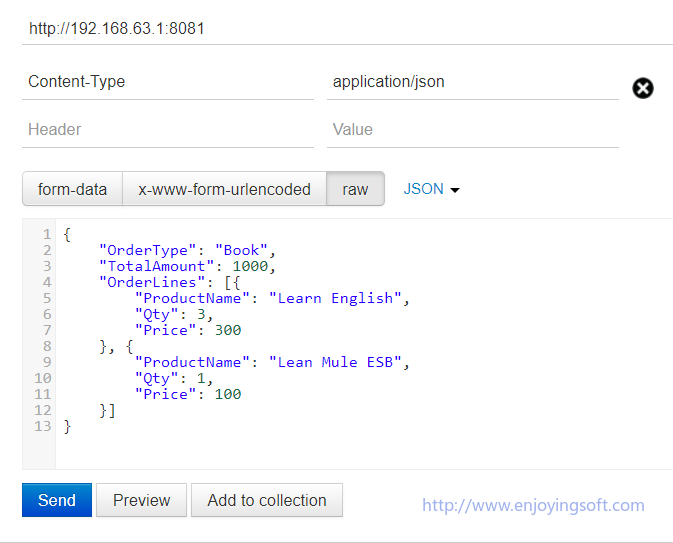
通过Postman的Preview可以看到,实际上Http的Request头信息上设定了Content-Type字段为application/json。

2.2 使用XML提交订单的消息
<?xml version="1.0" encoding="UTF-8"?>

<OrderInfo>

  <OrderType>Book</OrderType>

  <TotalAmount>1000</TotalAmount>

  <OrderLines>

    <OrderLine>

      <ProductName>Learn English</ProductName>

      <Qty>3</Qty>

      <Price>300</Price>

    </OrderLine>

    <OrderLine>

      <ProductName>Learn Mule ESB</ProductName>

      <Qty>1</Qty>

      <Price>100</Price>

    </OrderLine>

  </OrderLines>

</OrderInfo>
使用Postman提交XML,注意Content-Type设置为application/xml。
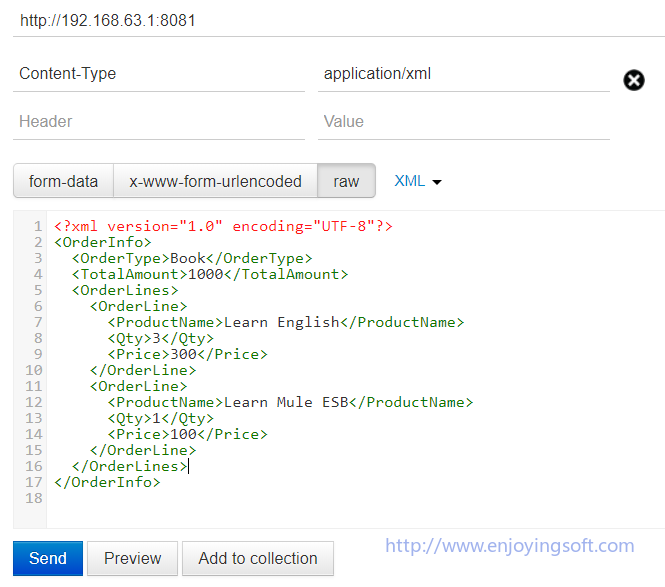
通过Postman的Preview可以看到,实际上Http的Request头信息上设定了Content-Type字段为application/xml。

2.3 使用Choice组件判断订单格式
Mule ESB最基本的路由组件就是Choice组件,组件类似于我们在编程语言中的if/esle if/else。订单的格式是存放在Message Inbound Properties中的。这里就使用Choice组件来判断订单的格式。
Mule XML Config:
<?xml version="1.0" encoding="UTF-8"?>

<mule xmlns:http="http://www.mulesoft.org/schema/mule/http" xmlns="http://www.mulesoft.org/schema/mule/core" xmlns:doc="http://www.mulesoft.org/schema/mule/documentation"

	xmlns:spring="http://www.springframework.org/schema/beans"

	xmlns:xsi="http://www.w3.org/2001/XMLSchema-instance"

	xsi:schemaLocation="http://www.springframework.org/schema/beans http://www.springframework.org/schema/beans/spring-beans-current.xsd

http://www.mulesoft.org/schema/mule/core http://www.mulesoft.org/schema/mule/core/current/mule.xsd

http://www.mulesoft.org/schema/mule/http http://www.mulesoft.org/schema/mule/http/current/mule-http.xsd">

    <http:listener-config name="HTTP_Listener_Configuration" host="0.0.0.0" port="8081" doc:name="HTTP Listener Configuration"/>

    <flow name="flow-control">

        <http:listener config-ref="HTTP_Listener_Configuration" path="/" doc:name="HTTP"/>

        <choice doc:name="Choice">

            <when expression="#[message.inboundProperties['content-type'] == 'application/json']">

                <logger message="JSON" level="INFO" doc:name="JSON"/>

            </when>

            <when expression="#[message.inboundProperties['content-type'] == 'application/xml']">

                <logger message="XML" level="INFO" doc:name="XML"/>

            </when>

            <otherwise>

                <logger message="Error" level="INFO" doc:name="Error"/>

            </otherwise>

        </choice>

    </flow>

</mule>
Mule UI Config:
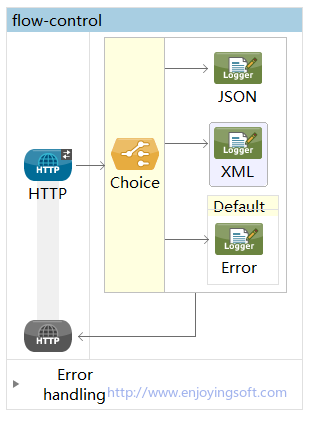
通过Choice组件所支持的MEL语法,我们就能通过判断mule message inboundProperties来确定订单格式。需要注意的是,图上所示的Default是选择的最后一个路径,实际是if,else if,else,end if这个路径中的else路径。
3. 基于消息内容的路由
通过消息头的判断,我们已经可以区分JSON格式和XML格式订单,那么如果区分订单类型呢,这里就需要用到基于消息内容的路由,我们对前面的代码做改进,同时引入消息队列。
Mule XML Config:
<?xml version="1.0" encoding="UTF-8"?>

<mule xmlns:jms="http://www.mulesoft.org/schema/mule/jms" xmlns:http="http://www.mulesoft.org/schema/mule/http" xmlns="http://www.mulesoft.org/schema/mule/core" xmlns:doc="http://www.mulesoft.org/schema/mule/documentation"

	xmlns:spring="http://www.springframework.org/schema/beans"

	xmlns:xsi="http://www.w3.org/2001/XMLSchema-instance"

	xsi:schemaLocation="http://www.springframework.org/schema/beans http://www.springframework.org/schema/beans/spring-beans-current.xsd

http://www.mulesoft.org/schema/mule/core http://www.mulesoft.org/schema/mule/core/current/mule.xsd

http://www.mulesoft.org/schema/mule/http http://www.mulesoft.org/schema/mule/http/current/mule-http.xsd

http://www.mulesoft.org/schema/mule/jms http://www.mulesoft.org/schema/mule/jms/current/mule-jms.xsd">

    <http:listener-config name="HTTP_Listener_Configuration" host="0.0.0.0" port="8081" doc:name="HTTP Listener Configuration"/>

    <jms:activemq-connector name="Active_MQ" brokerURL="tcp://192.168.63.1:61616" validateConnections="true" doc:name="Active MQ"/>

    <flow name="flow-control">

        <http:listener config-ref="HTTP_Listener_Configuration" path="/" doc:name="HTTP"/>

        <choice doc:name="Choice">

            <when expression="#[message.inboundProperties['content-type'] == 'application/json']">

                <set-variable doc:name="orderType" value="#[json:/OrderType]" variableName="orderType"/>

                <choice doc:name="Choice">

                    <when expression="#[flowVars.orderType == 'Book']">

                        <jms:outbound-endpoint queue="bookQ" connector-ref="Active_MQ" doc:name="bookQ"/>

                    </when>

                    <when expression="#[flowVars.orderType == 'Tool']">

                        <jms:outbound-endpoint queue="toolQ" connector-ref="Active_MQ" doc:name="toolQ"/>

                    </when>

                    <otherwise>

                        <jms:outbound-endpoint queue="DLQ" connector-ref="Active_MQ" doc:name="DLQ"/>

                    </otherwise>

                </choice>

            </when>

            <when expression="#[message.inboundProperties['content-type'] == 'application/xml']">

                <set-variable doc:name="orderType" value="#[xpath://OrderInfo/OrderType]" variableName="orderType"/>

                <choice doc:name="Choice">

                    <when expression="#[flowVars.orderType == 'Book']">

                        <jms:outbound-endpoint queue="bookQ" connector-ref="Active_MQ" doc:name="bookQ"/>

                    </when>

                    <when expression="#[flowVars.orderType == 'Tool']">

                        <jms:outbound-endpoint queue="toolQ" connector-ref="Active_MQ" doc:name="toolQ"/>

                    </when>

                    <otherwise>

                        <jms:outbound-endpoint queue="DLQ" connector-ref="Active_MQ" doc:name="DLQ"/>

                    </otherwise>

                </choice>

            </when>

            <otherwise>

                <jms:outbound-endpoint queue="DLQ" connector-ref="Active_MQ" doc:name="DQL"/>

            </otherwise>

        </choice>

    </flow>

</mule>
Mule UI Config:
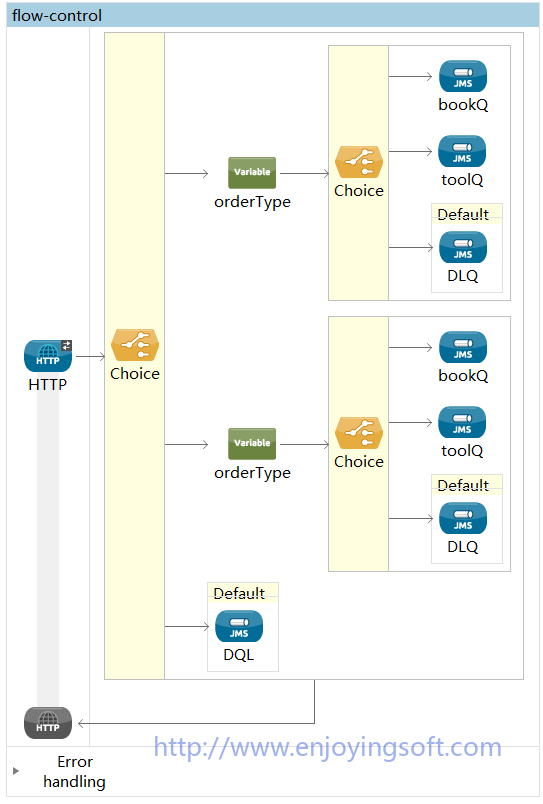
4. 其他控制流向的组件
除了使用Choice组件改变Flow执行路径以外,还要很多控制流向的组件。比如Round-Robin,Resequencer,Scatter-Gather,Splitter,Aggregator等组件。这些组件的用法各不相同,这里主要讲一下Round-Robin的用法。Round-Robin是一种轮询调度算法,在负载均衡的策略里面经常见到Round-Robin,轮询调度算法的原理是每一次把来自用户的请求轮流分配给内部中的服务器,从1开始,直到N(内部服务器个数),然后重新开始循环。
Mule的Round-Robin组件也是类似的思路,轮询执行Flow中的分支路径。举例如下,我们接收到用户的检索请求,每次请求我们使用不同的执行路径,第一次使用Bing搜索,第二次使用Google,第三次使用Baidu。
Mule XML Config:
<?xml version="1.0" encoding="UTF-8"?>

<mule xmlns:http="http://www.mulesoft.org/schema/mule/http" xmlns="http://www.mulesoft.org/schema/mule/core" xmlns:doc="http://www.mulesoft.org/schema/mule/documentation"

	xmlns:spring="http://www.springframework.org/schema/beans"

	xmlns:xsi="http://www.w3.org/2001/XMLSchema-instance"

	xsi:schemaLocation="http://www.springframework.org/schema/beans http://www.springframework.org/schema/beans/spring-beans-current.xsd

http://www.mulesoft.org/schema/mule/core http://www.mulesoft.org/schema/mule/core/current/mule.xsd

http://www.mulesoft.org/schema/mule/http http://www.mulesoft.org/schema/mule/http/current/mule-http.xsd">

    <http:listener-config name="HTTP_Listener_Configuration" host="0.0.0.0" port="8081" doc:name="HTTP Listener Configuration"/>

    <flow name="round-robin-flow">

        <http:listener config-ref="HTTP_Listener_Configuration" path="/" doc:name="HTTP"/>

        <round-robin doc:name="Round Robin">

            <set-payload value="Baidu" doc:name="Baidu"/>

            <set-payload value="Google" doc:name="Google"/>

            <set-payload value="Bing" doc:name="Bing"/>

        </round-robin>

    </flow>

</mule>
Mule UI Config:
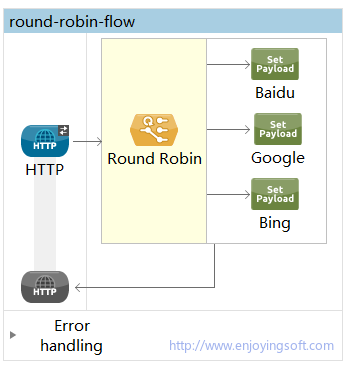
本文同步发文于EnjoyingSoft Blogs ,CSDN,简书
访问EnjoyingSoft 网站,获取更多Mule ESB 社区版 实施帮助。
欢迎转载,但必须保留原文和此段声明,且在文章页面明显位置给出原文链接,否则保留追究法律责任的权利。
EnjoyingSoft之Mule ESB开发教程系列第五篇:控制消息的流向-数据路由的更多相关文章
- EnjoyingSoft之Mule ESB开发教程第一篇:初识Mule ESB
目录 1. Mule ESB基本介绍 2. Mule ESB社区版和企业版 3. Mule ESB常用场景 4. Mule ESB软件安装 客户端安装 服务端安装 5. 第一个Mule ESB应用- ...
- EnjoyingSoft之Mule ESB开发教程第二篇:Mule ESB基本概念
目录 1. 使用Anypoint Studio开发 2. Mule ESB Application Structure - Mule ESB应用程序结构 3. Mule ESB Application ...
- EnjoyingSoft之Mule ESB开发教程第三篇:Mule message structure - Mule message结构
目录 1. 探索Mule Message结构 2. Mule Message的Payload 3. Mule Message的Property 4. Mule Message的Attachment 5 ...
- EnjoyingSoft之Mule ESB开发教程第四篇:Mule Expression Language - MEL表达式
目录 1. MEL的优势 2. MEL的使用场景 3. MEL的示例 4. MEL的上下文对象 5. MEL的Variable 6. MEL访问属性 7. MEL操作符 本篇主要介绍Mule表达式语言 ...
- EnjoyingSoft之Mule ESB开发教程第六篇:Data Transform - 数据转换
目录 1. 数据转换概念 2. 数据智能感知 - DataSense 3. 简单数据转换组件 3.1 Object to JSON 3.2 JSON to XML 3.3 JSON to Object ...
- Senparc.Weixin.MP SDK 微信公众平台开发教程(十五):消息加密
前不久,微信的企业号使用了强制的消息加密方式,随后公众号也加入了可选的消息加密选项.目前企业号和公众号的加密方式是一致的(格式会有少许差别). 加密设置 进入公众号后台的“开发者中心”,我们可以看到U ...
- MongoDB基础教程系列--第五篇 MongoDB 映射与限制记录
上一篇提到的 find() 的方法,细心的伙伴会发现查询的结果都是显示了集合中全部的字段,实际应用中,显然是不够用的.那么有没有办法指定特定的字段显示出文档呢?答案是肯定的,MongoDB 中用映射实 ...
- iOS 11开发教程(十五)iOS11应用视图的位置和大小
iOS 11开发教程(十五)iOS11应用视图的位置和大小 当一个视图使用拖动的方式添加到主视图后,它的位置和大小可以使用拖动的方式进行设置,也可以使用尺寸检查器面板中的内容进行设置,如图1.52所示 ...
- struts2官方 中文教程 系列十二:控制标签
介绍 struts2有一些控制语句的标签,本教程中我们将讨论如何使用 if 和iterator 标签.更多的控制标签可以参见 tags reference. 到此我们新建一个struts2 web 项 ...
随机推荐
- 命令行程序如何获取HINSTANCE?
main() { HINSTANCE hinst = GetModuleHandle(NULL); }
- 【转】ORACLE AWR报告
转自:http://blog.csdn.net/liqfyiyi/article/details/8236864 About Oracle AWR Oracle AWR is a powerful m ...
- 广义线性模型(Generalized Linear Model)
广义线性模型(Generalized Linear Model) http://www.cnblogs.com/sumai 1.指数分布族 我们在建模的时候,关心的目标变量Y可能服从很多种分布.像线性 ...
- Qt常见皮肤qss代码(有Metro的风格)
##QTabWidget 淡蓝色效果TabWidget(属性值lightblue) QTabWidget[lightblue = "true"] QTabBar::tab{ bor ...
- elasticsearch.yml 常用参数说明
cluster.name: 指定node所属的cluster. node.name: 本机的hostname. node.master: 是否可以被选举为master节点.(true or false ...
- 【canvas】高级功能一 变形
[canvas]Demo1 scale缩放 <!DOCTYPE html> <html lang="en"> <head> <meta c ...
- Google C++测试框架系列入门篇:第二章 开始一个新项目
上一篇:Google C++测试框架系列入门篇:第一章 介绍:为什么使用GTest? 原始链接:Setting up a New Test Project 词汇表 版本号:v_0.1 开始一个新项目 ...
- 基于ASP.NET的新闻管理系统(一)
1. 项目简介 1.1设计内容 (1)可以在首页查看各类新闻,可以点击新闻查看具体内容:可以查看不同类型的新闻,并了解热点新闻,可以在搜索框里输入要查找的内容. (2)在后台界面中,管理员可以修改密码 ...
- Java多线程同步工具类之CyclicBarrier
一.CyclicBarrier使用 CyclicBarrier从字面上可以直接理解为线程运行的屏障,它可以让一组线程执行到一个共同的屏障点时被阻塞,直到最后一个线程执行到指定位置,你设置的执行线程就会 ...
- Python自学day-10
一.多进程 程序中, 大量的计算占用CPU资源,而IO操作不占CPU资源.当程序需要进行大量计算时,Python采用多线程运行的速度不一定比单线程快多少.但是当程序是IO密集型的,那就应该使用多线程来 ...