
C#写日志工具类
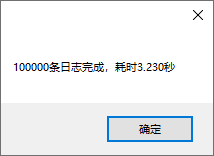
CPU:i5-8265U 硬盘:固态硬盘 测试结果:每秒写入文件大约1万到3万条日志,每条日志的字符串长度是140多个字符
支持多线程并发,支持多进程并发,支持按文件大小分隔日志文件
LogUtil.cs代码:
using System;

using System.Collections.Concurrent;

using System.Collections.Generic;

using System.IO;

using System.Linq;

using System.Reflection;

using System.Text;

using System.Text.RegularExpressions;

using System.Threading;

using System.Threading.Tasks;

namespace Utils

{

    /// <summary>

    /// 写日志类

    /// </summary>

    public class LogUtil

    {

        #region 字段

        private static string _path = null;

        private static Mutex _mutexDebug = new Mutex(false, "LogUtil.Mutex.Debug.252F8025254D4DAA8EFB7FFE177F13E0");

        private static Mutex _mutexInfo = new Mutex(false, "LogUtil.Mutex.Info.180740C3B1C44D428683D35F84F97E22");

        private static Mutex _mutexError = new Mutex(false, "LogUtil.Mutex.Error.81273C1400774A3B8310C2EC1C3AFFFF");

        private static ConcurrentDictionary<string, int> _dictIndex = new ConcurrentDictionary<string, int>();

        private static ConcurrentDictionary<string, long> _dictSize = new ConcurrentDictionary<string, long>();

        private static ConcurrentDictionary<string, FileStream> _dictStream = new ConcurrentDictionary<string, FileStream>();

        private static ConcurrentDictionary<string, StreamWriter> _dictWriter = new ConcurrentDictionary<string, StreamWriter>();

        private static ConcurrentDictionary<string, string> _dictPathFolders = new ConcurrentDictionary<string, string>();

        private static LimitedTaskScheduler _scheduler = new LimitedTaskScheduler();

        private static int _fileSize =  *  * ; //日志分隔文件大小

        #endregion

        #region 写文件

        /// <summary>

        /// 写文件

        /// </summary>

        private static void WriteFile(LogType logType, string log, string path)

        {

            try

            {

                FileStream fs = null;

                StreamWriter sw = null;

                if (!(_dictStream.TryGetValue(logType.ToString() + path, out fs) && _dictWriter.TryGetValue(logType.ToString() + path, out sw)))

                {

                    foreach (string key in _dictWriter.Keys)

                    {

                        if (key.StartsWith(logType.ToString()))

                        {

                            StreamWriter item;

                            _dictWriter.TryRemove(key, out item);

                            item.Close();

                        }

                    }

                    foreach (string key in _dictStream.Keys)

                    {

                        if (key.StartsWith(logType.ToString()))

                        {

                            FileStream item;

                            _dictStream.TryRemove(key, out item);

                            item.Close();

                        }

                    }

                    if (!Directory.Exists(Path.GetDirectoryName(path)))

                    {

                        Directory.CreateDirectory(Path.GetDirectoryName(path));

                    }

                    fs = new FileStream(path, FileMode.Append, FileAccess.Write, FileShare.ReadWrite);

                    sw = new StreamWriter(fs);

                    _dictWriter.TryAdd(logType.ToString() + path, sw);

                    _dictStream.TryAdd(logType.ToString() + path, fs);

                }

                fs.Seek(, SeekOrigin.End);

                sw.WriteLine(log);

                sw.Flush();

                fs.Flush();

            }

            catch (Exception ex)

            {

                string str = ex.Message;

            }

        }

        #endregion

        #region 生成日志文件路径

        /// <summary>

        /// 生成日志文件路径

        /// </summary>

        private static string CreateLogPath(LogType logType, string log)

        {

            try

            {

                if (_path == null)

                {

                    UriBuilder uri = new UriBuilder(Assembly.GetExecutingAssembly().CodeBase);

                    _path = Path.GetDirectoryName(Uri.UnescapeDataString(uri.Path));

                }

                string pathFolder = Path.Combine(_path, "Log\\" + logType.ToString() + "\\");

                if (!_dictPathFolders.ContainsKey(pathFolder))

                {

                    if (!Directory.Exists(Path.GetDirectoryName(pathFolder)))

                    {

                        Directory.CreateDirectory(Path.GetDirectoryName(pathFolder));

                    }

                    _dictPathFolders.TryAdd(pathFolder, pathFolder);

                }

                int currentIndex;

                long size;

                string strNow = DateTime.Now.ToString("yyyyMMdd");

                string strKey = pathFolder + strNow;

                if (!(_dictIndex.TryGetValue(strKey, out currentIndex) && _dictSize.TryGetValue(strKey, out size)))

                {

                    _dictIndex.Clear();

                    _dictSize.Clear();

                    GetIndexAndSize(pathFolder, strNow, out currentIndex, out size);

                    if (size >= _fileSize) currentIndex++;

                    _dictIndex.TryAdd(strKey, currentIndex);

                    _dictSize.TryAdd(strKey, size);

                }

                int index = _dictIndex[strKey];

                string logPath = Path.Combine(pathFolder, strNow + (index ==  ? "" : "_" + index.ToString()) + ".txt");

                _dictSize[strKey] += Encoding.UTF8.GetByteCount(log);

                if (_dictSize[strKey] > _fileSize)

                {

                    _dictIndex[strKey]++;

                    _dictSize[strKey] = ;

                }

                return logPath;

            }

            catch (Exception ex)

            {

                string str = ex.Message;

                return null;

            }

        }

        #endregion

        #region 拼接日志内容

        /// <summary>

        /// 拼接日志内容

        /// </summary>

        private static string CreateLogString(LogType logType, string log)

        {

            return string.Format(@"{0} {1} {2}", DateTime.Now.ToString("yyyy-MM-dd HH:mm:ss.fff"), ("[" + logType.ToString() + "]").PadRight(, ' '), log);

        }

        #endregion

        #region 获取初始Index和Size

        /// <summary>

        /// 获取初始Index和Size

        /// </summary>

        private static void GetIndexAndSize(string pathFolder, string strNow, out int index, out long size)

        {

            index = ;

            size = ;

            Regex regex = new Regex(strNow + "_*(\\d*).txt");

            string[] fileArr = Directory.GetFiles(pathFolder);

            string currentFile = null;

            foreach (string file in fileArr)

            {

                Match match = regex.Match(file);

                if (match.Success)

                {

                    string str = match.Groups[].Value;

                    if (!string.IsNullOrWhiteSpace(str))

                    {

                        int temp = Convert.ToInt32(str);

                        if (temp > index)

                        {

                            index = temp;

                            currentFile = file;

                        }

                    }

                    else

                    {

                        index = ;

                        currentFile = file;

                    }

                }

            }

            if (currentFile != null)

            {

                FileInfo fileInfo = new FileInfo(currentFile);

                size = fileInfo.Length;

            }

        }

        #endregion

        #region 写调试日志

        /// <summary>

        /// 写调试日志

        /// </summary>

        public static Task Debug(string log)

        {

            return Task.Factory.StartNew(() =>

            {

                try

                {

                    _mutexDebug.WaitOne();

                    log = CreateLogString(LogType.Debug, log);

                    string path = CreateLogPath(LogType.Debug, log);

                    WriteFile(LogType.Debug, log, path);

                }

                catch (Exception ex)

                {

                    string str = ex.Message;

                }

                finally

                {

                    _mutexDebug.ReleaseMutex();

                }

            }, CancellationToken.None, TaskCreationOptions.None, _scheduler);

        }

        #endregion

        #region 写错误日志

        public static Task Error(Exception ex, string log = null)

        {

            return Error(string.IsNullOrEmpty(log) ? ex.Message + "\r\n" + ex.StackTrace : (log + ":") + ex.Message + "\r\n" + ex.StackTrace);

        }

        /// <summary>

        /// 写错误日志

        /// </summary>

        public static Task Error(string log)

        {

            return Task.Factory.StartNew(() =>

            {

                try

                {

                    _mutexError.WaitOne();

                    log = CreateLogString(LogType.Error, log);

                    string path = CreateLogPath(LogType.Error, log);

                    WriteFile(LogType.Error, log, path);

                }

                catch (Exception ex)

                {

                    string str = ex.Message;

                }

                finally

                {

                    _mutexError.ReleaseMutex();

                }

            }, CancellationToken.None, TaskCreationOptions.None, _scheduler);

        }

        #endregion

        #region 写操作日志

        /// <summary>

        /// 写操作日志

        /// </summary>

        public static Task Log(string log)

        {

            return Task.Factory.StartNew(() =>

            {

                try

                {

                    _mutexInfo.WaitOne();

                    log = CreateLogString(LogType.Info, log);

                    string path = CreateLogPath(LogType.Info, log);

                    WriteFile(LogType.Info, log, path);

                }

                catch (Exception ex)

                {

                    string str = ex.Message;

                }

                finally

                {

                    _mutexInfo.ReleaseMutex();

                }

            }, CancellationToken.None, TaskCreationOptions.None, _scheduler);

        }

        #endregion

    }

    #region 日志类型

    /// <summary>

    /// 日志类型

    /// </summary>

    public enum LogType

    {

        Debug,

        Info,

        Error

    }

    #endregion

}
依赖的LimitedTaskScheduler.cs代码:
using System;

using System.Collections.Concurrent;

using System.Collections.Generic;

using System.Linq;

using System.Runtime.InteropServices;

using System.Text;

using System.Threading;

using System.Threading.Tasks;

namespace Utils

{

    public class LimitedTaskScheduler : TaskScheduler, IDisposable

    {

        #region 外部方法

        [DllImport("kernel32.dll", EntryPoint = "SetProcessWorkingSetSize")]

        public static extern int SetProcessWorkingSetSize(IntPtr process, int minSize, int maxSize);

        #endregion

        #region 变量属性事件

        private BlockingCollection<Task> _tasks = new BlockingCollection<Task>();

        List<Thread> _threadList = new List<Thread>();

        private int _threadCount = ;

        private int _timeOut = Timeout.Infinite;

        private Task _tempTask;

        #endregion

        #region 构造函数

        public LimitedTaskScheduler(int threadCount = )

        {

            CreateThreads(threadCount);

        }

        #endregion

        #region override GetScheduledTasks

        protected override IEnumerable<Task> GetScheduledTasks()

        {

            return _tasks;

        }

        #endregion

        #region override TryExecuteTaskInline

        protected override bool TryExecuteTaskInline(Task task, bool taskWasPreviouslyQueued)

        {

            return false;

        }

        #endregion

        #region override QueueTask

        protected override void QueueTask(Task task)

        {

            _tasks.Add(task);

        }

        #endregion

        #region 资源释放

        /// <summary>

        /// 资源释放

        /// 如果尚有任务在执行,则会在调用此方法的线程上引发System.Threading.ThreadAbortException,请使用Task.WaitAll等待任务执行完毕后,再调用该方法

        /// </summary>

        public void Dispose()

        {

            _timeOut = ;

            foreach (Thread item in _threadList)

            {

                item.Abort();

            }

            _threadList.Clear();

            GC.Collect();

            GC.WaitForPendingFinalizers();

            if (Environment.OSVersion.Platform == PlatformID.Win32NT)

            {

                SetProcessWorkingSetSize(System.Diagnostics.Process.GetCurrentProcess().Handle, -, -);

            }

        }

        #endregion

        #region 创建线程池

        /// <summary>

        /// 创建线程池

        /// </summary>

        private void CreateThreads(int? threadCount = null)

        {

            if (threadCount != null) _threadCount = threadCount.Value;

            _timeOut = Timeout.Infinite;

            for (int i = ; i < _threadCount; i++)

            {

                Thread thread = new Thread(new ThreadStart(() =>

                {

                    Task task;

                    while (_tasks.TryTake(out task, _timeOut))

                    {

                        TryExecuteTask(task);

                    }

                }));

                thread.IsBackground = true;

                thread.Start();

                _threadList.Add(thread);

            }

        }

        #endregion

        #region 全部取消

        /// <summary>

        /// 全部取消

        /// 当前正在执行的任务无法取消,取消的只是后续任务,相当于AbortAll

        /// </summary>

        public void CancelAll()

        {

            while (_tasks.TryTake(out _tempTask)) { }

        }

        #endregion

    }

}
测试代码:
using System;

using System.Collections.Generic;

using System.ComponentModel;

using System.Data;

using System.Diagnostics;

using System.Drawing;

using System.Linq;

using System.Text;

using System.Threading;

using System.Threading.Tasks;

using System.Windows.Forms;

using Utils;

namespace LogUtilTest

{

    public partial class Form1 : Form

    {

        public Form1()

        {

            InitializeComponent();

        }

        private void button1_Click(object sender, EventArgs e)

        {

            Task.Factory.StartNew(() =>

            {

                int n = ;

                string processId = Process.GetCurrentProcess().Id.ToString().PadLeft(, ' ');

                List<Task> taskList = new List<Task>();

                string str = "    abcdabcdabcdabcdabcdabcdabcdabcdabcdabcdabcda3.1415bcdabcdabcdabcdabc@#$%^&dabcdabcdabcdabcdabcdabcdabcdabcd";

                DateTime dtStart = DateTime.Now;

                for (int i = ; i <= n; i++)

                {

                    Task task = LogUtil.Log("ProcessId:【" + processId + "】 测试" + i.ToString().PadLeft(, '') + str);

                    taskList.Add(task);

                    task = LogUtil.Debug("ProcessId:【" + processId + "】 测试" + i.ToString().PadLeft(, '') + str);

                    taskList.Add(task);

                }

                Task.WaitAll(taskList.ToArray());

                double sec = DateTime.Now.Subtract(dtStart).TotalSeconds;

                MessageBox.Show(n + "条日志完成,耗时" + sec.ToString("0.000") + "秒");

            });

        }

    }

}
测试结果截图:
C#写日志工具类的更多相关文章
- Android开发调试日志工具类[支持保存到SD卡]
直接上代码: package com.example.callstatus; import java.io.File; import java.io.FileWriter; import java.i ...
- Log 日志工具类 保存到文件 MD
Markdown版本笔记 我的GitHub首页 我的博客 我的微信 我的邮箱 MyAndroidBlogs baiqiantao baiqiantao bqt20094 baiqiantao@sina ...
- Android utils 之 日志工具类
工具类 在开发的过程中,我们时常会对代码执行特定的处理,而这部分处理在代码中可能多次用到,为了代码的统一性.规范性等,通过建工具类的方式统一处理.接下来我会罗列各种工具类. 日志工具类 在utils文 ...
- 30行自己写并发工具类(Semaphore, CyclicBarrier, CountDownLatch)是什么体验?
30行自己写并发工具类(Semaphore, CyclicBarrier, CountDownLatch)是什么体验? 前言 在本篇文章当中首先给大家介绍三个工具Semaphore, CyclicBa ...
- 自写Date工具类
以前写项目的时候总是在使用到了时间的转换的时候才在工具类中添加一个方法,这样很容易导致代码冗余以及转换的方法注释不清晰导致每次使用都要重新看一遍工具类.因此整理出经常使用的一些转换,用作记录,以便以后 ...
- 002-基本业务搭建【日志,工具类dbutils,dbcp等使用】
一.需求分析 1.1.概述 1.用户进入“客户管理”,通过列表方式查看用户: 2.客户名称,模糊查询用户列表 3.客户名称,可查看客户详细信息 4.新增.编辑.删除功能等 二.系统设计 需要对原始需求 ...
- Delphi 写日志的类
unit uProgLog; interface uses Windows, SysUtils, SyncObjs; const C_LOG_LEVEL_TRACE = $; C_LOG_LEVEL_ ...
- logger日志工具类
日志工厂类 package cn.itcast.utils; import java.util.logging.FileHandler; import java.util.logging.Handle ...
- Java 基于log4j的日志工具类
对log4j日志类进行了简单封装,使用该封装类的优势在于以下两点: 1.不必在每个类中去创建对象,直接类名 + 方法即可 2.可以很方便的打印出堆栈信息 package com.tradeplatfo ...
随机推荐
- springBoot 集成Mysql数据库
springBoot 集成Mysql数据库 前一段时间,我们大体介绍过SpringBoot,想必大家还有依稀的印象.我们先来回顾一下:SpringBoot是目前java世界最流行的一个企业级解决方案框 ...
- H5常用新特性
html5新特性 [注意]这些新特性都有兼容性的问题,基本是IE9+以上版本的浏览器才支持,如果不考兼容性问题,可以大量使用这些新特性 html5新增的语义话标签 <header> :头部 ...
- 微信小程序访问webservice(wsdl)+ axis2发布服务端(Java)
0.主要思路:使用axis2发布webservice服务端,微信小程序作为客户端访问.步骤如下: 1.服务端: 首先微信小程序仅支持访问https的url,且必须是已备案域名.因此前期的服务器端工作需 ...
- 3.JavaCC 语法描述文件的格式解析
JavaCC的语法描述文件格式如下所示: options { JavaCC的选项 } PARSER_BEGIN(解析器类名) package 包名; import 库名; public class ...
- qt md5加密,base64编码解码
qt md5加密,base64编码解码 md5加密 QByteArray data = "12121221"; data += "asdfas"; QByteA ...
- Falling back to java on path. This behavior is deprecated
windows启动elasticsearch报错:warning: Falling back to java on path. This behavior is deprecated. Specify ...
- 深度自编码器(Deep Autoencoder)MATLAB解读
深度自编码器(Deep Autoencoder)MATLAB解读 作者:凯鲁嘎吉 - 博客园 http://www.cnblogs.com/kailugaji/ 这篇文章主要讲解Hinton在2006 ...
- 1. Go语言—初始
一.golang语言特性 1. 垃圾回收 内存自动回收,再也不需要开发人员管理内存 开发人员专注业务实现,降低了心智负担 只需要new分配内存,不需要释放 2. 天然并发 从语言层面支持并发,非常简单 ...
- 动态内存的分配(new delete malloc free)
new和malloc的区别是什么?-new关键字是C++的一部分,在所有的C++编译器中都被支持-malloc是由C库提供的函数,在某些系统开发中是不能调用的-new以具体类型为单位进行内存分配-ma ...
- day64_10_8 vue的导入
一.简介 vue是一个渐进式的js框架.具体介绍查看官网: https://cn.vuejs.org 在vue框架中,有两个文件,当在开发阶段时使用完整版vue,因为有报错信息,而在上市阶段可以使用m ...