
No provider available for the service com.xxx.xxx 错误解决
HTTP Status 500 - Servlet.init() for servlet springmvc threw exception
type Exception report
message Servlet.init() for servlet springmvc threw exception
description The server encountered an internal error that prevented it from fulfilling this request.
exception
javax.servlet.ServletException: Servlet.init() for servlet springmvc threw exception
org.apache.catalina.authenticator.AuthenticatorBase.invoke(AuthenticatorBase.java:502)
org.apache.catalina.valves.ErrorReportValve.invoke(ErrorReportValve.java:100)
org.apache.catalina.valves.AccessLogValve.invoke(AccessLogValve.java:953)
org.apache.catalina.connector.CoyoteAdapter.service(CoyoteAdapter.java:408)
org.apache.coyote.http11.AbstractHttp11Processor.process(AbstractHttp11Processor.java:1041)
org.apache.coyote.AbstractProtocol$AbstractConnectionHandler.process(AbstractProtocol.java:603)
org.apache.tomcat.util.net.JIoEndpoint$SocketProcessor.run(JIoEndpoint.java:310)
java.util.concurrent.ThreadPoolExecutor.runWorker(ThreadPoolExecutor.java:1149)
java.util.concurrent.ThreadPoolExecutor$Worker.run(ThreadPoolExecutor.java:624)
java.lang.Thread.run(Thread.java:748)
root cause
org.springframework.beans.factory.BeanCreationException: Error creating bean with name 'cartController' defined in file [D:\workspace\pinyougou_parent\pinyougou_cart_web\target\classes\com\pinyougou\cart\controller\CartController.class]: Initialization of bean failed; nested exception is org.springframework.beans.factory.BeanInitializationException: Failed to init remote service reference at filed cartService in class com.pinyougou.cart.controller.CartController; nested exception is java.lang.IllegalStateException: Failed to check the status of the service com.pinyougou.cart.service.CartService. **No provider available** for the service com.pinyougou.cart.service.CartService from the url zookeeper://192.168.25.133:2181/com.alibaba.dubbo.registry.RegistryService?anyhost=true&application=pinyougou_cart_web&check=false&dubbo=2.8.4&generic=false&interface=com.pinyougou.cart.service.CartService&methods=addGoodsToCartList&pid=12688&revision=1.0-SNAPSHOT&side=consumer×tamp=1575554801235 to the consumer 192.168.56.1 use dubbo version 2.8.4
org.springframework.beans.factory.support.AbstractAutowireCapableBeanFactory.doCreateBean(AbstractAutowireCapableBeanFactory.java:553)
org.springframework.beans.factory.support.AbstractAutowireCapableBeanFactory.createBean(AbstractAutowireCapableBeanFactory.java:482)
org.springframework.beans.factory.support.AbstractBeanFactory$1.getObject(AbstractBeanFactory.java:306)
org.springframework.beans.factory.support.DefaultSingletonBeanRegistry.getSingleton(DefaultSingletonBeanRegistry.java:230)
org.springframework.beans.factory.support.AbstractBeanFactory.doGetBean(AbstractBeanFactory.java:302)
org.springframework.beans.factory.support.AbstractBeanFactory.getBean(AbstractBeanFactory.java:197)
org.springframework.beans.factory.support.DefaultListableBeanFactory.preInstantiateSingletons(DefaultListableBeanFactory.java:772)
org.springframework.context.support.AbstractApplicationContext.finishBeanFactoryInitialization(AbstractApplicationContext.java:839)
org.springframework.context.support.AbstractApplicationContext.refresh(AbstractApplicationContext.java:538)
org.springframework.web.servlet.FrameworkServlet.configureAndRefreshWebApplicationContext(FrameworkServlet.java:668)
org.springframework.web.servlet.FrameworkServlet.createWebApplicationContext(FrameworkServlet.java:634)
org.springframework.web.servlet.FrameworkServlet.createWebApplicationContext(FrameworkServlet.java:682)
org.springframework.web.servlet.FrameworkServlet.initWebApplicationContext(FrameworkServlet.java:553)
org.springframework.web.servlet.FrameworkServlet.initServletBean(FrameworkServlet.java:494)
org.springframework.web.servlet.HttpServletBean.init(HttpServletBean.java:136)
javax.servlet.GenericServlet.init(GenericServlet.java:160)
org.apache.catalina.authenticator.AuthenticatorBase.invoke(AuthenticatorBase.java:502)
org.apache.catalina.valves.ErrorReportValve.invoke(ErrorReportValve.java:100)
org.apache.catalina.valves.AccessLogValve.invoke(AccessLogValve.java:953)
org.apache.catalina.connector.CoyoteAdapter.service(CoyoteAdapter.java:408)
org.apache.coyote.http11.AbstractHttp11Processor.process(AbstractHttp11Processor.java:1041)
org.apache.coyote.AbstractProtocol$AbstractConnectionHandler.process(AbstractProtocol.java:603)
org.apache.tomcat.util.net.JIoEndpoint$SocketProcessor.run(JIoEndpoint.java:310)
java.util.concurrent.ThreadPoolExecutor.runWorker(ThreadPoolExecutor.java:1149)
java.util.concurrent.ThreadPoolExecutor$Worker.run(ThreadPoolExecutor.java:624)
java.lang.Thread.run(Thread.java:748)
登录 Dubbo 发现确实没有提供者

但是我的service服务是启动成功了呀

最后发现原来是我的service 的web.xml没有配置
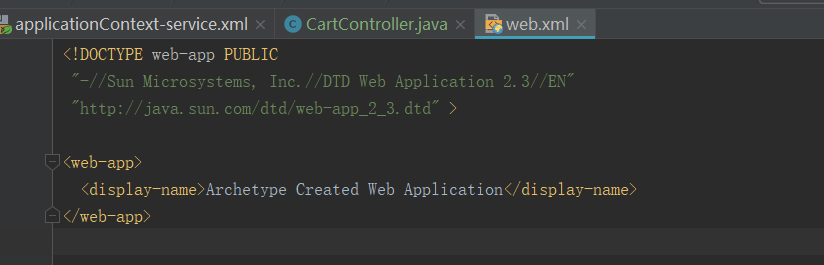
将web.xml配置好之后,重新启动服务即可,这时候提供者就有了
<?xml version="1.0" encoding="UTF-8"?>

<web-app xmlns:xsi="http://www.w3.org/2001/XMLSchema-instance" xmlns="http://java.sun.com/xml/ns/javaee"

         xsi:schemaLocation="http://java.sun.com/xml/ns/javaee http://java.sun.com/xml/ns/javaee/web-app_2_5.xsd"

         version="2.5">

    <display-name>pinyougou_user_service</display-name>

    <!-- 加载spring容器 -->

    <context-param>

        <param-name>contextConfigLocation</param-name>

        <param-value>classpath*:spring/applicationContext*.xml</param-value>

    </context-param>

    <listener>

        <listener-class>org.springframework.web.context.ContextLoaderListener</listener-class>

    </listener>

</web-app>

所以总结:
- 当出现No provider available for the service的时候,先检查自己的service提供者是否真的已经成功启动,如果启动成功了,还是报这个错误,再检查一下自己的 xml配置文件,需要配置对才能提供服务.
- 另外,还有一个需要注意的地方,@Service 和 @Reference 这两个的注解需要是 com.alibaba.dubbo.config.annotation 包下的才行
No provider available for the service com.xxx.xxx 错误解决的更多相关文章
- 启动dubbo消费端过程提示No provider available for the service的问题定位与解决
文/朱季谦 某次在启动dubbo消费端时,发现无法从zookeeper注册中心获取到所依赖的消费者API,启动日志一直出现这样的异常提示 Failed to check the status of t ...
- centOS 7下无法启动网络(service network start)错误解决办法
今天在centOS 7下更改完静态ip后发现network服务重启不了,翻遍了网络,尝试了各种方法,终于解决了. 现把各种解决方法归纳整理,希望能让后面的同学少走点歪路... 首先看问题:执行serv ...
- centOS 7下无法启动网络(service network start)错误解决办法(应该是最全的了。。。)
今天在centOS 7下更改完静态ip后发现network服务重启不了,翻遍了网络,尝试了各种方法,终于解决了. 现把各种解决方法归纳整理,希望能让后面的同学少走点歪路... 首先看问题:执行serv ...
- Loadrunner 运行场景时:missing newline in XXX.dat 错误解决
脚本参数化类型为file,在controller里运行场景的时候,报了个missing newline的错误,查了一下,将参数化的dat文件中的最后一行补上一个空行就解决啦!! 如果遇到此错误,需检查 ...
- angularjs中provider,factory,service的区别和用法
angularjs中provider,factory,service的区别和用法 都能提供service,但是又有差别 service 第一次被注入时实例化,只实例化一次,整个应用的生命周期中是个单例 ...
- dubbo No provider available for the service com.alibaba.dubbo.monitor.MonitorService from registry
No provider available for the service com.alibaba.dubbo.monitor.MonitorService from registry http:// ...
- dubbo rest服务 No provider available for the service 错误问题
1.版本 dubbo 2.6.2 2.描述 消费者调用dubbo rest服务报No provider available for the service错误 网络上有讲是实体类未实现Serializ ...
- java.lang.RuntimeException: Unable to get provider cn.jpush.android.service.DataProvider
转自:https://blog.csdn.net/u014306335/article/details/80355169 Android Studio 3.1.2 报错: java.lang.Runt ...
- [dubbo] dubbo No provider available for the service
com.alibaba.dubbo.rpc.RpcException: Failed to invoke the method queryTemplate in the service com.x.a ...
随机推荐
- tomcat的虚拟路径的配置
在一些项目中有时候需要把一些文件(例如图片.视频)存储在硬盘上的,如果是把文件在放在硬盘上的话,怎么才能访问到这些文件昵. 好了.下面就为大家讲讲如何利用tomcat 虚拟路径访问硬盘上的文件.总共有 ...
- (Java) AES-128 数据加密
package com.vcgeek.hephaestus.utils; import javax.crypto.Cipher; import javax.crypto.spec.SecretKeyS ...
- 学习c++11 ThreadPool【转】
#ifndef THREAD_POOL_H #define THREAD_POOL_H #include <vector> #include <queue> #include ...
- javascript创建一个基于数组的栈结构
栈是一种遵从后进先出(LIFO)原则的有序集合.新添加或待删除的元素都保存在栈的同 一端,称作栈顶,另一端就叫栈底.在栈里,新元素都靠近栈顶,旧元素都接近栈底. 栈拥有以下方法: push(eleme ...
- OPTIONS 请求引发的分析
阅读提纲: 为什么会出现 OPTIONS 请求? 什么情况下会出现 OPTIONS 请求? OPTIONS 请求会发送什么内容? 跨域前端访问后端时,所有的 Ajax HTTP 请求都会先发送一个 O ...
- CSPS模拟 53
T1 两种差分,拆分转化 T2 状压,hash压状态卡空间 T3 dfs,分类讨论.
- NOIP模拟测试2-5
该补一下以前挖的坑了 先总结一下 第二次 T1 搜索+剪枝 #include<cstdio> #include<iostream> #define ll long long u ...
- 关于GC(上):Apache的POI组件导致线上频繁FullGC问题排查及处理全过程
某线上应用在进行查询结果导出Excel时,大概率出现持续的FullGC.解决这个问题时,记录了一下整个的流程,也可以作为一般性的FullGC问题排查指导. 1. 生成dump文件 为了定位FullGC ...
- MSF小记
0x00 Windows,Linux反弹shell生成 Windows: msfvenom -p windows/meterpreter/reverse_tcp lhost=[你的IP] lport= ...
- 201871010114-李岩松《面向对象程序设计(java)》第六、七周学习总结
项目 内容 这个作业属于哪个课程 https://www.cnblogs.com/nwnu-daizh/ 这个作业的要求在哪里 https://www.cnblogs.com/nwnu-daizh/p ...