
使用Gerrit发送测试邮件
使用Gerrit发送测试邮件
作者:尹正杰
版权声明:原创作品,谢绝转载!否则将追究法律责任。
一.安装HTTP服务
1>.安装HTTP服务
[root@gerrit.yinzhengjie.org.cn ~]# yum -y install httpd
2>.使用HTTP配置反响代理
[root@gerrit.yinzhengjie.org.cn ~]# tail - /etc/httpd/conf/httpd.conf

Listen

<VirtualHost *:>

    ServerName gerrit.yinzhengjie.org.cn

    ProxyRequests Off

    ProxyVia Off

    ProxyPreserveHost On

    <Proxy *>

        Order deny,allow

        Allow from all

    </Proxy>

    <Location /login/>

        AuthType Basic

        AuthName "Gerrit Code Review"

        Require valid-user

        AuthUserFile /etc/httpd/passwords

    </Location>

    AllowEncodedSlashes On

    ProxyPass / http://gerrit.yinzhengjie.org.cn:8888/

</VirtualHost>

[root@gerrit.yinzhengjie.org.cn ~]#
3>.创建passwd文件,添加gerrit登录用户
[root@gerrit.yinzhengjie.org.cn ~]# htpasswd -cb /etc/httpd/passwords admin admin          #注意,"-c"参数为创建,仅限第一次添加用户时使用,用户名和密码均为admin

Adding password for user admin

[root@gerrit.yinzhengjie.org.cn ~]# htpasswd -b /etc/httpd/passwords jason yinzhengjie       #第二次创建时不要加"-c"参数。创建一个jason用户,密码为"yinzhengjie"

Adding password for user jason

[root@gerrit.yinzhengjie.org.cn ~]#

[root@gerrit.yinzhengjie.org.cn ~]#

[root@gerrit.yinzhengjie.org.cn ~]# cat /etc/httpd/passwords                       #我们查看该文件的确有2个用户,但是密码时经过加密处理的!

admin:$apr1$Em..sIno$GMpAsQlJ4l.S4C0Qnu0iD/

jason:$apr1$892G6DfX$IBkKm8paM/4wPvowppI/d1

[root@gerrit.yinzhengjie.org.cn ~]#

[root@gerrit.yinzhengjie.org.cn ~]#
4>.启动HTTP服务
[root@gerrit.yinzhengjie.org.cn ~]# systemctl start httpd

[root@gerrit.yinzhengjie.org.cn ~]#

[root@gerrit.yinzhengjie.org.cn ~]# systemctl enable httpd

Created symlink from /etc/systemd/system/multi-user.target.wants/httpd.service to /usr/lib/systemd/system/httpd.service.

[root@gerrit.yinzhengjie.org.cn ~]#

[root@gerrit.yinzhengjie.org.cn ~]# systemctl status httpd

● httpd.service - The Apache HTTP Server

   Loaded: loaded (/usr/lib/systemd/system/httpd.service; enabled; vendor preset: disabled)

   Active: active (running) since Wed -- :: EDT; 22h ago

     Docs: man:httpd()

           man:apachectl()

 Main PID:  (httpd)

   Status: "Total requests: 233; Current requests/sec: 0; Current traffic:   0 B/sec"

   CGroup: /system.slice/httpd.service

           ├─  /usr/sbin/httpd -DFOREGROUND

           ├─  /usr/sbin/httpd -DFOREGROUND

           ├─  /usr/sbin/httpd -DFOREGROUND

           ├─  /usr/sbin/httpd -DFOREGROUND

           ├─ /usr/sbin/httpd -DFOREGROUND

           ├─ /usr/sbin/httpd -DFOREGROUND

           ├─ /usr/sbin/httpd -DFOREGROUND

           ├─ /usr/sbin/httpd -DFOREGROUND

           ├─ /usr/sbin/httpd -DFOREGROUND

           ├─ /usr/sbin/httpd -DFOREGROUND

           └─ /usr/sbin/httpd -DFOREGROUND

Jun  :: gerrit.yinzhengjie.org.cn systemd[]: Starting The Apache HTTP Server...

Jun  :: gerrit.yinzhengjie.org.cn systemd[]: Started The Apache HTTP Server.

[root@gerrit.yinzhengjie.org.cn ~]#
二.安装Gerrit(需要有jdk环境)
1>.安装Gerrit
[root@gerrit.yinzhengjie.org.cn ~]# java -jar gerrit-3.0..war   init -d /yinzhengjie/softwares/gerrit

Using secure store: com.google.gerrit.server.securestore.DefaultSecureStore

[-- ::,] [main] INFO  com.google.gerrit.server.config.GerritServerConfigProvider : No /yinzhengjie/softwares/gerrit/etc/gerrit.config; assuming defaults

*** Gerrit Code Review 3.0.

***

Create '/yinzhengjie/softwares/gerrit' [Y/n]?

*** Git Repositories

***

Location of Git repositories   [git]:

*** Index

***

Type                           [lucene/?]:

*** User Authentication

***

Authentication method          [openid/?]: http

Get username from custom HTTP header [y/N]? n

SSO logout URL                 :

Enable signed push support     [y/N]?

*** Review Labels

***

Install Verified label         [y/N]?

*** Email Delivery

***

SMTP server hostname           [localhost]:  smtp.ym..com

SMTP server port               [(default)]:

SMTP encryption                [none/?]:

SMTP username                  [root]: yinzhengjie@aggrx.com

yinzhengjie@aggrx.com's password :

              confirm password :

*** Container Process

***

Run as                         [root]:

Java runtime                   [/yinzhengjie/softwares/jdk1..0_201/jre]:

Copy gerrit-3.0..war to /yinzhengjie/softwares/gerrit/bin/gerrit.war [Y/n]? y

Copying gerrit-3.0..war to /yinzhengjie/softwares/gerrit/bin/gerrit.war

*** SSH Daemon

***

Listen on address              [*]: gerrit.yinzhengjie.org.cn

Listen on port                 []:

Generating SSH host key ... rsa... ed25519... ecdsa ... ecdsa ... ecdsa ... done

*** HTTP Daemon

***

Behind reverse proxy           [y/N]? y

Proxy uses SSL (https://)      [y/N]? n

Subdirectory on proxy server   [/]:

Listen on address              [*]: gerrit.yinzhengjie.org.cn

Listen on port                 []:

Canonical URL                  [http://gerrit.yinzhengjie.org.cn/]: http://gerrit.yinzhengjie.org.cn:8090/

*** Cache

***

*** Plugins

***

Installing plugins.

Install plugin codemirror-editor version v3.0.0 [y/N]? y

Installed codemirror-editor v3.0.0

Install plugin commit-message-length-validator version v3.0.0 [y/N]? y

Installed commit-message-length-validator v3.0.0

Install plugin delete-project version v3.0.0 [y/N]? y

Installed delete-project v3.0.0

Install plugin download-commands version v3.0.0 [y/N]? y

Installed download-commands v3.0.0

Install plugin gitiles version v3.0.0 [y/N]? y

Installed gitiles v3.0.0

Install plugin hooks version v3.0.0 [y/N]? y

Installed hooks v3.0.0

Install plugin plugin-manager version v3.0.0 [y/N]? y

Installed plugin-manager v3.0.0

Install plugin replication version v3.0.0 [y/N]? y

Installed replication v3.0.0

Install plugin reviewnotes version v3.0.0 [y/N]? y

Installed reviewnotes v3.0.0

Install plugin singleusergroup version v3.0.0 [y/N]? y

Installed singleusergroup v3.0.0

Install plugin webhooks version v3.0.0 [y/N]? y

Installed webhooks v3.0.0

Initializing plugins.

yInitialized /yinzhengjie/softwares/gerrit

Reindexing projects:    % (/) with: reindex --site-path /yinzhengjie/softwares/gerrit --threads  --index projects

Reindexed  documents in projects index in .1s (23.0/s)

Executing /yinzhengjie/softwares/gerrit/bin/gerrit.sh start

Starting Gerrit Code Review: OK

Waiting for server on gerrit.yinzhengjie.org.cn: ... OK

Opening http://gerrit.yinzhengjie.org.cn/#/admin/projects/ ...FAILED

Open Gerrit with a JavaScript capable browser:

  http://gerrit.yinzhengjie.org.cn/#/admin/projects/

[root@gerrit.yinzhengjie.org.cn ~]# ss -ntl

State       Recv-Q Send-Q                                                          Local Address:Port                                                                         Peer Address:Port

LISTEN                                                                            172.30.1.81:                                                                                   *:*

LISTEN                                                                                     *:                                                                                      *:*

LISTEN                                                                                     *:                                                                                      *:*

LISTEN                                                                            172.30.1.81:                                                                                    *:*

LISTEN                                                                             127.0.0.1:                                                                                      *:*

LISTEN                                                                                     *:                                                                                    *:*

LISTEN                                                                                    :::                                                                                     :::*

[root@gerrit.yinzhengjie.org.cn ~]#
2>.修改Gerrit配置文件,添加from字段
[root@gerrit.yinzhengjie.org.cn /yinzhengjie/softwares/gerrit]# ll

total

drwxr-xr-x  root root    Jun  : bin

drwxr-xr-x  root root  Jun  : cache

drwxr-xr-x  root root    Jun  : data

drwxr-xr-x  root root    Jun  : db

drwxr-xr-x  root root  Jun  : etc

drwxr-xr-x  root root    Jun  : git

drwxr-xr-x  root root   Jun  : index

drwxr-xr-x  root root     Jun  : lib

drwxr-xr-x  root root   Jun  : logs

drwxr-xr-x  root root   Jun  : plugins

drwxr-xr-x  root root     Jun  : static

drwx------  root root  Jun  : tmp

[root@gerrit.yinzhengjie.org.cn /yinzhengjie/softwares/gerrit]#

[root@gerrit.yinzhengjie.org.cn /yinzhengjie/softwares/gerrit]#

[root@gerrit.yinzhengjie.org.cn /yinzhengjie/softwares/gerrit]# cat etc/gerrit.config

[gerrit]

        basePath = git

        canonicalWebUrl = http://gerrit.yinzhengjie.org.cn:8090/

        serverId = 8102839b--4d4c-8e55-ecfe5c397833

[container]

        javaOptions = "-Dflogger.backend_factory=com.google.common.flogger.backend.log4j.Log4jBackendFactory#getInstance"

        javaOptions = "-Dflogger.logging_context=com.google.gerrit.server.logging.LoggingContext#getInstance"

        user = root

        javaHome = /yinzhengjie/softwares/jdk1..0_201/jre

[index]

        type = LUCENE

[auth]

        type = HTTP

[receive]

        enableSignedPush = false

[sendemail]

        smtpServer = smtp.ym..com

        smtpServerPort =

        smtpUser = yinzhengjie@aggrx.com

        from = yinzhengjie@aggrx.com

[sshd]

        listenAddress = gerrit.yinzhengjie.org.cn:

[httpd]

        listenUrl = proxy-http://gerrit.yinzhengjie.org.cn:8888/

[cache]

        directory = cache

[root@gerrit.yinzhengjie.org.cn /yinzhengjie/softwares/gerrit]#

[root@gerrit.yinzhengjie.org.cn /yinzhengjie/softwares/gerrit]#

[root@gerrit.yinzhengjie.org.cn /yinzhengjie/softwares/gerrit]#

[root@gerrit.yinzhengjie.org.cn /yinzhengjie/softwares/gerrit]# ./bin/gerrit.sh restart

Stopping Gerrit Code Review: OK

Starting Gerrit Code Review: OK

[root@gerrit.yinzhengjie.org.cn /yinzhengjie/softwares/gerrit]#

[root@gerrit.yinzhengjie.org.cn /yinzhengjie/softwares/gerrit]# ss -ntl

State       Recv-Q Send-Q                                                          Local Address:Port                                                                         Peer Address:Port

LISTEN                                                                            172.30.1.81:                                                                                   *:*

LISTEN                                                                                     *:                                                                                      *:*

LISTEN                                                                                     *:                                                                                      *:*

LISTEN                                                                            172.30.1.81:                                                                                    *:*

LISTEN                                                                             127.0.0.1:                                                                                      *:*

LISTEN                                                                                     *:                                                                                    *:*

LISTEN                                                                                    :::                                                                                     :::*

[root@gerrit.yinzhengjie.org.cn /yinzhengjie/softwares/gerrit]#
三.使用Gerrit Web UI发送邮件
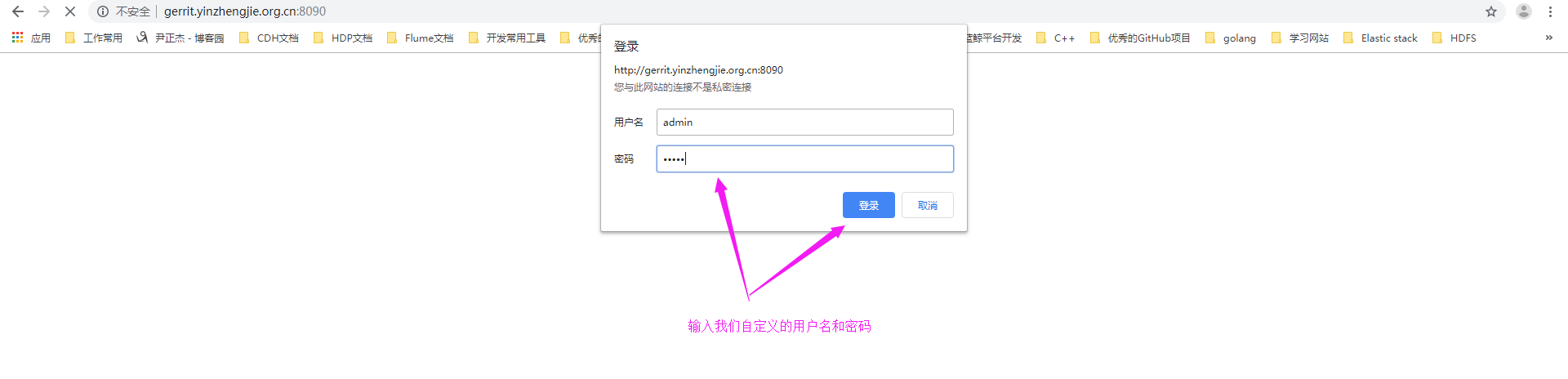
1>.使用admin用户登陆
2>.点击设置
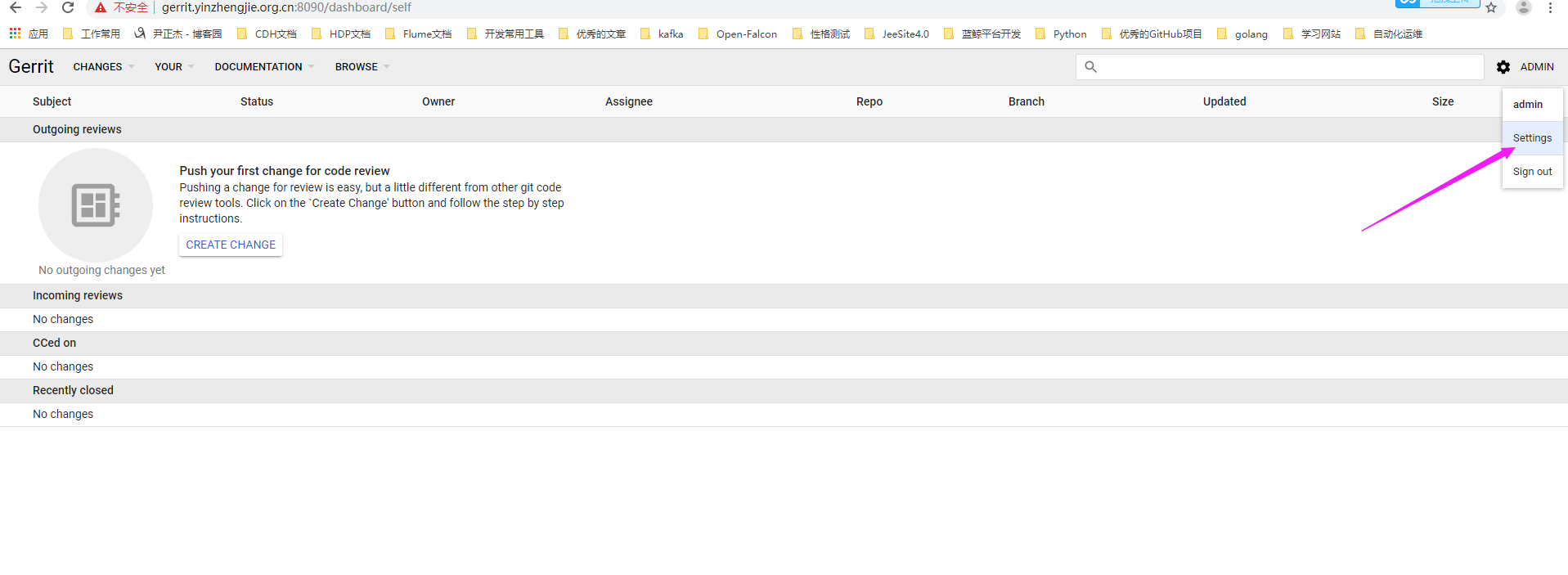
3>.设置发送邮箱地址为:yinzhengjie@aggrx.com

4>.邮箱发送成功

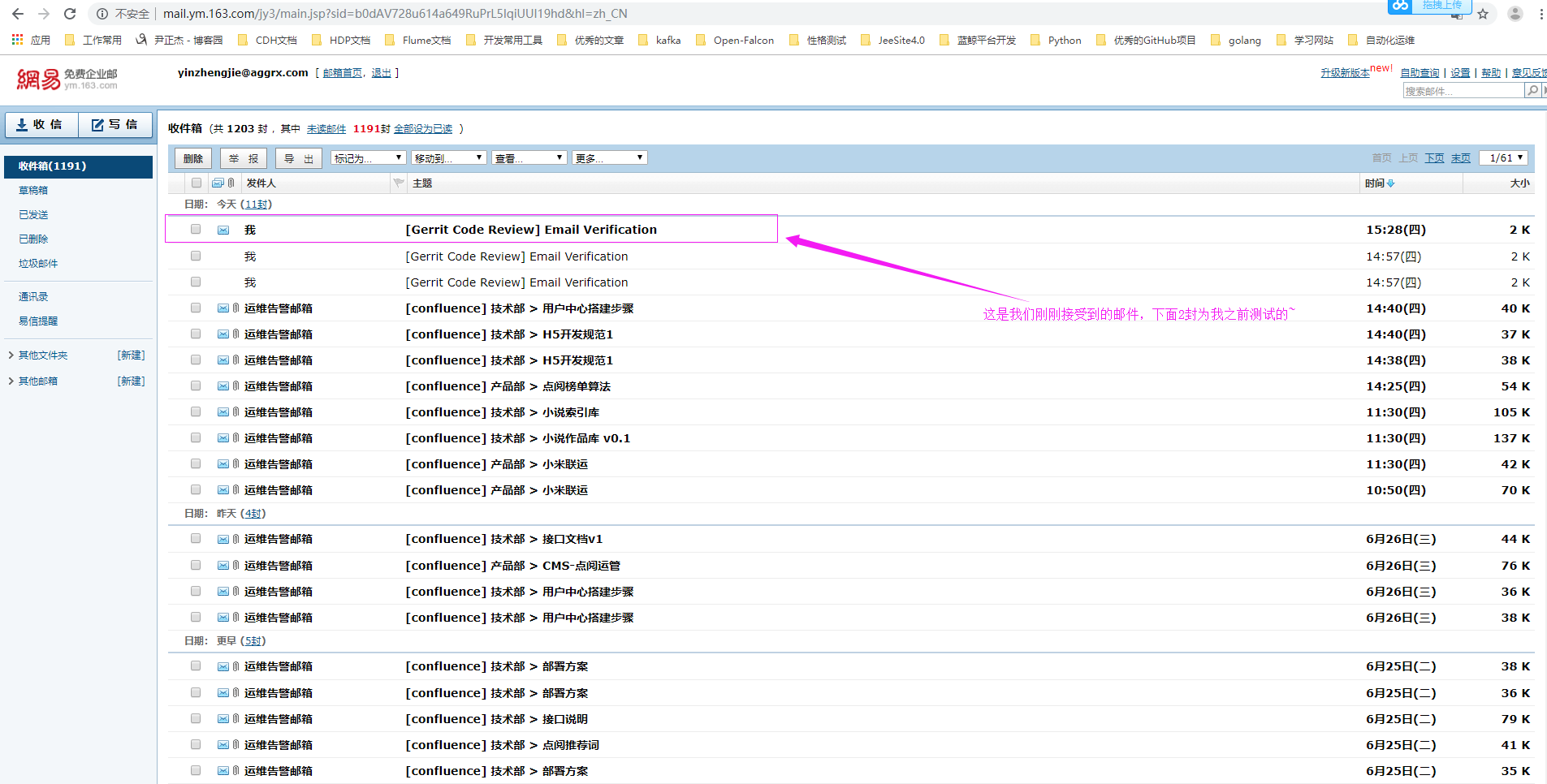
5>.登陆yinzhengjie@aggrx.com邮箱验证是否成功接收邮件
6>.查看测试邮件内容
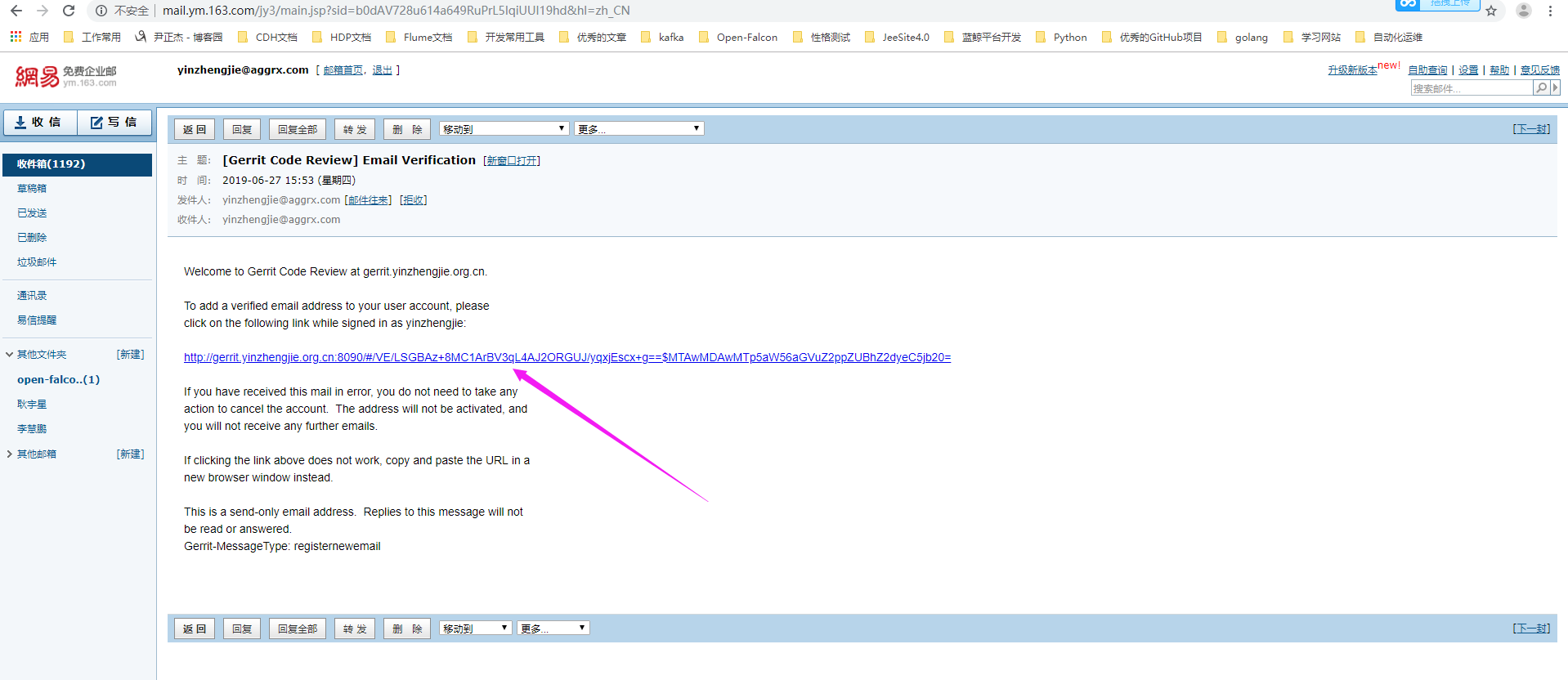
7>.根据链接点进去,可以发现邮件添加成功啦~

使用Gerrit发送测试邮件的更多相关文章
- wordpress发送测试邮件
下面的邮箱设置使用了qq邮箱的设置 写上接收测试邮件的邮箱 再send test
- python3修改HTMLTestRunner,生成有截图的测试报告,并发送测试邮件(二)
3. 如何将第一步得到的地址和名称 输入 进第二步里的表格中呢... 用上述查找元素的方法,发现HTMLTestRunner.py中REPORT_TEST_WITH_OUTPUT_TMPL是用来输出测 ...
- WordPress用户注册无法发送密码邮件怎么回事?
wordpress无法发送电子邮件.可能原因:您的主机禁用了 mail() 函数 等等几句话.在网上一搜,很快找到了解决方案:使用wp-mail-smtp插件. 一.插件下载安装.可以在wordpre ...
- Python发送SMTP邮件指南
SMTP(Simple Mail Transfer Protocol)简单邮件传输协议,Python内置对SMTP的支持,可以发送纯文本文件,HTML邮件以及附带文件. 一.两个模块 Pyth ...
- sql 邮件发送测试情况
sql 邮件发送测试情况 select * from msdb.dbo.sysmail_allitems select * from msdb.dbo.sysmail_event_log
- MailUtils 测试邮件是否发送
import java.util.Properties; import javax.mail.Message; import javax.mail.Session; import javax.mail ...
- jenkins构建邮件自动发送,测试邮件发送成功,构建项目邮件发送不成功的问题
提示问题: Connection error sending email,retrying once more in 10 seconds…… Connection error sending ema ...
- CI框架使用PHPmail插件发送QQ邮件:
有助请顶,不好请评.0:33 2016/3/12CI框架使用PHPmail插件发送QQ邮件:发送成功,不过修改了主机参数,还包含了一个phpmail中的一个另外的文件,详见下方:参见:http://c ...
- 5分钟 wamp下php phpmaile发送qq邮件 2015最新方法说明
13:40 2015/11/20 5分钟 wamp下php phpmaile发送qq邮件 2015最新方法说明 关键点:现在qq邮箱开通smtp服务后会给你一个很长的独立新密码,发邮件配置中的密码需要 ...
随机推荐
- EasyDSS高性能RTMP、HLS(m3u8)、HTTP-FLV、RTSP流媒体服务器软件正式环境安装部署攻略
背景介绍 EasyDSS流媒体服务器软件,提供一站式的转码.点播.直播.时移回放服务,极大地简化了开发和集成的工作.其中,点播功能主要包含:上传.转码.分发.直播功能,主要包含:直播.录像, 直播支持 ...
- xcode简单教程
1.使用Xcode软件.Xcode是一个苹果系统上的集成开发环境(IDE),就是说用Xcode就能编写C语言程序,并编译运行.也能开发ios程序等,是一种软件.在windows上类似这种能编c语言的还 ...
- phpspreadsheet 中文文档(一) 访问单元格
2019年10月11日11:45:09 访问单元格 访问电子表格中的单元格应该非常简单.本主题列出了一些访问单元的选项. 通过坐标设置单元格值 可以使用工作表的setCellValue()方法来按坐标 ...
- 远程控制分析之VBS编码转换
简介 分析这种VBS简单chr()函数编码的脚本技巧.只需要把vbs的execute()函数换成信息输出到控制台(dos窗口)函数就可以了. WSH.Echo "print your mes ...
- 搭建基于docker 的redis分布式集群在docker for windows
https://blog.csdn.net/xielinrui123/article/details/85104446 首先在docker中下载使用 docker pull redis:3.0.7do ...
- Pycharm2018中DataBase的使用
1.点击右侧边栏的DataBase,在出现的Database窗口下点击绿色小加号,选择Data Source,选择需要的数据库类型,此处选择Sqlite 2.配置数据库连接信息 3.选择schema, ...
- C++ 智能指针 shared_ptr 分析
引文: C++对指针的管理提供了两种解决问题的思路: 1.不允许多个对象管理一个指针 2.允许多个对象管理一个指针,但仅当管理这个指针的最后一个对象析构时才调用delete ps:这两种思路的共同点就 ...
- a++与++a,谈谈C++的参数传递
先看一段代码: #include<iostream> using namespace std; void func(int a, int b) { cout << a < ...
- Python之路【第十一篇】:Python面向对象之封装
一 引子 从封装本身的意思去理解,封装就好像是拿来一个麻袋,把青菜,土豆,花菜,还有苹果一起装进麻袋,然后把麻袋封上口子.照这种逻辑看,封装=‘隐藏’,这种理解是相当片面的. 在面向对象中这个麻袋就是 ...
- jQuery格式化显示json数据
一.概述 JSONView 在gitlab上面,有一个jQuery JSONView插件,地址为:https://github.com/yesmeck/jquery-jsonview demo地址:h ...