
201871010106-丁宣元 《面向对象程序设计(java)》第十六周学习总结
201871010106-丁宣元 《面向对象程序设计(java)》第十六周学习总结
正文开头:
|
项目 |
内容 |
|
这个作业属于哪个课程 |
https://home.cnblogs.com/u/nwnu-daizh/ |
|
这个作业的要求在哪里 |
https://www.cnblogs.com/nwnu-daizh/p/12031970.html |
|
作业学习目标 |
(1) 掌握Java应用程序的打包操作;
(2) 掌握线程概念; (3) 掌握线程创建的两种技术。 (4) 学习设计应用程序的GUI。 |
正文内容:
第一部分:总结教材14.1-14.3知识内容
第十四章(14.1-14.3) 并发
14.1什么是线程
1.程序是一段静态的代码,它是应用程序执行的蓝本。
2.进程是程序的一次动态执行,它对应了从代码加载、执行至执行完毕的一个完整过程。
3.多任务:在同一刻运行多个程序的能力
4.多线程程序:一个程序同时执行多个任务。每一个任务称为一个线程
.多线程与多进程的区别:
多进程:每个进程拥有自己的一套变量
多线程:共享数据
.使用线程可以给其他任务提供机会
7.使用多线程的两种途径:
a.创建Thread类的子类
eg:在Thread类派生出一个子类,在该子类中重写run()方法。
class hand extends Thread
{
public void run()
{
……
}
}
完整:class hand extends Thread
{
public void run()
{……}
}
创建该子类的对象 Lefthand left=new Lefthand();
Righthand right=new Righthand();
用start()方法启动线程 left.start();
right.start();
b.在定义时实现Runnable接口的类
重写run方法-> 创建该类对象,以此为参数建立Thread 类的对象->调用Thread类对象start方法启动线程
eg:class XX implements Runnable
{
public void run()
{
}
}
14-2中断线程
1.没有一个可以强制中断线程的方法,但interrupt方法可以用来请求终止线程
2.详细过程:
当对一个线程调用interrupt方法时,线程的中断状态将被置位。这是boolean的标志,应当不断检查这个标志,以判断是否中断。
判断是否被置位可以调用静态的Thread.currentThread方法获得当前线程,再调用isInterrupted方法:
eg:while(!Thread.currentThread().isInterrupted() && more work to do)
{
...
}
若阻塞,则无法检测中断状态,会产生异常。
线程将简单的将中断作为一个终止请求。
14-3 线程状态
1.6种状态:new新创建,
Runnable可运行,
Blocked被阻塞,
Waiting等待,
Timed waiting计时等待,
Terminated被终止
2.新创建线程
线程对象刚创建,没有启动,线程处于不可运行状态
3.可运行线程
调用start方法,线程处于runnable可运行状态
eg:thread.start();
一旦一个线程开始运行,不必始终保持运行。
运行中的线程被中断,目的是为了让其他线程获得运行机会。
4.被阻塞线程和等待线程
此时暂时不活动,不运行任何代码且耗资最少,直至线程调度器重新激活它。
等待阻塞 :调用线程的wait()方法,使线程等待某项工作的完成
同步阻塞 :获取synchronized同步锁失败会进入同步阻塞状态
其他阻塞 :调用线程的sleep(),join() 或发出了I/O请求,线程进入到阻塞状态。
5.被阻塞的线程
a.Terminated终止原因:
run方法正常退出而自然死亡
因为一个没有捕获的异常终止了run方法而意外死亡
注:调用stop方法杀死一个线程,不要用
b.sleep(),wait()是常用的引起线程阻塞的方法

第二部分:实验部分
实验1:测试程序1
实验1: 导入第13章示例程序,测试程序并进行代码注释。
测试程序1
在elipse IDE中调试运行教材585页程序13-1,结合程序运行结果理解程序;
将所生成的JAR文件移到另外一个不同的目录中,再运行该归档文件,以便确认程序是从JAR文件中,而不是从当前目录中读取的资源。
掌握创建JAR文件的方法;
代码:
package resource;

import java.awt.*;

import java.io.*;

import java.net.*;

import java.util.*;

import javax.swing.*;

/**

 * @version 1.41 2015-06-12

 * @author Cay Horstmann

 */

public class ResourceTest

{

   public static void main(String[] args)

   {

      EventQueue.invokeLater(() -> {

         JFrame frame = new ResourceTestFrame();

         frame.setTitle("ResourceTest");

         frame.setDefaultCloseOperation(JFrame.EXIT_ON_CLOSE);

         frame.setVisible(true);

      });

   }

}

/**

 * A frame that loads image and text resources.

 */

class ResourceTestFrame extends JFrame

{

   private static final int DEFAULT_WIDTH = 300;

   private static final int DEFAULT_HEIGHT = 300;

   public ResourceTestFrame()

   {

      setSize(DEFAULT_WIDTH, DEFAULT_HEIGHT);//来自JComponent类

      URL aboutURL = getClass().getResource("about.gif");

      Image img = new ImageIcon(aboutURL).getImage();//在找到ResourceTest类的地方查找about.gif文件

      setIconImage(img);

      JTextArea textArea = new JTextArea();

      InputStream stream = getClass().getResourceAsStream("about.txt");//读取about.txt文件

      try (Scanner in = new Scanner(stream, "UTF-8"))//UTF-8文本编码标准

      {

         while (in.hasNext())

            textArea.append(in.nextLine() + "\n");

      }

      add(textArea);//将文本区添加到框架上

   }

}
结果:
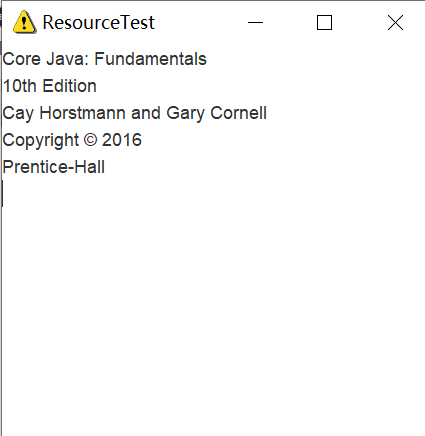 此时:
此时:
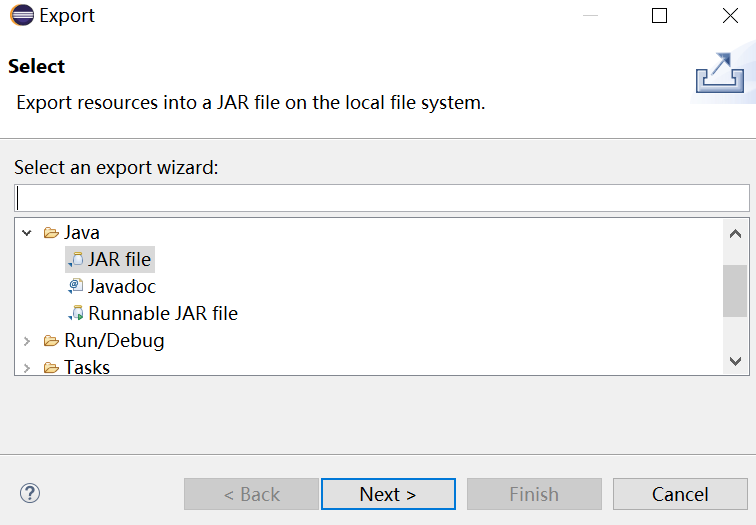
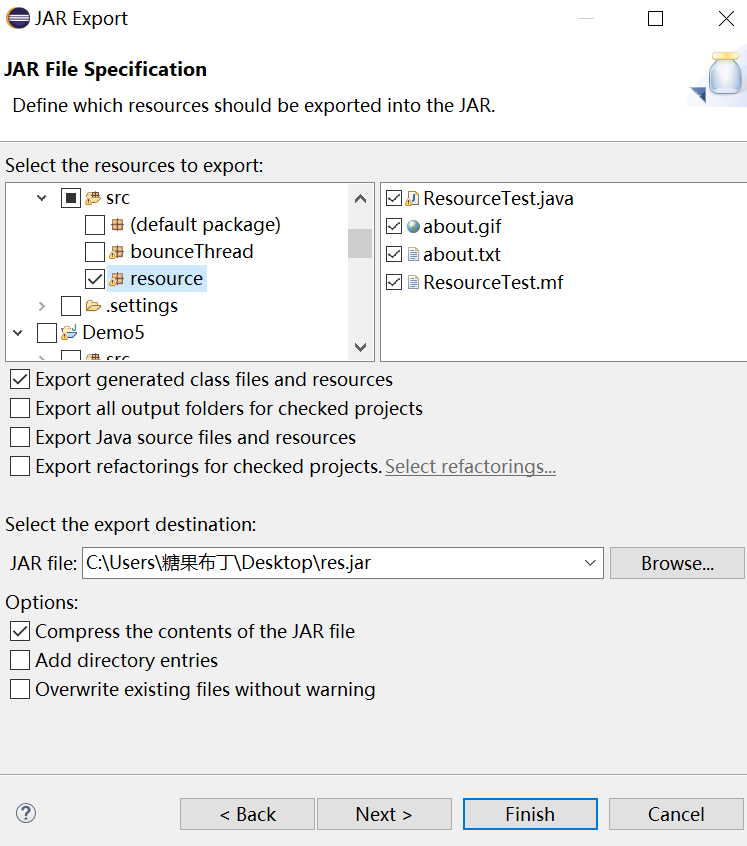
归档:Export -> JAR file

实验1:测试程序2
在elipse IDE中调试运行ThreadTest,结合程序运行结果理解程序;
掌握线程概念;
掌握用Thread的扩展类实现线程的方法;
利用Runnable接口改造程序,掌握用Runnable接口创建线程的方法。
代码:
class Lefthand extends Thread {

   public void run()

   {

       for(int i=0;i<=5;i++)

       {  System.out.println("You are Students!");

           try{   sleep(500);   }

           catch(InterruptedException e)

           { System.out.println("Lefthand error.");}

       }

  }

}

class Righthand extends Thread {

    public void run()

    {

         for(int i=0;i<=5;i++)

         {   System.out.println("I am a Teacher!");

             try{  sleep(300);  }

             catch(InterruptedException e)

             { System.out.println("Righthand error.");}

         }

    }

}

public class ThreadTest

{

     static Lefthand left;

     static Righthand right;

     public static void main(String[] args)

     {     left=new Lefthand();

           right=new Righthand();

           left.start();//启动线程

           right.start();

     }

}
结果:

利用Runnable接口改造程序
class Lefthand1 implements Runnable {

   public void run()

   {

       for(int i=0;i<=5;i++)

       {  System.out.println("You are Students!");

           try{   Thread.sleep(500);//休眠500ms

           }

           catch(InterruptedException e)

           { System.out.println("Lefthand error.");}

       }

  }

 }

class Righthand1 implements Runnable {

    public void run()

    {

         for(int i=0;i<=5;i++)

         {   System.out.println("I am a Teacher!");

             try{  Thread.sleep(300);//休眠300ms

             }

             catch(InterruptedException e)

             { System.out.println("Righthand error.");}

         }

    }

 }

public class ThreadT

{

     public static void main(String[] args)

     {

         Righthand righthand = new Righthand();

         Lefthand lefthand = new Lefthand();

         Thread right = new Thread(righthand);

         right.start();

         Thread left=new Thread(lefthand);

         left.start();

     }

}
结果:
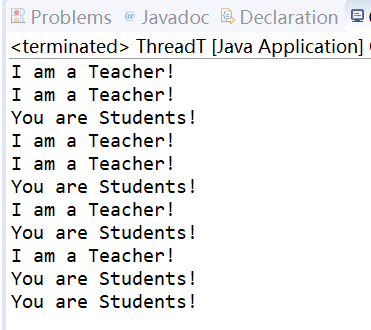
不同方法实现多线程
实验1:测试程序3
在Elipse环境下调试教材625页程序14-1、14-2 、14-3,结合程序运行结果理解程序;
在Elipse环境下调试教材631页程序14-4,结合程序运行结果理解程序;
对比两个程序,理解线程的概念和用途;
掌握线程创建的两种技术。
14-1、14-2 、14-3代码:
import java.awt.*;

import java.awt.event.*;

import javax.swing.*;

/**

 * Shows an animated bouncing ball.

 * @version 1.34 2015-06-21

 * @author Cay Horstmann

 */

public class Bounce

{

   public static void main(String[] args)

   {

      EventQueue.invokeLater(() -> {

         JFrame frame = new BounceFrame();

         frame.setDefaultCloseOperation(JFrame.EXIT_ON_CLOSE);

         frame.setVisible(true);

      });

   }

}

/**

 * The frame with ball component and buttons.

 */

class BounceFrame extends JFrame

{

   private BallComponent comp;

   public static final int STEPS = 1000;

   public static final int DELAY = 3;

   /**

    * Constructs the frame with the component for showing the bouncing ball and

    * Start and Close buttons

    */

   public BounceFrame()

   {

      setTitle("Bounce");

      comp = new BallComponent();

      add(comp, BorderLayout.CENTER);//边框布局显示在中心位置

      JPanel buttonPanel = new JPanel();

      addButton(buttonPanel, "Start", event -> addBall());//添加两个按钮

      addButton(buttonPanel, "Close", event -> System.exit(0));

      add(buttonPanel, BorderLayout.SOUTH);

      pack();

   }

   /**

    * Adds a button to a container.

    * @param c the container

    * @param title the button title

    * @param listener the action listener for the button

    */

   public void addButton(Container c, String title, ActionListener listener)

   {

      JButton button = new JButton(title);

      c.add(button);

      button.addActionListener(listener);

   }

   /**

    * Adds a bouncing ball to the panel and makes it bounce 1,000 times.加一个球

    */

   public void addBall()

   {

      try//异常处理

      {

         Ball ball = new Ball();

         comp.add(ball);

         for (int i = 1; i <= STEPS; i++)

         {

            ball.move(comp.getBounds());

            comp.paint(comp.getGraphics());

            Thread.sleep(DELAY);

         }

      }

      catch (InterruptedException e)

      {

      }

   }

}
import java.awt.geom.*;

/**

 * A ball that moves and bounces off the edges of a rectangle

 * @version 1.33 2007-05-17

 * @author Cay Horstmann

 */

public class Ball

{

   private static final int XSIZE = 15;

   private static final int YSIZE = 15;

   private double x = 0;

   private double y = 0;

   private double dx = 1;

   private double dy = 1;

   /**

    * 将球移动至下一个位置,若碰到一边,变向

    */

   public void move(Rectangle2D bounds)

   {

      x += dx;

      y += dy;

      if (x < bounds.getMinX())//四个方向

      {

         x = bounds.getMinX();

         dx = -dx;

      }

      if (x + XSIZE >= bounds.getMaxX())

      {

         x = bounds.getMaxX() - XSIZE;

         dx = -dx;

      }

      if (y < bounds.getMinY())

      {

         y = bounds.getMinY();

         dy = -dy;

      }

      if (y + YSIZE >= bounds.getMaxY())

      {

         y = bounds.getMaxY() - YSIZE;

         dy = -dy;

      }

   }

   /**

    *球在当前位置

    */

   public Ellipse2D getShape()

   {

      return new Ellipse2D.Double(x, y, XSIZE, YSIZE);

   }

}
import java.awt.*;

import java.util.*;

import javax.swing.*;

/**

 * The component that draws the balls.

 * @version 1.34 2012-01-26

 * @author Cay Horstmann

 */

public class BallComponent extends JPanel

{

   private static final int DEFAULT_WIDTH = 450;

   private static final int DEFAULT_HEIGHT = 350;

   private java.util.List<Ball> balls = new ArrayList<>();

   /**

    * Add a ball to the component.

    * @param b the ball to add

    */

   public void add(Ball b)

   {

      balls.add(b);

   }

   public void paintComponent(Graphics g)

   {

      super.paintComponent(g); // 擦除背景

      Graphics2D g2 = (Graphics2D) g;

      for (Ball b : balls)

      {

         g2.fill(b.getShape());

      }

   }

   public Dimension getPreferredSize()

  {

       return new Dimension(DEFAULT_WIDTH, DEFAULT_HEIGHT);
  }

}
结果:
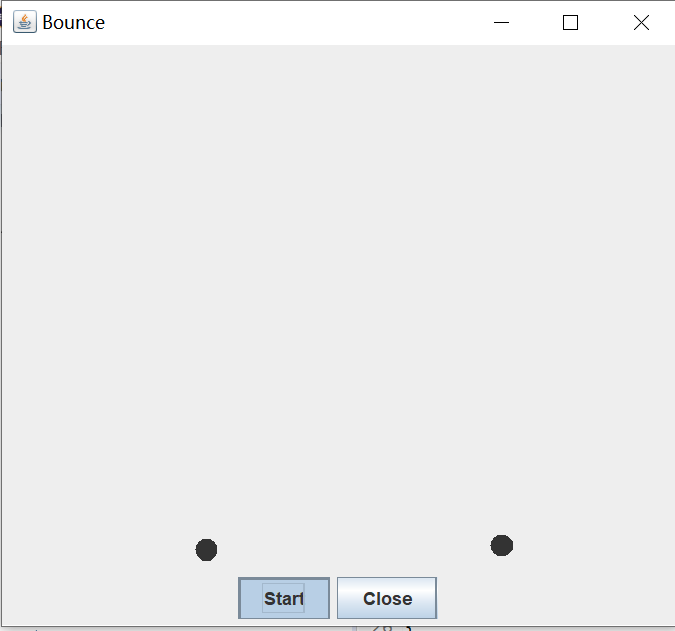
14-4
package bounceThread;

import java.awt.*;

import java.awt.event.*;

import javax.swing.*;

/**

 * Shows animated bouncing balls.

 * @version 1.34 2015-06-21

 * @author Cay Horstmann

 */

public class BounceThread

{

   public static void main(String[] args)

   {

      EventQueue.invokeLater(() -> {

         JFrame frame = new BounceFrame();

         frame.setTitle("BounceThread");

         frame.setDefaultCloseOperation(JFrame.EXIT_ON_CLOSE);

         frame.setVisible(true);

      });

   }

}

/**

 * The frame with panel and buttons.

 */

class BounceFrame extends JFrame

{

   private BallComponent comp;

   public static final int STEPS = 1000;

   public static final int DELAY = 5;

   /**

    * Constructs the frame with the component for showing the bouncing ball and

    * Start and Close buttons

    */

   public BounceFrame()

   {

      comp = new BallComponent();

      add(comp, BorderLayout.CENTER);//加在中间

      JPanel buttonPanel = new JPanel();//容器

      addButton(buttonPanel, "Start", event -> addBall());//start加ball

      addButton(buttonPanel, "Close", event -> System.exit(0));//colse退出程序

      add(buttonPanel, BorderLayout.SOUTH);

      pack();//自适应窗口大小

   }

   /**

    * Adds a button to a container.

    * @param c the container

    * @param title the button title

    * @param listener the action listener for the button

    */

   public void addButton(Container c, String title, ActionListener listener)

   {

      JButton button = new JButton(title);

      c.add(button);

      button.addActionListener(listener);

   }

   /**

    * Adds a bouncing ball to the canvas and starts a thread to make it bounce

    */

   public void addBall()

   {

      Ball ball = new Ball();

      comp.add(ball);

      Runnable r = () -> { //lambda表达式,回调程序设计

         try

         {

            for (int i = 1; i <= STEPS; i++)

            {

               ball.move(comp.getBounds());

               comp.repaint();//重绘

               Thread.sleep(DELAY);//延迟

            }

         }

         catch (InterruptedException e)

         {

         }

      };

      Thread t = new Thread(r);

      t.start();//启动

   }

}
结果:
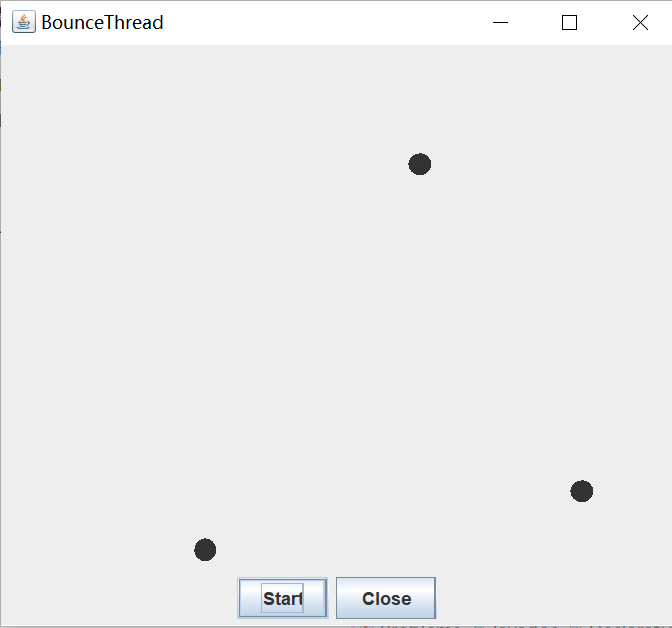
并发式设计:点一次可以再点一次,可以出现多个小球。start键可以点击多次,同时引入多个小球运动。
普通设计:只能出现一个小球,只能这个球结束后,再出现下一个球
实验总结:
通过本次实验,我了解了:1.Java应用程序的打包操作 2.了解线程的基本知识及概念 3.掌握线程创建的两种技术 4.学习设计应用程序的GUI
通过本次实验,加深对线程新概念的理解。程序一不会归档,求助于同学,明白了如何做。结对编程一直是难点,搜索资料知识,参照例码,还存在一些问题,需再修改。编程一直是最弱的地方,要多加练习。
201871010106-丁宣元 《面向对象程序设计(java)》第十六周学习总结的更多相关文章
- 201571030332 扎西平措 《面向对象程序设计Java》第八周学习总结
<面向对象程序设计Java>第八周学习总结 项目 内容 这个作业属于哪个课程 https://www.cnblogs.com/nwnu-daizh/ 这个作业的要求在哪里 https: ...
- 201771010118马昕璐《面向对象程序设计java》第八周学习总结
第一部分:理论知识学习部分 1.接口 在Java程序设计语言中,接口不是类,而是对类的一组需求描述,由常量和一组抽象方法组成.Java为了克服单继承的缺点,Java使用了接口,一个类可以实现一个或多个 ...
- 201771010134杨其菊《面向对象程序设计java》第八周学习总结
第八周学习总结 第一部分:理论知识 一.接口.lambda和内部类: Comparator与comparable接口: 1.comparable接口的方法是compareTo,只有一个参数:comp ...
- 201771010134杨其菊《面向对象程序设计java》第七周学习总结
第七周学习总结 第一部分:理论知识 1.继承是面向对象程序设计(Object Oriented Programming-OOP)中软件重用的关键技术.继承机制使用已经定义的类作为基础建立新的类定义,新 ...
- 201771010128 王玉兰《面象对象程序设计 (Java) 》第六周学习总结
---恢复内容开始--- 第一部分:基础知识总结: 1.继承 A:用已有类来构建新类的一种机制,当定义了一个新类继承一个类时,这个新类就继承了这个类的方法和域以适应新的情况: B:特点:具有层次结构. ...
- 201871010126 王亚涛《面向对象程序设计 JAVA》 第十三周学习总结
内容 这个作业属于哪个课程 https://www.cnblogs.com/nwnu-daizh/ 这个作业的要求在哪里 https://www.cnblogs.com/nwnu-daizh/p/ ...
- 马凯军201771010116《面向对象程序设计Java》第八周学习总结
一,理论知识学习部分 6.1.1 接口概念 两种含义:一,Java接口,Java语言中存在的结构,有特定的语法和结构:二,一个类所具有的方法的特征集合,是一种逻辑上的抽象.前者叫做“Java接口”,后 ...
- 周强201771010141《面向对象程序设计Java》第八周学习总结
一.理论知识学习部分 Java为了克服单继承的缺点,Java使用了接口,一个类可以实现一个或多个接口. 接口体中包含常量定义和方法定义,接口中只进行方法的声明,不提供方法的实现. 类似建立类的继承关系 ...
- 201777010217-金云馨《面向对象程序设计Java》第八周学习总结
项目 内容 这个作业属于哪个课程 https://www.cnblogs.com/nwnu-daizh/ 这个作业的要求在哪里 https://www.cnblogs.com/nwnu-daizh/p ...
- 201871010126 王亚涛 《面向对象程序设计 (Java)》第十七周学习总结
内容 这个作业属于哪个课程 https://www.cnblogs.com/nwnu-daizh/ 这个作业的要求在哪里 https://www.cnblogs.com/nwnu-daizh/p/12 ...
随机推荐
- mysql 高级查询二
各种showshow columns from my_student;show grants for root;show aviables;show processlist;show table st ...
- [C2W3] Improving Deep Neural Networks : Hyperparameter tuning, Batch Normalization and Programming Frameworks
第三周:Hyperparameter tuning, Batch Normalization and Programming Frameworks 调试处理(Tuning process) 目前为止, ...
- Linux学习笔记-第11天 特殊的RAID与LVM
没搞清楚madam是什么意思, 这点是个疑问,其实发现书上有挺多没讲到的地方,比如LVM是不支持有些分区格式的.看来课后还是要做好细化工作.
- split task
和印度的team合作的时候,他们经常有些要求,然后我们这边有时候需要改代码来满足他们的需求. 最近一次,他们要求在我们的一个工具中为他们加入2个asp.net的注册命令,不知道什么原因,system ...
- python 机器学习基础教程——第一章,引言
https://www.cnblogs.com/HolyShine/p/10819831.html # from sklearn.datasets import load_iris import nu ...
- 字节跳动笔试题:1. 小于N的质数数量;2. 逆时针二维数组;3. 判断a+b>c
1. 小于N的质数数量 import java.util.Scanner; /** * 计算小于N的质数数量 * @author Turing * */ public class Main4 { pu ...
- 彻底解决Intellij IDEA中文乱码问题
关于JAVA IDE开发工具,Eclipse系列和Intelli IDEA是大部分公司的主要选择,从开发者的选择角度,Intellij IDEA似乎比Eclipse系列更受欢迎一些.当我们使用Inte ...
- VMWare 怎样复制/copy部署好的一台虚拟机
1:修改 vi /ect/udev/rules.d/70-persisten-net.rules 2:执行命令:uuidgen eth0 3:vi /etc/sysconfig/network-scr ...
- 安装pip-9.0.1-py2.py3-none-any.whl
pip的安装 1.从https://pypi.python.org/pypi/pip#downloads下载所需的.whl文件 2.将下载的文件放入Python的根目录 我的根目录是F:\Python ...
- 微信小程序跳转页面时参数过长导致参数丢失
问题描述: 微信小程序:跳转页面时传参,参数过长导致参数丢失 跳转到文章详情页时,使用的文章链接e.currentTarget.dataset.id过长导致参数丢失 handleClickArticl ...