
React.js Tutorial: React Component Lifecycle
Introduction about React component lifecycle.
1 Lifecycle
A React component in browser can be any of the following three statuses: mounted, update and unmounted.
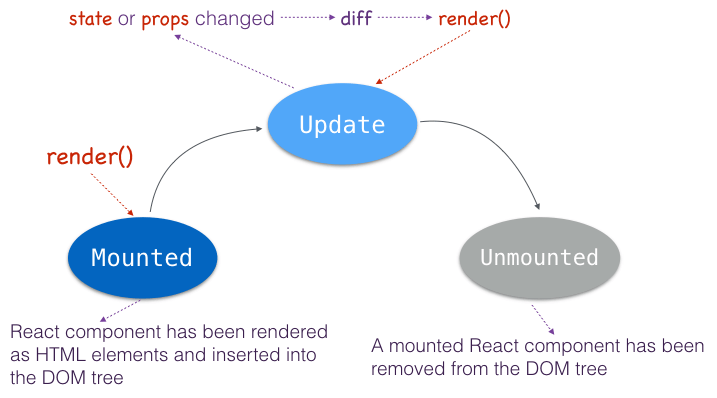
So React component lifecycle can be divided into three phases according to these statuses: mounting, updating and unmounting.
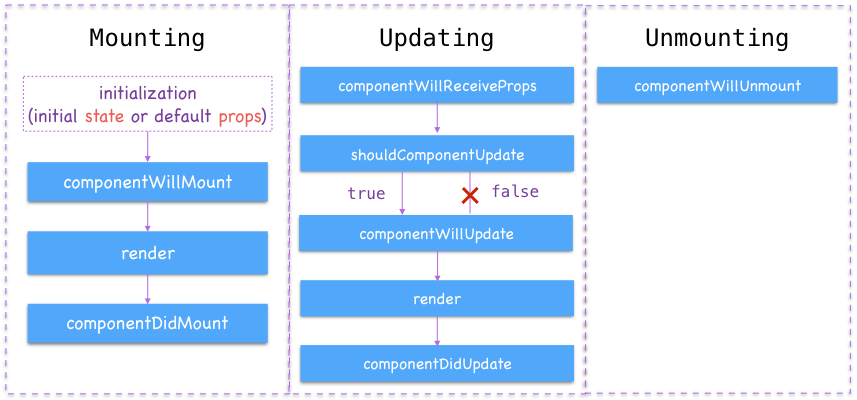
2 Mounting
React.js exposed interfaces or hook methods in each phase of component lifecycle.
2.1 Initializing state
You can optionally set initial state value in constructor() method of the component if you are using ES6 syntax.
const tom_and_jerry = [

    {

        name: 'Tom',

        score: 55

    },

    {

        name: 'Jerry',

        score: 80

    }

];

class ScoreBoard extends React.Component {

    constructor(props) {

        super(props);

        this.state = { players: tom_and_jerry }

    }

    // ...

}
If you are using ES5 syntax, getInitialState() in the right place to initialize component state.
var ScoreBoard = React.createClass({

    getInitialState: function() {

        return {

            players: tom_and_jerry

        }

    },

    // ...

});
The getInitialState() method is called only one time before the component is mounted.
Initialization of state should typically only be done in a top level component, which acts as a role of controller view in your page.
2.2 Default props
You can also define default values of component props (properties) if the parent component does not declare their values.
Return default props using ES7+ static property initializer.
class SinglePlayer extends React.Component {

    static defaultProps = {

        name: 'Nobody',

        score: 0

    }

    // ...

}
Default props in ES6:
class SinglePlayer extends React.Component {

    // ...

}

SinglePlayer.defaultProps = {

    name: 'Nobody',

    score: 0

}
You can define getDefaultProps() method in ES5.
var SinglePlayer = React.createClass({

    getDefaultProps: function() {

        return {

            name: 'Nobody',

            score: 0

        }

    }

});
The getDefaultProps() method is called only once before any instance of the component is created. So you should avoid using this.props inside getDefaultProps() method.
2.3 componentWillMount()
The componentWillMount() method is invoked only once before initial rendering.
It is also a good place to set initial state value inside componentWillMount().
class SinglePlayer extends React.Component {

    componentWillMount() {

        this.setState({

            isPassed: this.props.score >= 60

        });

        alert('componentWillMount => ' + this.props.name);

        console.log('componentWillMount => ' + this.props.name);

    }

    // ...

}
2.4 componentDidMount()
This lifecycle method will be invoked after rendering.
It is the right place to access DOM of the component.
class ScoreBoard extends React.Component {

    constructor(props) {

        super(props);

        this._handleScroll = this.handleScroll.bind(this);

    }

    handleScroll() {}

    componentDidMount() {

        alert('componentDidMount in NoticeBoard');

        window.addEventListener('scroll', this._handleScroll);

    }

    // ...

}
3 Updating
3.1 componentWillReceiveProps()
void componentWillReceiveProps(object nextProps)This method will be invoked when a component is receiving new props. componentWillReceiveProps() won't be called for the initial rendering.
class SinglePlayer extends React.Component {

    componentWillReceiveProps(nextProps) {

        // Calculate state according to props changes

        this.setState({

            isPassed: nextProps.score >= 60

        });

    }

}
The old props can be accessed via this.props inside componentWillReceiveProps(). Typically, you can set state according to changes of props in this method.
3.2 shouldComponentUpdate()
boolean shouldComponentUpdate(object nextProps,

                              object nextState)
shouldComponentUpdate() will be invoked before rendering when new props or state are being received. This method won't be called on initial rendering.
shouldComponentUpdate() returns true by default.
This method is usually an opportunity to prevent the unnecessary rerendering considering performance. Just let shouldComponentUpdate() return false, then the render() method of the component will be completely skipped until the next props or state change.
class SinglePlayer extends React.Component {

    shouldComponentUpdate(nextProps, nextState) {

        // Don't rerender if score doesn't change,

        if ( nextProps.score == this.props.score ) {

            return false;

        }

        return true;

    }

}
3.3 componentWillUpdate()
void componentWillUpdate(object nextProps,

                         object nextState)
Invoked just before render(), but after shouldComponentUpdate() (of course, return a true). This method is not called for the initial rendering.
Use this as an opportunity to prepare for an update.
class SinglePlayer extends React.Component {

    componentWillUpdate(nextProps, nextState) {

        alert('componentWillUpdate => ' + this.props.name);

        console.log('componentWillUpdate => ' + this.props.name);

    }

}
3.4 componentDidUpdate()
void componentDidUpdate(object prevProps,

                        object prevState)
Invoked immediately after the component's updates are flushed to the DOM. This method is not called for the initial rendering.
You can perform DOM operations after an update inside this function.
class SinglePlayer extends React.Component {

    componentDidUpdate(prevProps, prevState) {

        alert('componentDidUpdate => ' + this.props.name);

        console.log('componentDidUpdate => ' + this.props.name);

    }

}
4 Unmounting
void componentWillUnmount()This is invoked immediately before a component is unmounted or removed from the DOM.
Use this as an opportunity to perform cleanup operations. For example, unbind event listeners here to avoid memory leaking.
class ScoreBoard extends React.Component {

    componentWillUnmount() {

        window.removeEventListener('scroll', this._handleScroll);

    }

}
5 Sample codes
Complete sample codes to log each lifecycle method call in browser's console.
<!DOCTYPE html>

<html lang="en">

<head>

    <meta charset="UTF-8">

    <title>React Component Lifecycle Demo</title>

    <!-- react includes two parts: react.js and react-dom.js -->

    <script src="//fb.me/react-15.2.1.js"></script>

    <script src="//fb.me/react-dom-15.2.1.js"></script>

    <!-- babel standalone -->

    <script src="//cdnjs.cloudflare.com/ajax/libs/babel-standalone/6.10.3/babel.min.js"></script>

</head>

<body>

    <div id="app"></div>

    <script type="text/babel">

        const tom_and_jerry = [

            {

                name: 'Tom',

                score: 55

            },

            {

                name: 'Jerry',

                score: 80

            }

        ];

        class SinglePlayer extends React.Component {

            constructor(props) {

                super(props);

                this.state = { isPassed: false }

            }

            componentWillMount() {

                // Mark it as 'Pass' if score >= 60

                this.setState({

                    isPassed: this.props.score >= 60

                });

                console.log('componentWillMount => ' + this.props.name);

                alert('componentWillMount => ' + this.props.name);

            }

            componentDidMount() {

                console.log('componentDidMount => ' + this.props.name);

                alert('componentDidMount => ' + this.props.name);

            }

            componentWillReceiveProps(nextProps) {

                // Calculate state according to props changes

                this.setState({

                    isPassed: nextProps.score >= 60

                });

                console.log('componentWillReceiveProps => ' + this.props.name + ': ' + nextProps.score);

                alert('componentWillReceiveProps => ' + this.props.name + ': ' + nextProps.score);

            }

            shouldComponentUpdate(nextProps, nextState) {

                // Don't rerender if score doesn't change,

                if ( nextProps.score == this.props.score ) {

                    console.log('shouldComponentUpdate => ' + this.props.name + '? false');

                    alert('shouldComponentUpdate => ' + this.props.name + '? false');

                    return false;

                }

                console.log('shouldComponentUpdate => ' + this.props.name + '? true');

                alert('shouldComponentUpdate => ' + this.props.name + '? true');

                return true;

            }

            componentWillUpdate(nextProps, nextState) {

                console.log('componentWillUpdate => ' + this.props.name);

                alert('componentWillUpdate => ' + this.props.name);

            }

            componentDidUpdate(prevProps, prevState) {

                console.log('componentDidUpdate => ' + this.props.name);

                alert('componentDidUpdate => ' + this.props.name);

            }

            componentWillUnmount() {

                console.log('componentDidUpdate => ' + this.props.name);

                alert('componentDidUpdate => ' + this.props.name);

            }

            render() {

                console.log("render => " + this.props.name);

                return (

                    <div>

                        <h5><span>Name: </span>{this.props.name}</h5>

                        <p><span>Score: </span><em>{this.props.score}</em></p>

                        <p><span>Pass: </span><input type="checkbox" defaultChecked={this.state.isPassed} disabled={true}  /></p>

                    </div>

                );

            }

        }

        class ScoreBoard extends React.Component {

            constructor(props) {

                super(props);

                this.state = {

                    players: tom_and_jerry

                };

            }

            changeScore(amount) {

                if ( typeof(amount) != "number" ) {

                    return;

                }

                let players = this.state.players;

                let tom = players[0];

                tom.score = tom.score + amount;

                tom.score = (tom.score > 100) ? 100 : tom.score;

                tom.score = (tom.score < 0) ? 0 : tom.score;

                players[0] = tom;

                this.setState({ players: players });

            }

            render() {

                return (

                    <div>

                        <h4>Score Board</h4>

                        <div>

                            <button onClick={ (amount) => this.changeScore(5) }>Score of Tom: +5</button>

                            <button onClick={ (amount) => this.changeScore(-5) }>Score of Tom: -5</button>

                        </div>

                        {

                            this.state.players.map((v, idx) => {

                                return <SinglePlayer key={idx} name={v.name} score={v.score} />

                            })

                        }

                    </div>

                );

            }

        }

        class App extends React.Component {

            render() {

                return (

                    <div>

                        <h1>React Component Lifecycle Demo</h1>

                        <ScoreBoard />

                    </div>

                )

            }

        }

        // Mount root App component

        ReactDOM.render(<App />, document.getElementById('app'));

    </script>

</body>

</html>

https://www.codevoila.com/post/57/reactjs-tutorial-react-component-lifecycle
React.js Tutorial: React Component Lifecycle的更多相关文章
- WHAT IS THE DIFFERENCE BETWEEN REACT.JS AND REACT NATIVE?
Amit Ashwini - 09 SEPTEMBER 2017 React.js was developed by Facebook to address its need for a dynami ...
- [React] 10 - Tutorial: router
Ref: REACT JS TUTORIAL #6 - React Router & Intro to Single Page Apps with React JS Ref: REACT JS ...
- React.js入门笔记
# React.js入门笔记 核心提示 这是本人学习react.js的第一篇入门笔记,估计也会是该系列涵盖内容最多的笔记,主要内容来自英文官方文档的快速上手部分和阮一峰博客教程.当然,还有我自己尝试的 ...
- Facebook React.js库 入门实例教程
作者: 阮一峰 日期: 2015年3月31日 现在最热门的前端框架,毫无疑问是 React . 上周,基于 React 的 React Native 发布,结果一天之内,就获得了 5000 颗星,受瞩 ...
- React.js入门
React 入门实例教程 现在最热门的前端框架,毫无疑问是 React . 上周,基于 React 的 React Native 发布,结果一天之内,就获得了 5000 颗星,受瞩目程度可见一斑. ...
- 13个精选的React JS框架
如果你正在使用 React.js 或 React Native 创建用户界面,可以试一试本文推荐的这些框架. React.js 和 React Native 是流行的用户界面(UI)开发平台,且都是开 ...
- React JS 基础知识17条
1. 基础实例 <!DOCTYPE html> <html> <head> <script src="../build/react.js" ...
- react.js 从零开始(一)
React 是什么? 网络上的解释很多...我这里把他定义为 通过javascript 的形式组件化 html的框架... React 仅仅是 VIEW 层. React 提供了模板语法以及一些函数钩 ...
- 【每天半小时学框架】——React.js的模板语法与组件概念
[重点提前说:组件化与虚拟DOM是React.js的核心理念!] 先抛出一个论题:在React.js中,JSX语法提倡将 HTML 和 CSS 全都写入到JavaScrip ...
随机推荐
- laravel 可以做什么
laravel 可以做什么? Laravel是一套简洁.优雅的PHP Web开发框架(PHP Web Framework).它可以让你从面条一样杂乱的代码中解脱出来:它可以帮你构建一个完美的网络APP ...
- FastReport 程序员手册
一.使用TfrxReport 组件工作1.加载并存储报表默认情况下,报表窗体同项目窗体构存储在同一个DFM文件中.多数情况下,无须再操作,因而你就不必采用特殊方法加载报表.如果你决定在文件中存储报表窗 ...
- Golang读取并修改非主流配置文件
今天工作中碰到的问题,要求修改此配置文件,没看出来是什么格式,用了下面的思路: mysql { # If any of the files below are set, TLS encryption ...
- 【题解】Luogu P4091 [HEOI2016/TJOI2016]求和
原题传送门 \[\begin{aligned} a n s &=\sum_{i=0}^{n} \sum_{j=0}^{i}\left\{\begin{array}{c}{i} \\ {j}\e ...
- SQL分类之DQL:查询表中的记录
DQL:查询表中的记录 select * from 表名: 1.语法 select 字段列表from 表名列表where 条件列表group by 分组字段having 分组之后的条件order ...
- webUI框架miniUI,easyUI,extJS,Bootstrap简介及简单部署
本文为大家讲解的是webUI框架miniUI,easyUI,extJS,Bootstrap简介及简单部属,感兴趣的同学参考下 ExtJS是一种主要用于创建前端用户界面,是一个基本与后台技术无关的前端a ...
- 关于vs无法创建虚拟目录的问题
插入链接:https://blog.csdn.net/zhao1955/article/details/92182935 补充:改完之后不要忘记以管理员的身份运行vs
- SQL小技巧(一)拼音首字母的模糊查询
基于Microsoft SQL Server 的标量值函数fun_GetPy,借鉴其他优秀的博主文章,此处贴出源码,以及使用方法 1.打开新建查询,贴如下代码,F5 /****** Object: U ...
- T-SQL 批量更新字段
;WITH IdPhone AS ( SELECT * FROM(VALUES ('), ('), ('), ('), ('), ('), ('), ('), ('), (') ) AS v(Id, ...
- 关于springMVC中的路径问题
相对路径中,我们最后想要的到的是绝对路径,而绝对路径=参照路径+相对路径: 相对路径往往都知道,只需要区分参照路径即可:对于前台和后台,参照路径不太相同: 什么是前台,后台路径: 前台路径: 出现在 ...