
【winform】主窗体多线程给子窗体传值
0.委托窗体传值

1.主窗体多线程给子窗体传值(多线程)
解决方案:主要使用委托,因为会出现跨线程错误
主窗体
        public FormMain()

        {

            InitializeComponent();

            //background thread running

            Action sAction = async () => await CallbackWorkItem();

            System.Threading.Tasks.Task task = System.Threading.Tasks.Task.Run(sAction);

            System.Threading.Tasks.Task.WaitAll(task);

        }

        private async Task CallbackWorkItem()

        {

            List<string> filesGuidList = new List<string>(); //the GUID to download

            while (true)

            {

                try

                {

                     int count = int.Parse(COUNT);

                    if (string.IsNullOrWhiteSpace(DOWNPATH))

                    {

                        MessageBox.Show("the config's key for DOWNPATH is empty.");

                        return;

                    }

                    if (!string.IsNullOrWhiteSpace(PROJECTID) && !string.IsNullOrWhiteSpace(HOID))

                    {

                        filesGuidList.Clear();

                        //1.Check

                        bool checkTask = await CheckIds(Guid.Parse(PROJECTID), Guid.Parse(HOID));

                        if (checkTask)

                        {

                            deliveryFile.SetMonitor(deliveryFile,"download begins.", COUNT);

                            //2.Load

                            var files = await LoadDeliveryFiles(Guid.Parse(PROJECTID), Guid.Parse(HOID), TEMPKEY, count);

                            if (count == 1)

                            {

                                deliveryFile.SetMonitor(deliveryFile,$"download the data: {files[0].Name}", COUNT);

                            }

                            else

                            {

                                deliveryFile.SetMonitor(deliveryFile,$"download the {COUNT} data.", COUNT);

                            }

                            foreach (var file in files)

                            {

                                filesGuidList.Add(file.Guid.ToString());

                            }

                            string fileZipName = string.Empty;

                            //3.download

                            if (DownloadFile(Guid.Parse(PROJECTID), filesGuidList, out fileZipName))

                            {

                                DeleteRedis(Guid.Parse(PROJECTID), filesGuidList, fileZipName, TEMPKEY);

                                deliveryFile.SetMonitor(deliveryFile,"end of download.", COUNT);

                            }

                        }

                        else

                        {

                            deliveryFile.SetMonitor(deliveryFile,"no download data.", COUNT);

                           await Task.Delay(1000);

                        }

                    }

                    deliveryFile.SetMonitor(deliveryFile,"rest 7 seconds...", COUNT);

                    await Task.Delay(7000);

                }

                catch (FormatException e)

                {

                    MessageBox.Show("the config's key for PROJECTID or HOID must be GUID,and COUNT must be number.");

                    await Task.Delay(60000); //if throw exception,re-execute after 60 seconds

                }

                catch (Exception e)

                {

                    MessageBox.Show(e.Message);

                    await Task.Delay(60000); //if throw exception,re-execute after 60 seconds

                }

            }

        }
FileDeliveryFile.cs
public partial class FormDeliveryFile : Form

{

	public delegate void FileUpdateStatus(Control control, string monitor, string count);

}

public void SetMonitor(Control control, string monitor, string count)

        {

            if (control.InvokeRequired)

            {

                //direct access to controls across threads-跨线程直接访问控件 - InvokeRequired

                FileUpdateStatus update = new FileUpdateStatus(SetMonitor);

                control.Invoke(update, new object[] { control, monitor, count });

            }

            else

            {

                this.txtMonitor.Text = monitor;

                this.txtMonitorSetCount.Text = count;

                this.txtMonitor.ForeColor = Color.Brown;

                this.txtMonitorSetCount.ForeColor = Color.Brown;

                this.dataGridView1.DataSource = LoadPath();

                this.dataGridView1.Columns[1].AutoSizeMode = DataGridViewAutoSizeColumnMode.AllCells;  //自适应列宽

                this.dataGridView1.Columns[1].DefaultCellStyle = new DataGridViewCellStyle() { ForeColor = Color.Blue, Font = new Font("Arial", 11F) }; //样式

                this.dataGridView1.SelectionMode = DataGridViewSelectionMode.FullRowSelect;

                this.dataGridView1.ReadOnly = true;

                if (this.dataGridView1.FirstDisplayedScrollingRowIndex > -1)

                {

                    this.dataGridView1.FirstDisplayedScrollingRowIndex = VerticalScrollIndex;//设置垂直滚动条位置

//                    this.dataGridView1.CurrentCell = this.dataGridView1.Rows[rowIndex].Cells[0];

                }

            }

        }
2.datagridview 滚动时位置不变
if (this.dataGridView1.FirstDisplayedScrollingRowIndex > -1)

                {

                    this.dataGridView1.FirstDisplayedScrollingRowIndex = VerticalScrollIndex;//设置垂直滚动条位置

                    this.dataGridView1.CurrentCell = this.dataGridView1.Rows[rowIndex].Cells[0];

                }
Scroll事件
 private void dataGridView1_Scroll(object sender, ScrollEventArgs e)

        {

            try

            {

                if (e.ScrollOrientation == ScrollOrientation.VerticalScroll)

                {

                    VerticalScrollIndex = e.NewValue;

                }

                else if (e.ScrollOrientation == ScrollOrientation.HorizontalScroll)

                {

                    HorizontalOffset = e.NewValue;

                }

            }

            catch { }

        }
3.datagridview 第1列点击打开文件并选择文件夹位置
		private void dataGridView1_CellContentClick(object sender, DataGridViewCellEventArgs e)

        {

			//第1列

            if (e.ColumnIndex == 1)

            {

                string file = DOWNPATH + this.dataGridView1.Rows[e.RowIndex].Cells[e.ColumnIndex].Value.ToString();

                System.Diagnostics.Process.Start(file); //打开文件

                //string v_OpenFolderPath = DOWNPATH;

                System.Diagnostics.Process.Start("explorer.exe", "/select," + file); //打开后选择文件

                //this.dataGridView2.Rows[e.RowIndex].Cells[e.ColumnIndex].Value.ToString());

            }

        }
4.鼠标移动到文字上显示"hand"按钮
      private void dataGridView1_CellMouseLeave(object sender, DataGridViewCellEventArgs e)

        {

            this.Cursor = Cursors.Default;

        }

        private void dataGridView1_CellMouseMove(object sender, DataGridViewCellMouseEventArgs e)

        {

            if (e.ColumnIndex == 1)

            {

                this.Cursor = Cursors.Hand;

            }

        }
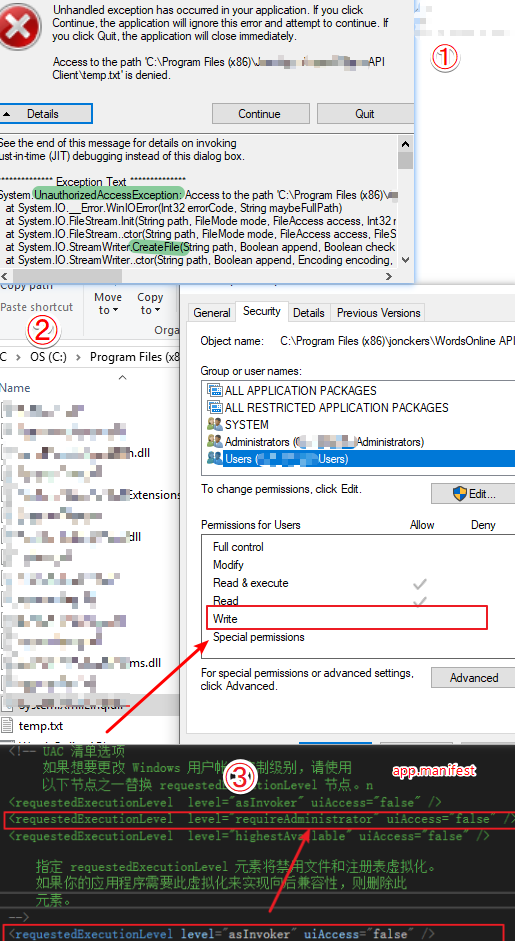
5.安全性问题,System.UnauthorizedAccessException异常
Advanced Installer打包Winform后安装在C盘权限不足的解决方法
解决方法:
(1)VS中右键项目=》属性=》安全性,勾选【启用ClickOne安全设置】;
(2)找到app.manifest,将
修改为
(3)再次找到项目属性的安全性,去掉【启用ClickOne安全设置】的勾选;
【winform】主窗体多线程给子窗体传值的更多相关文章
- winform里操作打开在panel里的form窗体,子窗体操作同级子窗体或者父窗体的方法
最近开始了一个winform项目,原先一直都是web项目.遇到个问题,就是在框架内,左侧和中间的main都是用panel来实现的form,就是把form窗体打开到panel里,实现左侧是导航,中间是操 ...
- 主窗体里面打开子窗体&&打印饼图《Delphi 6数据库开发典型实例》--图表的绘制
\Delphi 6数据库开发典型实例\图表的绘制 1.在主窗体里面打开子窗体:ShowForm(Tfrm_Print); procedure Tfrm_Main.ShowForm(AFormClass ...
- C#嵌入子窗体,判断子窗体是否打开了
/// <summary> /// 嵌入子窗体,判断子窗体是否打开了 /// </summary> public static Form1 f; public void For ...
- Winform中如何实现父窗体传递数据到子窗体并刷新子窗体
原理:利用委托和事件,本文将以图文并茂的例子讲述,告诉我们So Easy --------------------------------------------------------------- ...
- WinForm中如何实现在容器控件中嵌入form窗体(panel与子窗体)
今天在做项目时候遇到一个问题,窗体分为左右两部分,要求在左边栏点击按钮时,右边动态加载窗体最后想到用panel实现,经历几次失败,并查找资料后,终于搞定 说明:如果多次切换需加入 panel.clea ...
- Ribbon 窗体的 MDI 子窗体使用 TabbedMDIManager 切换时工具条闪屏问题的解决办法
补充说明: 此问题已经在新版本中解决(15.2.6),方法更加简单,只需要在 MDIChild 窗体的 Create 方法中,将 Ribbon 的 Visible 属性设置为 false 就可以了,且 ...
- js父窗体关闭,子窗体紧随
近来的.我们遇到了权限管理系统.由于权限管理系统与原系统的风格不符.打开一个全新的窗口.问题就来了.admin取消后,,权限管理形式不关闭.其他普通用户登录后.尚能经营权的管理形式. 简化问题:adm ...
- 父窗体的委托,子窗体注册,this.Owner是关键
//声明委托 public delegate void RefreshParentHandler<T>(T obj); //父窗体的委托 public RefreshParentHandl ...
- 【VC】Dialog 窗体随意切割子窗体。
用 Dialog 对话框来实现窗体的随意切割. 在资源中加入 Dialog 选择 IDD_FORMVIEW 资源..分别新建FormViewOne,FormViewTwo FormViewThre ...
随机推荐
- django数据表生成
在创建的app中models.py生成表结构 class 表名(models.Model): #表名一般首字母大写 中突出信息的大写 列名=models.Charfield(max_lenth=) # ...
- KMP算法的时间复杂度与next数组分析
一.什么是 KMP 算法 KMP 算法是一种改进的字符串匹配算法,用于判断一个字符串是否是另一个字符串的子串 二.KMP 算法的时间复杂度 O(m+n) 三.Next 数组 - KMP 算法的核心 K ...
- Product Oriented Recurrence(Codeforces Round #566 (Div. 2)E+矩阵快速幂+欧拉降幂)
传送门 题目 \[ \begin{aligned} &f_n=c^{2*n-6}f_{n-1}f_{n-2}f_{n-3}&\\ \end{aligned} \] 思路 我们通过迭代发 ...
- bat echo 每行不同的颜色
bat echo 每行不同的颜色 先看代码: @echo off SETLOCAL EnableDelayedExpansion for /F "tokens=1,2 delims=#&qu ...
- test201909027 老Z
30+100+40=170.数据出锅*2,也是没谁了. 装饰 快要到 Mope 的生日了,Mope 希望举行一场盛大的生日派对. 派对的准备工作中当然有装饰房间啦.Mope 的房间里有按从左到右的顺序 ...
- 4、markdown基本语法
一.前言 由于有些语法无法在博客园展示,推荐使用Typora解锁全套,下载地址:https://www.typora.io/ 推荐使用jupyter,使用方法:https://www.cnblogs. ...
- sort()函数中的key
d = { , , } #for k in d.items(): # print(k) content = list(d.items()) print(content) content.sort(ke ...
- C++报错:全局变量重定义或是多次定义
如何在C++中定义全局变量时避免重复定义呢? 只要在定义时尽量在.cpp文件中进行,而不要在.h 文件中定义,定义好了之后,可以在.h文件中利用extern关键字进行声明. 如果在.h文件中定义的话, ...
- rsync提权
介绍:Rsync是linux下一款数据备份工具,默认开启873端口 利用条件:rsync未授权 列出模板 rsync rsync://目标ip:873/ 列出模块src下的文件 rsync rsync ...
- jsp之大文件分段上传、断点续传
1,项目调研 因为需要研究下断点上传的问题.找了很久终于找到一个比较好的项目. 在GoogleCode上面,代码弄下来超级不方便,还是配置hosts才好,把代码重新上传到了github上面. http ...