
Vue(七)整合vue-router&Vuex&Axios
整合vue-router&Vuex
先创建工程
vue create vue-axios
然后选择

勾选

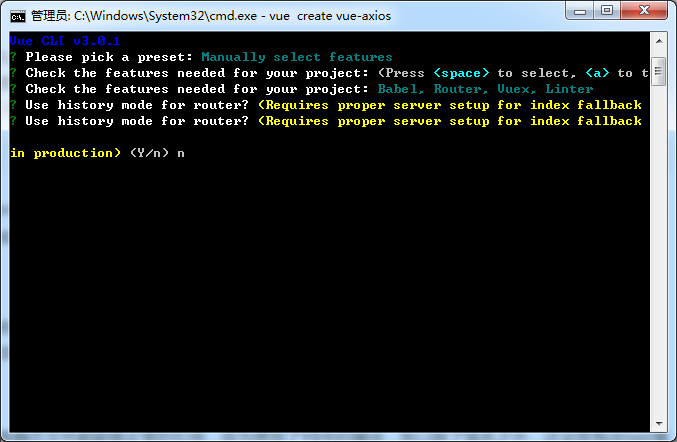
回车,出现是否使用history mode?选择y,代表URL地址里面不会出现#。选择n,代表URL里面带有#。这里我们选择n,看自己需要了。
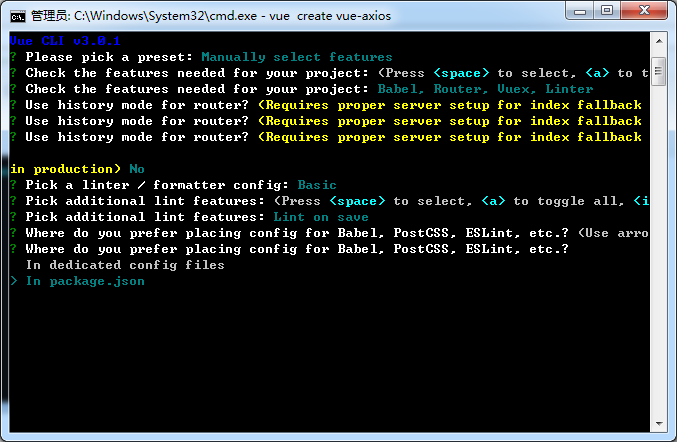
回车,出现ESLint,直接选第一个即可

回车,勾选默认

回车,选择把配置放在package.json文件里
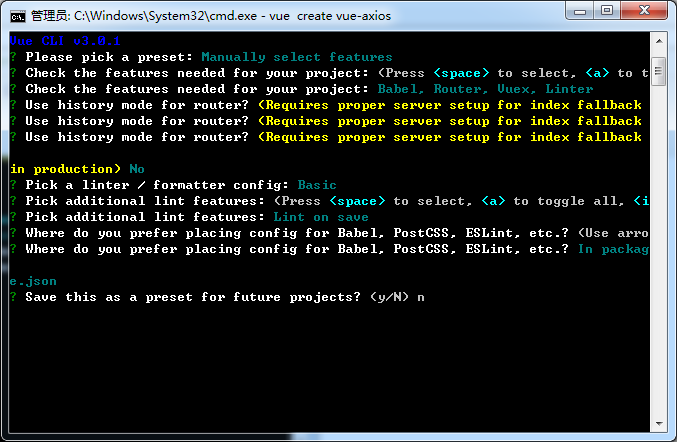
回车,最后一个选项,问你是否要存储当前的配置为预设配置。你根据需要选择即可。
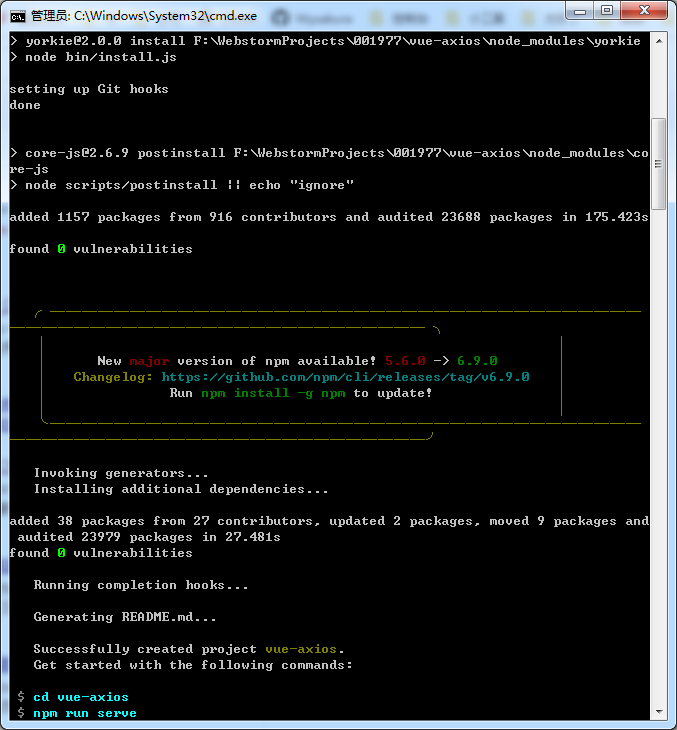
回车之后开始安装了。
Vuex 用法:修改store.js 和 Home.vue
import Vue from 'vue'

import Vuex from 'vuex'

Vue.use(Vuex)

export default new Vuex.Store({

    state: {

        // 定义一个状态,并赋值

        name: '待改名'

    },

    mutations: {

        // 接受 state 作为第一个参数,你可以传入额外的参数,即 mutation 的 载荷(payload)。在大多数情况下,载荷应该是一个对象,这样可以包含多个字段并且记录的 mutation 会更易读

        setName(state, payload) {

            state.name = payload.name;

        }

    },

    actions: {}

})
Home.vue
<template>

    <div class="home">

        <h1>{{globalName}}</h1>

        <div>

            <button @click="changeStatus">更改状态</button>

        </div>

        <img alt="Vue logo" src="../assets/logo.png">

        <HelloWorld msg="Welcome to Your Vue.js App"/>

    </div>

</template>

<script>

    // @ is an alias to /src

    import HelloWorld from '@/components/HelloWorld.vue'

    export default {

        name: 'home',

        components: {

            HelloWorld

        },

        computed: {

            // 从 store 实例中读取状态最简单的方法就是在计算属性中返回某个状态

            globalName: function () {

                return this.$store.state.name;

            }

        },

        methods:{

            // 更改 Vuex 的 store 中的状态的唯一方法是提交 mutation;你不能直接调用一个 mutation handler,要唤醒一个 mutation handler,你需要以相应的 type 调用 store.commit 方法

            changeStatus: function () {

                this.$store.commit('setName',{

                    name: '阿猫阿狗'

                });

            }

        }

    }

</script>
页面:

点击按钮

整合Axios
你可以进入工程目录执行以下命令,或者用WebStorm打开后,在Terminal里执行以下命令来安装Axios。
$ npm install axios

测试运行
先看一下工程目录结构
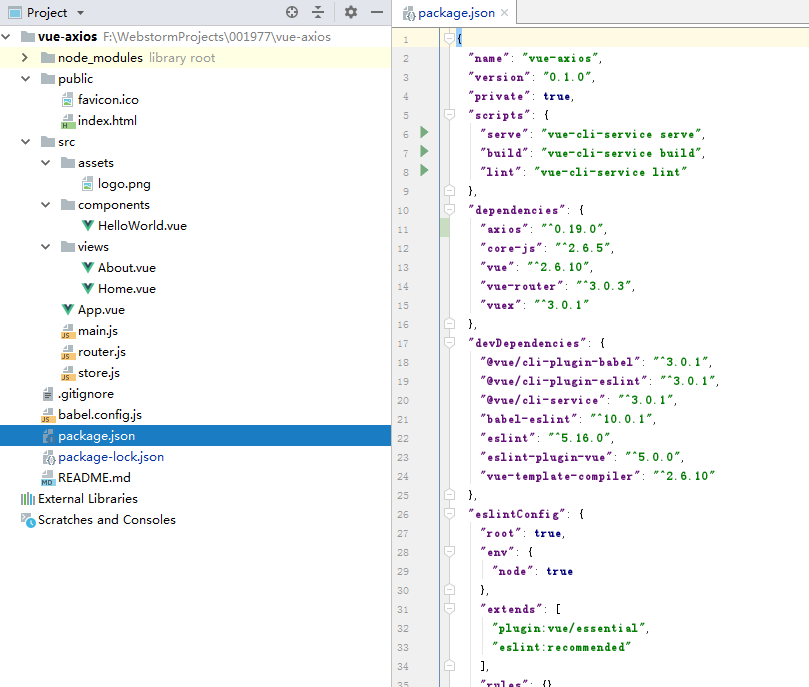
然后修改文件 main.js

加入
import Axios from 'axios'   // 引入Axios

Vue.prototype.$axios = Axios;    // 全局变量
再修改 About.vue,内容如下(由于懒得写接口测试了,直接调用的墨迹天气,然后由于跨域问题,无法访问,所以我把catch块中写了死数据)
<template>
<div class="about">
<table style="width: 300px;margin: 0 auto;">
<tbody>
<tr v-for="w in dataList.hour24" :key="w.Fpredict_hour">
<td>{{w.Fpredict_date}}</td>
<td>{{w.Fpredict_hour}}点</td>
<td>{{w.Fcondition}}</td>
</tr>
<tr>
<td colspan="3">一共{{totalCount}}条数据</td>
</tr>
</tbody>
</table>
</div>
</template>
<script>
export default {
name: 'about',
data: ()=> ({
dataList: {},
totalCount: 0
}),
mounted: function () {
let me = this;
me.getDataForTable()
.then(data => {
me.dataList = data.data
me.totalCount = data.count
})
},
methods: {
getDataForTable () {
let me = this;
return new Promise((resolve, reject) => {
// 额外的参数,比如headers
// let options = {
// headers: {
// 'token': '00000'
// }
// }
// 参数
let params = {};
me.$axios.post('http://tianqi.moji.com/index/getHour24',params/*,options*/)
// 请求成功后
.then(function (response) {
let data = response.data;
let count = data.hour24.length
resolve({
data,
count
})
})
// 请求失败处理
.catch(function (error) {
console.log(error);
let data = {
"hour24": [
{
"Fpredict_date": "2019-06-18",
"Ficon_id": 2,
"Fcondition_id": 13,
"Ftemp": 28,
"Fwspd": 16.92,
"Fwind_dir_id": 8,
"Ffeelslike": 40,
"Fpredict_hour": 12,
"Fhumidity": 89,
"id": 892,
"wind_degrees": "135",
"Fcondition": "阴",
"Fwdir": "SSE",
"wind_level": 3
},
{
"Fpredict_date": "2019-06-18",
"Ficon_id": 2,
"Fcondition_id": 13,
"Ftemp": 28,
"Fwspd": 18.72,
"Fwind_dir_id": 9,
"Ffeelslike": 40,
"Fpredict_hour": 13,
"Fhumidity": 88,
"id": 892,
"wind_degrees": "180",
"Fcondition": "阴",
"Fwdir": "S",
"wind_level": 3
},
{
"Fpredict_date": "2019-06-18",
"Ficon_id": 2,
"Fcondition_id": 13,
"Ftemp": 28,
"Fwspd": 20.88,
"Fwind_dir_id": 9,
"Ffeelslike": 36,
"Fpredict_hour": 14,
"Fhumidity": 75,
"id": 892,
"wind_degrees": "180",
"Fcondition": "阴",
"Fwdir": "S",
"wind_level": 4
},
{
"Fpredict_date": "2019-06-18",
"Ficon_id": 2,
"Fcondition_id": 13,
"Ftemp": 28,
"Fwspd": 19.8,
"Fwind_dir_id": 9,
"Ffeelslike": 37,
"Fpredict_hour": 15,
"Fhumidity": 76,
"id": 892,
"wind_degrees": "180",
"Fcondition": "阴",
"Fwdir": "S",
"wind_level": 0
},
{
"Fpredict_date": "2019-06-18",
"Ficon_id": 2,
"Fcondition_id": 13,
"Ftemp": 28,
"Fwspd": 18.72,
"Fwind_dir_id": 9,
"Ffeelslike": 37,
"Fpredict_hour": 16,
"Fhumidity": 76,
"id": 892,
"wind_degrees": "180",
"Fcondition": "阴",
"Fwdir": "S",
"wind_level": 3
},
{
"Fpredict_date": "2019-06-18",
"Ficon_id": 2,
"Fcondition_id": 13,
"Ftemp": 27,
"Fwspd": 17.28,
"Fwind_dir_id": 9,
"Ffeelslike": 35,
"Fpredict_hour": 17,
"Fhumidity": 80,
"id": 892,
"wind_degrees": "180",
"Fcondition": "阴",
"Fwdir": "S",
"wind_level": 3
},
{
"Fpredict_date": "2019-06-18",
"Ficon_id": 2,
"Fcondition_id": 13,
"Ftemp": 27,
"Fwspd": 16.2,
"Fwind_dir_id": 9,
"Ffeelslike": 35,
"Fpredict_hour": 18,
"Fhumidity": 81,
"id": 892,
"wind_degrees": "180",
"Fcondition": "阴",
"Fwdir": "S",
"wind_level": 3
},
{
"Fpredict_date": "2019-06-18",
"Ficon_id": 2,
"Fcondition_id": 13,
"Ftemp": 27,
"Fwspd": 14.76,
"Fwind_dir_id": 9,
"Ffeelslike": 35,
"Fpredict_hour": 19,
"Fhumidity": 83,
"id": 892,
"wind_degrees": "180",
"Fcondition": "阴",
"Fwdir": "S",
"wind_level": 3
},
{
"Fpredict_date": "2019-06-18",
"Ficon_id": 2,
"Fcondition_id": 13,
"Ftemp": 27,
"Fwspd": 13.68,
"Fwind_dir_id": 8,
"Ffeelslike": 33,
"Fpredict_hour": 20,
"Fhumidity": 83,
"id": 892,
"wind_degrees": "135",
"Fcondition": "阴",
"Fwdir": "SSE",
"wind_level": 3
},
{
"Fpredict_date": "2019-06-18",
"Ficon_id": 2,
"Fcondition_id": 13,
"Ftemp": 27,
"Fwspd": 12.6,
"Fwind_dir_id": 8,
"Ffeelslike": 33,
"Fpredict_hour": 21,
"Fhumidity": 84,
"id": 892,
"wind_degrees": "135",
"Fcondition": "阴",
"Fwdir": "SSE",
"wind_level": 3
},
{
"Fpredict_date": "2019-06-18",
"Ficon_id": 2,
"Fcondition_id": 13,
"Ftemp": 27,
"Fwspd": 11.52,
"Fwind_dir_id": 8,
"Ffeelslike": 33,
"Fpredict_hour": 22,
"Fhumidity": 84,
"id": 892,
"wind_degrees": "135",
"Fcondition": "阴",
"Fwdir": "SSE",
"wind_level": 0
},
{
"Fpredict_date": "2019-06-18",
"Ficon_id": 2,
"Fcondition_id": 13,
"Ftemp": 27,
"Fwspd": 10.8,
"Fwind_dir_id": 8,
"Ffeelslike": 34,
"Fpredict_hour": 23,
"Fhumidity": 91,
"id": 892,
"wind_degrees": "135",
"Fcondition": "阴",
"Fwdir": "SSE",
"wind_level": 2
},
{
"Fpredict_date": "2019-06-19",
"Ficon_id": 2,
"Fcondition_id": 13,
"Ftemp": 27,
"Fwspd": 10.08,
"Fwind_dir_id": 8,
"Ffeelslike": 34,
"Fpredict_hour": 0,
"Fhumidity": 93,
"id": 892,
"wind_degrees": "135",
"Fcondition": "阴",
"Fwdir": "SSE",
"wind_level": 2
},
{
"Fpredict_date": "2019-06-19",
"Ficon_id": 2,
"Fcondition_id": 13,
"Ftemp": 27,
"Fwspd": 9.72,
"Fwind_dir_id": 8,
"Ffeelslike": 31,
"Fpredict_hour": 1,
"Fhumidity": 94,
"id": 892,
"wind_degrees": "135",
"Fcondition": "阴",
"Fwdir": "SSE",
"wind_level": 2
},
{
"Fpredict_date": "2019-06-19",
"Ficon_id": 2,
"Fcondition_id": 13,
"Ftemp": 27,
"Fwspd": 9.36,
"Fwind_dir_id": 8,
"Ffeelslike": 31,
"Fpredict_hour": 2,
"Fhumidity": 95,
"id": 892,
"wind_degrees": "135",
"Fcondition": "阴",
"Fwdir": "SSE",
"wind_level": 2
},
{
"Fpredict_date": "2019-06-19",
"Ficon_id": 2,
"Fcondition_id": 13,
"Ftemp": 27,
"Fwspd": 9,
"Fwind_dir_id": 8,
"Ffeelslike": 31,
"Fpredict_hour": 3,
"Fhumidity": 95,
"id": 892,
"wind_degrees": "135",
"Fcondition": "阴",
"Fwdir": "SSE",
"wind_level": 2
},
{
"Fpredict_date": "2019-06-19",
"Ficon_id": 33,
"Fcondition_id": 15,
"Ftemp": 27,
"Fwspd": 8.28,
"Fwind_dir_id": 8,
"Ffeelslike": 31,
"Fpredict_hour": 4,
"Fhumidity": 94,
"id": 892,
"wind_degrees": "135",
"Fcondition": "阵雨",
"Fwdir": "SSE",
"wind_level": 2
},
{
"Fpredict_date": "2019-06-19",
"Ficon_id": 33,
"Fcondition_id": 15,
"Ftemp": 27,
"Fwspd": 7.56,
"Fwind_dir_id": 8,
"Ffeelslike": 31,
"Fpredict_hour": 5,
"Fhumidity": 89,
"id": 892,
"wind_degrees": "135",
"Fcondition": "阵雨",
"Fwdir": "SSE",
"wind_level": 2
},
{
"Fpredict_date": "2019-06-19",
"Ficon_id": 1,
"Fcondition_id": 8,
"Ftemp": 27,
"Fwspd": 7.56,
"Fwind_dir_id": 8,
"Ffeelslike": 34,
"Fpredict_hour": 6,
"Fhumidity": 89,
"id": 892,
"wind_degrees": "135",
"Fcondition": "多云",
"Fwdir": "SSE",
"wind_level": 2
},
{
"Fpredict_date": "2019-06-19",
"Ficon_id": 1,
"Fcondition_id": 8,
"Ftemp": 27,
"Fwspd": 7.92,
"Fwind_dir_id": 9,
"Ffeelslike": 33,
"Fpredict_hour": 7,
"Fhumidity": 88,
"id": 892,
"wind_degrees": "180",
"Fcondition": "多云",
"Fwdir": "S",
"wind_level": 2
},
{
"Fpredict_date": "2019-06-19",
"Ficon_id": 1,
"Fcondition_id": 8,
"Ftemp": 27,
"Fwspd": 8.28,
"Fwind_dir_id": 9,
"Ffeelslike": 38,
"Fpredict_hour": 8,
"Fhumidity": 94,
"id": 892,
"wind_degrees": "180",
"Fcondition": "多云",
"Fwdir": "S",
"wind_level": 2
},
{
"Fpredict_date": "2019-06-19",
"Ficon_id": 2,
"Fcondition_id": 13,
"Ftemp": 27,
"Fwspd": 10.08,
"Fwind_dir_id": 9,
"Ffeelslike": 38,
"Fpredict_hour": 9,
"Fhumidity": 93,
"id": 892,
"wind_degrees": "180",
"Fcondition": "阴",
"Fwdir": "S",
"wind_level": 2
},
{
"Fpredict_date": "2019-06-19",
"Ficon_id": 2,
"Fcondition_id": 13,
"Ftemp": 27,
"Fwspd": 11.88,
"Fwind_dir_id": 9,
"Ffeelslike": 41,
"Fpredict_hour": 10,
"Fhumidity": 91,
"id": 892,
"wind_degrees": "180",
"Fcondition": "阴",
"Fwdir": "S",
"wind_level": 0
},
{
"Fpredict_date": "2019-06-19",
"Ficon_id": 2,
"Fcondition_id": 13,
"Ftemp": 27,
"Fwspd": 13.68,
"Fwind_dir_id": 10,
"Ffeelslike": 37,
"Fpredict_hour": 11,
"Fhumidity": 91,
"id": 892,
"wind_degrees": "225",
"Fcondition": "阴",
"Fwdir": "SSW",
"wind_level": 3
}
],
"sunset": {
"date": "2019-06-18",
"sunrise": "2019-06-19 05:40:00",
"sundown": "2019-06-18 19:10:00",
"sunrise_h": "05",
"sundown_h": "07"
}
};
let count = data.hour24.length
resolve({
data,
count
})
});
})
}
}
}
</script>
然后运行
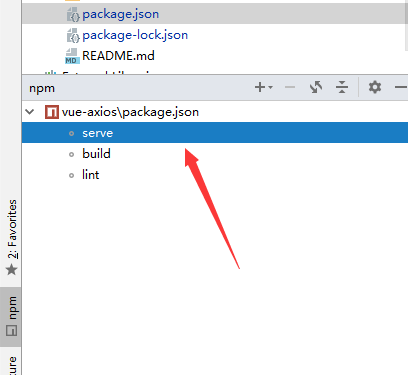
前台页面:

Vue(七)整合vue-router&Vuex&Axios的更多相关文章
- 已配置好的vue全家桶项目router,vuex,api,axios,vue-ls,async/await,less下载即使用
github 地址: https://github.com/liangfengbo/vue-cli-project 点击进入 vue-cli-project 已构建配置好的vuejs全家桶项目,统一管 ...
- Vue(二十三)vuex + axios + 缓存 运用 (以登陆功能为例)
(一)axios 封装 (1)axios拦截器 可以在axios中加入加载的代码... (2)封装请求 后期每个请求接口都可以写在这个里面... (二)vuex user.js import { lo ...
- 基于 vue+vue-router+vuex+axios+koa+koa-router 本地开发全栈项目
因为毕业设计要做基于Node服务器的项目,所以我就想着用刚学的vue作为前端开发框架,vue作为Vue.js应用程序的状态管理模式+库,axios基于promise用于浏览器和node.js的http ...
- Vue项目中使用Vuex + axios发送请求
本文是受多篇类似博文的影响写成的,内容也大致相同.无意抄袭,只是为了总结出一份自己的经验. 一直以来,在使用Vue进行开发时,每当涉及到前后端交互都是在每个函数中单独的写代码,这样一来加大了工作量,二 ...
- 【实战】Vue全家桶(vue + axios + vue-router + vuex)搭建移动端H5项目
使用Vue全家桶开发移动端页面. 本博文默认已安装node.js. github链接 一.准备工作 安装vue npm install vue 安装脚手架vue-cli npm install -g ...
- Vue 2.0 + Vue Router + Vuex
用 Vue.js 2.x 与相配套的 Vue Router.Vuex 搭建了一个最基本的后台管理系统的骨架. 当然先要安装 node.js(包括了 npm).vue-cli 项目结构如图所示: ass ...
- vue+vuex+axios实现登录、注册页权限拦截
1.修改config文件夹里的dev.env.js里的BASE_API,把地址改成请求后端的公共部分 1 BASE_API: '"http://192.168.xx.xx"', 2 ...
- vue+vuex+axios+echarts画一个动态更新的中国地图
一. 生成项目及安装插件 # 安装vue-cli npm install vue-cli -g # 初始化项目 vue init webpack china-map # 切到目录下 cd china- ...
- Vue3: 如何以 Vite 创建,以 Vue Router, Vuex, Ant Design 开始应用
本文代码: https://github.com/ikuokuo/start-vue3 在线演示: https://ikuokuo.github.io/start-vue3/ Vite 创建 Vue ...
- vue全家桶项目搭建(vue-cli 2.9.6+vue-router+vuex+axios)
一.安装vue-cli + vue-router + vuex + axios 1.安装vue-cli 2.创建项目 3.安装vuex和axios 二.搭建项目目录结构,如下所示: 1.assets目 ...
随机推荐
- 少女NULL中
NULL inline void read (int &now) { register ; ; !isdigit (word); word = getchar ()) ; + word - ' ...
- 【LG3783】[SDOI2017]天才黑客
[LG3783][SDOI2017]天才黑客 题面 洛谷 题解 首先我们有一个非常显然的\(O(m^2)\)算法,就是将每条边看成点, 然后将每个点的所有入边和出边暴力连边跑最短路,我们想办法优化这里 ...
- 洛谷P4735题解
若想要深入学习可持久化0-1Trie树,传送门. Description: 给定数列 \(\{a_n\}\) ,支持两种操作: 在数列尾添加一个数 \(x\) ,数列长度变成 \(n+1\) ; 给定 ...
- Linux下的零拷贝
Reference: https://segmentfault.com/a/1190000011989008 零拷贝是什么? 维基百科对“零拷贝”是这样描述的: "Zero-copy&qu ...
- 第08组 Alpha冲刺(2/6)
队名:955 组长博客: 作业博客:https://edu.cnblogs.com/campus/fzu/SE_FZU_1917_K/homework/9939 组员情况 组员1(组长):庄锡荣 过去 ...
- js之切换全屏和退出全屏实现
应用场景:比如很多网页游戏全屏之类的,或者是网上看小说等. 核心代码: //控制全屏 function enterfullscreen() { //进入全屏 $("#fullscreen&q ...
- Armbian编译以及定制
Armbian项目地址 Github: https://github.com/armbian/build Armbian for TV Box 项目地址 Github: https://github. ...
- Python的threading和multiprocessing
Python的threading 基础用法, 通过 threading.Thread() 创建线程, 然后 start() 和 join() import time import threading ...
- HDFS部署测试记录(2019/05)
目录 HDFS部署测试记录 0.HDFS基础知识 1.基本组成结构与文件访问过程 2.NameNode启动时如何维护元数据 3.HDFS文件上传流程 1.系统环境 1.安装大致记录: 2.磁盘分区 3 ...
- CobaltStrike3.14破解
原文发布在:https://bithack.io/forum/310 8月6日已更新 之前发的是5月2号破解的,并且官方作者的exit暗桩没有去掉.看到很多人用此版本遇到问题,抽空修复了下bug.此版 ...