
HttpLitener处理http请求和Websocket请求
HttpLitener处理http请求和Websocket请求的案例具体步骤如下
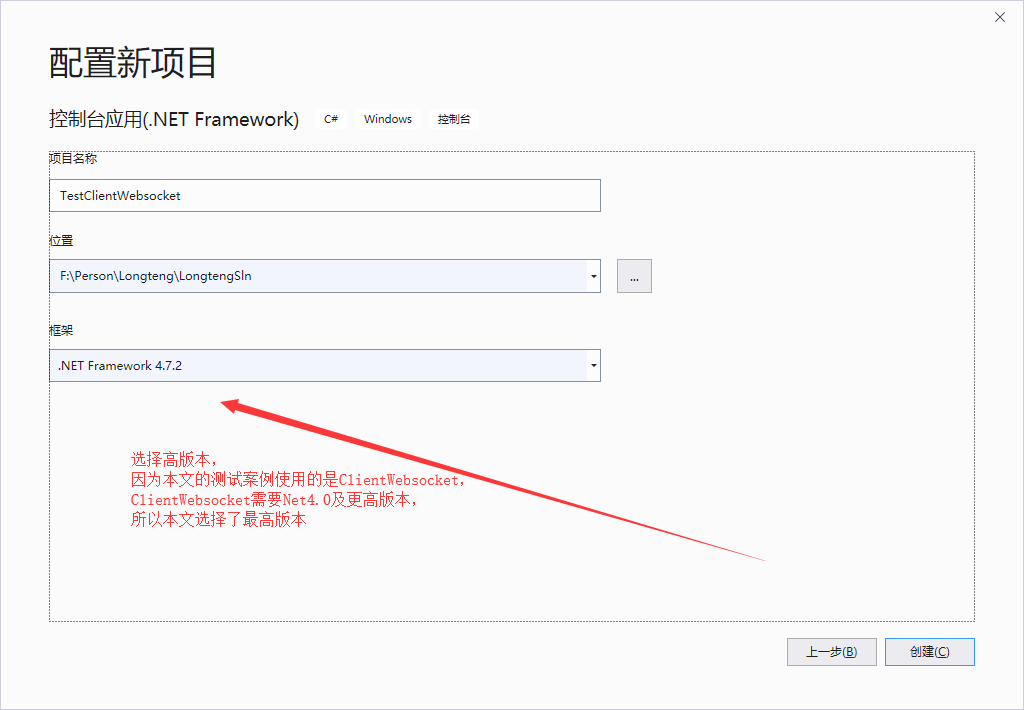
1、新建控制台项目TestClientWebsocket
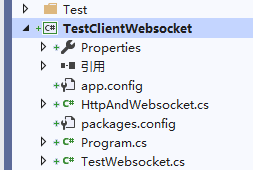
2、选择项目右键添加类HttpAndWebsocket,代码如下
using System;
using System.Collections.Generic;
using System.Linq;
using System.Net;
using System.Net.WebSockets;
using System.Text;
using System.Threading;
using System.Threading.Tasks;
namespace TestClientWebsocket
{
public class HttpAndWebsocket
{
public async void Start(string url)
{
string url1 = "http://+:80/";
int Port = 1234;
HttpListener httpListener = new HttpListener();
httpListener.Prefixes.Add("http://+:" + Port + "/");//注:其中//和:之间的+是代表本机的所有ip
httpListener.Start();
while (true)
{
try
{
HttpListenerContext httpListenerContext = await httpListener.GetContextAsync();
try
{
if (httpListenerContext.Request.IsWebSocketRequest)
{
ProcessRequest(httpListenerContext);
}
}
catch (Exception)
{
httpListenerContext.Response.StatusCode = 400;
httpListenerContext.Response.Close();
}
}
catch (Exception)
{
throw;
}
}
}
private async void ProcessRequest(HttpListenerContext listenerContext)
{
HttpListenerWebSocketContext httpListenerWebSocket;
try
{
httpListenerWebSocket = await listenerContext.AcceptWebSocketAsync(null);
}
catch (Exception)
{
listenerContext.Response.StatusCode = 500;
listenerContext.Response.Close();
return;
}
WebSocket webSocket = httpListenerWebSocket.WebSocket;
try
{
while (webSocket.State == WebSocketState.Open)
{
byte[] returnBytes = new byte[10240];
WebSocketReceiveResult webSocketReceiveResult = await webSocket.ReceiveAsync(new ArraySegment<byte>(returnBytes), CancellationToken.None);
string ReceivesData = Encoding.UTF8.GetString(returnBytes, 0, webSocketReceiveResult.Count);
ReceivesData = $"我已经收到数据:{ReceivesData}";
returnBytes = Encoding.UTF8.GetBytes(ReceivesData);
await webSocket.SendAsync(new ArraySegment<byte>(returnBytes), WebSocketMessageType.Text, true, CancellationToken.None);
await Task.Delay(TimeSpan.FromSeconds(3));
}
}
catch (Exception)
{
throw;
}
finally
{
if (webSocket != null)
{
webSocket.Dispose();
}
}
}
}
}
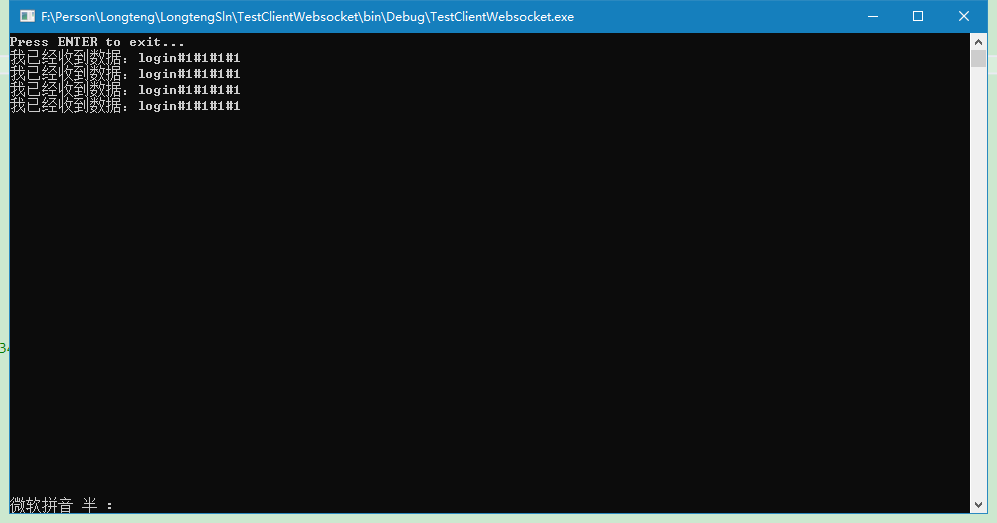
4、控制台的Program.cs中代码
using System;
using System.Collections.Generic;
using System.IO;
using System.Linq;
using System.Net.WebSockets;
using System.Text;
using System.Threading;
using System.Threading.Tasks;
namespace TestClientWebsocket
{
class Program
{
public static string SocketUrl = "ws://127.0.0.1:1234/";
//public static string SocketUrl = "ws://192.168.1.202:8081/ws?id=";
static void Main(string[] args)
{
//启动Websocket服务
HttpAndWebsocket httpAndWebsocket = new HttpAndWebsocket();
httpAndWebsocket.Start(SocketUrl);
//启动ClientWebsocket客户端
for (int i = 0; i < 2; i++)
{
System.Threading.Tasks.Task.Factory.StartNew(BBB, i);
}
Console.WriteLine("Press ENTER to exit...");
Console.ReadLine();
//string name = Console.ReadLine();
//string no = Console.ReadLine();
//string level = Console.ReadLine();
//string imagestring = Console.ReadLine();
//string returnvalue = Login(name, no, level, imagestring).Result;
//string returnvalue = Login("22", "22", "22", "22").Result;
//for (int i = 0; i < 2; i++)
//{
// //System.Threading.Thread.Sleep(TimeSpan.FromSeconds(5));
// //System.Threading.Tasks.Task.Factory.StartNew(BBB, i);
// Task.Delay(2000);
// TestWebsocket testWebsocket = new TestWebsocket("ws://127.0.0.1:1234/", i.ToString(), "1", "1", "1");
// testWebsocket.showmeg = Addlog;
// testWebsocket.Satart();
//}
//System.Threading.Tasks.Task.Factory.StartNew(BBB, 66);
//Console.WriteLine($"{returnvalue}");
//returnvalue = Login("33", "33", "33", "33").Result;
//Console.WriteLine($"{returnvalue}");
Console.Read();
//string returnvalue = TestWebsocket.EvaluateWithReasons().Result;
//string returnvalue = TestWebsocket.FaceValidateWithIdCard().Result;
}
public static async void BBB(object i)
{
string x = $"这是第{i}个。。。";
//ClientWebSocket cln = new ClientWebSocket();
//cln.ConnectAsync(new Uri(SocketUrl), new CancellationToken()).Wait();
//byte[] bytess = Encoding.Default.GetBytes($"111");
//cln.SendAsync(new ArraySegment<byte>(bytess), WebSocketMessageType.Text, true, new CancellationToken()).Wait();
//string returnValue = await GetAsyncValue(cln);//异步方法
//Console.WriteLine($"{returnValue}");
try
{
ClientWebSocket cln = new ClientWebSocket();
await cln.ConnectAsync(new Uri(SocketUrl + i.ToString()), new CancellationToken());
string returnvalue = await Login(cln, "1", "1", "1", "1");
Console.WriteLine($"{returnvalue}");
//string returnvalue = await TestClientWebsocket.TestWebsocket.Login("1", "1", "1", "1");
//Console.WriteLine($"{returnvalue}");
}
catch (Exception ex)
{
throw ex;
}
}
public static async Task<string> Login(ClientWebSocket cln, string name, string no, string level, string imagestring)
{
byte[] bytess = Encoding.Default.GetBytes($"login#{name}#{no}#{level}#{imagestring}");
await cln.SendAsync(new ArraySegment<byte>(bytess), WebSocketMessageType.Text, true, new CancellationToken());
string returnValue = await GetAsyncValue(cln);//异步方法
return returnValue;
}
public static async Task<string> GetAsyncValue(ClientWebSocket clientWebSocket)
{
string returnValue = null;
byte[] buffer = new byte[10240];
WebSocketReceiveResult result = null;
//while (clientWebSocket.State == WebSocketState.Open)
//{
result = await clientWebSocket.ReceiveAsync(new ArraySegment<byte>(buffer), CancellationToken.None);
if (result.MessageType == WebSocketMessageType.Text)
{
returnValue = Encoding.UTF8.GetString(buffer, 0, result.Count);
Console.WriteLine(returnValue);
}
return returnValue;
}
}
}
HttpLitener处理http请求和Websocket请求的更多相关文章
- Ajax中get请求和post请求
我们在使用Ajax向服务器发送数据时,可以采用Get方式请求服务器,也可以使用Post方式请求服务器,那么什么时候该采用Get方式,什么时候该采用Post方式呢? Get请求和Post请求的区别: 1 ...
- slave IO流程之二:注册slave请求和dump请求
slave IO流程已经在http://www.cnblogs.com/onlyac/p/5815566.html中有介绍 这次我们要探索注册slave请求和dump请求的报文格式和主要流程. 一.注 ...
- loadrunner录制脚本如何选择使用get请求和post请求的方式
在loadrunner工具里录制脚本时常常会用到get请求和post请求,有关loadrunner常用的这两类的请求主要有: get请求: web_url 和 web_link post请求: web ...
- iOS开发网络篇—GET请求和POST请求
iOS开发网络篇—GET请求和POST请求 一.GET请求和POST请求简单说明 创建GET请求 // 1.设置请求路径 NSString *urlStr=[NSString stringWithFo ...
- 普通请求和ajax请求的区别
普通请求和ajax请求的区别? 下面的action返回一个json文件,文件内容为sts.*,data1
- iOS开发网络篇—GET请求和POST请求(转)
一.GET请求和POST请求简单说明 创建GET请求 1 // 1.设置请求路径 2 NSString *urlStr=[NSString stringWithFormat:@"http:/ ...
- GET请求和POST请求的区别
request获取请求参数 最为常见的客户端传递参数方式有两种: 浏览器地址栏直接输入:一定是GET请求: 超链接:一定是GET请求: 表单:可以是GET,也可以是POST,这取决与<form& ...
- 使用SoapUI工具做get请求和post请求接口测试
祝大家节日快乐啦. 之前写过的一篇帖子已经介绍了SoapUI工具的基本使用,所以在此不再重复讲解关于建工程.建测试套件.添加用例等操作,可查看该篇文章详解:http://www.cnblogs.com ...
- Ajax相关——get请求和post请求的区别
一.完整的URL由以下几部分组成: scheme:通信协议,常用的有:http/ftp. host:主机,服务器(计算机)域名或IP地址 port:端口,整数,可选,省略时使用默认端口,http的默认 ...
随机推荐
- Android笔记(六十一)动态添加组件
想要一个功能,点击按钮,可以在已有的布局上,新添加一组组件. 动态的创建组件,本质上还是创建组件,只不过是在程序中根据逻辑来创建.大致步骤是找到要创建控件的位置,然后将要创建的组件添加进去. 看代码: ...
- 【HCIA Gauss】学习汇总-数据库管理(数据库基本概念)-3
数据库:操作系统文件或磁盘数据块的集合数据库实例: 指操作系统中一系列进程以及为这些进程分配的内存块 通常来说一个数据库实例对应着一个数据库[数据库实例是访问数据的通道] 多实例:利用多实例 可以充分 ...
- tensorflow与神经网络中遇到的问题与解决方法【持续更新】
1.如何在全连接层拼接特征? 有一种方法是有两个input,一个input通过网络最终达到全连接层,另一个input直接接一个全连接网络,神经元数是特征数,这两个可以进行一个concat. 当然了也 ...
- python_面向对象——动态创建类和isinstance和issubclass方法
# 给动态生产的类定义一个方法 def __init__(self,name): self.name = name print(self.name) def take(self,obj): print ...
- vue路由机制导致的坑,坑,坑
实现一个手机定位的功能: 跳转到指定页面的时候,安卓手机地图定位正常,苹果手机第一次进入页面,地图定位不准, 要刷新后,才可以准确定位,后来无意间不用路由跳转,使用JS跳转,完美解决, 特此记录,方便 ...
- 使用fastjson 进行jsonObject转实体类对象
使用fastjson 进行jsonObject转实体类对象 1 <dependency> 2 <groupId>com.alibaba</groupId> 3 ...
- springcloud实践(二)之api网关:zuul
zuul是什么? front door. API Gateway.Zuul is a JVM based router and server side load balancer by Netflix ...
- ztree树默认根据ID默认选中该条数据
functiongetZtree() { varsetting = { view: { expandSpeed: 100, selectedMulti: true, showLine: true, / ...
- Springboot-data-jpa增删改查
导入依赖 <?xml version="1.0" encoding="UTF-8"?> <project xmlns="http:/ ...
- javaweb学习笔记(二)
一.javaweb学习是所需要的细节 1.Cookie的注意点 ① Cookie一旦创建,它的名称就不能更改,Cookie的值可以为任意值,创建后允许被修改. ② 关于Cookie中的setMaxAg ...