
记录一次使用iisnode部署node项目遇到的坑!
前言:最近因为项目原因,需要在IIS下部署node项目,在此之前,曾经部署过类似的项目,因此在这次部署还算比较顺利,只是在其中遇到了几个比较坑的问题,所以这次使用博客记录下来,如有园友遇到过类似问题,希望对你有所帮助。
一、前期准备
1、node.js(下载地址:https://nodejs.org/en/),根据自己的需要安装对应版本
2、iisnode(下载地址:https://github.com/tjanczuk/iisnode)
3、IIS的URL Rewrite模块(下载地址:https://www.iis.net/downloads/microsoft/url-rewrite)
依次安装好以上软件,记录下node.js的安装路径(例如我的安装路径是:C:\software\nodejs),在后续中会用到。
如果需要测试iisnode是否安装成功,可以用
%programfiles%\iisnode\setupsamples.bat
执行后:

来安装iisnode自带的一个例子,安装完成后,访问:http://localhost/node,如果网页不能编译出现以下错误的解决办法:
The iisnode module is unable to start the node.exe process. Make sure the node.exe executable is available at the location specified in the system.webServer/iisnode/@nodeProcessCommandLine element of web.config. By default node.exe is expected in one of the directories listed in the PATH environment variable
在要打开在页面所在文件夹下的web.config中添加以下内容:
nodeProcessCommandLine=""%programfiles%\nodejs\node.exe"" interceptor=""%programfiles%\iisnode\interceptor.js"" />,注意配置文件里只允许有一个 iisnode 属性设置
如图
二、部署项目
在IIS下新建一个站点(此过程不在赘述),然后在项目下打开控制台,安装项目需要依赖的包,执行:
npm install
安装完成后会在项目中新增一个文件夹:
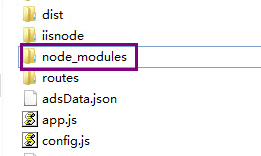
然后编辑web.config:
<configuration>

  <system.webServer>

    <!-- bin/www 是Express示例默认的启动程序 -->

    <handlers>

      <add name="iisnode" path="bin/www" verb="*" modules="iisnode" />

    </handlers>

    <rewrite>

      <rules>

        <rule name="myapp">

          <match url="/*" />

          <action type="Rewrite" url="bin/www" />

        </rule>

      </rules>

    </rewrite>

  </system.webServer>

</configuration>
此时在浏览器中打开地址http://localhost/myapp/,将出现404错误,原因是bin目录是默认输出目录,默认不允许模块调用
HTTP 错误 404.8 - Not Found

请求筛选模块被配置为拒绝包含 hiddenSegment 节的 URL 中的路径。
解决办法:
在你的项目根目录下,新建一个index.js的文件,然后将bin/www里面的代码剪切过来,同时可以删除bin文件夹了,并且再次修改你的web.config文件,将入口程序改成index.js:
<configuration>
<system.webServer> <!-- indicates that the hello.js file is a node.js application
to be handled by the iisnode module --> <handlers>
<add name="iisnode" path="index.js" verb="*" modules="iisnode" resourceType="Unspecified" requireAccess="Script" preCondition="bitness64" />
</handlers> <rewrite>
<rules>
<rule name="all">
<match url="/*" />
<action type="Rewrite" url="index.js" />
</rule>
</rules>
</rewrite> <iisnode
node_env="%node_env%"
nodeProcessCountPerApplication="1"
maxConcurrentRequestsPerProcess="1024"
maxNamedPipeConnectionRetry="100"
namedPipeConnectionRetryDelay="250"
maxNamedPipeConnectionPoolSize="512"
maxNamedPipePooledConnectionAge="30000"
asyncCompletionThreadCount="0"
initialRequestBufferSize="4096"
maxRequestBufferSize="65536"
watchedFiles="*.js;node_modules\*;routes\*.js;views\*.jade"
uncFileChangesPollingInterval="5000"
gracefulShutdownTimeout="60000"
loggingEnabled="true"
logDirectory="iisnode"
debuggingEnabled="true"
debugHeaderEnabled="false"
debuggerPortRange="5058-6058"
debuggerPathSegment="debug"
maxLogFileSizeInKB="128"
maxTotalLogFileSizeInKB="1024"
maxLogFiles="20"
devErrorsEnabled="true"
flushResponse="false"
enableXFF="false"
configOverrides="iisnode.yml"
nodeProcessCommandLine="C:\software\nodejs\node.exe"
promoteServerVars="REMOTE_ADDR" /> <defaultDocument>
<files>
<add value="index.js" />
</files>
</defaultDocument> <!-- One more setting that can be modified is the path to the node.exe executable and the interceptor: <iisnode
nodeProcessCommandLine=""%programfiles%\nodejs\node.exe""
interceptor=""%programfiles%\iisnode\interceptor.js"" /> --> </system.webServer>
</configuration>
此时你就可以运行你的项目了,如果在运行的时候输出如下错误:
iisnode encountered an error when processing the request.
请检查你的index.js文件的require路径是否正确:
var app = require('./app');

var debug = require('debug')('myapp:server');

var http = require('http');
正常情况下,此时你的项目就可以正常运行了,但是!!!还没完!!,最坑人的地方来了,你的项目可能会一直报一下错误:
iisnode encountered an error when processing the request.

HRESULT: 0x2

HTTP status: 500

HTTP reason: Internal Server Error

You are receiving this HTTP 200 response because system.webServer/iisnode/@devErrorsEnabled configuration setting is 'true'.

In addition to the log of stdout and stderr of the node.exe process, consider using debugging and ETW traces to further diagnose the problem.

The node.exe process has not written any information to stderr or iisnode was unable to capture this information. Frequent reason is that the iisnode module is unable to create a log file to capture stdout and stderr output from node.exe. Please check that the identity of the IIS application pool running the node.js application has read and write access permissions to the directory on the server where the node.js application is located. Alternatively you can disable logging by setting system.webServer/iisnode/@loggingEnabled element of web.config to 'false'.
找了很久错误,始终以为是哪个环节安装好,或者依赖包没有安装正确,始终没有解决,在快绝望的时候,终于在stackoverflow上找到了一位外国网友记录这个错误解决办法:
地址:https://stackoverflow.com/questions/24028537/iisnode-encountered-an-error-when-processing-the-request/24038377

老铁们!看到这个解决办法我也是想哭了,还有这个??于是修改了项目的user权限,问题就迎刃而解了。

三、总结
永远不要忽略细节!!!
记录一次使用iisnode部署node项目遇到的坑!的更多相关文章
- 在阿里云创建子域名,配置nginx,使用pm2部署node项目到ubuntu服务器
配置域名 在阿里云找到主域名 进入主域名之后,右上角添加解析,添加子域名, 记录类型选择cname,主机记录填写子域名的名称,记录值为主域名,至此阿里云已经配置好了. 检查nginx安装 首先检查服务 ...
- 在Linux服务器上部署node项目(git部署,forever持续运行,配置SSL证书)
一.环境部署 1.下载安装包: wget https://nodejs.org/dist/v9.9.0/node-v9.9.0-linux-x64.tar.xz 2.解压并进入目录: xz -d no ...
- CentOS 7 部署 node 项目
CentOS 7 部署 node 项目 安装 node 环境 方法一:使用 wget 的方式下载压缩包进行解压 淘宝node镜像地址,进入地址选择自己想要安装的版本 wget https://npm. ...
- 宝塔linux部署node项目
1.安装宝塔linux之后,按需配置,我的是nginx,不是apq的. 2.下载pm2管理器 3.添加站点,将node项目从localhost打包到到站点,node_modules这个无需打包,这个依 ...
- weblogic中部署SSH项目遇到的坑
总结将SSH项目部署到weblogic遇到的坑.项目中是SSH,另外还用到了webservice.quartz等框架.在tomcat部署是可以的,现在总结部署到weblogic遇到的坑. 在这里说一下 ...
- 使用pm2自动化部署node项目
1.pm2简介 pm2(process manager)是一个进程管理工具,维护一个进程列表,可以用它来管理你的node进程,负责所有正在运行的进程,并查看node进程的状态,也支持性能监控,负载均衡 ...
- Docker搭建部署Node项目
前段时间做了个node全栈项目,服务端技术栈是 nginx + koa + postgresql.其中在centos上搭建环境和部署都挺费周折,部署测试服务器,接着上线的时候又部署生产环境服务器.这中 ...
- jenkins部署node项目
docker run -d --name jenkins -p 8081:8080 -v /home/jenkins_home:/home/jenkins_home jenkins
- 那些在BAE上部署node.js碰到的坑
在BAE上使用node.js半年多了,其中碰到了不少因为BAE云环境限制碰到的坑 写下来大家碰到了,也不用那么麻烦的去看好几天代码了,直接对症下药 官方公布的坑有: BAE是使用package.jso ...
随机推荐
- 解决PHP处理图片时内存占用过高问题
用过GD库的同学可能都知道,使用imagecreatetruecolor()函数创建一个真彩色的画布是第一步.但是,如果画布的宽高超过平常的宽高,会带来极大的内存消耗.比如,一个9600×4800的画 ...
- Python应用之-file 方法
#!/usr/bin/env python # *_* coding=utf-8 *_* """ desc: 文件方法 ######################### ...
- intellij高亮字体背景颜色
https://blog.csdn.net/aosica321/article/details/52956419 https://blog.csdn.net/lxzpp/article/details ...
- Java 14 周作业
题目:编写一个应用程序,输入一个目录和一个文件类型,显示该目录下符合该类型的所有文件.之后,将这些文件中的某一个文件剪切到另外一个目录中. 代码: package ccut.cn; import ja ...
- 使用mybatis框架实现带条件查询-多条件(传入实体类)
在实际的项目开发中,使用mybatis框架查询的时候,不可能是只有一个条件的,大部分情况下是有多个条件的,那么多个条件应该怎样传入参数: 思考: 需求:根据用户姓名(模糊查询),和用户角色对用户表进 ...
- Ajax的个人总结
Ajax Ajax是Asynchronous Javascript And XML(异步JavaScript和XML)的缩写. Ajax技术描述了使用脚本操纵HTTP和Web服务器进行数据交换,在页面 ...
- shell脚本 基础应用
变量分为普通变量可只读变量 1 2 3 4 5 6 7 8 9 10 11 12 13 14 15 16 17 18 19 20 21 22 23 24 25 26 27 28 29 30 31 32 ...
- ARC093F Dark Horse 【容斥,状压dp】
题目链接:gfoj 神仙计数题. 可以转化为求\(p_1,p_2,\ldots,p_{2^n}\),使得\(b_i=\min\limits_{j=2^i+1}^{2^{i+1}}p_j\)都不属于\( ...
- P2052 [NOI2011]道路修建——树形结构(水题,大佬勿进)
P2052 [NOI2011]道路修建 这个题其实在dfs里面就可以把事干完的,(我一开始还拿出来求了一把)…… 一条边的贡献就是儿子的大小和n-siz[v]乘上边权: #include<cma ...
- mysql substring()函数,字符串分割
mysql> select * from test; +----+------------+-------+-----------+ | id | name | score | subject ...