
全选全不选案例table表格
全选全不选案例table表格
案例一纯table表格
<table class="table table-bordered">
<thead class="aa">
<tr>
<th>品类</th>
<th>计量单位</th>
<th>积分</th>
<th>最后修改时间</th>
<th>修改人</th>
<th>操作</th>
</tr>
</thead>
<tbody>
<tr>
<td>废纸</td>
<td>kg</td>
<td>1</td>
<td></td>
<td></td>
<td>
<span class="glyphicon glyphicon-credit-card sp"></span ><span class="sp"> 查看</span>
<span class="glyphicon glyphicon-pencil sp"></span><span class="sp"> 编辑 </span>
<span class="glyphicon glyphicon-trash sp"></span><span class="sp"> 删除 </span>
</td>
</tr>
<tr>
<td>塑料瓶</td>
<td>个</td>
<td>1</td>
<td></td>
<td></td>
<td>
<span class="glyphicon glyphicon-credit-card sp"></span ><span class="sp"> 查看</span>
<span class="glyphicon glyphicon-pencil sp"></span><span class="sp"> 编辑 </span>
<span class="glyphicon glyphicon-trash sp"></span><span class="sp"> 删除 </span>
</td>
</tr>
<tr>
<td>厨余</td>
<td>次</td>
<td>1</td>
<td></td>
<td></td>
<td>
<span class="glyphicon glyphicon-credit-card sp"></span ><span class="sp"> 查看</span>
<span class="glyphicon glyphicon-pencil sp"></span><span class="sp"> 编辑 </span>
<span class="glyphicon glyphicon-trash sp"></span><span class="sp"> 删除 </span>
</td>
</tr>
</tbody> </table>
图一图二如下所示
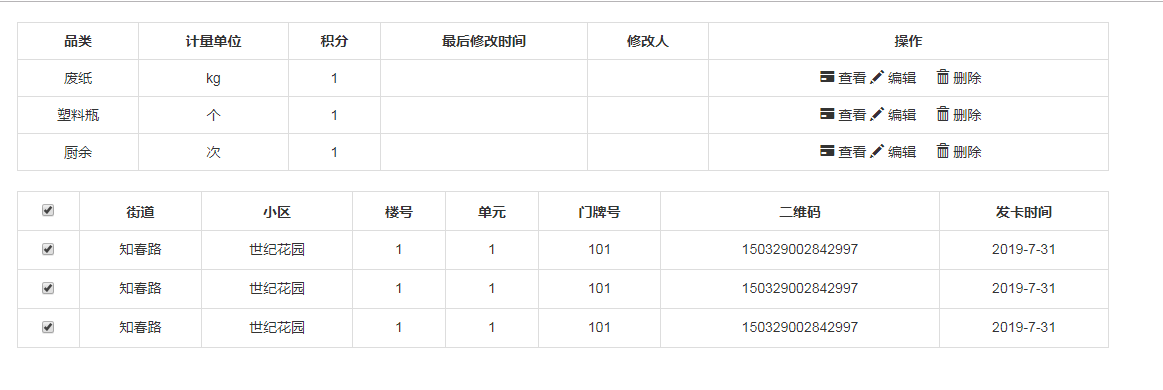
案例二table表格及全选全不选
<table class="table table-bordered">

            <thead class="aa">

                <tr>

                    <th>

                        <input type="checkbox" id="selectAll" />

                    </th>

                    <th>街道</th>

                    <th>小区</th>

                    <th>楼号</th>

                    <th>单元</th>

                    <th>门牌号</th>

                    <th>二维码</th>

                    <th>发卡时间</th>

                </tr>

            </thead>

            <tbody id="tbodyss">

                <tr>

                    <th>

                        <input type="checkbox" name="check" />

                    </th>

                    <td>知春路</td>

                    <td>世纪花园</td>

                    <td>1</td>

                    <td>1</td>

                    <td>101</td>

                    <td>150329002842997</td>

                    <td>2019-7-31 </td>

                </tr>

                <tr>

                    <th>

                        <input type="checkbox" name="check" />

                    </th>

                    <td>知春路</td>

                    <td>世纪花园</td>

                    <td>1</td>

                    <td>1</td>

                    <td>101</td>

                    <td>150329002842997</td>

                    <td>2019-7-31 </td>

                </tr>

                <tr>

                    <th>

                        <input type="checkbox" name="check" />

                    </th>

                    <td>知春路</td>

                    <td>世纪花园</td>

                    <td>1</td>

                    <td>1</td>

                    <td>101</td>

                    <td>150329002842997</td>

                    <td>2019-7-31 </td>

                </tr>

            </tbody>

        </table>
js代码
$(function(){

            var selectAll=$("#selectAll")

            selectAll.click(function(){

                if (selectAll.prop("checked") == true) {

                    // 上面的复选框已被选中

                    $(":checkbox[name='check']").prop("checked", true);

                } else {

                    // 上面的复选框没被选中

                    $(":checkbox[name='check']").prop("checked", false);

                }

            })

            $("#tbodyss :input").click(function(){

                //获取复选框的个数

                var length1=$("#tbodyss :input").length

                //获取选中的复选框的个数

                var length2=$("#tbodyss :checked").length

                if(length1 == length2){

                    $("#selectAll").prop("checked",true);

                }else{

                    $("#selectAll").prop("checked",false);

                }

            })

        })
全选全不选案例table表格的更多相关文章
- 九九乘法表,全js编写,放入table表格带入页面渲染出来
<!DOCTYPE html> <html lang="en"> <head> <meta charset="UTF-8&quo ...
- Jquery 遍历 Table;遍历CheckBox ;遍历Select;全选/全不选
关于Jquery:相信大家已经很熟悉了,我最近的项目运用到关于Jquery的遍历事件:权当总结下: 遍历Table <table id="thistab"> < ...
- 原生JS实现全选和不全选
案例演示 源代码 <!DOCTYPE html> <html> <head lang="en"> <meta charset=" ...
- Dynamic CRM 2013学习笔记(二十六)报表设计:Reporting Service报表 动态参数、参数多选全选、动态列、动态显示行字体颜色
上次介绍过CRM里开始报表的一些注意事项:Dynamic CRM 2013学习笔记(十五)报表入门.开发工具及注意事项,本文继续介绍报表里的一些动态效果:动态显示参数,参数是从数据库里查询出来的:参数 ...
- jQuery/javascript实现全选全不选
<html> <head> <meta charset="utf-8"> <title>Checkbox的练习</title& ...
- jQuery实现Checkbox中项目开发全选全不选的使用
<html> <head> <meta charset="utf-8"> <title>Checkbox的练习</title& ...
- Jq 遍历 全选 全不选 反选
//全选 全不选 $('#checkAll').click(function () { //判断是否被选中 var bischecked = $('#checkAll').is(':checked') ...
- javascript实现复选框的全选全不选
通过复选框的id获取到复选框 元素 对复选框绑定点击事件 每个checkbox都设置相同的name checkOne 通过得到的元素获取checkbox的状态 当点击全选全不选checkbox时,检查 ...
- VUE实现简单的全选/全不选
<!DOCTYPE html> <html> <head lang="en"> <meta charset="UTF-8&quo ...
随机推荐
- java命名总结
下文主要来源于网上,我做了一些编辑整理. “如果你不知道一件事物叫什么, 你就不知道它是什么. 如果你不知道这是什么, 你就不可能坐下来写代码.” ----萨姆·加德纳(Sam Gardiner) 1 ...
- HDFS部署测试记录(2019/05)
目录 HDFS部署测试记录 0.HDFS基础知识 1.基本组成结构与文件访问过程 2.NameNode启动时如何维护元数据 3.HDFS文件上传流程 1.系统环境 1.安装大致记录: 2.磁盘分区 3 ...
- Android设置顶部banner背景透明度时影响全局背景问题
项目中用到滑动界面使顶部title栏背景渐隐渐现的效果,即初始不滑动时的透明度为0,用了bannerle.getBackground().setAlpha(0); 但使用这个方法设置透明度是管用,返回 ...
- vs查找替换功能打不开!
其实解决办法很简单啊 vs--窗口--重置窗口布局
- jzy3D从入门到弃坑_3使用jzy3D0.9画2D散点图--多条线条
jzy3D从入门到弃坑_3 使用jzy3D0.9画2D散点图--多条线条 觉得有用的话,欢迎一起讨论相互学习~Follow Me 主要思路 将多个线条的二维数组读入Scatter对象 存入到同一个画布 ...
- 共享和独享IP的VPS的区别?
共享IP的VPS主机: 顾名思义,共享IP的VPS主机的最大特性即是若干VPS主机用户共享同一个公网IP地址,此目的显然是节省有限的IP地址资源,有效应对Ipv4枯竭的问题.其基本原理是,所有VPS主 ...
- 好用的npm包或者工具
1.样式 classnames:https://github.com/JedWatson/classnames 2.随机数 uuid:https://github.com/kelektiv/node- ...
- zuul 熔断后重试
<dependency> <groupId>org.springframework.retry</groupId> <artifactId>spring ...
- mysql报错 常见 1045 10061
报错1045: 远程没有设置用户远程访问的权限 解决方案: 进行授权(红色是你的密码) 如果想root用户使用password从任何主机连接到mysql服务器的话. GRANT ALL PRIVILE ...
- IDEA的java源码文件左边有一个红色的J
解决办法: 如果源码文件这里已经有一个路径,那就添加现在的.java文件所在目录,或者删除了再重新添加