
全选全不选案例table表格
全选全不选案例table表格
案例一纯table表格
<table class="table table-bordered">
<thead class="aa">
<tr>
<th>品类</th>
<th>计量单位</th>
<th>积分</th>
<th>最后修改时间</th>
<th>修改人</th>
<th>操作</th>
</tr>
</thead>
<tbody>
<tr>
<td>废纸</td>
<td>kg</td>
<td>1</td>
<td></td>
<td></td>
<td>
<span class="glyphicon glyphicon-credit-card sp"></span ><span class="sp"> 查看</span>
<span class="glyphicon glyphicon-pencil sp"></span><span class="sp"> 编辑 </span>
<span class="glyphicon glyphicon-trash sp"></span><span class="sp"> 删除 </span>
</td>
</tr>
<tr>
<td>塑料瓶</td>
<td>个</td>
<td>1</td>
<td></td>
<td></td>
<td>
<span class="glyphicon glyphicon-credit-card sp"></span ><span class="sp"> 查看</span>
<span class="glyphicon glyphicon-pencil sp"></span><span class="sp"> 编辑 </span>
<span class="glyphicon glyphicon-trash sp"></span><span class="sp"> 删除 </span>
</td>
</tr>
<tr>
<td>厨余</td>
<td>次</td>
<td>1</td>
<td></td>
<td></td>
<td>
<span class="glyphicon glyphicon-credit-card sp"></span ><span class="sp"> 查看</span>
<span class="glyphicon glyphicon-pencil sp"></span><span class="sp"> 编辑 </span>
<span class="glyphicon glyphicon-trash sp"></span><span class="sp"> 删除 </span>
</td>
</tr>
</tbody> </table>
图一图二如下所示
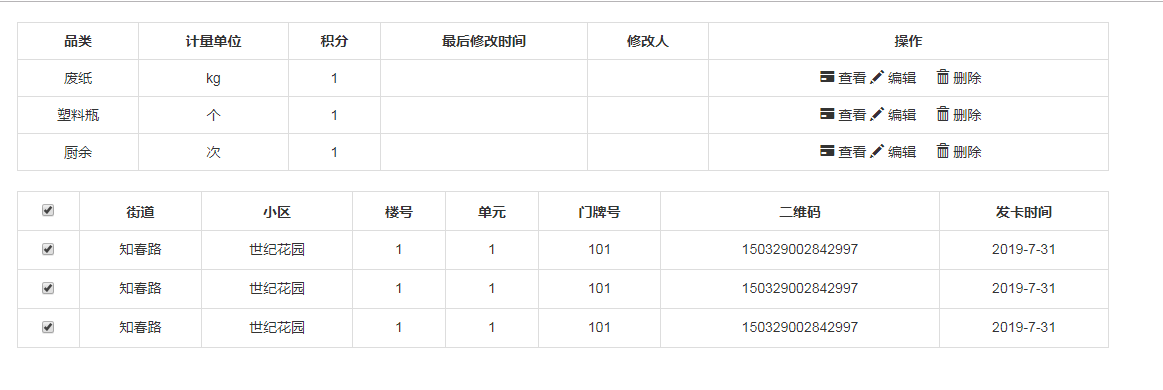
案例二table表格及全选全不选
<table class="table table-bordered">

            <thead class="aa">

                <tr>

                    <th>

                        <input type="checkbox" id="selectAll" />

                    </th>

                    <th>街道</th>

                    <th>小区</th>

                    <th>楼号</th>

                    <th>单元</th>

                    <th>门牌号</th>

                    <th>二维码</th>

                    <th>发卡时间</th>

                </tr>

            </thead>

            <tbody id="tbodyss">

                <tr>

                    <th>

                        <input type="checkbox" name="check" />

                    </th>

                    <td>知春路</td>

                    <td>世纪花园</td>

                    <td>1</td>

                    <td>1</td>

                    <td>101</td>

                    <td>150329002842997</td>

                    <td>2019-7-31 </td>

                </tr>

                <tr>

                    <th>

                        <input type="checkbox" name="check" />

                    </th>

                    <td>知春路</td>

                    <td>世纪花园</td>

                    <td>1</td>

                    <td>1</td>

                    <td>101</td>

                    <td>150329002842997</td>

                    <td>2019-7-31 </td>

                </tr>

                <tr>

                    <th>

                        <input type="checkbox" name="check" />

                    </th>

                    <td>知春路</td>

                    <td>世纪花园</td>

                    <td>1</td>

                    <td>1</td>

                    <td>101</td>

                    <td>150329002842997</td>

                    <td>2019-7-31 </td>

                </tr>

            </tbody>

        </table>
js代码
$(function(){

            var selectAll=$("#selectAll")

            selectAll.click(function(){

                if (selectAll.prop("checked") == true) {

                    // 上面的复选框已被选中

                    $(":checkbox[name='check']").prop("checked", true);

                } else {

                    // 上面的复选框没被选中

                    $(":checkbox[name='check']").prop("checked", false);

                }

            })

            $("#tbodyss :input").click(function(){

                //获取复选框的个数

                var length1=$("#tbodyss :input").length

                //获取选中的复选框的个数

                var length2=$("#tbodyss :checked").length

                if(length1 == length2){

                    $("#selectAll").prop("checked",true);

                }else{

                    $("#selectAll").prop("checked",false);

                }

            })

        })
全选全不选案例table表格的更多相关文章
- 九九乘法表,全js编写,放入table表格带入页面渲染出来
<!DOCTYPE html> <html lang="en"> <head> <meta charset="UTF-8&quo ...
- Jquery 遍历 Table;遍历CheckBox ;遍历Select;全选/全不选
关于Jquery:相信大家已经很熟悉了,我最近的项目运用到关于Jquery的遍历事件:权当总结下: 遍历Table <table id="thistab"> < ...
- 原生JS实现全选和不全选
案例演示 源代码 <!DOCTYPE html> <html> <head lang="en"> <meta charset=" ...
- Dynamic CRM 2013学习笔记(二十六)报表设计:Reporting Service报表 动态参数、参数多选全选、动态列、动态显示行字体颜色
上次介绍过CRM里开始报表的一些注意事项:Dynamic CRM 2013学习笔记(十五)报表入门.开发工具及注意事项,本文继续介绍报表里的一些动态效果:动态显示参数,参数是从数据库里查询出来的:参数 ...
- jQuery/javascript实现全选全不选
<html> <head> <meta charset="utf-8"> <title>Checkbox的练习</title& ...
- jQuery实现Checkbox中项目开发全选全不选的使用
<html> <head> <meta charset="utf-8"> <title>Checkbox的练习</title& ...
- Jq 遍历 全选 全不选 反选
//全选 全不选 $('#checkAll').click(function () { //判断是否被选中 var bischecked = $('#checkAll').is(':checked') ...
- javascript实现复选框的全选全不选
通过复选框的id获取到复选框 元素 对复选框绑定点击事件 每个checkbox都设置相同的name checkOne 通过得到的元素获取checkbox的状态 当点击全选全不选checkbox时,检查 ...
- VUE实现简单的全选/全不选
<!DOCTYPE html> <html> <head lang="en"> <meta charset="UTF-8&quo ...
随机推荐
- C# 序列化与反序列化Serialization之Json Xml Binary Soap JavaScript序列化
所谓的序列化其实就是把一个内存中的对象信息转化成一个可以持久化保存的形式,方便保存数据库和文件或着用于传输, 序列化的主要作用是不同平台之间进行通信与信息的传递保存等,常用的有序列化有Json Xml ...
- Android相关视频
Android架构师 层次分析 –从顶层到底层 洞察其原理https://www.bilibili.com/video/av59066641?t=132安卓/Android 逆向破解系统班 第2期 全 ...
- sumdoc t3 final dir.txt
C:\Users\zhoufeiyue\Documents\sumdoc t3 final\sumdoc t3 final dir.txtC:\Users\zhoufeiyue\Documents\s ...
- Python 使用 paho-mqtt
https://blog.csdn.net/weixin_41656968/article/details/80848542 https://blog.csdn.net/lhh08hasee/arti ...
- python os.popen('xxx.py') 遇到的坑 (No Child Processes)
1.调用系统库 platform.system() 报错: 2.os.popen() 打开的文件流未关闭也会出现这种错误. f = os.popen() f.read() f.close() 问题复现 ...
- Jmeter通过SSHCommand测试获取Linux服务器资源文件信息
有些时间我们想通过接口测试来获取服务器上面的某个资源文件信息,应该怎么办? 别急.... Jmeter通过ssh协议可以实现这个操作. 下面来看一下具体的实现吧. 需要提前安装好的工具: 1.按照好j ...
- Apache限制IP并发数和流量控制
使用mod_limitipconn模块限制IP并发连接数安装: wget http://dominia.org/djao/limit/mod_limitipconn-0.24.tar.bz2 tar ...
- HTML、css、javascript、DOM编程
HTML.css.javascript.DOM编程 一.Html 1.1html概述 Html就是超文本标记语言的简写,是最基础的网页语言,其代码都是由标签所组成,是通过标签来定义的语言,代码不需要区 ...
- Win10 专业版 Hyper-V 主机计算服务无法启动
Windows 10升级1809版本后,发现Hyper-V不能用了,管理器里是一片空白,看服务Hyper-V 主机计算服务没有启动,手动启动的话失败,报错,代码1053. 自己尝试修复,也百度了很久, ...
- mysql 更新与查询(排序 分组 链接查询)
UPDATE更新 #每一次数据的更新都需要update UPDATE 命令修改 MySQL 数据表数据的通用 SQL 语法: UPDATE table_name SET field1=new-valu ...