
Linux文件恢复利器 ext3grep与extundelete
介绍两款Linux文件恢复工具,ext3grep与extundelete,可能在关键时刻会有所帮助。ext3grep仅对ext3文件系统有效,extundelete对ext3与ext4文件系统都有效
cd /home

dd if=/dev/zero of=sdc1 bs=1M count=    #块大小为1M,数量为100,也就是100M

mkfs.ext3 /home/sdc1                     #ext3文件系统格式化

mount /home/sdc1 /sdc
本实例采用第一种方式添加2块磁盘,添加后一块ext3格式化,另一块ext4格式化,然后挂载。具体操作过程省略
mount 查看下

/dev/sdb1 on /sdb type ext4 (rw)

/dev/sdc1 on /sdc type ext3 (rw)
root@ubuntu-test:/home# cat /etc/apt/sources.list

deb http://ubuntu.cn99.com/ubuntu/ quantal main restricted universe multiverse

deb http://ubuntu.cn99.com/ubuntu/ quantal-updates main restricted universe multiverse

deb http://ubuntu.cn99.com/ubuntu/ quantal-security main restricted universe multiverse

deb http://ubuntu.cn99.com/ubuntu/ quantal-backports main restricted universe multiverse

deb http://ubuntu.cn99.com/ubuntu-cn/ quantal main restricted universe multiverse
aptitude install ext3grep
apt-get install e2fslibs-dev # Centos上用yum install e2fsprogs-devel
如果不安装依赖会报错:
checking for compiler with PCH support... yes

checking for special C compiler options needed for large files... no

checking for _FILE_OFFSET_BITS value needed for large files... no

Package ext2fs was not found in the pkg-config search path.

Perhaps you should add the directory containing `ext2fs.pc'

to the PKG_CONFIG_PATH environment variable

No package 'ext2fs' found

checking ext2fs/ext2_fs.h usability... no

checking ext2fs/ext2_fs.h presence... no

checking for ext2fs/ext2_fs.h... no

checking ext2fs/ext2fs.h usability... no

checking ext2fs/ext2fs.h presence... no

checking for ext2fs/ext2fs.h... no

configure: error: Missing headers. Please install the package e2fslibs-dev from e2fsprogs, or http://e2fsprogs.sourceforge.net for the upstream tar-ball.
然后编译安装软件
tar xvf ext3grep-0.10..tar.gz

cd ext3grep-0.10.

./configuremake && make install
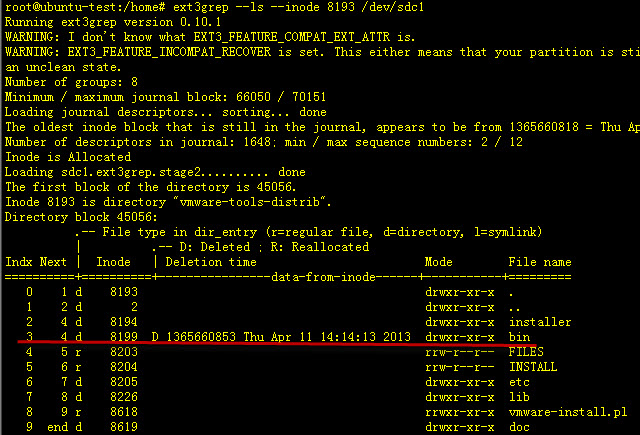
ext3grep --ls --inode /dev/sdc1
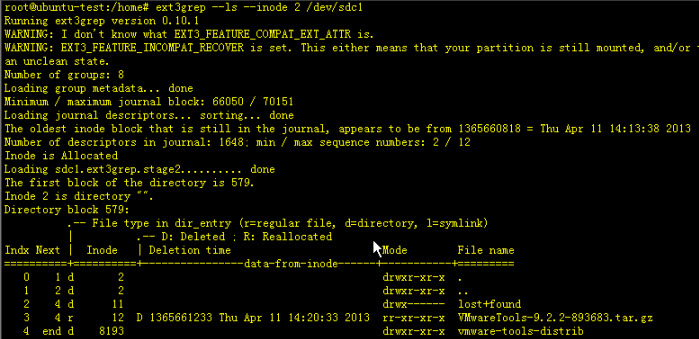
ext3grep --ls --inode /dev/sdc1
ext3grep --ls --dump-names /dev/sdc1 > filename.txt #将显示结果放在一个文件中
ext3grep --restore-file VMwareTools-9.2.-.tar.gz /dev/sdc1


ext3grep --restore-file vmware-tools-distrib/INSTALL.log /dev/sdc1
ext3grep --restore-all /dev/sdc1
ext3grep --restore-all --after  /dev/sdc1 #恢复Apr  : 2013之后被删文件

ext3grep --restore-all --before  /dev/sdc1   #恢复Apr  : 2013之前被删文件
wget http://nchc.dl.sourceforge.net/project/extundelete/extundelete/0.2.4/extundelete-0.2.4.tar.bz2
sudo apt-get install e2fsprogs
sudo apt-get install e2fslibs-dev
sudo apt-get install build-essential
tar -jxvf extundelete-0.2..tar.bz2

cd extundelete-0.2.

./configure --prefix=/usr/local/extundelete

make && make install
cd /usr/local/extundelete/bin

./extundelete -v

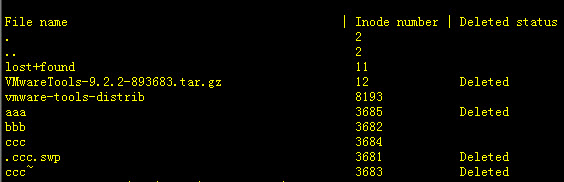
./extundelete --restore-file aaa /dev/sdb1

./extundelete --restore-all /dev/sdb1
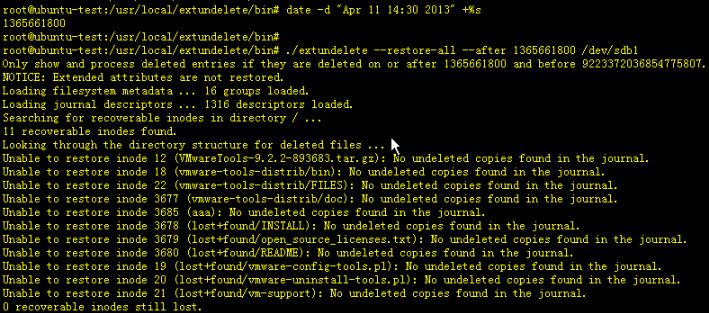
date -d "Apr 11 14:30 2013" +%s
./extundelete --restore-all --after “” /dev/sdb1
Linux文件恢复利器 ext3grep与extundelete的更多相关文章
- 介绍两款Linux文件恢复工具,ext3grep与extundelete https://www.cnblogs.com/lazyfang/p/7699994.html
介绍两款Linux文件恢复工具,ext3grep与extundelete,可能在关键时刻会有所帮助.ext3grep仅对ext3文件系统有效,extundelete对ext3与ext4文件系统都有效 ...
- Linux 文件恢复(XFS & EXT4)
在Linux中,删除rm命令使用需谨慎,有时候可能由于误操作,导致重要文件删除了,这时不要太紧张,操作得当的话,还是可以恢复的. EXT 类型文件恢复 删除一个文件,实际上并不清除inode节点和bl ...
- Linux 文件恢复
可以恢复,使用系统自还工具debugfs来还原删除的文件 步骤详解 1. 查看一下当前系统版本号,及文件系统格式 [root@localhost ~]# df -T Filesystem Type 1 ...
- 使用 Linux 文件恢复工具
使用 Linux 文件恢复工具 Linux 文件恢复的原理 inode 和 block 首先简单介绍一下 Linux 文件系统的最基本单元:inode.inode 译成中文就是索引节点 ...
- 高性能Linux服务器 第6章 ext3文件系统反删除利器ext3grep extundelete工具恢复rm -rf 误删除的文件
高性能Linux服务器 第6章 ext3文件系统反删除利器ext3grep extundelete工具恢复rm -rf 误删除的文件 只能用于ext3文件系统!!!!!!!高俊峰(高性能Linux ...
- linux extundelete 删除文件恢复
extundelete是基于Linux的一个数据恢复工具,它通过分析文件系统的日志,解析出所有文件的inode信息,从而可以恢复Linux下主流的ext3,ext4文件系统下被误删除的文件. [问题案 ...
- Linux之文件恢复[extundelete,针对rm]
[恢复过程] 1.下载+安装extundelete cd /tmp wget wget http://jaist.dl.sourceforge.net/project/extundelete/extu ...
- 云服务器 ECS Linux 误删除文件恢复方法介绍
云服务器 ECS Linux 下,rm -rf 意味着一旦删除的文件是无法挽回的.但如果在没有文件覆盖操作的前提下,可以先尝试相关方式进行文件恢复. 本文对此进行简要说明. https://help ...
- linux下恢复误删除的文件方法(ext2及ext3)
linux下恢复误删除的文件方法(ext2及ext3) 2009-12-19 15:23:47 分类: LINUX 如果是ext2文件系统的,直接用debugfs是可以恢复出来的,但对于ext3,d ...
随机推荐
- PMP ITTO工具
整合管理 范围管理 进度管理 成本管理 质量 资源管理 沟通管理 风险管理 采购管理 相关方管理
- Spark sql -- Spark sql中的窗口函数和对应的api
一.窗口函数种类 ranking 排名类 analytic 分析类 aggregate 聚合类 Function Type SQL DataFrame API Description Ranking ...
- 服务器端debug操作
写好的代码打个包放在服务器上,发现与理想的情况下不一致.查看log日志又觉得很烦,毕竟debug调试才是王道. 下面来说说怎么debug调试服务器上的.最好服务器上的代码和本地的保存一致,这样误差会小 ...
- ECharts 避免变窄
var roomPercentChart = echarts.init(document.getElementById('room_percent')); function ajaxGetRoomPe ...
- 【剑指offer】链表中的倒数第k个结点
输入一个链表,输出该链表中倒数第k个结点. 分析: 定义两个结点p1和p2都指向头节点,p1先走k-1步,然后p1和p2一起走,当p1走到链表尾部时,p2指向的结点就是倒数第k个结点 遍历一遍链表即可 ...
- springboot2.1.7整合mybati3.5.2与mysql8.0.13
springboot2.x已经发布一段时间,博主在这里使用springboot2.1.7整合mybatis3.5.2,使用的数据库为mysql8.0.13 1. 导入依赖 <!--mysql-- ...
- 第2课,python while循环的使用
引言: 上次课学习了python turtle库的基本使用,向前向后和转向.本次课需要画多个图形,简单的东西多起来就变得不简单了. 0/1是简单的,但却能组成丰富多彩的多媒体世界. 课程内容: 1. ...
- Go基础编程实践(六)—— 文件
检查文件是否存在 在此程序同目录下创建log.txt文件,以检测. package main import ( "os" "fmt" ) func main() ...
- H5页面跳转与传值
页面之间的跳转经常使用a标签,使用mvc框架的都是通过访问controller的请求方法,返回请求页面.但本次开发,前端与后台完全分离,前端APP使用HBuider来开发,后台数据就无法使用mvc框架 ...
- Calico网络模型
由于两台物理机的容器网段不同,我们完全可以将两台物理机配置成为路由器,并按照容器的网段配置路由表. 在物理机A中,我们可以这样配置:要想访问网段172.17.9.0/24,下一跳是192.168.10 ...