
netcore容器与配置文件操作
using Microsoft.Extensions.Configuration;

using Microsoft.Extensions.Configuration.Json;

using Microsoft.Extensions.DependencyInjection;

using Microsoft.Extensions.Options;

using System;

namespace CoreConsoleApp1

{

    class Program

    {

        static void Main(string[] args)

        {

            //DI容器测试

            var provider1 = new ServiceCollection()

                .AddOptions()

                .AddTransient<IPerson, Person>()

                .AddTransient<IDog, Dog>()

                .AddTransient<IFly, Fly>()

                .BuildServiceProvider();

            var dog1 = provider1.GetService<IDog>();

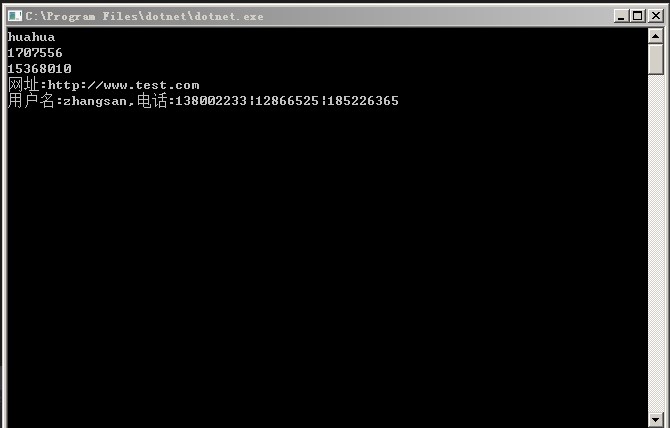
            Console.WriteLine(provider1.GetService<IDog>().Name);

            Console.WriteLine(provider1.GetHashCode());

            var provider2 = new ServiceCollection()

                .AddOptions()

                .AddTransient<IPerson, Person>()

                .AddTransient<IDog, Dog>()

                .BuildServiceProvider();

            var dog2 = provider2.GetService<IDog>();

            Console.WriteLine(provider2.GetHashCode());

            //配置文件读取测试

            IConfiguration config = new ConfigurationBuilder()

                .SetBasePath(AppContext.BaseDirectory)

                .Add(new JsonConfigurationSource

                {

                    Path = "appsettings.json",

                    Optional = false,

                    ReloadOnChange = true

                }).Build();

            ConfigHelper.config = config;

            var user = ConfigHelper.GetConfig<Usernfo>("User");

            string url = ConfigHelper.GetValue("Url");

            Console.WriteLine($"网址:{url}");

            Console.WriteLine($"用户名:{user.Name},电话:{string.Join("|",user.Phones)}");

            Console.ReadKey();

        }

    }

}
using System;

using System.Collections.Generic;

using System.Text;

using Microsoft.Extensions.Configuration;

using Microsoft.Extensions.Configuration.Json;

using Microsoft.Extensions.DependencyInjection;

using Microsoft.Extensions.Options;

namespace CoreConsoleApp1

{

    public class ConfigHelper

    {

        public static IConfiguration config;

        public static string GetValue(string key)

        {

            return config.GetSection(key).Value;

        }

        public static T GetConfig<T>(string key) where T : class, new()

        {

            var data = new ServiceCollection()

                .AddOptions()

                .Configure<T>(config.GetSection(key))

                .BuildServiceProvider()

                .GetService<IOptions<T>>()

                .Value;

            return data;

        }

    }

}
using System;

using System.Collections.Generic;

using System.Text;

namespace CoreConsoleApp1

{

    public interface IPerson

    {

        string Name { get; set; }

    }

    public class Person : IPerson

    {

        public string Name { get; set; }

    }

    public interface IDog

    {

        string Name { get; set; }

    }

    public class Dog : IDog

    {

        private IFly _fly;

        public Dog()

        { }

        public Dog(IFly fly)

        {

            _fly = fly;

        }

        public Dog(string name)

        {

            this.Name = name;

        }

        public string Name { get; set; } = "huahua";

    }

    public interface IFly

    {

        string Fiy();

    }

    public class Fly : IFly

    {

        public string Fiy()

        {

            return "fly....";

        }

    }

}
using System;

using System.Collections.Generic;

using System.Text;

namespace CoreConsoleApp1

{

    public class Usernfo

    {

        public string Name { get; set; }

        public string[] Phones { get; set; }

    }

}
appsettings.json

{

  "Url": "http://www.test.com",

  "User": {

    "Name": "zhangsan",

    "Phones": [ "", "", "" ]

  }

}
netcore容器与配置文件操作的更多相关文章
- IT咨询顾问:一次吐血的项目救火 java或判断优化小技巧 asp.net core Session的测试使用心得 【.NET架构】BIM软件架构02:Web管控平台后台架构 NetCore入门篇:(十一)NetCore项目读取配置文件appsettings.json 使用LINQ生成Where的SQL语句 js_jquery_创建cookie有效期问题_时区问题
IT咨询顾问:一次吐血的项目救火 年后的一个合作公司上线了一个子业务系统,对接公司内部的单点系统.我收到该公司的技术咨询:项目启动后没有规律的突然无法登录了,重新启动后,登录一断时间后又无法重新登 ...
- 一文了解Docker容器技术的操作
一文了解Docker容器技术的操作 前言一.Docker是什么二.Docker的安装及测试Docker的安装Docker的Hello world测试三.Docker的常见操作镜像的基本操作容器的基本操 ...
- 配置文件操作(ini、cfg、xml、config等格式)
配置文件的格式主要有ini.xml.config等,现在对这些格式的配置文件的操作(C#)进行简单说明. INI配置文件操作 调用系统函数GetPrivateProfileString()和Write ...
- centos7下安装docker(8.3容器的常用操作)
yu我们之前已经学习了如何运行容器docker run,也学习了如何进入容器docker attach和docker exec,下面我们来学习容器的其他操作: stop/start/restart 1 ...
- C# 配置文件操作类
注意添加引用:System.Configuration: using System; using System.Collections.Generic; using System.Text; usin ...
- 修改SolrCloud在ZooKeeper中的配置文件操作记录
修改SolrCloud在ZooKeeper中的配置文件操作记录. 命令执行目录: /opt/solr-/server/scripts/cloud-scripts/ 1.下载配置文件 ./zkcli., ...
- .NET程序配置文件操作(ini,cfg,config)
在程序开发过程中,我们一般会用到配置文件来设定一些参数.常见的配置文件格式为 ini, xml, config等. INI .ini文件,通常为初始化文件,是用来存储程序配置信息的文本文件. [Log ...
- asp.netcore 深入了解配置文件加载过程
前言 配置文件中程序运行中,担当着不可或缺的角色:通常情况下,使用 visual studio 进行创建项目过程中,项目配置文件会自动生成在项目根目录下,如 appsettings.json, ...
- docker镜像、容器以及命令操作
docker image docker image是一个极度精简版的Linux程序运行环境,官网的java镜像包括的东西更少,除非是镜像叠加方式的如centos+java7 docker image是 ...
随机推荐
- [转] vue前端异常监控sentry实践
1. 监控原理 1.1 onerror 传统的前端监控原理分为异常捕获和异常上报.一般使用onerror捕获前端错误: window.onerror = (msg, url, line, col, e ...
- Asp.net MVC企业级开发(01)---Autofac
1.1 控制反转 在面向对象设计的软件系统中,它的底层都是由N个对象构成的,各个对象之间通过相互合作,最终实现系统的业务逻辑.同时,对象之间的耦合关系是无法避免的,也是必要的,这是协同工作的基础.但是 ...
- 浅谈Spring中JDK动态代理与CGLIB动态代理
前言Spring是Java程序员基本不可能绕开的一个框架,它的核心思想是IOC(控制反转)和AOP(面向切面编程).在Spring中这两个核心思想都是基于设计模式实现的,IOC思想的实现基于工厂模式, ...
- 达梦DCI
/************************************************************************/ /* DCI编程实例 */ /********** ...
- 结对项目(JAVA)
项目成员: 邓镇港 3117004608 陈嘉欣 3117004604 一.Github项目地址: https://github.com/kestrelcjx/operation_expression ...
- SwitchGame---MybatisPLus
//实体类package com.example.spring.entity; import cn.afterturn.easypoi.excel.annotation.Excel;import cn ...
- 集合(set)
'''set是一个无序(不支持索引和切片)而且不重复的集合,有些类似于数学中的集合,也可以求交集,求并集等,''' s1={1,2,3,1} #定义一个set s1 如果s1={}为空则默认定义一个字 ...
- CPU和Memory压力测试方法
一:用原生Centos自带的工具 1. CPU 下面命令会创建 CPU 负荷,方法是通过压缩随机数据并将结果发送到 /dev/null: cat /dev/urandom | gzip -9 > ...
- Pods应用NFS存储
Volumes选择NFS服务器: 条件: 1. k8s集群,目前为(hadoop1,hadoop2,hadoop3) 2. 另起一台服务器做专门的NFS服务器 3. NFS需要在K8S的各个节点安装 ...
- 极简让ingress-nginx最新版(0.25.0)跑起来
裸步骤: 一,manadatory.yaml apiVersion: v1 kind: Namespace metadata: name: ingress-nginx labels: app.kube ...