
springboot2 配置 https
package cn.xiaojf.aibus.configure;

import org.apache.catalina.Context;

import org.apache.catalina.connector.Connector;

import org.apache.coyote.http11.Http11NioProtocol;

import org.apache.tomcat.util.descriptor.web.SecurityCollection;

import org.apache.tomcat.util.descriptor.web.SecurityConstraint;

import org.springframework.boot.web.embedded.tomcat.TomcatServletWebServerFactory;

import org.springframework.boot.web.servlet.server.ServletWebServerFactory;

import org.springframework.context.annotation.Bean;

import org.springframework.context.annotation.Configuration;

import org.springframework.context.annotation.Profile;

/**

 * http ssl 配置

 * @author xiaojf 2019/9/21 20:07

 */

@Configuration

@Profile("prod")

public class HttpsConfigure {

    @Bean

    public ServletWebServerFactory servletWebServerFactory() {

        TomcatServletWebServerFactory factory = new TomcatServletWebServerFactory() {

            @Override

            protected void postProcessContext(Context context) {

                SecurityConstraint securityConstraint = new SecurityConstraint();

                securityConstraint.setUserConstraint("CONFIDENTIAL");

                SecurityCollection securityCollection = new SecurityCollection();

                securityCollection.addPattern("/*");

                securityConstraint.addCollection(securityCollection);

                context.addConstraint(securityConstraint);

            }

        };

        factory.addAdditionalTomcatConnectors(redirectConnector());

        return factory;

    }

    private Connector redirectConnector() {

        Connector connector = new Connector(Http11NioProtocol.class.getName());

        connector.setScheme("http");

        connector.setPort(8100);

        connector.setSecure(false);

        connector.setRedirectPort(443);

        return connector;

    }

}
修改配置文件
server:

  ssl:

    key-store: classpath:ssl/2833975_www.renyimao.cn.pfx

    key-store-password: KzwpacCY

    keyStoreType: PKCS12

  port: 443 #启动端口
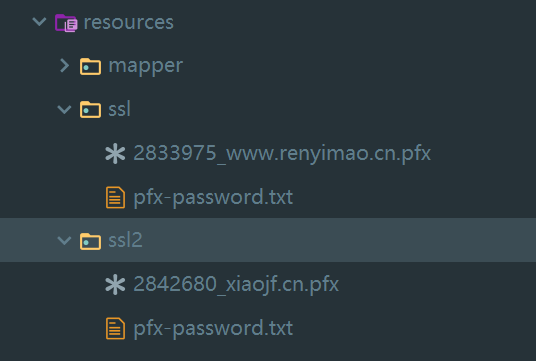
文件目录
springboot2 配置 https的更多相关文章
- 腾讯云域名申请+ssl证书申请+springboot配置https
阿里云域名申请 域名申请比较简单,使用微信注册阿里云账号并登陆,点击产品,选择域名注册 输入你想注册的域名 进入域名购买页面,搜索可用的后缀及价格,越热门的后缀(.com,.cn)越贵一般,并且很可能 ...
- SpringBoot配置Https
HTTPS (全称:Hyper Text Transfer Protocol over SecureSocket Layer),是以安全为目标的 HTTP 通道,在HTTP的基础上通过传输加密和身份认 ...
- Nginx配置Https
1.申请证书: https://console.qcloud.com/ssl?utm_source=yingyongbao&utm_medium=ssl&utm_campaign=qc ...
- 天河微信小程序入门:阿里云tomcat免费配置https
天河君在第一时间通过了微信小程序验证,开启了我的微信小程序之旅.因为天河君之前是一名后端狗,对前端不是很了解,所以几乎可以认为是从零开始学做微信小程序.也希望有志在微信小程序方向做点事情的朋友能够和我 ...
- 在 IIS 6 和 IIS 7中配置Https,设置WCF同时支持HTTP和HTPPS,以及使用HttpWebRequest和HttpClient调用HttpS
IIS 7 ,给IIS添加CA证书以支持https IIS 6 架设证书服务器 及 让IIS启用HTTPS服务 WCF IIS 7中配置HTTPS C#利用HttpWebRequest进行post请求 ...
- nginx 反向代理 配置 https 实现http https同时存在
server { listen ssl; #监听443端口 server_name www.app01.com; ssl on; #启用ssl加密 ssl_certificate /etc/cert/ ...
- 【burp】配置HTTPS抓包方法
以Chrome为例,配置HTTPS抓包方法 1.获取破解版的burp,将BurpLoader.jar和burpsuite_pro_v1.5.18.jar放到一个路径下 2.在cmd里进入上述两个jar ...
- YTKNetworkConfig配置HTTPS请求
YTKNetworkConfig配置HTTPS请求 p.p1 { margin: 0.0px 0.0px 0.0px 0.0px; font: 14.0px Menlo; color: #ad91cc ...
- Apache配置HTTPS功能
apache配置https 一.yum 安装openssl和openssl-devel,httpd-devel 二.生成证书(也可以从公司的证书颁发机构获取): #建立服务器密钥 openssl ge ...
随机推荐
- jQuery中的text()、html()和val()以及javaScript中的innerText、innerHTML和value
*jQuery中设置或者获取所选内容的值:text();设置或者获取所选元素的文本内容: html();设置或者获取所选元素的内容(包括html标记): val();设置或者获取表单字段的值(前提是表 ...
- SQL中的trim函数
Oracle TRIM函数是很常见的函数,下面对Oracle TRIM函数的语法作了详尽的阐述说明,希望可以让您对Oracle TRIM函数有更深的认识. 如果提到Oracle TRIM函数,最简单的 ...
- GPP(Group Policy Preferences)漏洞
再次之前先讲一些知识点: 密码的难题 每台Windows主机有一个内置的Administrator账户以及相关联的密码.大多数组织机构为了安全,可能都会要求更改密码,虽然这种方法的效果并不尽如人意.标 ...
- ArrayList 集合:库存管理
import java.util.ArrayList; import java.lang.Integer; import java.util.Scanner; import java.util.Ran ...
- jaeger使用yugabyte作为后端存储的尝试以及几个问题
前边写过使用scylladb 做为jaeger 的后端存储,还是一个不错选择的包括性能以及 兼容性,对于 yugabyte 当前存在兼容性的问题,需要版本的支持,或者尝试进行一些变动 create 语 ...
- canvas的基本使用
一.定义 canvas最早是由Apple引入Webkit的,<canvas>元素包含于HTML5中 HTML5的canvas元素使用JavaScript在网页上绘制图像,画布是一个矩形区域 ...
- 54、Spark Streaming:DStream的transformation操作概览
一. transformation操作概览 Transformation Meaning map 对传入的每个元素,返回一个新的元素 flatMap 对传入的每个元素,返回一个或多个元素 filter ...
- QQ for Mac聊天纪录怎么查找??
在你Mac上打开你的QQ,选择任意聊天窗口,打字的上面有6个图表快捷键,第6个就是查看聊天记录的功能键
- Linux环境下查看历史操作命令及清除方法(history -c)
在Linux环境中可以通过方向键的上下按键查看近期键入的命令.但这种方法只能一个一个的查看,其实系统提供了查看所有历史命令的方法. 在终端中输入以下命令查看所有命令: history [root@te ...
- Tomcat Response encode
Character Encoding - Apache Tomcat - Apache Software Foundation https://cwiki.apache.org/confluence/ ...