
QT Graphics-View图元组使用
通过把一个item作为另一个item的孩子,你可以得到item组的大多数本质特性:这些items会一起移动,所有变换会从父到子传递。QGraphicsItem也可以为它的孩子处理所有的事件,这样就允许以父亲代表它所有的孩子,可以有效地把所有的items看作一个整体。
另外,QGraphicsItemGroup是一个特殊的item,它既对孩子事件进行处理又有一个接口把items从一个组中增加和删除。把一个item加到 QGraphicsItemGroup仍会保留item的原始位置与变换,而给一个item重新指定父item则会让item根据其新的父亲重新定位。可以用QGraphicsScene::createItemGroup()建组。
1、通过父子关系-如果想要将 items 存储在其他 item 内,可以直接将任何 QGraphicsItem 通过为 setParentItem() 传递一个合适的 parent。
注意: 对于该方式,QGraphicsItem 可以有自己的子 item 对象。但是,QGraphicsItem 没有 API(例如:setItems()、addChild())添加孩子,它只能允许孩子附加到 parent (setParentItem()),想想也挺神奇的。
// Item parent-children
QGraphicsRectItem* pRectItemTmp = new QGraphicsRectItem(QRectF(-100.0, -100.0, 50.0, 50.0));
QGraphicsEllipseItem* pEllipseItemTmp = new QGraphicsEllipseItem(QRectF(-100.0, -100.0, 50.0, 50.0));
pEllipseItemTmp->setParentItem(pRectItemTmp);
pScene->addItem(pRectItemTmp);
pRectItemTmp->setFlag(QGraphicsItem::ItemIsSelectable);
pRectItemTmp->setFlag(QGraphicsItem::ItemIsMovable);
2、QGraphicsItemGroup(图元组)是一个容器,它的作用是将加入到该组里的图元当成一个图元来看待。QGraphicsItemGroup的父类是QGraphicsItem,所以它本质上也是一个图元,只是这个图元本身是不可见的。
QGraphicsItemGroup有两种创建方法:
一种是手动创建QGraphicsItemGroup对象然后再加入到场景中。
另一种是使用场景类的createItemGroup方法创建,该方法返回一个QGraphicsItemGroup对象。
// Item Group
// [1]
QGraphicsRectItem* pRectItem = new QGraphicsRectItem(QRectF(-30.0, -30.0, 60.0, 60.0));
QGraphicsEllipseItem* pEllipseItem = new QGraphicsEllipseItem(QRectF(-30.0, -30.0, 60.0, 60.0));
QGraphicsItemGroup* pItemGroup = new QGraphicsItemGroup();
pItemGroup->setFlag(QGraphicsItem::ItemIsSelectable);
pItemGroup->setFlag(QGraphicsItem::ItemIsMovable);
pItemGroup->addToGroup(pRectItem);
pItemGroup->addToGroup(pEllipseItem);
pScene->addItem(pItemGroup);
// [2]
QGraphicsRectItem* pRectItemEx = new QGraphicsRectItem(QRectF(-30.0, -30.0, 60.0, 60.0));
QGraphicsEllipseItem* pEllipseItemEx = new QGraphicsEllipseItem(QRectF(-30.0, -30.0, 60.0, 60.0));
QList<QGraphicsItem*> pItemList;
pItemList.append(pRectItemEx);
pItemList.append(pEllipseItemEx);
QGraphicsItemGroup* pItemGroupEx = pScene->createItemGroup(pItemList);
pItemGroupEx->setFlag(QGraphicsItem::ItemIsSelectable);
pItemGroupEx->setFlag(QGraphicsItem::ItemIsMovable);
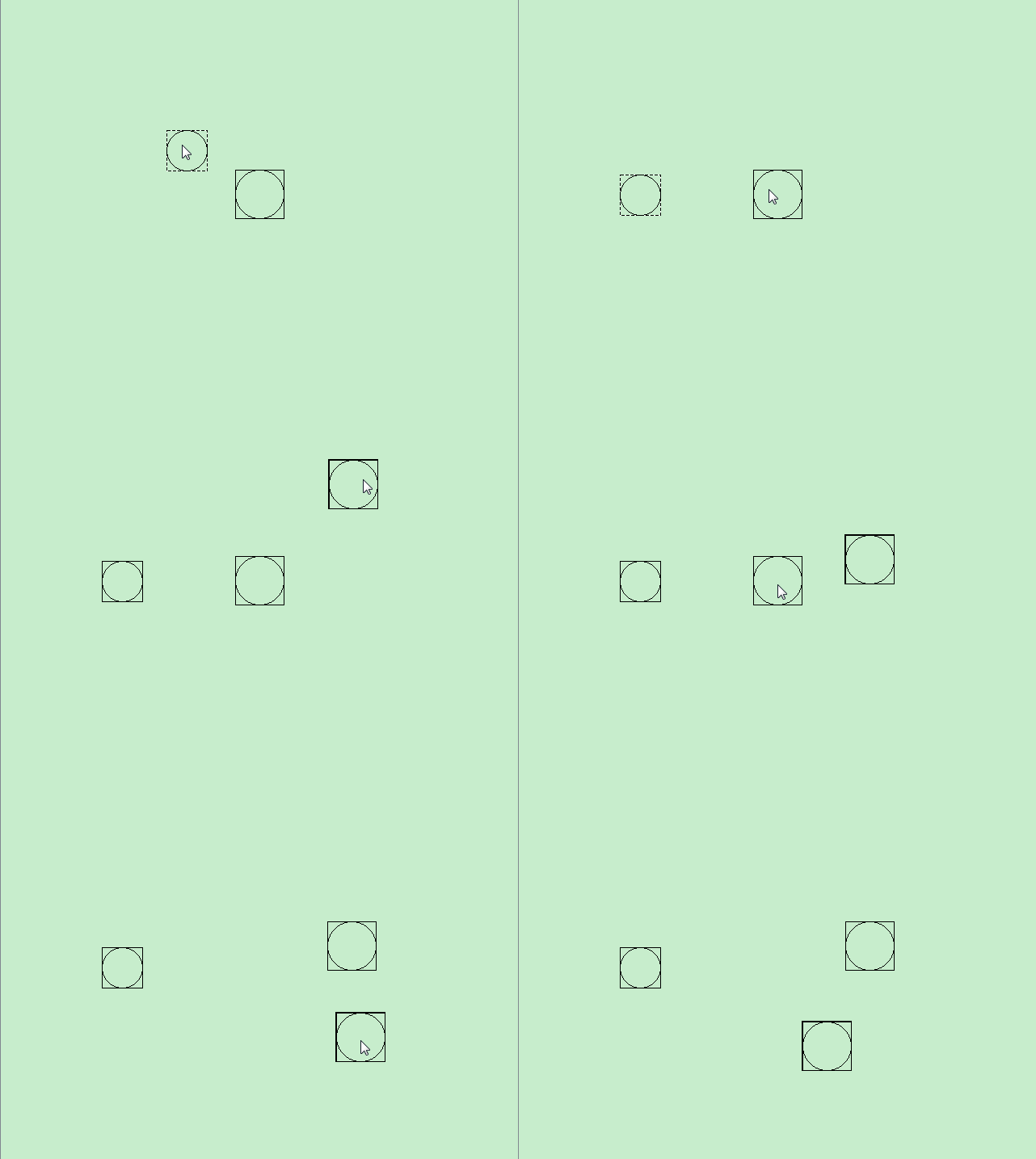
图元组可以使用addToGroup将图元添加到组里,使用removeFromGroup将图元从组里移除。其他的操作就把它当成QGraphicsItem来看待。如果想要销毁组,可以使用场景类的destroyItemGroup方法即可。
添加和删除Item的操作保留了Item的场景相对位置和转换,相反,调用setParentItem(),其中仅保留子项目的父项相对位置和转换。
QGraphicsItem 分组比较简单,但在分组之后 group 中的 QGraphicsItem 无法捕获自己的相关事件(例如:鼠标事件、键盘事件),实际接受消息对象为 QGraphicsItemGroup。
让 QGraphicsItemGroup 中的 item 处理自己的事件
查看QGraphicsItemGroup源码
QGraphicsItemGroup::QGraphicsItemGroup(QGraphicsItem *parent)
: QGraphicsItem(*new QGraphicsItemGroupPrivate, parent)
{
setHandlesChildEvents(true);
}
setHandlesChildEvents:
This function is obsolete. It is provided to keep old source code working. We strongly advise against using it in new code.
If enabled is true, this item is set to handle all events for all its children (i.e., all events intented for any of its children are instead sent to this item); otherwise, if enabled is false, this item will only handle its own events. The default value is false.
This property is useful for item groups; it allows one item to handle events on behalf of its children, as opposed to its children handling their events individually.
If a child item accepts hover events, its parent will receive hover move events as the cursor passes through the child, but it does not receive hover enter and hover leave events on behalf of its child.
QT Graphics-View图元组使用的更多相关文章
- 关于QT Graphics View开启OpenGL渲染后复选框、微调框等无法正常显示的问题
之前学习QT Graphics View框架,除了基本的图元外,还可以通过QGraphicsProxyWidget类添加QT的基本Widget(如按钮.复选框.单选框等),常使用的场景类接口如下: Q ...
- qt Graphics View Framework(非重点)
Graphics View 提供了一种接口,用于管理大量自定义的 2D 图形元素,并与之进行交互:还提供了用于将这些元素进行可视化显示的观察组件,并支持缩放和旋转. 说明;Graphics View ...
- Qt 学习之路:Graphics View Framework
Graphics View 提供了一种接口,用于管理大量自定义的 2D 图形元素,并与之进行交互:还提供了用于将这些元素进行可视化显示的观察组件,并支持缩放和旋转.我们通常所说的 Linux 的 KD ...
- Qt 学习之路 2(30):Graphics View Framework
Qt 学习之路 2(30):Graphics View Framework 豆子 2012年12月11日 Qt 学习之路 2 27条评论 Graphics View 提供了一种接口,用于管理大量自定义 ...
- Qt 之 Graphics View Framework 简介
Graphics View Framework 交互式 2D 图形的 Graphics View 框架概述.自 Qt4.2 中引入了 Graphics View,以取代其前身 QCanvas.Grap ...
- Graphics View框架
Qt4.2开始引入了Graphics View框架用来取代Qt3中的Canvas模块,并在很多地方作了改进,Graphics View框架实现了模型-视图结构的图形管理,能对大量图元进行管理,支持碰撞 ...
- Qt Model/View(官方翻译,图文并茂)
http://doc.trolltech.com/main-snapshot/model-view-programming.html 介绍 Qt 4推出了一组新的item view类,它们使用mode ...
- (转)Qt Model/View 学习笔记 (五)——View 类
Qt Model/View 学习笔记 (五) View 类 概念 在model/view架构中,view从model中获得数据项然后显示给用户.数据显示的方式不必与model提供的表示方式相同,可以与 ...
- 【转】Qt Mode/View
1.view与Widget 在UI中,最常用的就是list/grid/tree了(在Qt中,grid被称为table).尤其是做那些数据库相关的程序,可能每个界面都要用到 list或grid.在Qt中 ...
随机推荐
- 【oracle】定时任务
--创建定时任务-------------------------------------------------------------------------------------------- ...
- luogu_2480: 古代猪文
洛谷:2480古代猪文 题意描述: 给定两个整数\(N,G\),求$G^{\sum_{k|n}C_n^k} mod 999911659 $. 数据范围: \(1\leq N\leq 10^9,1\le ...
- 洛谷[SHOI2002]滑雪题解
什么破题啊 简直就是浪费我时间! 我每天还被我xf定目标了不知道嘛! 题目 朴素的搜索只能得90分 #include <cstdio> #include <iostream> ...
- uname 命令简介
[root@localhost root]# uname --help Usage: uname [OPTION]... Print certain system information. With ...
- 小端存储转大端存储 & 大端存储转小端存储
1.socket编程常用的相关函数:htons.htonl.ntohs.ntohl h:host n:network s:string l:long 2.基本数据类型,2字节,4字 ...
- [转]MySQL之——崩溃-修复损坏的innodb:innodb_force_recovery
原文 https://blog.csdn.net/l1028386804/article/details/77199194 1. mysql崩溃 --------------------------- ...
- MySQL统计百分比结果
1,不带小数点的百分比 SELECT CONCAT(ROUND(errorTable.errorCount / totalTable.totalCount * 100),'','%') FROM (S ...
- 基于32位Windows2003的数据库服务器优化,启用AWE,优化SQL Server
最近几天,笔者所在的单位中的一台WEB服务器由于负载过大出现了问题,当同时在线的用户达到一定规模(2000-3000)时,频繁出现页面响应迟缓.超时等问题.服务器采用的操作系统是Windows Ser ...
- python发展
python的创始人---吉多·范罗苏姆(Guido van Rossum)
- 收藏:C语言中字符串常量到底存在哪了?
来源:https://www.cnblogs.com/jaysir/p/5041799.html 常量存储总结局部变量.静态局部变量.全局变量.全局静态变量.字符串常量以及动态申请的内存区 1.局部变 ...