
HtmlHelper拓展实现CheckBoxList
经过一番折腾(主要是SelectList这个类操作有些繁琐)实现了CheckBoxList,过程RadioList基本一样
拓展方法
    public static MvcHtmlString CheckBoxList(this HtmlHelper htmlHelper, string name, IEnumerable<SelectListItem> selectList)

    {

        return CheckBoxList(htmlHelper, name, selectList, null, null, null, 1);

    }

    public static MvcHtmlString CheckBoxList(this HtmlHelper htmlHelper, string name, IEnumerable<SelectListItem> selectList, int col)

    {

        return CheckBoxList(htmlHelper, name, selectList, null, null, null, col);

    }

    public static MvcHtmlString CheckBoxList(this HtmlHelper htmlHelper, string name, IEnumerable<SelectListItem> selectList, string rowClass, string CheckBoxClass, string spanClass, int col)

    {

        return CheckBoxListHelper(htmlHelper, metadata: null, name: name, selectList: selectList, rowClass: rowClass, checkBoxClass: CheckBoxClass, spanClass: spanClass, col: col);

    }

    public static MvcHtmlString CheckBoxListFor<TModel, TProperty>(this HtmlHelper<TModel> htmlHelper, Expression<Func<TModel, TProperty>> expression, IEnumerable<SelectListItem> selectList)

    {

        return CheckBoxListFor(htmlHelper, expression, selectList, null, null, null, 1);

    }

    public static MvcHtmlString CheckBoxListFor<TModel, TProperty>(this HtmlHelper<TModel> htmlHelper, Expression<Func<TModel, TProperty>> expression, IEnumerable<SelectListItem> selectList, int col)

    {

        return CheckBoxListFor(htmlHelper, expression, selectList, null, null, null, col);

    }

    public static MvcHtmlString CheckBoxListFor<TModel, TProperty>(this HtmlHelper<TModel> htmlHelper, Expression<Func<TModel, TProperty>> expression, IEnumerable<SelectListItem> selectList, string rowClass, string CheckBoxClass, string spanClass, int col)

    {

        if (expression == null)

        {

            throw new ArgumentNullException("expression");

        }

        //可以不用

        ModelMetadata metadata = ModelMetadata.FromLambdaExpression(expression, htmlHelper.ViewData);

        return CheckBoxListHelper(htmlHelper, metadata, ExpressionHelper.GetExpressionText(expression), selectList, rowClass, CheckBoxClass, spanClass, col);

    }

    public static MvcHtmlString CheckBoxListHelper(this HtmlHelper htmlHelper, ModelMetadata metadata, string name, IEnumerable<SelectListItem> selectList, string rowClass, string checkBoxClass, string spanClass, int col)

    {

        StringBuilder resultString = new StringBuilder();

        if (checkBoxClass == null) checkBoxClass = "";

        if (rowClass == null) rowClass = "";

        if (spanClass == null) spanClass = "";

        StringBuilder checkBox = new StringBuilder("<input type=\"checkBox\" class=\"" + checkBoxClass + "\" name=\"" + name + "\" value=\"noValue\" isChecked /><span class=\"" + spanClass + "\">noText</span>");

        StringBuilder tempcheckBox = new StringBuilder();

        StringBuilder tempLine = new StringBuilder();

        var selectValues = (IEnumerable<string>)((SelectList)selectList).SelectedValue;

        int tempCol = col;

        foreach (SelectListItem selectItem in selectList)

        {

            tempcheckBox = new StringBuilder(checkBox.ToString());

            if (selectValues.Contains(selectItem.Value))

            {

                tempcheckBox.Replace("isChecked", "checked");

            }

            else

            {

                tempcheckBox.Replace("isChecked", "");

            }

            tempcheckBox.Replace("noValue", selectItem.Value);

            tempcheckBox.Replace("noText", selectItem.Text);

            tempLine.Append(tempcheckBox);

            if (--tempCol == 0)

            {//要换行

                tempLine.WearDiv(rowClass);

                resultString.Append(tempLine);

                tempCol = col;

                tempLine.Clear();

            }

        }

        if (tempLine.Length != 0)

        {

            tempLine.WearDiv("");

        }

        resultString.Append(tempLine);

        return new MvcHtmlString(resultString.ToString());

    }
HttpGet
      public ActionResult EditPerson(string id)

        {

            IService service = new Service();

            var person = service.GetPersons().FirstOrDefault(lbItem => lbItem.Id == id);

            if (person == null)

                throw new NullReferenceException();

            //性别列表

            var sexList = new List<object>();

            sexList.Add(new { Value = "nan", Text = "男" });

            sexList.Add(new { Value = "nv", Text = "女" });

            var sexSelectList = new SelectList(sexList, "Value", "Text",person.Sex);

            //学位列表

            var dipList = new List<object>();

            dipList.Add(new { Value = "dz", Text = "大专" });

            dipList.Add(new { Value = "bs", Text = "博士" });

            dipList.Add(new { Value = "yjs", Text = "研究生" });

            dipList.Add(new { Value = "gz", Text = "高中" });

            var dipSelectList = new SelectList(dipList, "Value", "Text",person.Diploma);

            //爱好列表

            var personHobbies = person.Hobbies.ToList();

            var allHobbies = service.GetHobbies().ToList();

            var hobbySelectList = new SelectList(allHobbies, "Id", "Name", personHobbies.Select(a => a.Id).ToList());

            ViewData["RadioSexList"] = sexSelectList;

            ViewData["RadioDiplomaList"] = dipSelectList;

            ViewData["CheckBoxHobbyList"] = hobbySelectList;

            return View(person);

        }
cshtml
@model MyExtend.Controllers.Person

@{

    Layout = null;

    ViewBag.Title = "EditPerson";

}

<h2>EditPerson</h2>

@using (Html.BeginForm("SaveEdit", "CheeseBar", FormMethod.Post))

{

    <div>

        @Html.EditorFor(model => model.Name)

    </div>

    <div>

        @Html.RadioListFor(model => model.Sex, (SelectList)ViewData["RadioSexList"],"rowClass","radioClass","spanClass",1)

    </div>

    <div>

        @Html.RadioList("Diploma", (SelectList)ViewData["RadioDiplomaList"],"rowClass", "radioClass", "spanClass", 2)

    </div>

    <div>

        @Html.CheckBoxListFor(model => model.Hobbies, (SelectList)ViewData["CheckBoxHobbyList"],2)

    </div>

}

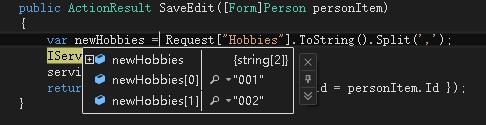
编辑后提交,save方法添加断点
HtmlHelper拓展实现CheckBoxList的更多相关文章
- HtmlHelper拓展实现RadioList
mvc中HtmlHelper可以帮助我们生成许多Html控件,但是没有类似DropDownList的RadioList,但是发现这些方法都是拓展方法,于是就想自己也拓展一个RadioList 从网上下 ...
- .NET MVC3中扩展一个HtmlHelper方法CheckBoxList
MVC中有DropDownList方法,挺好用,可是最常用的需求,一组checkboxlist咋没个类似方法呢?郁闷之余,自己做一个吧,直接上代码 public static MvcHtmlStrin ...
- MVC扩展HtmlHelper,加入RadioButtonList、CheckBoxList、DropdownList
代码: using System; using System.Collections.Generic; using System.Linq; using System.Linq.Expressions ...
- MVC CheckBoxList的实现
using System; using System.Collections.Generic; using System.Linq; using System.Linq.Expressions; us ...
- ASP.NET MVC 3 CheckBoxList 的使用
在以前的 ASP.NET MVC 中可以直接使用 CheckBoxList,但后来不知道什么原因在 MVC 中移除了 CheckBoxList,所以默认情况下 ASP.NET MVC 3 中是没有 C ...
- MVC生成CheckBoxList并对其验证
原文:MVC生成CheckBoxList并对其验证 通过扩展方法,可以让CheckBox水平排列,生成CheckBoxList,正如"MVC扩展生成CheckBoxList并水平排列&quo ...
- ASP .NET MVC HtmlHelper扩展——简化“列表控件”的绑定
在众多表单元素中,有一类<select>元素用于绑定一组预定义列表.传统的ASP.NET Web Form中,它对应着一组重要的控件类型,即ListControl,我们经常用到DropDo ...
- 再议ASP.NET MVC中CheckBoxList的验证
在ASP.NET MVC 4中谈到CheckBoxList,经常是与CheckBoxList的显示以及验证有关.我在"MVC扩展生成CheckBoxList并水平排列"中通过扩展H ...
- MVC扩展生成CheckBoxList并水平排列
本篇体验生成CheckBoxList的几个思路,扩展MVC的HtmlHelper生成CheckBoxList,并使之水平排开. 通过遍历从控制器方法拿到的Model集合 □ 思路 比如为一个用 ...
随机推荐
- Coping with the TCP TIME-WAIT state on busy Linux servers
Coping with the TCP TIME-WAIT state on busy Linux servers 文章源自于:https://vincent.bernat.im/en/blog/20 ...
- UWP图片编辑器(涂鸦、裁剪、合成)
一.编辑器简介 写这个控件之前总想找一找开源的,可以偷下懒省点事.可是各种地方都搜遍了也没有找到. 于是,那就做第一个吃螃蟹的人吧! 控件主要有三个功能:涂鸦.裁剪.合成. 涂鸦:主要是用到了InkT ...
- C#中使用Socket请求Web服务器过程
最开始我们需要明白一件事情,因为这是这篇文章的前提: HTTP协议只是一个应用层协议,它底层是通过TCP进行传输数据的.因此,浏览器访问Web服务器的过程必须先有“连接建立”的发生. 而有人或许会问: ...
- [.net 面向对象程序设计深入](1)UML——在Visual Studio 2013/2015中设计UML类图
[.net 面向对象程序设计深入](1)UML——在Visual Studio 2013/2015中设计UML类图 1.UML简介 Unified Modeling Language (UML)又称统 ...
- IOS 开发中 Whose view is not in the window hierarchy 错误的解决办法
在 IOS 开发当中经常碰到 whose view is not in the window hierarchy 的错误,该错误简单的说,是由于 "ViewController" ...
- SQL Server中的事务与锁
了解事务和锁 事务:保持逻辑数据一致性与可恢复性,必不可少的利器. 锁:多用户访问同一数据库资源时,对访问的先后次序权限管理的一种机制,没有他事务或许将会一塌糊涂,不能保证数据的安全正确读写. 死锁: ...
- Spring(三)AOP面向切面编程
原文链接:http://www.orlion.ga/205/ 一.AOP简介 1.AOP概念 参考文章:http://www.orlion.ml/57 2.AOP的产生 对于如下方法: pub ...
- py2exe使用中遇到的几个问题
问题: 在使用py2exe对所写的python脚本打包成.exe可执行程序时,遇到两个问题: 问题1: RuntimeError: maximum recursion depth exceeded w ...
- 一起学微软Power BI系列-官方文档-入门指南(7)发布与共享-终结篇+完整PDF文档
接触Power BI的时间也只有几个月,虽然花的时间不多,但通过各种渠道了解收集,谈不上精通,但对一些重要概念和细节还是有所了解.在整理官方文档的过程中,也熟悉和了解了很多概念.所以从前到后把微软官方 ...
- 准备 KVM 实验环境 - 每天5分钟玩转 OpenStack(3)
KVM 是 OpenStack 使用最广泛的 Hypervisor,本节介绍如何搭建 KVM 实验环境 安装 KVM 上一节说了,KVM 是 2 型虚拟化,是运行在操作系统之上的,所以我们先要装一个 ...