
远程服务通讯Service(Remote--AIDL)
服务端代码:https://github.com/maogefff/AndroidTest/tree/develop-ServiceLocal2
客户端代码:https://github.com/maogefff/AndroidTest/tree/develop-ServiceRemote2
1. 服务端编写
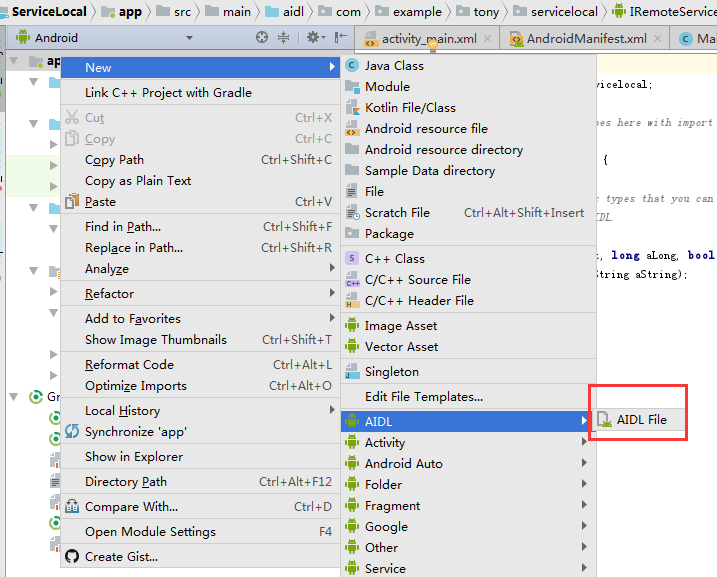
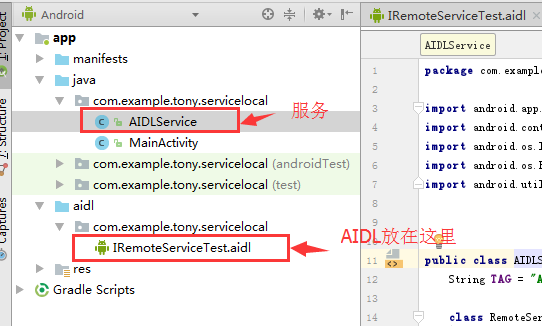
AndroidManifest.xml:
        <service

            android:name=".AIDLService"

            android:enabled="true"

            android:exported="true">

            <intent-filter>

                <action android:name="android.intent.action.TestRemoteService"></action>

                <category android:name="android.intent.category.DEFAULT"></category>

            </intent-filter>

        </service>
IRemoteServiceTest.aidl:
package com.example.tony.servicelocal;

interface IRemoteServiceTest {

    int TestInt(int i);

    double TestDouble(double i);

    String TestString(String i);

}
AIDLService.java
package com.example.tony.servicelocal;

import android.app.Service;

import android.content.Intent;

import android.os.IBinder;

import android.os.RemoteException;

import android.util.Log;

public class AIDLService extends Service {

    String TAG = "AIDLService";

    class RemoteServiceTest extends IRemoteServiceTest.Stub {

        @Override

        public int TestInt(int i) throws RemoteException {

            return lTestInt(i);

        }

        @Override

        public double TestDouble(double i) throws RemoteException {

            return lTestDouble(i);

        }

        @Override

        public String TestString(String i) throws RemoteException {

            return lTestString(i);

        }

    }

    @Override

    public IBinder onBind(Intent intent) {

        return new RemoteServiceTest();

    }

    private int lTestInt(int i){

return i+;

    }

    private double lTestDouble(double i){

return i+;

    }

    private String lTestString(String i){

return i+" fuck";

    }

}
2. 客户端编写
把服务端的AIDL放入包名相同的AIDL路径中:

MainActivity.java
package com.example.tony.serviceclient;

import android.app.Service;

import android.content.ComponentName;

import android.content.Intent;

import android.content.ServiceConnection;

import android.os.IBinder;

import android.os.RemoteException;

import android.support.v7.app.AppCompatActivity;

import android.os.Bundle;

import android.util.Log;

import android.view.View;

import android.widget.Button;

import android.widget.Toast;

import com.example.tony.servicelocal.IRemoteServiceTest;

public class MainActivity extends AppCompatActivity implements View.OnClickListener{

    String TAG = "MainActivity";

    Button start;

    Button testInt;

    Button testFloat;

    Button testString;

    Intent it;

    IRemoteServiceTest remoteServiceTest;

    ServiceConnection sc = new ServiceConnection() {

        @Override

        public void onServiceConnected(ComponentName componentName, IBinder iBinder) {
       //这句很重要!!!

            remoteServiceTest = IRemoteServiceTest.Stub.asInterface(iBinder);

        }

        @Override

        public void onServiceDisconnected(ComponentName componentName) {

            Log.d(TAG, "onServiceDisconnected");

            remoteServiceTest = null;

        }

    };

    @Override

    protected void onCreate(Bundle savedInstanceState) {

        super.onCreate(savedInstanceState);

        setContentView(R.layout.activity_main);

        start = (Button)findViewById(R.id.startService);

        testInt = (Button)findViewById(R.id.testInt);

        testFloat = (Button)findViewById(R.id.testfloat);

        testString = (Button)findViewById(R.id.testString);

        start.setOnClickListener(this);

        testInt.setOnClickListener(this);

        testFloat.setOnClickListener(this);

        testString.setOnClickListener(this);

    }

    @Override

    public void onClick(View view) {

        switch (view.getId()){

            case R.id.startService:

                it = new Intent();

                //远程服务的intent-filter中的动作

                it.setAction("android.intent.action.TestRemoteService");

                //IRemoteServiceTest.aidl的包名

                it.setPackage("com.example.tony.servicelocal");

                if(bindService(it, sc, Service.BIND_AUTO_CREATE)==true)

                    Toast.makeText(this, "启动服务成功", Toast.LENGTH_SHORT).show();

                else

                    Toast.makeText(this, "启动服务失败", Toast.LENGTH_SHORT).show();

                break;

            case R.id.testInt:

                try {

                    int i = remoteServiceTest.TestInt();

                    Toast.makeText(this, "测试整型:i="+i, Toast.LENGTH_SHORT).show();

                } catch (RemoteException e) {

                    e.printStackTrace();

                }

                break;

            case R.id.testfloat:

                try {

                    double i = remoteServiceTest.TestDouble(2.34);

                    Toast.makeText(this, "测试浮点:i="+i, Toast.LENGTH_SHORT).show();

                } catch (RemoteException e) {

                    e.printStackTrace();

                }

                break;

            case R.id.testString:

                try {

                    String i = remoteServiceTest.TestString("hello world");

                    Toast.makeText(this, "测试字符串:i="+i, Toast.LENGTH_SHORT).show();

                } catch (RemoteException e) {

                    e.printStackTrace();

                }

                break;

        }

    }

}
远程服务通讯Service(Remote--AIDL)的更多相关文章
- Android service binder aidl 关系
/********************************************************************************** * Android servic ...
- Android学习笔记_23_服务Service之AIDL和远程服务实现进程通信以及进程间传递自定义类型参数
一.了解AIDL语言: 在Android中, 每个应用程序都有自己的进程,当需要在不同的进程之间传递对象时,该如何实现呢? 显然, Java中是不支持跨进程内存共享的.因此要传递对象, 需要把对象解析 ...
- 一个简单的demo学习Android远程Service(AIDL的使用)
这是milo很早之前写在论坛上的一个帖子,现在整理出来,milo也复习一下一般来说Android 的四大组件都是运行在同一个进程中的,但远程Service运行在不同的进程里.这进程间的通信是使用了An ...
- 【起航计划 037】2015 起航计划 Android APIDemo的魔鬼步伐 36 App->Service->Remote Service Binding AIDL实现不同进程间调用服务接口 kill 进程
本例和下个例子Remote Service Controller 涉及到的文件有RemoteService.java ,IRemoteService.aidl, IRemoteServiceCallb ...
- android 远程Service以及AIDL的跨进程通信
在Android中,Service是运行在主线程中的,如果在Service中处理一些耗时的操作,就会导致程序出现ANR. 但如果将本地的Service转换成一个远程的Service,就不会出现这样的问 ...
- 【5】Android Service 与 AIDL
前言:本系列仅介绍基本大体的使用步骤,而不对每个步骤进行细致的讲解.读者可作为已经对相关内容有所了解后的快速查阅. 一.单应用内Service的使用 Service组件与Activity以IBinde ...
- Android四大组件--服务(Service)
1. startService和bindService的区别 1. startService: 生命周期: onCreate---onStartCommand---onDestory 与服务的通讯: ...
- Android(java)学习笔记232:Android进程间通讯(IPC)之AIDL
一.IPC inter process communication 进程间通讯 二.AIDL android interface defination language 安卓接口定义语言 满 ...
- Android Service和Binder、AIDL
1.首先理解service的作用和生命周期 由于activity如果切换,那么他就不再运行,那么我们想在玩游戏的时候听播放器中的音乐,activity就应运而生了,这是最常见的一种场景,同时servi ...
随机推荐
- airport 抓包
链接airport命令: ln -s /System/Library/PrivateFrameworks/Apple80211.framework/Versions/Current/Resources ...
- deepin jdk 安装
一.安装JDK环境 1 .卸载系统自带的Openjdk(可能不需要) 先用检测是否安装了openjdk dpkg -l | grep openjdk 如果安装了, 使用下面命令卸载. sudo apt ...
- C#中Cookies的读取
C#中Cookies的读取 链接: 一 .写入Cookie 1. Name 和 Value 属性由程序设定,默认值都是空引用. 2. Domain属性的默认值为当前URL的域名部分,不管发出这个c ...
- GO学习笔记 - Go 只有一种循环结构—— for 循环。
一,Go 只有一种循环结构—— for 循环. 官方教程:https://tour.go-zh.org/flowcontrol/1 Go 只有一种循环结构—— for 循环. 基本的 for 循环包含 ...
- httpclient org.apache.http.NoHttpResponseException: host:端口 failed to respond 错误原因和解决方法
原因:httpclient 之前与服务端建立的链接已经失效(例如:tomcat 默认的keep-alive timeout :20s),再次从连接池拿该失效链接进行请求时,就会保存. 解决方法:官方链 ...
- blueborne漏洞的联想
本文作者:ice 0X00前言 昨天看到blueborne的漏洞,顺手给我的nexus6装了一个app,测试了一下,一脸懵逼,怎么修复啊,然后我联想了一下, 还有哪些协议和传输是我们身边的威胁了,于是 ...
- Linux安装yum的痛苦路程(失败,慎入)
1,在网上下载了一个yum 的 rpm文件(yum-3.2.29-81.el6.centos.noarch.rpm),我在 http://www.rpmfind.net/linux/rpm2html/ ...
- HTML Strip Char Filter
The html_strip character filter strips HTML elements from the text and replaces HTML entities with t ...
- luncene 查询字符串的解析-QueryParser类
搜索流程中的第二步就是构建一个Query.下面就来介绍Query及其构建. 当用户输入一个关键字,搜索引擎接收到后,并不是立刻就将它放入后台开始进行关键字的检索,而应当首先对这个关键字进行一定的分析和 ...
- 为什么说 Gumroad 是一家 “失败” 的创业公司?
Gumroad 是一家 "失败" 的创业公司. 创立于 2012 年,Gumroad 是一个面向创造者的电商平台.创始人 Sahil Lavingia,一名 19 岁的少年,Pin ...