
springboot多数据源动态切换和自定义mybatis分页插件
1、配置多数据源
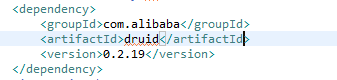
增加druid依赖
完整pom文件
数据源配置文件
route.datasource.driver-class-name= com.mysql.jdbc.Driver

route.datasource.url= jdbc:mysql://localhost:3306/test?useUnicode=true&characterEncoding=utf8

route.datasource.username= root

route.datasource.password= 123456

operate.datasource.driver-class-name= com.mysql.jdbc.Driver

operate.datasource.url= jdbc:mysql://localhost:3306/test2?useUnicode=true&characterEncoding=utf8

operate.datasource.username= root

operate.datasource.password= 123456
multiple-datasource.properties
初始化数据源
/**

 * 多数据源配置

 * @author zhouliang

 * @date 2017年9月20日

 */

@Configuration

@PropertySource("classpath:multiple-datasource.properties")

public class MyBatisConfig {

    @Autowired

    private Environment env;

    @Autowired MybatisSpringPageInterceptor inteceptor;

    /**

     * 创建数据源(数据源的名称:方法名可以取为XXXDataSource(),XXX为数据库名称,该名称也就是数据源的名称)

     */

    @Bean

    public DataSource operateDataSource() throws Exception {

        Properties props = new Properties();

        props.put("driverClassName", env.getProperty("operate.datasource.driver-class-name"));

        props.put("url", env.getProperty("operate.datasource.url"));

        props.put("username", env.getProperty("operate.datasource.username"));

        props.put("password", env.getProperty("operate.datasource.password"));

        return DruidDataSourceFactory.createDataSource(props);

    }

    @Bean

    public DataSource routeDataSource() throws Exception {

        Properties props = new Properties();

        props.put("driverClassName", env.getProperty("route.datasource.driver-class-name"));

        props.put("url", env.getProperty("route.datasource.url"));

        props.put("username", env.getProperty("route.datasource.username"));

        props.put("password", env.getProperty("route.datasource.password"));

        return DruidDataSourceFactory.createDataSource(props);

    }

    /**

     * @Primary 该注解表示在同一个接口有多个实现类可以注入的时候,默认选择哪一个,而不是让@autowire注解报错

     * @Qualifier 根据名称进行注入,通常是在具有相同的多个类型的实例的一个注入(例如有多个DataSource类型的实例)

     */

    @Bean

    @Primary

    public DynamicDataSource dataSource(

            @Qualifier("routeDataSource") DataSource routeDataSource,

            @Qualifier("operateDataSource") DataSource operateDataSource) {

        Map<Object, Object> targetDataSources = new HashMap<Object, Object>();

        targetDataSources.put(DatabaseType.routeDS, routeDataSource);

        targetDataSources.put(DatabaseType.operateDS, operateDataSource);

        DynamicDataSource dataSource = new DynamicDataSource();

        dataSource.setTargetDataSources(targetDataSources);// 该方法是AbstractRoutingDataSource的方法

        return dataSource;

    }

    /**

     * 根据数据源创建SqlSessionFactory

     */

    @Bean

    public SqlSessionFactory sqlSessionFactory(DynamicDataSource ds)

            throws Exception {

        SqlSessionFactoryBean fb = new SqlSessionFactoryBean();

        fb.setDataSource(ds);// 指定数据源(这个必须有,否则报错)

        // 下边两句仅仅用于*.xml文件,如果整个持久层操作不需要使用到xml文件的话(只用注解就可以搞定),则不加

        fb.setTypeAliasesPackage(env.getProperty("mybatis.typeAliasesPackage"));// 指定基包

        fb.setMapperLocations(new PathMatchingResourcePatternResolver()

                .getResources(env.getProperty("mybatis.mapperLocations")));//

        fb.setPlugins(new Interceptor[]{inteceptor});

        return fb.getObject();

    }

}
MyBatisConfig.java
@Bean是分别注入两个数据源,
当自动注入多个同样的bean时需要指定一个默认额,所以这里指定了一个默认的抽象数据源@primary
数据源注入之后需要创建SqlSessionFactory
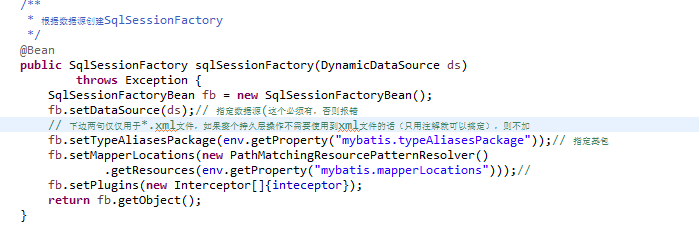
创建抽象数据源类集成AbstractRoutingDataSource
 public class DynamicDataSource extends AbstractRoutingDataSource {

     @Override

     protected Object determineCurrentLookupKey() {

         // TODO Auto-generated method stub

         return DatabaseContextHolder.getDatabaseType();

     }

 }
DynamicDataSource.java
 public enum DatabaseType {

     routeDS,operateDS

 }
DatabaseType.java
 public class DatabaseContextHolder {

     private static final ThreadLocal<DatabaseType> contextHolder = new ThreadLocal<DatabaseType>();

       public static void setDatabaseType(DatabaseType type){

         contextHolder.set(type);

       }

       public static DatabaseType getDatabaseType(){

         return contextHolder.get();

       }

       public static void clearDatabaseType(){

           contextHolder.remove();

       }
DatabaseContextHolder.java
上述配置完成之后需要在配置文件中指定mybatis映射的xml文件的位置

指定mybatis映射文件之后需要在项目的启动类上排除springboot默认的数据库的配置以及指定mybatis映射文件对应的接口

不排除springboot默认的数据库配置类,项目启动的时候会报错启动失败
@MapperScan指定了mybatis映射文件对应的接口所在的目录,这样避免了再每个接口上都加上@Mapper的注解
到此两个数据源已经配置完成
2、数据源的动态切换
这里设置了所有的实体bean都继承了一个父类,父类信息如下
 public class BaseBean implements Serializable{

     private int pageSize=10;

     private int pageNo=0;

     private long totalNum;

     private String totalMappedStatementId;

     private long shardValue = 0l;

     public BaseBean() {

         super();

         // TODO Auto-generated constructor stub

     }

     public BaseBean(int pageSize, int pageNo, int totalNum) {

         super();

         this.pageSize = pageSize;

         this.pageNo = pageNo;

         this.totalNum = totalNum;

     }

     public int getPageSize() {

         return pageSize;

     }

     public long getShardValue() {

         return shardValue;

     }

     public void setShardValue(long shardValue) {

         this.shardValue = shardValue;

     }

     public String getTotalMappedStatementId() {

         return totalMappedStatementId;

     }

     public void setTotalMappedStatementId(String totalMappedStatementId) {

         this.totalMappedStatementId = totalMappedStatementId;

     }

     public void setPageSize(int pageSize) {

         this.pageSize = pageSize;

     }

     public int getPageNo() {

         return pageNo;

     }

     public void setPageNo(int pageNo) {

         this.pageNo = pageNo;

     }

     public long getTotalNum() {

         return totalNum;

     }

     public void setTotalNum(long totalNum) {

         this.totalNum = totalNum;

     }

 }
BaseBean.java
BaseBean中的shardValue属性是用来指定数据源的,默认值为0,其余属性是分页相关的。
数据源的动态切换是通过spring的切面编程来实现的,通过对mybatis的映射文件对应的接口进行监控,代码如下
 @Aspect

 @Component

 public class DataSourceAspect {

     Logger logger = LoggerFactory.getLogger(DataSourceAspect.class);

     @Before("execution(* zl.mybatis.mapper.*.*(..))")

     public void setDataSourcePgKey(JoinPoint point) {

         Object args[] = point.getArgs();

         for(Object obj:args){

             if(obj instanceof BaseBean){

                 BaseBean bean = (BaseBean) obj;

                 if(Common.DB_0==bean.getShardValue()){

                     logger.info("===========================使用数据源DB_route=======================");

                     DatabaseContextHolder.setDatabaseType(DatabaseType.routeDS);

                 }else{

                     logger.info("===========================使用数据源DB_operate=======================");

                     DatabaseContextHolder.setDatabaseType(DatabaseType.operateDS);

                 }

                 break;

             }

         }

     }

 }
DataSourceAspect.java
@Before("execution(* zl.mybatis.mapper.*.*(..))")是对mybatis的映射文件对应的接口进行监控,根据获取到的参数实体类判断里面的shardValue的值来决定使用哪个数据源
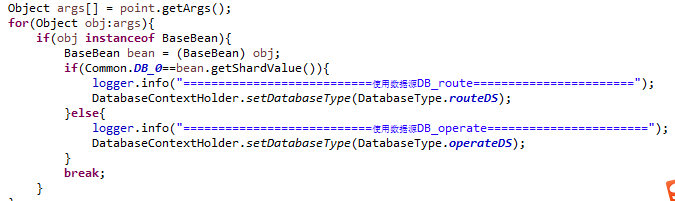
完成这一步之后springboot的多数据源动态切换完成了,接下来继续
3、实现自定义mybatis的分页插件
mybatis本身提供了对数据库操作的拦截器,所以实现自定义分页的时候只需要实现这个接口自定义里面的拦截方法。这里我是只拦截了查询的方法

具体代码如下
 @Component

 @Intercepts({ @Signature(type = Executor.class, method = "query",

     args = { MappedStatement.class, Object.class, RowBounds.class, ResultHandler.class }) })

 public class MybatisSpringPageInterceptor implements Interceptor {

     private static final Logger logger = LoggerFactory.getLogger(MybatisSpringPageInterceptor.class.getName());

     @SuppressWarnings("unused")

     public Object intercept(Invocation arg0) throws Throwable {

         MappedStatement mappedStatement = (MappedStatement) arg0.getArgs()[0];

         Object parameter = arg0.getArgs()[1];

         BoundSql boundSql = mappedStatement.getBoundSql(parameter);

         if (null == boundSql || StringUtils.isBlank(boundSql.getSql())) {

             return null;

         }

         RowBounds rowBounds = (RowBounds) arg0.getArgs()[2];

         Object parameterObject = boundSql.getParameterObject();

         BaseBean model = null;

         if (parameterObject instanceof BaseBean) {

             model = (BaseBean) parameterObject;

         } else {

             BoundSql newBoundSql = copyFromBoundSql(mappedStatement, boundSql, boundSql.getSql());

             arg0.getArgs()[0] = copyFromMappedStatement(mappedStatement, new BoundSqlSqlSource(newBoundSql));

             return arg0.proceed();

         }

         if (null == model) {

             throw new Exception("无法获取分页参数.");

         }

         if (model.getPageNo() == -1) {

             BoundSql newBoundSql = copyFromBoundSql(mappedStatement, boundSql, boundSql.getSql());

             arg0.getArgs()[0] = copyFromMappedStatement(mappedStatement, new BoundSqlSqlSource(newBoundSql));

             return arg0.proceed();

         }

         String shardSql = boundSql.getSql();

         queryTotal(mappedStatement, shardSql, parameterObject, boundSql,model);

         if (null == rowBounds || rowBounds == RowBounds.DEFAULT) {

             rowBounds = new RowBounds(model.getPageSize() * (model.getPageNo() - 1), model.getPageSize());

         }

         String pagesql = getLimitSql(shardSql, rowBounds.getOffset(), rowBounds.getLimit());

         arg0.getArgs()[2] = new RowBounds(RowBounds.NO_ROW_OFFSET, RowBounds.NO_ROW_LIMIT);

         BoundSql newBoundSql =  copyFromBoundSql(mappedStatement, boundSql, pagesql);

         arg0.getArgs()[0] = copyFromMappedStatement(mappedStatement, new BoundSqlSqlSource(newBoundSql));

         return arg0.proceed();

     }

     public static class BoundSqlSqlSource implements SqlSource {

         BoundSql boundSql;

         public BoundSqlSqlSource(BoundSql boundSql) {

             this.boundSql = boundSql;

         }

         public BoundSql getBoundSql(Object parameterObject) {

             return boundSql;

         }

     }

     private String getLimitSql(String sql, int start, int end) throws Exception{

         if(sql ==null){

             throw new Exception("execute sql is empty.");

         }

         StringBuffer sqlBuffer = new StringBuffer(sql.length()+300);

         sqlBuffer.append(sql);

         sqlBuffer.append(" LIMIT ").append(start).append(",").append(end);

         return sqlBuffer.toString();

     }

     private void queryTotal(MappedStatement mappedStatement, String replaceSql, Object parameterObject, BoundSql boundSql,BaseBean model) throws Exception{

         StringBuffer countSql = new StringBuffer();

         if(model.getTotalMappedStatementId()!=null && model.getTotalMappedStatementId().length()>0){

             MappedStatement totalMappedStatement=mappedStatement.getConfiguration().getMappedStatement(model.getTotalMappedStatementId());

             BoundSql totalBoundSql = totalMappedStatement.getBoundSql(parameterObject);

             countSql.append(totalBoundSql.getSql());

         }else{

             // 未指定,自动拼装

             countSql.append("SELECT COUNT(1) FROM (").append(replaceSql).append(") as total");

         }

         Connection conn = null;

         PreparedStatement ps = null;

         ResultSet rs = null;

         try {

             conn = mappedStatement.getConfiguration().getEnvironment().getDataSource().getConnection();

             if (logger.isDebugEnabled()) {

                 logger.debug(countSql.toString());

             }

             ps = conn.prepareStatement(countSql.toString());

             BoundSql countBS = copyFromBoundSql(mappedStatement, boundSql, countSql.toString());

             setParameters(ps, mappedStatement, countBS, parameterObject);

             rs = ps.executeQuery();

             if (rs.next()) {

                 model.setTotalNum(rs.getLong(1));

             }

         } catch (Exception e) {

             logger.error(e.getMessage(), e);

             throw new Exception(e.getMessage(), e);

         } finally {

             try {

                 if (null != rs) {

                     rs.close();

                 }

             } catch (Exception e) {

                 logger.error("rs.close() error!", e);

             }

             try {

                 if (null != ps) {

                     ps.close();

                 }

             } catch (Exception e) {

                 logger.error("ps.close() error!", e);

             }

             try {

                 if (null != conn) {

                     conn.close();

                 }

             } catch (Exception e) {

                 logger.error("conn.close() error!", e);

             }

         }

     }

     protected MappedStatement copyFromMappedStatement(MappedStatement ms, SqlSource newSqlSource) {

         Builder builder = new MappedStatement.Builder(ms.getConfiguration(), ms.getId(), newSqlSource, ms.getSqlCommandType());

         builder.resource(ms.getResource());

         builder.fetchSize(ms.getFetchSize());

         builder.statementType(ms.getStatementType());

         builder.keyGenerator(ms.getKeyGenerator());

         // builder.keyProperty(ms.getKeyProperties());

         builder.timeout(ms.getTimeout());

         builder.parameterMap(ms.getParameterMap());

         builder.resultMaps(ms.getResultMaps());

         builder.cache(ms.getCache());

         MappedStatement newMs = builder.build();

         return newMs;

     }

     /**

      *

      * @param ps

      * @param mappedStatement

      * @param boundSql

      * @param parameterObject

      * @throws SQLException

      */

     private void setParameters(PreparedStatement ps, MappedStatement mappedStatement, BoundSql boundSql, Object parameterObject) throws SQLException {

         ErrorContext.instance().activity("setting parameters").object(mappedStatement.getParameterMap().getId());

         List<ParameterMapping> parameterMappings = boundSql.getParameterMappings();

         if (parameterMappings != null) {

             Configuration configuration = mappedStatement.getConfiguration();

             TypeHandlerRegistry typeHandlerRegistry = configuration.getTypeHandlerRegistry();

             MetaObject metaObject = parameterObject == null ? null : configuration.newMetaObject(parameterObject);

             for (int i = 0; i < parameterMappings.size(); i++) {

                 ParameterMapping parameterMapping = parameterMappings.get(i);

                 if (parameterMapping.getMode() != ParameterMode.OUT) {

                     Object value;

                     String propertyName = parameterMapping.getProperty();

                     if (parameterObject == null) {

                         value = null;

                     } else if (typeHandlerRegistry.hasTypeHandler(parameterObject.getClass())) {

                         value = parameterObject;

                     } else if (boundSql.hasAdditionalParameter(propertyName)) {

                         value = boundSql.getAdditionalParameter(propertyName);

                     }  else {

                         value = metaObject == null ? null : metaObject.getValue(propertyName);

                     }

                     TypeHandler typeHandler = parameterMapping.getTypeHandler();

                     if (typeHandler == null) {

                         throw new ExecutorException("There was no TypeHandler found for parameter " + propertyName + " of statement " + mappedStatement.getId());

                     }

                     logger.debug(i + 1 + ":" + value);

                     typeHandler.setParameter(ps, i + 1, value, parameterMapping.getJdbcType());

                 }

             }

         }

     }

     @Override

     public Object plugin(Object arg0) {

         return Plugin.wrap(arg0, this);

     }

     public void setProperties(Properties arg0) {

     }

     private BoundSql copyFromBoundSql(MappedStatement ms, BoundSql boundSql, String sql) {

         BoundSql newBoundSql = new BoundSql(ms.getConfiguration(),sql, boundSql.getParameterMappings(), boundSql.getParameterObject());

         for (ParameterMapping mapping : boundSql.getParameterMappings()) {

             String prop = mapping.getProperty();

             if (boundSql.hasAdditionalParameter(prop)) {

                 newBoundSql.setAdditionalParameter(prop, boundSql.getAdditionalParameter(prop));

             }

         }

         return newBoundSql;

     }

 }
MybatisSpringPageInterceptor.java
插件重写完成之后需要在注入SqlSessionFactory的时候指定这个插件,下面的代码是在MyBatisConfig.java中
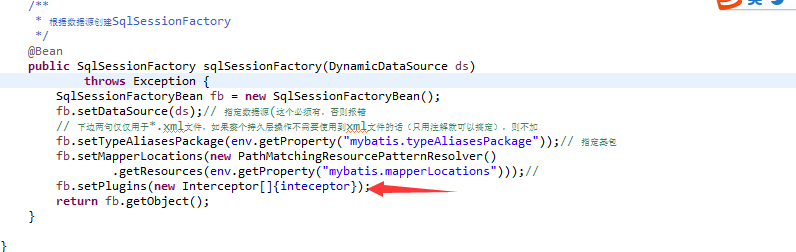
现在已经完成了多数据源的动态切换以及自定义mybatis的分页查询了,剩下的测试步骤就不再啰嗦了,排版比较乱大家就将就着看吧!
springboot多数据源动态切换和自定义mybatis分页插件的更多相关文章
- SpringBoot多数据源动态切换数据源
1.配置多数据源 spring: datasource: master: password: erp_test@abc url: jdbc:mysql://127.0.0.1:3306/M201911 ...
- mybatis 多数据源动态切换
笔者主要从事c#开发,近期因为项目需要,搭建了一套spring-cloud微服务框架,集成了eureka服务注册中心. gateway网关过滤.admin服务监控.auth授权体系验证,集成了redi ...
- Springboot多数据源配置--数据源动态切换
在上一篇我们介绍了多数据源,但是我们会发现在实际中我们很少直接获取数据源对象进行操作,我们常用的是jdbcTemplate或者是jpa进行操作数据库.那么这一节我们将要介绍怎么进行多数据源动态切换.添 ...
- Spring3.3 整合 Hibernate3、MyBatis3.2 配置多数据源/动态切换数据源 方法
一.开篇 这里整合分别采用了Hibernate和MyBatis两大持久层框架,Hibernate主要完成增删改功能和一些单一的对象查询功能,MyBatis主要负责查询功能.所以在出来数据库方言的时候基 ...
- Spring3.3 整合 Hibernate3、MyBatis3.2 配置多数据源/动态切换数据源方法
一.开篇 这里整合分别采用了Hibernate和MyBatis两大持久层框架,Hibernate主要完成增删改功能和一些单一的对象查询功能,MyBatis主要负责查询功能.所以在出来数据库方言的时候基 ...
- Spring多数据源动态切换
title: Spring多数据源动态切换 date: 2019-11-27 categories: Java Spring tags: 数据源 typora-root-url: ...... --- ...
- 实战:Spring AOP实现多数据源动态切换
需求背景 去年底,公司项目有一个需求中有个接口需要用到平台.算法.大数据等三个不同数据库的数据进行计算.组装以及最后的展示,当时这个需求是另一个老同事在做,我只是负责自己的部分. 直到今年回来了,这个 ...
- 基于SpringBoot项目MyBatis分页插件实现分页总结
前言 在使用Mybatis时,最头痛的就是写分页了,需要先写一个查询count的select语句,然后再写一个真正分页查询的语句,当查询条件多了之后,会发现真的不想花双倍的时间写 count 和 se ...
- Mybatis分页插件的使用流程
如果你也在用Mybatis,建议尝试该分页插件,这一定是最方便使用的分页插件.该插件支持任何复杂的单表.多表分页. 1.引入PageHelper的jar包 在pom.xml中添加如下依赖: 12345 ...
随机推荐
- for 续6
---------siwuxie095 for 实际运用样例(/f 的使用不列出来): for %%i in (*) do echo %%i 显示当前目录下 ,所有非文 ...
- Notebook computer(Ubuntu)
==============Mask_RCNN============== source activate flappbird cd /home/luo/Desktop/MyFile/MaskRCNN ...
- 解题报告-908. Smallest Range I
题目 : Given an array A of integers, for each integer A[i] we may choose any x with -K <= x <= K ...
- 命令--cut
--按文件大小排序 显示前100行 显示后五列 ll -Sh|head -n 100|cut -d ' ' -f 5- 一.基本语法cut是一个选取命令,以行为单位,用指定分隔符将行切分为若干字段,选 ...
- 1-为什么java的main方法必须是静态的
为什么java的main方法必须是静态的 今天看类型信息时发现一个问题,不能再main方法中打印this关键字的信息,这时想起了之前的知识,不能再静态方法中调用this.理由很简单,this表示“ ...
- Jenkins修改端口号(成功率高)
转载:http://blog.csdn.net/dzh0622/article/details/52470634 Jenkins默认的端口号是8080,修改方法: 1. 打开终端,cd 到Jenkin ...
- sort_contours_xld算子的几种排序方式研究
算子sort_contours_xld算子有5种排序方式,即: 'upper_left': The position is determined by the upper left corner of ...
- 获取iPod library中的媒体文件
[获取iPod library中的媒体文件] The Media Player framework provides facilities for playing movie, music, audi ...
- Access denied for user 'root'@'MiWiFi-Ryyy-srv' (using password: YES)
虽然是跟很多人一样的问题但是原因不同,其他很多文章说是授权问题,也确实是授权问题,但是,配置文件写的是连接localhost,而这里不知道什么原因切换了使用的用户,变成了默认访问MiWiFi-Ryyy ...
- 安装一个Redis
1. 官网 http://redis.io/ 2.下载 官方不提供windows版本,但https://github.com/MSOpenTech/redis 可以从这里获取64位. 3.