
Introduction to Locking in SQL Server
Locking is a major part of every RDBMS and is important to know about. It is a database functionality which without a multi-user environment could not work. The main problem of locking is that in an essence it's a logical and not physical problem. This means that no amount of hardware will help you in the end. Yes you might cut execution times but this is only a virtual fix. In a heavy multi-user environment any logical problems will appear sooner or later.
Lock modes
All examples are run under the default READ COMMITED isolation level. Taken locks differ between isolation levels, however these examples are just to demonstrate the lock mode with an example. Here's a little explanation of the three columns from sys.dm_tran_locks used in the examples:
| resource_type | This tells us what resource in the database the locks are being taken on. It can be one of these values: DATABASE, FILE, OBJECT, PAGE, KEY, EXTENT, RID, APPLICATION, METADATA, HOBT, ALLOCATION_UNIT. |
| request_mode | This tells us the mode of our lock. |
| resource_description | This shows a brief description of the resource. Usually holds the id of the page, object, file, row, etc. It isn't populated for every type of lock |
The filter on resource_type <> 'DATABASE' just means that we don't want to see general shared locks taken on databases. These are always present. All shown outputs are from the sys.dm_tran_locks dynamic management view. In some examples it is truncated to display only locks relevant for the example. For full output you can run these yourself.
Shared locks (S)
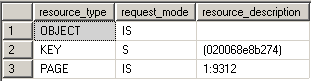
Shared locks are held on data being read under the pessimistic concurrency model. While a shared lock is being held other transactions can read but can't modify locked data. After the locked data has been read the shared lock is released, unless the transaction is being run with the locking hint (READCOMMITTED, READCOMMITTEDLOCK) or under the isolation level equal or more restrictive than Repeatable Read. In the example you can't see the shared locks because they're taken for the duration of the select statement and are already released when we would select data from sys.dm_tran_locks. That is why an addition of WITH (HOLDLOCK) is needed to see the locks.
BEGIN TRAN

USE AdventureWorks

SELECT * FROM Person.Address WITH (HOLDLOCK)

WHERE AddressId = 2

SELECT resource_type, request_mode, resource_description

FROM   sys.dm_tran_locks

WHERE  resource_type <> 'DATABASE'

ROLLBACK
Update locks (U)
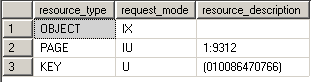
Update locks are a mix of shared and exclusive locks. When a DML statement is executed SQL Server has to find the data it wants to modify first, so to avoid lock conversion deadlocks an update lock is used. Only one update lock can be held on the data at one time, similar to an exclusive lock. But the difference here is that the update lock itself can't modify the underlying data. It has to be converted to an exclusive lock before the modification takes place. You can also force an update lock with the UPDLOCK hint:
BEGIN TRAN

USE AdventureWorks

SELECT * FROM Person.Address WITH (UPDLOCK)

WHERE AddressId < 2

SELECT resource_type, request_mode, resource_description

FROM   sys.dm_tran_locks

WHERE  resource_type <> 'DATABASE'

ROLLBACK
Exclusive locks (X)
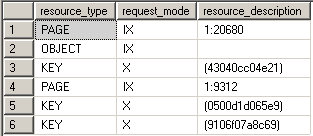
Exclusive locks are used to lock data being modified by one transaction thus preventing modifications by other concurrent transactions. You can read data held by exclusive lock only by specifying a NOLOCK hint or using a read uncommitted isolation level. Because DML statements first need to read the data they want to modify you'll always find Exclusive locks accompanied by shared locks on that same data.
BEGIN TRAN

USE AdventureWorks

UPDATE Person.Address

SET AddressLine2 = 'Test Address 2'

WHERE AddressId = 5

SELECT resource_type, request_mode, resource_description

FROM   sys.dm_tran_locks

WHERE  resource_type <> 'DATABASE'

ROLLBACK
Intent locks (I)
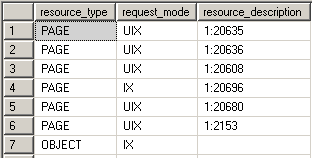
Intent locks are a means in which a transaction notifies other transaction that it is intending to lock the data. Thus the name. Their purpose is to assure proper data modification by preventing other transactions to acquire a lock on the object higher in lock hierarchy. What this means is that before you obtain a lock on the page or the row level an intent lock is set on the table. This prevents other transactions from putting exclusive locks on the table that would try to cancel the row/page lock. In the example we can see the intent exclusive locks being placed on the page and the table where the key is to protect the data from being locked by other transactions.
BEGIN TRAN

USE AdventureWorks

UPDATE TOP(5) Person.Address

SET AddressLine2 = 'Test Address 2'

WHERE PostalCode = '98011'

SELECT resource_type, request_mode, resource_description

FROM   sys.dm_tran_locks

WHERE  resource_type <> 'DATABASE'

ROLLBACK
Schema locks (Sch)
There are two types of schema locks:
- Schema stability lock (Sch-S): Used while generating execution plans. These locks don't block access to the object data.
- Schema modification lock (Sch-M): Used while executing a DDL statement. Blocks access to the object data since its structure is being changed.
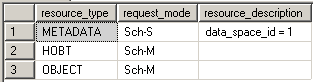
In the example we can see the Sch-S and Sch-M locks being taken on the system tables and the TestTable plus a lot of other locks on the system tables.
BEGIN TRAN

USE AdventureWorks

CREATE TABLE TestTable (TestColumn INT)

SELECT resource_type, request_mode, resource_description

FROM   sys.dm_tran_locks

WHERE  resource_type <> 'DATABASE'

ROLLBACK
Bulk Update locks (BU)
Bulk Update locks are used by bulk operations when TABLOCK hint is used by the import. This allows for multiple fast concurrent inserts by disallowing data reading to other transactions.
Conversion locks
Conversion locks are locks resulting from converting one type of lock to another. There are 3 types of conversion locks:
- Shared with Intent Exclusive (SIX). A transaction that holds a Shared lock also has some pages/rows locked with an Exclusive lock
- Shared with Intent Update (SIU). A transaction that holds a Shared lock also has some pages/rows locked with an Update lock.
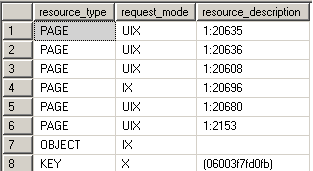
- Update with Intent Exclusive (UIX). A transaction that holds an Update lock also has some pages/rows locked with an Exclusive lock.
In the example you can see the UIX conversion lock being taken on the page:
BEGIN TRAN

USE AdventureWorks

UPDATE TOP(5) Person.Address

SET AddressLine2 = 'Test Address 2'

WHERE PostalCode = '98011'

SELECT resource_type, request_mode, resource_description

FROM   sys.dm_tran_locks

WHERE  resource_type <> 'DATABASE'

ROLLBACK
Key - Range locks
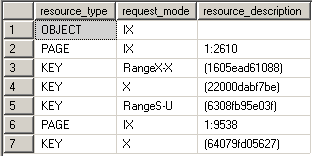
Key-range locks protect a range of rows implicitly included in a record set being read by a Transact-SQL statement while using the serializable transaction isolation level. Key-range locking prevents phantom reads. By protecting the ranges of keys between rows, it also prevents phantom insertions or deletions into a record set accessed by a transaction. In the example we can see that there are two types of key-range locks taken:
- RangeX-X - exclusive lock on the interval between the keys and exclusive lock on the last key in the range
- RangeS-U – shared lock on the interval between the keys and update lock on the last key in the range
SET TRANSACTION ISOLATION LEVEL SERIALIZABLE;

BEGIN TRAN

USE AdventureWorks

UPDATE Person.Address

SET AddressLine2 = 'Test Address 2'

WHERE AddressLine1 LIKE '987 %'

SELECT resource_type, request_mode, resource_description

FROM   sys.dm_tran_locks

WHERE  resource_type <> 'DATABASE'

ROLLBACK
Lock Granularity
Lock granularity consists of TABLE, PAGE and ROW locks. If you have a clustered index on the table then instead of a ROW lock you have a KEY lock. Locking on the lower level increases concurrency, but if a lot of locks are taken consumes more memory and vice versa for the higher levels. So granularity simply means the level at which the SQL Server locks data. Also note that the more restricted isolation level we choose, the higher the locking level to keep data in correct state. You can override the locking level by using ROWLOCK, PAGLOCK or TABLOCK hints but the use of these hints is discouraged since SQL Server know what are the appropriate locks to take for each scenario. If you must use them you should be aware of the concurrency and data consistency issues you might cause.
Spinlocks
Spinlocks are a light-weight lock mechanism that doesn't lock data but it waits for a short period of time for a lock to be free if a lock already exists on the data a transaction is trying to lock. It's a mutual exclusion mechanism to reduce context switching between threads in SQL Server.
Lock Compatibility Matrix
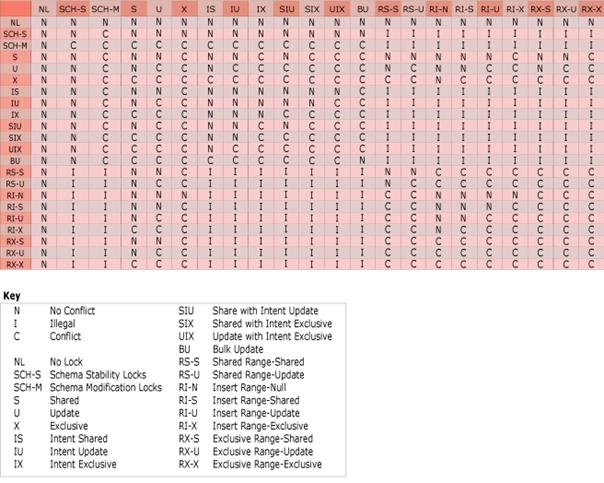
This is taken from http://msdn2.microsoft.com/En-US/library/ms186396.aspx. Also a good resource to have is a Lock Compatibility Matrix which tells you how each lock plays nice with other lock modes. It is one of those things you don't think you need up until the moment you need it.
Conclusion
Hopefully this article has shed some light on how SQL Server operates with locks and why is locking of such importance to proper application and database design and operation. Remember that locking problems are of logical and not physical nature so they have to be well thought out. Locking goes hand in hand with transaction isolation levels so be familiar with those too. In the next article I'll show some ways to resolve locking problems.
from:http://www.sqlteam.com/article/introduction-to-locking-in-sql-server
Introduction to Locking in SQL Server的更多相关文章
- SQL Server on Linux: How? Introduction: SQL Server Blog
SQL Server Blog Official News from Microsoft’s Information Platform https://blogs.technet.microsoft. ...
- SQL Server 监控系列(文章索引)
一.前言(Introduction) SQL Server监控在很多时候可以帮助我们了解数据库做了些什么,比如谁谁在什么时候修改了表结构,谁谁在删除了某个对象,当这些事情发生了,老板在后面追着说这是谁 ...
- SQL Server 复制系列(文章索引)
一.本文所涉及的内容(Contents) 本文所涉及的内容(Contents) 前言(Introduction) 复制逻辑结构图(Construction) 系列文章索引(Catalog) 总结&am ...
- Step1:SQL Server 复制介绍
一.本文所涉及的内容(Contents) 本文所涉及的内容(Contents) 前言(Introduction) 复制逻辑结构图(Construction) 系列文章索引(Catalog) 总结&am ...
- SQL Server: Difference Between Locking, Blocking and Dead Locking
Like ever, today’s article of Pinal Dave was interesting and informative. After, our mutual discussi ...
- Quick Introduction to SQL Server Profiler
Introduction to Profiler SQL Server Profiler — or just Profiler — is a tool that can help monitor al ...
- SQL Server Debugging with WinDbg – an Introduction
Klaus Aschenbrenner Klaus Aschenbrenner provides independent SQL Server Consulting Services across E ...
- 《Pro SQL Server Internals, 2nd edition》的CHAPTER 3 Statistics中的Introduction to SQL Server Statistics、Statistics and Execution Plans、Statistics Maintenance(译)
<Pro SQL Server Internals> 作者: Dmitri Korotkevitch 出版社: Apress出版年: 2016-12-29页数: 804定价: USD 59 ...
- SQL Server 2008性能故障排查(一)——概论
原文:SQL Server 2008性能故障排查(一)--概论 备注:本人花了大量下班时间翻译,绝无抄袭,允许转载,但请注明出处.由于篇幅长,无法一篇博文全部说完,同时也没那么快全部翻译完,所以按章节 ...
随机推荐
- adb命令篇 (转载)
转自:https://www.cnblogs.com/ailiailan/p/7896534.html 1.抓log方法 (bat文件) mkdir D:\logcat set /p miaosh ...
- [转]PowerDesigner使用常见问题锦集
1. 附加:PowerDesigner 的调色板(Palette)快捷工具栏不见了,怎么重新打开,找回来呢 上网搜索了一下”powerdesigner 图形工具栏”,找到了找回PowerDesigne ...
- 梯度下降法&牛顿法
梯度下降法 在机器学习任务中,需要最小化损失函数\(L(\theta)\),其中\(\theta\)是要求解的模型参数.梯度下降法是一种迭代方法,用到损失函数的一阶泰勒展开.选取初值\(\theta ...
- Xcode引入了第三方的类库之后真机调试提示莫名其妙的错误
其中的解决方法就是修改Build Setting里面的Build Active Architecture Only(仅仅编译动态代码),将这个里面的值修改为YES即可.
- c++学习笔记(新手学习笔记,如有错误请与作者联系)
逗号”,“运算符:a = 公式1,公式2:把公式1的结果放进公式2中进行运算,如: a = 3*5 , a*4; 计算结果:a = 3*5*4=60; typedef:类型别名,为已有类型另外命名 t ...
- js cookie使用
if (window.localStorage) { window.localStorage.setItem('cname', "cvalue"); }else{ setCooki ...
- html网站meta标签大全
案例 一.天猫 <meta charset="utf-8"> <title>天猫TMALL</title> <meta name=&quo ...
- (杭电 2045)不容易系列之(3)—— LELE的RPG难题
不容易系列之(3)-- LELE的RPG难题 Time Limit: 2000/1000 MS (Java/Others) Memory Limit: 65536/32768 K (Java/Othe ...
- structc 开源框架简介
了解 structc-https://github.com/wangzhione/structc structc 是 C 构建基础项目框架. 不是太惊艳, 但绝对是 C 简单项目中一股清流. 它的前身 ...
- Flex copy and paste
<?xml version="1.0" encoding="utf-8"?> <mx:WindowedApplication xmlns:mx ...