
配置resin web方式部署项目
写在前面,推荐下载resin4.0.47版本。其它版本没有测试
最近打算做一个小项目,然后容器选用了resin。想通过web提交war文件的方式 进行部署,更新代码也方便。
试了resin最新的版本(目前最新版本为4.0.53),提交war文件到webapps下面都是.tmp文件。百度google一通还是没找到解决办法。
看了下公司用的resin版本,选择4.0.47。下载后发现没最新版本的上传问题。
通过web提交war文件方式步骤如下:
步骤一:修改resin.properties。推荐配置如下
resin.properties
# resin.properties - configuration variable values

#

# See resin.xml, cluster-default.xml, and health.xml for full configuration.

# Any variable defined by ${...} can be set as a property in this file.

#

# Individual server overrides can be specified by prepending the server.id.

# For example, increasing the log level for an individual server:

#

# log_level : info

# app-0.log_level : finest

#

# Like Resin XML configuration, modification of this file will trigger

# a restart.

#

# General log level (modify resin.xml for more granular log level adjustments)

# log_level     : finer

# Enable verbose browser error reporting

dev_mode      : false

# How often Resin should check for updated files.

# dependency_check_interval : 5m

# Enable /resin-doc Resin documentation

resin_doc      : false

resin_doc_host :

# List Triad server ip-addresses:hmux-port for each tier, space separated

# App tier Triad servers must be listed to enable web-tier to

# app-tier load-balancing

# web-tier Triad servers: web-0 web-1 web-2

# web_servers      : 127.0.0.1:6810

# app-tier Triad servers: app-0 app-1 app-2

app_servers      : 127.0.0.1:6800

# Configures Resin for a memcached server tier

# memcached-tier Triad servers: memcached-0 memcached-1 memcached-2

# memcached_servers    : 127.0.0.1:6820

# memcached_port : 11211

# proxycache tier: proxycache-0 proxycache-1 proxycache-2

# proxycache_servers   : 127.0.0.1:6830

# backend_servers       : 127.0.0.1:80

# Allow elastic nodes to join the cluster (enable for cloud mode)

# elastic_cloud_enable : true

# The cluster that elastic nodes should join - each will contact a Triad server

# Use a separate resin.properties file for each cluster

home_cluster : app

# Used for an elastic server to join the cluster in home_cluster

# elastic_server : true

# Create a distinct webapps/ directory for each server, for vertical scaling

# elastic_webapp : true

# Used for cloud servers with dynamic IP addresses where the DNS name for the

# server is assigned after the server starts. Resin will retry the start.

# elastic_dns : true

# specifies the --server in the config file

# home_server : app-0

# Set HTTP and HTTPS bind address

# http_address  : *

# Set HTTP and HTTPS ports.

# Use overrides for individual server control, for example: app-0.http : 8081

app.http          : 80

app.https         : 8443

web.http          : 80

# web.https         : 8443

# memcached.http      : 8080

# memcached.https     : 8443

# proxycache.http    : 8080

# proxycache.https  : 8443

# For security, Resin can switch to a non-root user after binding to port 80

setuid_user   :

setuid_group  :

# Arg passed directly to the JVM

jvm_args  : -Xms1500m -Xmx1500m -XX:PermSize=206m -XX:MaxPermSize=206m

# jvm_args  : -Xmx2048m -XX:MaxPermSize=256m

jvm_mode    : -server

# This classpath has priority over the default classpath, like when you want to

# use a third party library like Hibernate's JPA

# jvm_classpath :

# Local URLs for the watchdog to check to ensure the server is up,

# space separated

# http_ping_urls : http://127.0.0.1/test.jsp

# Throttle the number of active threads for a port

port_thread_max   : 1000

accept_thread_max : 1000

accept_thread_min : 200

keepalive_max   : 512

# Enable JNI TCP speed optimizations

tcp_cork : true

sendfile : true

keepalive_select_enable : true

# OpenSSL certificate configuration

# Keys are typically stored in the resin configuration directory.

# openssl_file : keys/test.crt

# openssl_key : keys/test.key

# openssl_password : changeme

# openssl_protocols : -sslv2 -sslv3

# JSSE certificate configuration

# Keys are typically stored in the resin configuration directory.

# jsse_keystore_type : jks

# jsse_keystore_file : /etc/resin/keys/server.keystore

# jsse_keystore_password : changeme

# In absence of a signed certificate, Resin will fallback to using a

# self-signed development certificate if HTTPS is enabled

# Enable the proxy-cache - for caching static content in memory

proxy_cache_enable : false

# Sets the proxy cache memory size

# proxy_cache_size : 256m

# Enable clustered persistent sessions (for failover)

session_store : true

# disable the quercus *.php mapping when using Apache for PHP

# quercus_disable : true

# Web-apps named with numeric suffixes, e.g. foo-10.0.war and can be browsed

# as /foo. When a new version of the web-app is deployed, Resin continues

# to route active session requests to the previous web-app version while

# new sessions go to the new version, so users will not be aware of the

# application upgrade.

# webapp_multiversion_routing : true

# Set the email address to receive weekly and restart PDF reports

# email : admin@example.com

# pdf_summary : true

# Set a global password to prevent foreign Resin instances from connecting.

# Must be identical between web, app, and cache clusters.

# cluster_system_key : changeme

# Enable remote admin (for remote CLI and for EC2 ext: triad discovery)

# remote_admin_enable : true

# Enable /resin-admin web administration console

web_admin_enable : true

web_admin_host   :

# Permit access to /resin-admin from non-local network ip-addresses

web_admin_external : true

# Require HTTPS to access /resin-admin

# web_admin_ssl : true

# Enable Resin REST Admin

# rest_admin_enable : true

# Require SSL for REST Admin

# rest_admin_ssl : true

# Access to /resin-admin and remote CLI is password restricted.

# Use "resinctl generate-password" and copy/paste here to set the admin

# admin_user : admin

# admin_password : {SSHA}xxxxxxxx

# Enable reading EC2 user data as resin properties

# properties_import_url : http://169.254.169.254/latest/user-data
resin.xml
<host id="youryuming.com" root-directory=".">

      <web-app id="/" root-directory="webapps/testDeploy"/>

    </host>
步骤二:访问https://youryuming.com:8443/resin-admin/
tips:如果没有进行域名映射,使用服务器ip也可以
PS:为什么要使用https,注册不使用https也可以,通过youryuming.com:8443/resin-admin/ 也可以。后面进行上传war包就会提示需要使用ssl。为了避免麻烦索性直接通过https进行注册登录
点击create configuration file 后根据页面提示进行操作修改,这里不再赘述。
resin容器检测到有配置文件修改时,会进行自动重启,修改配置文件时,不用关闭resin或者重启。
步骤三:发布项目
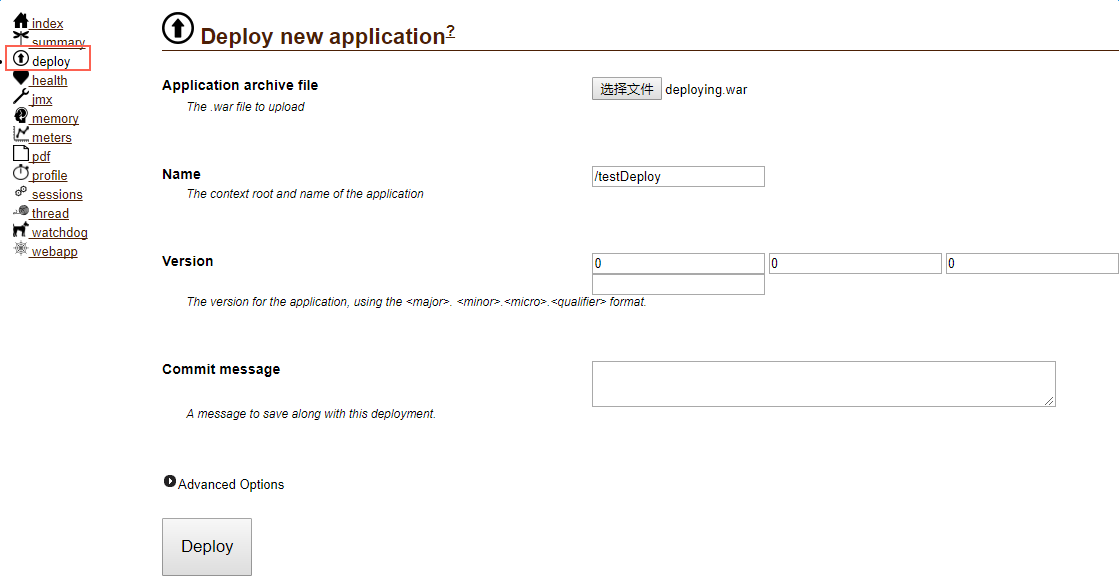
每次部署项目,resin容器都会自动重启。不用手动重启,感觉很爽有没有。。。
配置resin web方式部署项目的更多相关文章
- java web 手动部署项目步骤
java Web 手动部署项目步骤 1 在tomcat下面的webapps下面建立需要部署的文件夹(eg:demo);2 在demo下建立 WEB-INF WETA-INF src 文件夹;3 在sr ...
- IIS方式部署项目发布上线
VS2019如何把项目部署和发布 这里演示:通过IIS文件publish的方式部署到Windows本地服务器上 第一步(安装IIS) 1.在自己电脑上搜索Windows功能里的[启用或关闭Window ...
- dotnet core 命令行使用web deploy 部署项目到远程IIS
众所周知dotnet cli可以用来编译和生成发布.net core,其实dotnet publish 还能进行WebDeploy.先解释一下使用场景一般是用于持续部署 dotnet publish进 ...
- windows下安装node.js及环境配置、部署项目
windows下安装node.js及环境配置.部署项目 一.总结 一句话总结: 安装nodejs软件:就像普普通通的的软件那样安装 配置nodejs安装的全局模块的环境变量 并且安装cnpm(比如cn ...
- Eclipse使用Alibaba Cloud Toolkit极速部署项目
个人博客 地址:https://www.wenhaofan.com/a/20190716205809 什么是Alibaba Cloud Toolkit Cloud Toolkit 是针对 IDE 平台 ...
- Spring Boot移除内嵌Tomcat,使用非web方式启动
前言:当我们使用Spring Boot编写了一个批处理应用程序,该程序只是用于后台跑批数据,此时不需要内嵌的tomcat,简化启动方式使用非web方式启动项目,步骤如下: 1.在pom.xml文件中去 ...
- 理解 IntelliJ IDEA 的项目配置和Web部署(转载)
理解 IntelliJ IDEA 的项目配置和Web部署 1.项目配置的理解 IDEA 中最重要的各种设置项,就是这个 Project Structre 了,关乎你的项目运行,缺胳膊少腿都不行.最 ...
- eclipse下maven项目保持原有目录结构配置resin运行环境
maven项目用起来很方便,但是它的目录结构和eclipse的目录结构是有区别的,故而在eclipse下的maven项目,直接运行调试是有一些问题的. 为了方便maven项目的运行调试,因而也就有了像 ...
- Tomcat部署项目的几种常见方式
以前学习的时候只知道在Eclipse或者MyEclipse中发布项目到Tomcat,最近实习时发现不同的项目还有不同的发布方式,所以特地学习了Tomcat发布项目的方式,在此记录下来. 1 直接将we ...
随机推荐
- transform动画的一个3D的正方体盒子
<!DOCTYPE html> <html lang="en"> <head> <meta charset="UTF-8&quo ...
- 大数据学习--day16(集合总体架构--ArrayList--LinkedList)
集合总体架构--ArrayList--LinkedList Collection接口的实现类用法上都有相似的方法.Map同理. List: 特性 : 1. 有索引 2. 有序 ...
- SQL 列转行 分组去重并合并多条记录
继上篇<SQL 列转行 合并多条记录>后,有网友反馈新的需求还是不太会用. 现举例说明 一,网友需要如下的效果: 其实,这个需求依然可以我上篇的方法进行解答,但为了实现分组,需要disti ...
- tarjan 强连通分量
一.强连通分量定义 有向图强连通分量在有向图G中,如果两个顶点vi,vj间(vi>vj)有一条从vi到vj的有向路径,同时还有一条从vj到vi的有向路径,则称两个顶点强连通(strongly c ...
- 推荐一个学习Flex chart的好网站
推荐一个学习Flex chart的好网站 2013-03-04 14:16:56| 分类: Flex | 标签: |字号大中小 订阅 推荐一个学习Flex chart的好网站 最近在做一个 ...
- 20155328 2016-2017-2 《Java程序设计》第三周学习总结
20155328 2016-2017-2 <Java程序设计>第三周学习总结 教材学习内容总结 类是对象的设计图,对象是类的实例.用class定义类,用new新建一个对象. 一个原始码中可 ...
- 20155330 实验四 Android程序设计
20155330 实验四 Android程序设计 实验内容 1.基于Android Studio开发简单的Android应用并部署测试; 2.了解Android.组件.布局管理器的使用: 3.掌握An ...
- WPF 背景颜色渐变的滑动条实现
原文:WPF 背景颜色渐变的滑动条实现 版权声明:本文为博主原创文章,未经博主允许不得转载. https://blog.csdn.net/BYH371256/article/details/83507 ...
- day7 opencv+python 读取视频,没有东西
1.读取视频man.avi, 报错. 我的视频和文件在同一目录下. #coding=utf-8 import numpy as np import cv2 cap = cv2.VideoCapture ...
- 后端API入门到放弃指北
后端API入门学习指北 了解一下一下概念. RESTful API标准] 所有的API都遵循[RESTful API标准]. 建议大家都简单了解一下HTTP协议和RESTful API相关资料. 阮一 ...