
Net特性类Description了解下
NET特性类都有个特点类名+Attribute,继承基类Attribute,我们看下微软自带的特性类:DescriptionAttribute
namespace System.ComponentModel
{
    // 摘要:
    //     指定属性或事件的说明。
    [AttributeUsage(AttributeTargets.All)]
    public class DescriptionAttribute : Attribute
    {
        // 摘要:
        //     指定 System.ComponentModel.DescriptionAttribute 的默认值,即空字符串 ("")。此 static 字段是只读的。
        public static readonly DescriptionAttribute Default;

        // 摘要:
        //     不带参数初始化 System.ComponentModel.DescriptionAttribute 类的新实例。
        public DescriptionAttribute();
        //
        // 摘要:
        //     初始化 System.ComponentModel.DescriptionAttribute 类的新实例并带有说明。
        //
        // 参数:
        //   description:
        //     说明文本。
        [TargetedPatchingOptOut("Performance critical to inline this type of method across NGen image boundaries")]
        public DescriptionAttribute(string description);

        // 摘要:
        //     获取存储在此特性中的说明。
        //
        // 返回结果:
        //     存储在此特性中的说明。
        public virtual string Description { get; }
        //
        // 摘要:
        //     获取或设置作为说明存储的字符串。
        //
        // 返回结果:
        //     作为说明存储的字符串。默认值为空字符串 ("")。
        protected string DescriptionValue { get; set; }

        // 摘要:
        //     返回给定对象的值是否等于当前的 System.ComponentModel.DescriptionAttribute。
        //
        // 参数:
        //   obj:
        //     要进行值的相等性测试的对象。
        //
        // 返回结果:
        //     如果给定对象的值等于当前对象的值,则为 true;否则为 false。
        public override bool Equals(object obj);
        public override int GetHashCode();
        //
        // 摘要:
        //     返回一个值,该值指示这是否为默认 System.ComponentModel.DescriptionAttribute 实例。
        //
        // 返回结果:
        //     如果这是默认 System.ComponentModel.DescriptionAttribute 实例,则为 true;否则为 false。
        public override bool IsDefaultAttribute();
    }
}
看完这个类,我们了解到,此类是用来描述什么的,作用对象可以是类、属性、字段、接口、抽象、xxx
我们来看个作用对象为类的,我们定义一个人的对象,有两个属性 姓名和性别
public class Person
{
    [Description("姓名")]
    public string Name { get; set; }

    [Description("性别")]
    public int Sex { get; set; }
}
是不是觉得很熟悉,网上很多ORM工具生成的代码是不是和上面很像,但大多数都是自定义特性类,其实特性类,在我们实际做项目中起到很大的作用,本人举一个场景,在做报表的过程中,导出EXCEL过程中,列名和列的类型都是很有讲究的,一般我们准备的数据大多数都是List集合,其对象就是一个类,我们可以用到特性类来描述每列的中文名称,再读取字段类型,基本都是可以满足导出功能,下面看一个封装代码
public class ReflectionHelper<T> where T : new()
{
    /// <summary>
    /// 获取特性信息
    /// </summary>
    /// <param name="t"></param>
    /// <returns></returns>
    public static List<PropertityFieldInfo> GetPropertiyInfo()
    {
        List<PropertityFieldInfo> listRtn = new List<PropertityFieldInfo>();
        Dictionary<int, string> dicPropertiy = new Dictionary<int, string>();
        Dictionary<int, Type> dicFiled = new Dictionary<int, Type>();
        Dictionary<int, string> dicFiledName = new Dictionary<int, string>();
        T obj = new T();
        ;
        var properties = obj.GetType().GetProperties();
        var files = obj.GetType().GetFields(BindingFlags.NonPublic | BindingFlags.Instance | BindingFlags.Public);
        foreach (var p in properties)
        {
            var v = (DescriptionAttribute[])p.GetCustomAttributes(typeof(DescriptionAttribute), false);
            ].Description;
            dicFiledName.Add(pindex, p.Name);
            dicPropertiy.Add(pindex, desc);
            pindex++;
        }
        ;
        foreach (var f in files)
        {
            var fieldType = f.FieldType;
            dicFiled.Add(findex, fieldType);
            findex++;
        }

        foreach (KeyValuePair<int, string> kv in dicPropertiy)
        {
            PropertityFieldInfo m = new PropertityFieldInfo();
            m.Name = dicFiledName[kv.Key];
            m.Desc = dicPropertiy[kv.Key];
            m.Type = dicFiled[kv.Key];
            listRtn.Add(m);
        }
        return listRtn;
    }

    /// <summary>
    /// 获取所有列名描述
    /// </summary>
    /// <returns></returns>
    public static List<string> GetPropertiyDescInfo()
    {
        List<string> list = new List<string>();
        var propertiyInfos = GetPropertiyInfo();
        foreach (var item in propertiyInfos)
        {
            list.Add(item.Desc);
        }
        return list;
    }
}

public class PropertityFieldInfo
{
    public string Name { get; set; }
    public string Desc { get; set; }
    public Type Type { get; set; }
}
控制台运行下
class Program
    {
        static void Main(string[] args)
        {
            var dic = ReflectionHelper<Person>.GetPropertiyInfo();

            foreach (var kv in dic)
            {
                Console.WriteLine(kv.Name);
                Console.WriteLine(kv.Type);
                Console.WriteLine(kv.Desc);

            }
            Console.Read();
        }
    }
看结果
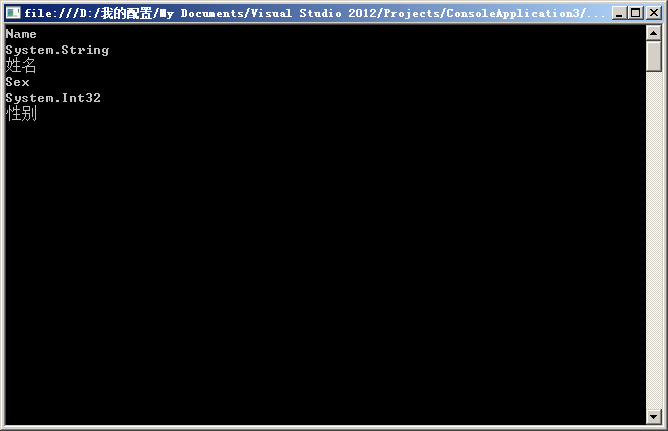
总结:ReflectionHelper 此类用到反射和泛型机制,有兴趣小伙伴可以自学下,关于自定义特性类,本人博客中也写过,好了,希望此文对大家有帮助,喜欢的点个赞,3Q!
Net特性类Description了解下的更多相关文章
- C# 所有特性,特性所在命名空间,那些命名空间拥有特性类
文章持续补充中 特性并不是集中在某一命名空间中,而是不同的特性在不同的命名空间下,特性是某一命名空间下提供的语法糖. 有哪些命名空间提供特性: 命名空间 描述 Microsoft.Build.Fram ...
- C#特性类的使用
特性类的使用过程: 第一步:定义一个特性类,定义一些成员来包含验证时需要的数据:第二步:创建特性类实例:创建一个特性类的实例,里面包含着验证某一个属性或者字段需要的数据.将该实例关联到某个属性上面.第 ...
- paip。java 高级特性 类默认方法,匿名方法+多方法连续调用, 常量类型
paip.java 高级特性 类默认方法,匿名方法+多方法连续调用, 常量类型 作者Attilax 艾龙, EMAIL:1466519819@qq.com 来源:attilax的专栏 地址:http ...
- 巧用CSS3 :target 伪类制作Dropdown下拉菜单(无JS)
:target 是CSS3 中新增的一个伪类,用以匹配当前页面的URI中某个标志符的目标元素(比如说当前页面URL下添加#comment就会定位到id=“comment”的位置,俗称锚).CSS3 为 ...
- WPF{ComboBox绑定类对象, 下拉列显示的值,与取到的值}
DisplayMemberPath 是用来显示下拉列表的值 SelectedValuePath是用来取得选中项的值. ComboBox绑定类对象, 下拉列显示的值,与取到的值 string. Join ...
- Siki_Unity_2-1_API常用方法和类详细讲解(下)
Unity 2-1 API常用方法和类详细讲解(下) 任务101&102:射线检测 射线origin + direction:射线检测:射线是否碰撞到物体 (物体需要有碰撞器),碰撞物体的信息 ...
- 巧用CSS3:target 伪类制作Dropdown下拉菜单(无JS)
原文链接:http://devework.com/css3-target-dropdown.html :target 是CSS3 中新增的一个伪类,用以匹配当前页面的URI中某个标志符的目标元素(比如 ...
- UML类图(下):关联、聚合、组合、依赖
前言 上一篇文章UML类图(上):类.继承.实现,讲了UML类图中类.继承.实现三种关系及其在UML类图中的画法,本文将接着上文的内容,继续讲讲对象之间的其他几种关系,主要就是关联.聚合.组合.依赖, ...
- 前端笔记之ES678&Webpack&Babel(中)对象|字符串|数组的扩展&函数新特性&类
一.对象的扩展 1.1对象属性名表达式 ES6可以在JSON中使用[]包裹一个key的名字.此时这个key将用表达式作为属性名(被当做变量求值),这个key值必须是字符串. var a = 'name ...
随机推荐
- java中一个简单的下载示例
首先在tomcat服务器下的webapps的download项目下建一个doc文件夹,再建个test.doc.防止控指针异常 DownLoad.java代码 package com.down; imp ...
- android 学习 之 布局(上)
学习安卓布局前,先了解三个属性值: 1.fill_parent: 设置一个构件的布局为fill_parent将强制性地使构件扩展,以填充布局单元内尽可能多的空间 2.match_parent: And ...
- <form> 表单提交 return 阻止内容为空事件
<!DOCTYPE html> <html lang="en"> <head> <meta charset="UTF-8&quo ...
- c# 后台调用接口接收传过来的json
public string GetRequestTest(string url) { HttpWebRequest httpWebRequest = (HttpWebRequest)WebReques ...
- hive中分组取前N个值的实现
背景 假设有一个学生各门课的成绩的表单,应用hive取出每科成绩前100名的学生成绩. 这个就是典型在分组取Top N的需求. 解决思路 对于取出每科成绩前100名的学生成绩,针对学生成绩表,根据学科 ...
- 关于std:auto_ptr std:shared_ptr std:unique_ptr
很多人听说过标准auto_ptr智能指针机制,但并不是每个人都天天使用它.这真是个遗憾,因为auto_ptr优雅地解决了C++设计和编码中常见的问题,正确地使用它可以生成健壮的代码.本文阐述了如何正确 ...
- artZoom 图片可放大旋转
资源下载:http://www.sucaijiayuan.com/Js/TuPianDaiMa/774.html 第一步:引入文件 <link rel="stylesheet" ...
- awk编程基础
一.awk介绍 awk(名字来源于三个创始人姓氏首字母)是linux系统下文本编辑工具,是一门编程语言,有自己的基本语法和流程控制.函数.awk简单高效. 二.awk的运行方法 例子:使用冒号:分 ...
- codeforces:Michael and Charging Stations分析和实现
题目大意 迈克尔接下来n天里分别需要支付C[1], C[2], ... , C[n]费用,但是每次支付费用可以选择使用优惠或不使用优惠,每次使用价值X的优惠那么迈克尔所能使用的优惠余量将减少X并且当天 ...
- canvas动画--demo
canvas动画:bubble